Desertcart purchases this item on your behalf and handles shipping, customs, and support to EGYPT.
⌨️ Elevate your typing game—comfort and control in every keystroke!
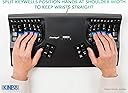
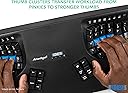
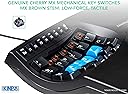
The Kinesis Advantage2 KB600 is a premium ergonomic keyboard designed to reduce typing-related muscle stress with its patented contoured keywells and tented layout. Featuring tactile Cherry MX Brown mechanical switches, it offers precise feedback preferred by ergonomists. Its SmartSet programming engine enables effortless customization without software, while a compact design and thumb clusters optimize comfort and productivity for professional users.


| Antenna Location | Office |
| Asin | B01KR1C5PY |
| Best Sellers Rank | 132,568 in Computers & Accessories (See Top 100 in Computers & Accessories) 2,123 in Keyboards (Computers & Accessories) |
| Box Contents | ['USB Cable'] if the keyboard requires a USB connection |
| Brand Name | Kinesis |
| Button Quantity | 87 |
| Colour | Black |
| Compatible Amazon Tablet Models | Amazon Fire 5th Generation |
| Compatible Devices | Laptop, PC |
| Compatible Operating System Family | Windows |
| Compatible Tablet Computer Models | AAUB P30 |
| Connectivity Technology | wired |
| Customer Reviews | 4.4 4.4 out of 5 stars (448) 4.4 out of 5 stars |
| Enclosure Material | Plastic |
| External Testing Certification | Não aplicável |
| Generation | First Generation" or "Generation 1 |
| Global Trade Identification Number | 00607998600078, 05050914962609 |
| Hand Orientation | Ambidextrous |
| Item Dimensions L X W X H | 46.7L x 27.2W x 10.4H centimetres |
| Item Type Name | KINESIS KB600 Advantage2 Keyboard |
| Item Weight | 2.2 Pounds |
| Keyboard Backlighting Color Support | Single Color |
| Keyboard Description | Ergonomic |
| Keyboard Layout | QWERTY |
| Manufacturer | KINESIS |
| Manufacturer Part Number | KB600 |
| Mechanical Keyboard Switch Model | Cherry MX Brown, Cherry ML |
| Minimum Required Operating System Version | Windows 7 |
| Model Name | Advantage 2 |
| Model Number | KB600 |
| Number Of Items | 1 |
| Number Of Keys | 68 |
| Number Of Packs | 1 |
| Number Of Sections | 3 |
| Power Source | Corded Electric |
| Product Features | Ergonomic |
| Product Warranty | 1 year manufacturer |
| Series Number | 600 |
| Style Name | US QWERTY - Tactile Feel |
| Switch Type | Tactile |
| Theme | Ergonomic Keyboard Design |
| Unit Count | 1.00 count |
| Upc | 607998600078 |
| Water Resistance Level | Not Water Resistant |
User
Great layout, bad plastic
The main point of the advantage2 is also the biggest benifit. Its layout is fantastic.The thumb cluster is common to a lot of ergo keyboards so all there really is to say on that is its good. Your thumb naturally rests on space and backspace and the four main keys here are easy to hit. The corner two keys on each side (alt and super) aren't as comfortable to use but should be needed less.Most other ergo boards come in two pieces which can be good but I specifically wanted a connected board for a more consistent feel and so I could use it on my lap sat on the couch. And the advantage2 is surprisingly comfy on both a desk and your lap.The body of the keyboard is a light plastic which means its really easy to move around but doesn't feel high quality. This is however a minor gripe as I've yet to hear of one breaking.The keycaps suffor from the same issue, they're ABS plastic and you can definitely feel that. I highly recommend if getting this board to get a set of ABs keycaps. Or two if you're not getting a specially made set as one full set will leave you one key short on two sizesThe switches on mine are the Cherry MX brown and the first thing you'll find when you Google these are how hated they are. I completely agreed at first, but actually once you replace the keycaps these switches work really well. They're not the best if you're all about sound and feel but they're exectly what you need for an ergonomic board.All of these points are entirely subjective and your milage may vary, but overall I think this is a great choice
User
it is expensive but you get what you pay for
This is the only keyboard that has kept RSI away. I am a software developer and I had instant improvement within a single day. Productivity will take a hit until muscle memory catches up.
User
Broke after six months of use
I bought this keyboard six months ago and it no longer works. The USB cable has broken, in the area where the cable meets the keyboard. There seems to be no easy way to fix it. It's a shame as this was a nice keyboard.There is no warranty so it seems there's nothing I can do. £322 down the drain.Edit: I was able to buy a replacement cable from Kinesis for $20, plus shipping. The keyboard is working fine again.
User
Un gran invento, pero prácticamente tienes que aprenderte las nuevas posiciones de las teclas
Un diseño fuera de serie en la búsqueda de un teclado ergonómico que reduzca las dolencias y malestares de quienes pasan muchas horas tecleando textos. Sin embargo, lo devolveré, porque en mi opinión, dado su diseño curvo, las teclas tienen una posición inusual, por no decir extraña, por lo que se tiene que reaprender la posición de las teclas para llegar a dominar este teclado. Tengo 50 años y empezar de nuevo significaría una preocupación, más que un apoyo.
User
Great product!
Initially, my words per minute dropped to 15 when using but after just a week it was up to 50 and now 75+. You can tell the ergonomic benefits you get especially after a long session at the desk where your hands and wrists aren’t sore. While it is expensive it is more than worth it for those who use a computer constantly
User
Amazing keyboard for RSI
I was recently diagnosed with RSI. A general economic keyboard did not help the situation and this is where I decided to try this. First challenge was you have to relearn how to use this keyboard as all the characters are slightly displaced. So I actually tracked my progress on typing test.com. on the first week I was at 13 words per minute and subsequently I progress back to 60 words per minute. the only biggest thing I hate about this keyboard is that it is not wireless, given how long it is really been in the industry.
User
Sehr geeignet bei RSI
Hat meine Probleme mit RSI sehr verbessert. Innerhalb von einer Woche werden die Schmerzen in der Hand bereits spuerbar weniger. Beste Investition in meine Gesundheit und in meine Arbeit als Programmierer.
User
Expensive but worth it
I've experimented with so many other keyboards before landing on this one. Started with a Typematrix before college, switched back to regular keyboards like keychron Q1, then got a Moonlander (which is also split, ortholinear, and has thumb clusters).The biggest thing all of those other keyboards miss that the Kinesis gets right is the keywell - it's convex so it encourages a natural wrist position, and all your fingers rest perfectly on each key. The column of keys for your pinky is slightly higher up and the column of keys for your middle finger is slightly lowered... because your fingers are different lengths.The thumb clusters encourage using your thumbs for super common keys like enter and backspace rather than your weak pinky. And these thumb clusters are way more natural to use compared to the Moonlander. When your fingers are on the home row, you can access all the thumb cluster keys without moving your hand because of the varying heights and angles of each of the thumb cluster keys. Clearly a lot of thought and research went into the design of the key layout.Also, it's super easy to remap keys. It's onboard - you press the remap button, press the key you want to move, and the destination key, and you're done. Makes it really easy to experiment with different positions; for instance, I switched the shift key with the one above it on both sides so that my shift keys were on the home row since it's one of the most common keys.When it comes to build quality and premium feel... Yeah, it's plasticy, yeah it has abs keycaps that will get shiny over time, yeah it has no backlight, and yeah it's wired, but clearly the money was spent on making the most comfortable keyboard, not the most flashy or premium feeling. Even though it's plastic, it feels super durable and I don't think it'll break very easily.If you can't do wired connection, the Kinesis 360 Pro is wireless and very similar, but honestly I prefer the simplicity of the wired connection on this one. No worrying about charging. I also like that it's one solid unit rather than distinct halves. Less to keep track of, less positioning to adjust, but that also means it's less flexible since you can't change the distance between each half of the keyboard like you can on the 360. I think this one is easier to have in your lap though than the 360 with its two distinct parts. All depends on your needs and wants.Speaking of having it in your lap, one downside of this keyboard is that it's raised higher than a lot of other keyboards. The actual keys are lowered down into the unit, but to enforce that, the actual body itself rises up quite a bit. You'll need to make sure you have a chair that can go high enough or a keyboard tray that makes it lower so you're not hurting yourself by scrunching up your neck and shoulders to reach the higher level. I find placing it in your lap is a super comfortable way to use it that gets around this, but consider getting a drafting chair if you need your chair to raise up higher than your current one does.Also, just a small thing, but I love having dedicated function keys (F1-F12). Might be silly, but I've never had a keyboard before where you can just press a function key - without holding down a separate "fn" key or other layer shift. If you use VS Code or develop in general, there's often a number of super useful shortcuts tied to the F1-12 keys, and it's very handy to access them at the press of a button without any key combos or anything else.Highly recommend this keyboard if you experience any sort of pain in your wrists, arms, shoulders, or neck from sitting at a desk typing all day. It's so so worth it. My pain went away so fast. Just make sure the rest of your setup is ergonomic as well. The Kinesis Advantage 2 User Manual has a whole section on how to make the rest of your desk setup ergonomic. Make sure to follow it.
Trustpilot
2 days ago
2 weeks ago