
قم بتنزيل التطبيق



Desert Online General Trading LLC
Warehouse # 7, 4th Street, Umm Ramool, Dubai, 30183, Dubai
قم بتنزيل التطبيق
Desert Online General Trading LLC
Warehouse # 7, 4th Street, Umm Ramool, Dubai, 30183, Dubai


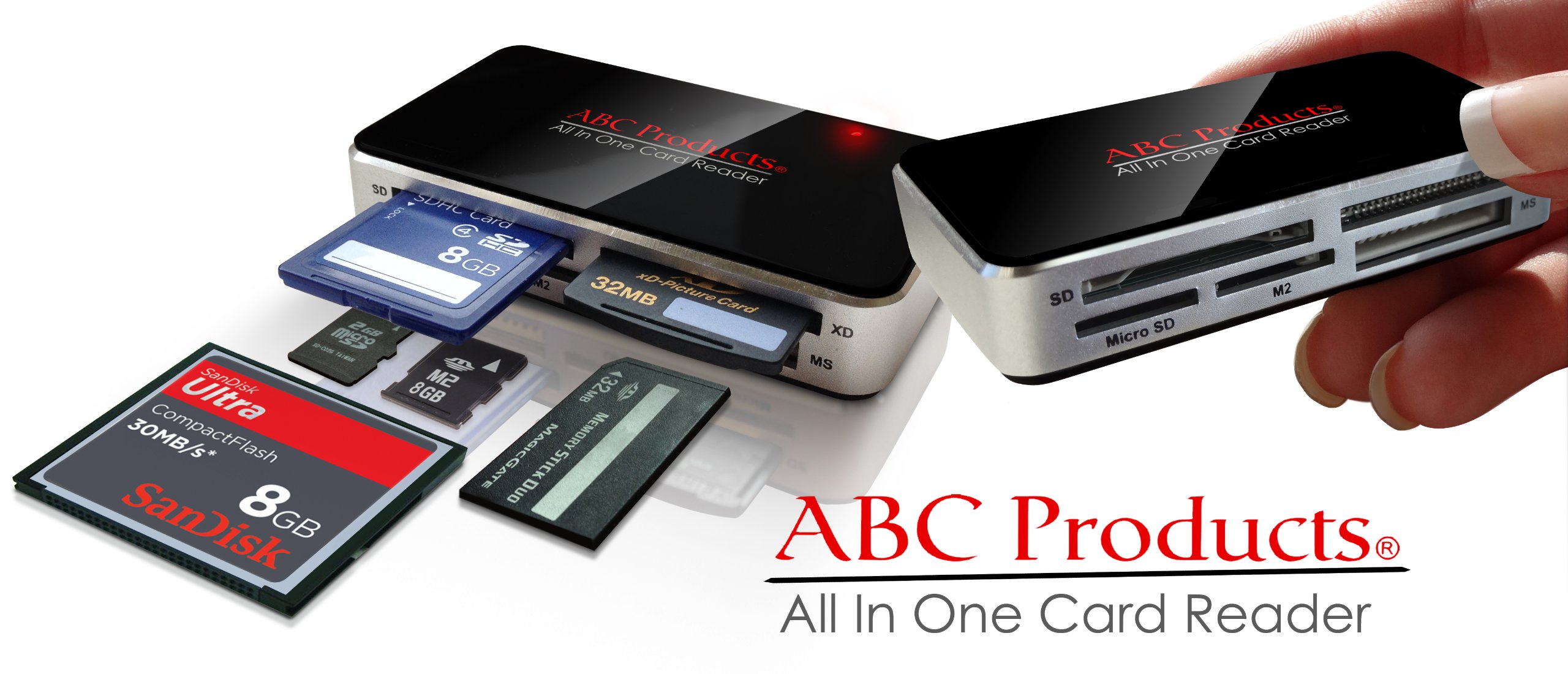
🚀 Elevate your data game with the ultimate all-in-one card reader!
The ABC Products All in One USB Multi Digital Camera Picture Memory Card Reader Writer offers ultra-fast USB 2.0 data transfer speeds up to 480Mbps in a compact 9x5x1 cm design. Compatible with all major memory cards and supporting a wide range of Windows and Mac OS versions, this plug-and-play device ensures seamless photo and data transfers for professionals who demand efficiency and versatility.
F**T
Perfect for pulling data off old memory cards.
This is a really handy card reader. If you have any old memory cards that you aren't sure what you have on them, and you don't want to bother with those cards that you no longer use, this is the perfect solution. It has worked for me for my Windows and Linux machines, and has allowed me to recycle my old 16MB cards (not 16GB, 16MB). The card types it can read include CF, Micro SD, M2, MS, SD, and XD. The one drawback is that those smaller cards (Micro SD, M2) can be a little tricky to pull out if you have big fingers. This device doesn't have the iron grip some of the cheaper chip readers have, but it doesn't have a spring function like most appliances have. For being the only flaw I could find, it is a fantastic card reader.
E**O
Great bargain
Was leery about the quality of this card reader because of the cheap price. Fears unwarranted. Plugged it into a USB slot and then slid the smartmedia card in the slot. Lights came on and was able to import the photos into the computer's program with no trouble at all. Was able to eject the reader with no problem. Highly recommend this unit as it works as it should and the price is certainly right. The only suggestion would be to include some instructions concerning which slots are for which card format.
V**I
Lights, magic, and answers!
I was surprised to find a Fuji Film 4 MB Smart Media Digital Memory Card in a desk drawer one fateful day. I did not have any clues as to what was on it and no card reader. I began the search for a reader that would work.A local store had a device that would "work with anything," guaranteed. Therefore, I did not bother to keep the box after I bought it. There was no slot for this media. I then borrowed a friend's reader, but again, no luck. Yes, totally frustrated, I asked for help. (That is what I do when all else fails.)I was sent the link to this little beauty. It was not expensive, and I was ready to try anything. I bought it. I plugged it in a few minutes ago, and bingo, my system recognized it immediately. Yeah! No drivers to download.I could not figure out where to put the card though. The big drawback on this device is no documentation, and with only four slots, it is not intuitive. (That is the minus one star.) The four slots read multiple cards.I studied the Amazon picture, and I figured out which one worked. I inserted my card. LEDs lit. It worked! After opening my Paint Shop Pro v.7.0, clicking on open file and locating which one of my peripheral devices was labeled for the device (F), I finally could see the pictures.There it was DCIM. I opened the sub directory to find 100_FUJI and I clicked on that subdirectory. Much to my chagrin, the priceless pictures did not exist. They had all been deleted.However, I finally knew. It was okay that it was blank it was not on my mind now.It is compact (two inches by three and three quarter's inches, about one-half inch high), shiny silver, with lights that let you know it is working. PWR will come on when your computer recognizes the peripheral device. Depending on what card you insert, the other lights will provide information: CF/MD, MS, SD/MMC, SM/XO/ and ACT.I am very happy with this card reader, and recommend it.Victoria Tarrani
F**D
Easy to use. Works great!
Just plug this amazing little device into your USB port, insert your memory card into one of the 4 slots, then read the files. No power is required since the device gets its power via the USB port. No software was required on either of my 2 Windows laptops. After you are done reading your files you can easily delete them. I used a SmartMedia card from my Olympus D-490 ZOOM camera. Using this device was 100 times more convenient than the serial port interface and custom software provided with my camera. Also, it's nice not to manually delete each photo from the camera.
B**T
Works Great - Can't Beat the Price
Got it 2 days ago, pulled photos off four 10-yr. old smart cards with no problem. My Olympus D-40 bought in 2002 had quit talking to my laptop which basically rendered the D-40 useless - if I couldn't get the pictures off it was no good to me. Got this little device and my D-40 is back in business. I like that it's small, very light-weight and the cable is short (so many of my devices have USB cables that are really long when they don't need to be and they just get in the way).I know it's early days yet and if I ever have any problems with this little gadget I'll update my review.
C**N
Does not work with Windows 7...despite advertising that it does! Check other 1 star reviews from other Windows 7 users...
Sadly I was not able to try this out until more than two months after I purchased it... and a even more sad result to learn it is not compatible with windows 7. I spent a great deal of time researching; trying to down load a driver; and the end result it was not compatible and there was no driver available. THEN, I checked the 1 star reviews.... comments from other Windows 7 users experienced the same problem. I even emailed the company to inquire about a driver fix, and they never responded! False advertising!Do NOT buy, period. Even if you have another Operating System, it is obvious if you experience a problem, you can count on not getting assistance from this Company. Buyer beware...Update: For those with Windows 7, I went to Besy Buy and actually found a product that works! After speaking with a salesperson who promised a product would work as he too had Windows 7, he recommended Best Buy's own product: Dynex for $10.99 (for the SD cards). Just plug and play, and wella... it immediately downloaded the driver, and worked!
D**S
It works as described
All the ports work as described. I wanted to use it to download the pictures from my cell phone to my computer. It would not read my cell phone card. I could read files on all the other ports that I tried with other cards such as my camera card, but it would not read my cell phone card. I finally had to borrow a designated phone card/computer usb connector from a friend to download my pictures. So I have a All in One USB reader that I don't need if any one wants to buy it.
ترست بايلوت
منذ 5 أيام
منذ أسبوع