Desert Online General Trading LLC
Dubai, United Arab Emirates
Desert Online General Trading LLC
Dubai, United Arab Emirates


🔗 Connect in style, display in brilliance!
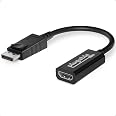
The Plugable Active DisplayPort to HDMI Adapter converts any full-sized DisplayPort output into a 4K UHD HDMI signal at 60Hz without drivers. Certified by VESA and compliant with HDMI 2.0, it guarantees reliable, high-quality video output for professional and entertainment setups alike.


| Wireless Type | 2.4 GHz Radio Frequency |
| Brand | Plugable |
| Item model number | DP-HDMI |
| Item Weight | 0.32 ounces |
| Product Dimensions | 8 x 8.75 x 0.5 inches |
| Item Dimensions LxWxH | 8 x 8.75 x 0.5 inches |
| Color | black |
| Manufacturer | Plugable |
| ASIN | B00S0C7QO8 |
| Is Discontinued By Manufacturer | No |
| Date First Available | February 3, 2015 |
R**S
Easy set up, great quality
Worked exactly as advertised. I’m a long time computer user, but late to multiple monitors. This product works perfectly so far. I highly recommend it, pending it lasting a reasonable time. I’ve been using it 4 days now, and very satisfied. Great price, excellent shipping and really was plug and go.
A**R
Easy, works like expected
As another in a long line of Plugable products, this DisplayPort to HDMI Adapter just works as expected. There is a premium to be paid for the Plugable brand, but you get the quality you pay for.
F**!
5 stars for a great product; 5 stars for pluggables expert, friendly and lightning fast customer service.
This plugable product is amazing. It really is as good as I expected it to be. I have other pluggable products that I use and they are reliable. I needed a known good brand-name displayport to HDMI adapter for my design workstation. I knew I could trust this product because of my experience with the brand in the past.After receiving the product, I tested it with quite a few AMD PCIe Video cards including the HD 7770 OC Series, The R9 270 Nitro series as well as the new R9 390 8GB Nitro series. The color and resolution come through with no lag, jitter or artifacts. No driver to install no setup required. You can still tweak the monitor details in Windows or through AMD apps with no issues.How does it work?Just plug it into a displayport port on your graphics card and connect the hdmi cable from your monitor/tv to this pluggable. Windows will bring up the monitor immediately.Why should you use this product? Plugable Active DisplayPort to HDMI Adapter (Supports displays up to 4K / UHD / 3840x2160@30Hz)It is better to use this displayport adapter than to use the "DVI to HDMI" converters that some video card manufacturers put in the retail box. I have always noticed that when using converters you lose color quality and the resolution appears altered. On my monitors there is a tone shift on the screen that uses "DVI to HDMI" instead of HDMI native or Displayport. No amount of tweaking could fix it. That was all resolved with this adapter from Plugable.This is transparent to the end-user and delivers high quality content with no reduction in quality or video resolution.So for me and my purposes, I will always use the HDMI port onboard the video card along with this adapter for extra monitors. Using this displayport adapter solved many of my 2nd and 3rd monitor display issues...RATING: 5 stars for a great product; 5 stars for Plugable's expert, friendly and lightning fast customer service.
C**I
Works with DP MST - Display Port Multi-Stream Transport
I needed a DP to HDMI adapter that would support DisplayPort Multi-Stream Transport (MST). This one worked for me where several others did not. My understanding is that MST implementations are finicky, and it may take trying lots of different alternatives to get one to work. So this may or may not work for you. My specific configuration is an HP EliteBook G5 laptop that has Intel Iris Xe graphics. I'm using the DP over USB-C from the laptop to attach to a Dell UltraSharp U2723QE monitor as the first display in an MST daisy-chain. The second and only other monitor in the daisy chain is attached with this adapter to the DP-Out port on the Dell monitor. That monitor is an an HDMI-only Eyoyo (yeah, I know) EY-ZB0406MG 5" 800x480 monitor that I'm using for a small above-screen teleprompter. Passive DP-to-HDMI cables definitely won't work (they can't decode the MST, obviously) and I tried at least the CableMatters 102021 Active DP to HDMI adapter. That one sort-of worked, but I had to toggle MST on the Dell monitor off and on again each time I connected to the display or else the HDMI monitor's display was garbled. (It looked like the signal to the HDMI monitor looked like it was out-of-sync/phase, or wrong bit-depth... something was not right. You could make out some images, but no way usable.) So that was no good. This one worked flawlessly with my setup. Your mileage may vary, but for me, this did the trick. Don't do many reviews, but since I couldn't find any adapters willing to say that, yes, they have a robust DP MST implementation, thought I'd share in the hopes this helps someone else. Good luck!
P**P
Works for 4K60 as advertised
I just got my first 4K TV and needed to get my HTPC to output a 4K60 signal. My HTPC motherboard (Intel UHD 610 graphics) will only output 4K60 with the DisplayPort output, but will not with the HDMI. This adapter is exactly what I needed since my TV only has HDMI inputs. Everything worked exactly as expected. The only things I had to manually tweak were 1) I had to manually set it to 60Hz refresh, for some reason it defaulted to 30Hz 2) I had to manually adjust the overscan, which I didn’t have to do with the native HDMI output when I was using 1080p with my old TV. It’s been a week and things are working great. I was surprised I could get an active adapter like this one for less than $15 that works so seamlessly.EDIT Aug 2022: I realized a bit after my previous review that with this adapter, the picture will not center on my LG C1 OLED TV and has a lot of overscan. If I use the native HDMI port on my HTPC to output 4k@30HZ, the picture is centered perfectly, and no overscan either. I had to manually tell the TV to force use the original program aspect ratio and also to force use 1:1 pixel display. Apparently this adapter doesn’t pass certain information to the TV so the TV doesn’t automatically use these settings. The native HDMI port on my computer does and the TV responds by automatically using these settings.Lowering rating from 5 to 4 stars due to this observation.
ترست بايلوت
منذ شهر
منذ شهرين