We remain fully operational. Our teams are working around the clock to ensure your deliveries continue safely.

قم بتنزيل التطبيق


معلومات عنا
حقوق الطبع والنشر © 2024 Desertcart Holdings Limited
قم بتنزيل التطبيق
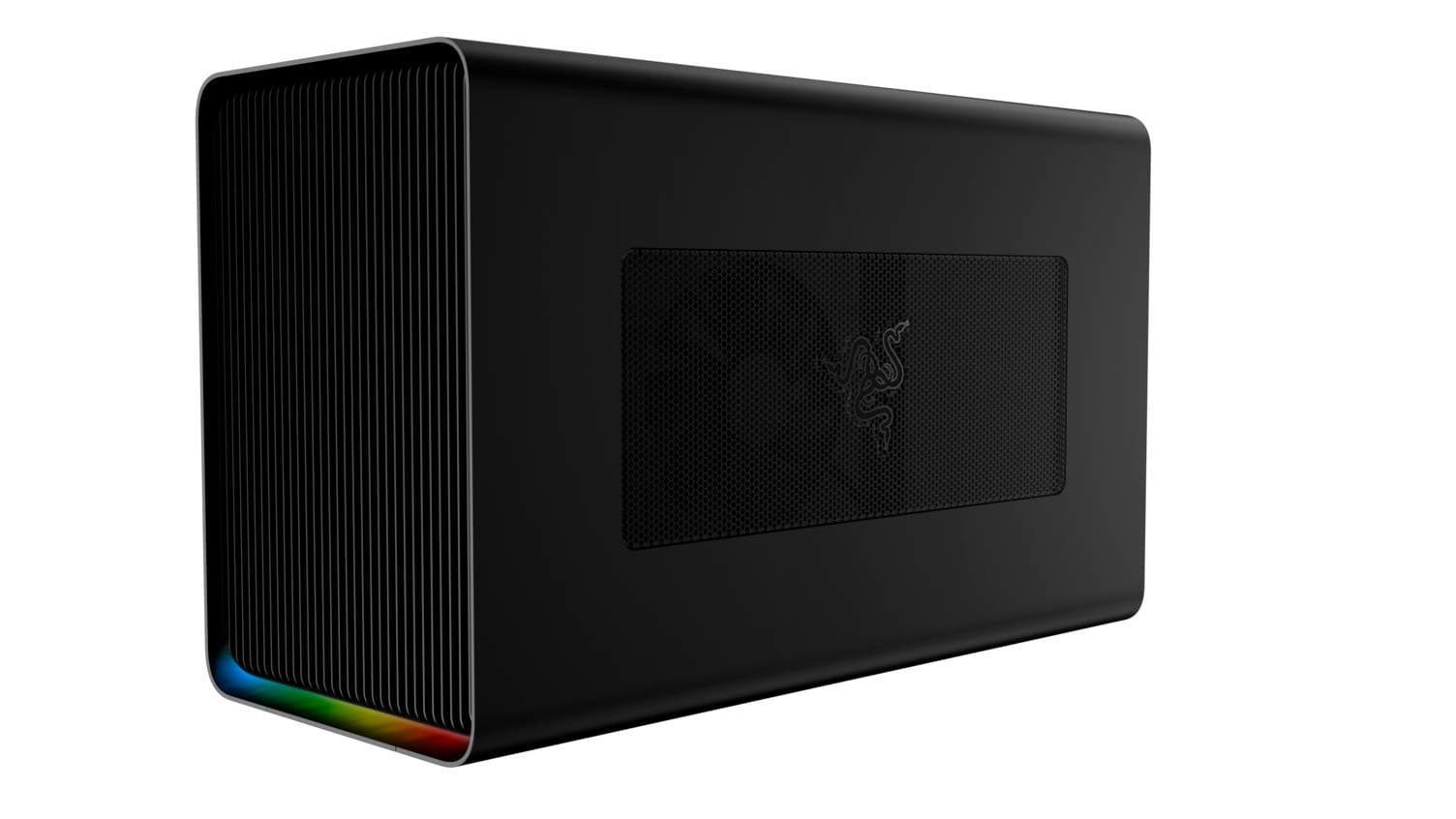




⚡ Transform your laptop into a powerhouse — game, create, and conquer in style!
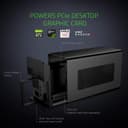
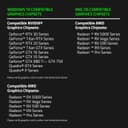
The Razer Core X Chroma is a premium external GPU enclosure designed to supercharge Thunderbolt 3 laptops with desktop-class graphics performance. Featuring a robust 700W power supply, support for full-sized PCIe GPUs, and customizable RGB lighting, it seamlessly enhances gaming and professional workflows on both Windows and macOS platforms. Its advanced cooling design and versatile connectivity make it the ultimate upgrade for millennial professionals craving power and style in one sleek package.


| ASIN | B07Q78VMPW |
| Antenna Location | Business, Gaming |
| Best Sellers Rank | #1,097 in Enclosures |
| Brand | Razer |
| Built-In Media | 1 eGPU |
| Case Type | Full Tower |
| Color | Classic Black |
| Compatible Devices | Laptop |
| Cooling Method | Air |
| Customer Reviews | 4.2 out of 5 stars 1,946 Reviews |
| Enclosure Material | Aluminum |
| Global Trade Identification Number | 00811659032416 |
| Hard Disk Form Factor | 3.5 Inches |
| Internal Bays Quantity | 3 |
| Item Dimensions D x W x H | 14.7"D x 6.6"W x 9"H |
| Item Weight | 15.23 Pounds |
| Manufacturer | Razer |
| Material | Aluminum |
| Model Name | Core X Chroma |
| Motherboard Compatability | ATX |
| Other Special Features of the Product | Led lights |
| Power Supply Mounting Type | Bottom Mount |
| Recommended Uses For Product | Business, Gaming |
| Supported Motherboard | ATX |
| Total USB 3.0 Ports | 4 |
| Total Usb Ports | 4 |
| UPC | 811659032416 |
| Warranty Description | 1 Year Manufacturer |
K**E
Premium Build Quality
I don't know about you, but I shopped around and around and around for eGPU cases. I looked at all of the premium vendors for Apple supported devices, and honestly this is the nicest and most practical case out of all of them. Unlike most cases there are vents on 4 sides of the case. It has a 72mm fan pulling in air opposite of the Graphics card and pulling in more are for the PSU... which most cases lack. It comes with a 600w power supply unit. Most cases don't have that and cost much more... Why? I have no clue except they include extra Thunderbolt and USB ports. (Which in my case I don't need slowing down the graphics card's Pipeline Thunderbolt basically already took it to 80% regardless of speed) I know some people love RBG but I hate RGB and I am so glad this case does not factor extra RGB into the cost of the product because it is a waste of electricity and money. Its smooth and black and it hides very well on one of the shelves of my desk. (They don't have sides so air flow is not an issue) Honestly it works really well and at first I was surprised that the 72mm fan was keeping my card so cold that it did not cycle at all until I was in a game for at least a few minutes. Only down side is that the Thunderbolt cable included was a little short... I can make it work but it would have been nice to have a 3 foot cable if that was technically possible with Thunderbolt. Very happy with this purchase and I think Razer really proved they can also make products for the active professionals, not just gamers.
D**2
Works great, plug and play... but heavy
As a part time gamer and full time Mac user, I wanted to play some games to my monitor when I am at home. Firstly, works great with Vega 64 and VII from AMD. These are, as of this review, the most recent GPU cards that both the box and the OS support. Moreover, to game you really need to go bootcamp... games just don't run well on OS X (despite the ports). Being able to reboot my machine into windows without unplugging something was key to my workflow. Plugging in the GPU and connecting this to the system is a breeze. I HIGHLY recommend a longer cord (Zikko makes a 6.6 foot TB3 that works perfectly). The PROS: All of them. I have the non-chroma version because ... I'm not an RGB guy and I don't need all those ports as I already have a big TB3 hub (having multiple TB3s on the MBP makes this a simple set up). The CONS: The thing is heavy... with the longer cord though, you can retire this unit to a safe location. If you are using the Chroma version, you will not be able to do this as the hub is built into the box... just a word of warning. Also, because of how the fans are set up, your GPU fans and the enclosure fan blow toward each other. Make sure the back of this unit is WIDE open as in don't put the back up to a wall. This is the only way the hot air can go to escape. Overall, this is the best eGPU enclosure by far... the power is perfect... The fan issues are minor at best.
C**O
Enclosure works great, Thunderbolt is a nightmare
This works great out of the box and if you have a Windows laptop or NUC or something similar. The nightmares begin on day 1 however. Thunderbolt is to blame here... I spent a while trying to find the "right version" of the Thunderbolt drivers to get this working stably on my HP Spectre laptop. It ended up only really being fully stable when I disabling the internal dGPU video card and turning off power management on random stuff like the ethernet card! It really feels like incantations to get this to just not blue screen the laptop. Worse, it would "plague" it for the duration before it blue screens. I'd unplug the enclosure and then go to a coffee shop and find the laptop already blue screened and on the login screen hot in my backpack. If I didn't plug in for a while, no problems like that. When this works, it's actually REALLY good. The video card, I've used an RTX 2080, and Intel Arc 770, only runs at PCI-e 4x but that's plenty for playing games on that are powered by a laptop. Diablo 4, Dead by Daylight, Overwatch, even Cyberpunk, run ok on this. There's some stutters and dips in FPS, but those really can be mostly attributed to the laptop. PCI-e 4x is just not slow enough for this to matter to gaming. Also, I was running an external display. Running the internal laptop display means you have to copy the framebuffer back to the internal card and it's not variable... the 4 PCI-e lanes are split so 2 go to the card and 2 come back... and that severely limits the framerate, makes things feel laggy, and causes a lot of stuttering and slowdown. I ran CUDA workloads on this as well... and honestly didn't see too much difference with the same video card in a normal PC motherboard. There were times it "felt like" the models being uploaded to the card was running slower, but the actual processing times and numbers really didn't reflect measurable differences. Thunderbolt in general is just super unreliable. My HP Spectre, a few Intel NUCs, a Dell XPS, and some other hardware all have random issues with Thunderbolt docks, VGA passthrough, and all the issues with stability. It's great if you're in a pinch, but terrible if it's your only setup. I'd recommend this only if you want to sit at a desk with your laptop and game every now and then but otherwise have a primary gaming computer setup. I can also recommend using it with an Intel NUC where you're ok with the occasional crash/random reboot.
J**P
Awesome solution for Macbook Pro users with a minor caveat.
Like every Razer item I've purchased, it's top notch quality products and the best bang for the buck. The Razer Core X eGPU seemed quite expensive at first but if you factor in power supply, control board, and quality; it's a great bargain. I've assembled every Win PC gaming rig that I've owned and use Macbook Pros for work. I recently upgraded to 2x BenQ 4K displays since the price was right and the WFH situation made it the right time... which is how I discovered the Razer Core X / eGPUs. My Macbook Pro (15" mid 2015) is "kind of" capable of running 2 4K monitors but noticed performance issues when the 4K resolution is scaled to 1440p. macOS shows a warning for this under display settings when changing the resolution. It's either 1080p or 4K where it doesn't bog down. Well, we all know 4K on a 27" monitor is going to make everything very tiny and the 1080p resolution is going to be in yo face but the picture quality is amazing. I prefer the 1440p with the better image quality reason I went 4K rather than native 1440p. 5K is just still super expensive. Some folks will probably be like why dual 4K?! I'm a software engineer so the extra real estate for the IDE / Text Editor on one screen and the rest on the other is what I've always preferred. The 1440p in high def makes the text look amazing. I know, I know... folks be like, you got a 4K for TEXT and 2 of them?! ... Yes, my eyes are not the same as they were over a decade ago when I started my software development career. Anyway, back to how I got here. The MBP was sluggish due to the GPU. My specific model is described to work with 1 5K external monitor. Makes sense, it's a 5 year old laptop GPU powering dual 4K. I needed to upgrade my GPU and researched some solutions. I was disappointed finding out there's no native macOS support for Thunderbolt 2 and eGPUs but I found purge-wrangler.sh. After following the basic instructions from the purge-wrangler github page, it was plug and play. I installed an AMD RX580... YES, an AMD... I have not purchased a desktop AMD card ever since the whole Bitcoin mining phase, people were forced to turn to NVIDIA cards. It all works great on my MBP. Also, I have this connected to a 4 port DisplayPort KVM for dual monitors. It works, make sure to buy the official Apple TB3 to TB2 since it's bidirectional and get a TB certified cable to plug into the adapter. # Pros - Quality packaging as always (stickers swag) 👏 - Quality product, paint, mesh, design, etc. 🙌 - Works with MBP (15" mid 2015, and a 13" MB Air 2012) TB2 (with install scripts) - Apple's limitation 🤦♂️ - macOS detected my monitors supported HDR and displayed an enable/disable checkbox in the display settings where as before it didn't 🤔 - Might have the highest wattage support compared to other competitors at the time of this review. Can support most high end GPUs but double check the dimensions and power requirements! 🥇 - The swivel / lock handle design - 👌 - It can play games with the RX580 but nowhere close to what my 1070Ti on the PC can do. I'm upgrading to a 5700XT since I got a Prime Day deal on it. - Can play fortnite, cs:go, left4dead, etc. I suggest a better card since the Razer X is designed for some serious gaming GPUs. The RX580 is an insult for what this eGPU enclosure can support. However, if you don't care about gaming in high/ultra settings, software & web development, CAD, video editing etc. then a RX580 paired with this enclosure is a great upgrade. # Cons - Leaving idle state, the fans spin quickly causing some fan noise. It's only like a second or two. Not that big of a deal. Might be the GPU + Enclosure combo. Will find out with the 5700XT swap. # Neutral - Ventilation - can be used as a mini space heater for the winter by playing games at ultra settings. Not sure how much the office will warm up during the summer. It's fall. - Some people complained theirs "didn't power on". You have to plug in a TB3 cable. Most people will assume they would see some kind of light or power when flipping the PSU switch. Wasn't the case and it left me scratching my head a bit. My situation with purge-wrangler had me connect the cable during script install. Razers instructions were to plug in the TB cable THEN flip the PSU switch. - Wish it came with a longer TB3 cable but they sell longer TB cables separately. That's how they can keep the price low b/c a 6.6 FT TB2 cable cost me $45 so be glad it came with one.
B**N
Equipment failures... Horrible support
This review is over the purchase and support of the Core X Chrome with extra USB and Ethernet. I want that to be clear because the GPU portion of the equipment is excellent. The additional $100 for USB and Ethernet is atrocious! It's a totally useless purchase and complete waste of money. I'll add, that RAZER support is either incompetent or uncaring. The technical capability of the GPU enclosure can't compensate for the distaste and feeling of being cheated in the transaction. I purchased the eGPU for use with a GeForce 2080 GPU. I had a new XPS 13" laptop with Thunderbolt 3 with the required channels to support full speed GPU use. The device and GPU were immediately detected by the laptop and configuration and the required drivers began to install under Windows 10. I was almost immediately able to play games with the included GPU at high resolution and performance. The negative part of the transaction came in attempting to get the USB devices and Ethernet to work. Ethernet would randomly "reset" and disconnect. Only resolution was to reset the connection in network troubleshooting which would re-establish the connection for about 5-10 minutes. Updates of drivers were unable to get a resolution. Additionally, no USB devices other than keyboard were detected on the USB ports. And that would periodically disconnect and force a complete reboot. Fearing an incompatibility I tried a second laptop a Lenovo X1 Carbon 7th gen. I had the exact same symptoms. I reached out to RAZER Support and after a few days they determined that RMA was the correct solution. After several days they determined that they could not reproduce the issue and that it was fixed. They returned the device to me and I immediately had the same issue upon the devices arrival at my house. This process has completely eroded my faith in the brand. I paid $100 more for a feature set that is not usable, Ethernet and USB. If you are considering a eGPU I would consider another vendor. There are cheaper options. If you want to stay with RAZER, DO NOT get the version with USB/Ethernet. The eGPU seems to work and quite well but paying $100 for broken feature should be illegal, but it's not. So I'm just warning the next buyer.
B**E
Not all USB-C cables are created equal.
The usb-c/Thunderbolt 3 cable you use to connect the Razer Core X to your compatible laptop MUST be able to deliver at least 60W of power and deliver data transmission speeds of 40Gbps. Razer provides a very short version of this cable with the Razer Core X. Be aware that the Apple Thunderbolt 3/USB-C Cable does not work for this function. I tried to use the one that comes with the Apple MBP 16 and it didn't work. The Razer Core X will not actually turn on unless a compatible video card is installed, Razer Core X power switch is on, and the right USB-C/TB3 cable is in place plugged in to your computer. If it is, then it will light up as soon as your connected compatible laptop computer turns on. It works great and the installation process on my 4 year old Razer Blade 17 laptop was almost immediate as it recognized it and asked me to follow through on installing the necessary drivers for both the video card and the Razer Core X. This device works as advertised. 2022 update. I originally ran an ASUS ROG STRIX GeForce RTX 2060 Advanced Overclocked 6G in this unit. The card worked great, but was starting to feel underpowered in certain high object count situations. I have since upgraded it to an EVGA GeForce RTX 3090 FTW3 Ultra Gaming, 24GB GDDR6X, iCX3 Technology. The Razer website lists the 3090 as compatible with the Razer Core X Chroma. This GPU card requires 350W to work and needs 3 GPU PCIe connections. Doing the math, the card would require a minimum 116.6667W per PCIe connector to function. The Razer Core X Chroma feeds 500W to the GPU but only has 2 PCIe connectors. With 250W to one connection, and 125W and 125W via a splitter to the 2nd and 3rd, this card turns on, works, and is recognized by the now 6 year old Razer Blade 17. However the card does throw a decent amount of heat so I wouldn't run it without AC on a hot day and I would let the fans on the eGPU run for about a minute or two after the laptop is shutdown before I shut the Core X Chroma off. Finally as I learned more about performance bottlenecks, I found that in retrospect this card is overkill for this rig setup because of the data bottleneck through the Thunderbolt 3 cable. A GPU in a PC tower has a much faster data rate than Thunderbolt 3 can provide. So generally if you play games in FHD (1920X1080) with the settings turned up then a rig set up with an eGPU will work for you. It also means you will never be running the card at its full potential. If you want to be able to play at higher resolutions, you will want the GPU card in the PC tower wired into the motherboard. Don't use an eGPU. So the moral of the story is do your homework. I would recommend anyone looking at GPUs for a Razer Core X Chroma to look at GPUs that only require 2 GPU PCIe's first and read the reviews. They'll use less power, and may get you the same FHD performance for less.
P**M
eGPU itself works fine in macOS. USB and Ethernet are terrible. Get the non-chroma model.
First experience with an eGPU and I probably should have done more reading before I purchased anything. Currently having difficulties getting it to work with Bootcamp on a 16" Macbook Pro. This is not the fault of the Razer Core X Chroma, but I think it's worth mentioning to anyone thinking about going done this road. That said, with a Radeon card in it, it's plug and play (at least for GPU purposes) on the macOS side which was very nice. Performance with my 5700 XT seems about where I'd expect given the limitations. The thing that IS the fault fo the Razer Core X Chroma though is how bad the USB and Ethernet ports are. The ethernet port requires an extra driver in macOS which isn't clear but not necessarily a problem in itself, but I could only get it to work for a few minutes before my system decided it no longer had internet access through that adaptor. Switching to WiFi fixed things, back to the Razer's Ethernet and I only got a couple minutes again. Worse than the ethernet though is that the USB devices seem to not get the correct/consistent power and connectivity they should. My keyboard kept disconnecting and reconnecting, my mouse didn't act right and my FiiO K3 headphone amp cut out regularly. If you want an eGPU for a Macbook Pro (running macOS), this works great for just that. Do yourself a favor though and save some money by getting the non-chroma version and a cheap USB-C hub.
A**R
One of the best eGPU enclosure ever, but heavy
Had received and used for 2 weeks, I’m quite impressed with the design and also letting me to work on my filmmaking editing projects much easier. I’m currently using the mid-2018 MacBook Pro Core i9, due to its dedicated graphics card isn’t much as powerful as desktop class but now I have Razer Core X with me to power my projects. The power supply has 650 watts of power, powerful enough to run your beefy GPU + providing 100 Watts of power to charge your laptop. This eGPU enclosure is big enough to slot in big and thick GPU. The internal cooler is upgradable/detachable if your GPU comes with a single radiator fan. For gaming wise? Mac has some hard time in gaming, but on Bootcamp, it works a bit but need lots of extra works to get it worked. If you want to game on Mac with Windows 10, make sure you follow the procedure by visiting eGPU community forum , to set up your eGPU to game on Mac. When comes to maintenance, just need to get an air duster to clean the internal on every 2 weeks to keep the fans and power supply free from accumulating layers of dusts. For bringing around to work, it’s hard, because, first it’s huge, 2ndly, it’s heavy and it weights 7KG (with GPU installed) and need a bag or large backpack to carry it around. EGPU enclosure is designed for people who want mobility working. Laptops’ GPU can’t be upgraded but with this enclosure comes in, it gives you the opportunity to use desktop class GPU on the go. But only 1 little downside of this enclosure is, the provided Thunderbolt cable is kinda short, but you can get a good long ones from Cable Matters. Overall, this eGPU enclosure satisfies my needs!
ترست بايلوت
منذ شهر
منذ أسبوع