
قم بتنزيل التطبيق


معلومات عنا
حقوق الطبع والنشر © 2024 Desertcart Holdings Limited
قم بتنزيل التطبيق

🔗 Bridge the gap between vintage power and modern speed!
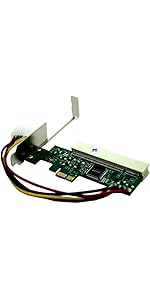
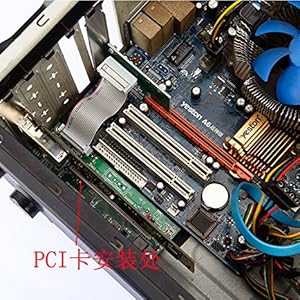
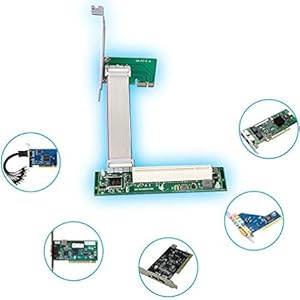
The Sintech PCI-E Express 1X to PCI 32bits Adapter with 10CM Flex Cable enables seamless integration of legacy PCI cards into modern PCIe 1X slots. Featuring a flexible cable design, jumper-selectable voltage (3.3V/5V), and PCI 2.3 compliance with up to 133MBps data transfer, it supports plug-and-play operation across multiple OS platforms. Perfect for professionals reviving classic hardware or extending system capabilities with proven reliability.





| ASIN | B00KZHDK4Q |
| Best Sellers Rank | #361 in Computer Memory Card Adapters |
| Brand | Sintech |
| Color | With white Molex power |
| Customer Reviews | 3.9 3.9 out of 5 stars (60) |
| Date First Available | June 14, 2014 |
| Is Discontinued By Manufacturer | No |
| Item Weight | 3.98 ounces |
| Item model number | ST8009B |
| Manufacturer | Sintech Electronic |
| Operating System | Linux, Windows 2000, Windows 7, Windows Vista, Windows XP |
| Package Dimensions | 7.24 x 5.51 x 1.1 inches |
A**R
Works On Ryzen PC For GPU PCI Passthrough
I have an UnRaid Server I built and have had problems trying to do graphics pass through for a Windows XP VM on it. Nothing I did could make my Windows XP VM show on a monitor. This adapter allowed me to take an old 32 bit pci graphics card I had laying in a drawer and attach it to the modern PCIe interface on my Ryzen motherboard. UnRaid recognized my old card immediately and I was able to pass my Windows XP VM through that old card to my monitor. Gaming like it’s 2005 again. Great product for connecting old hardware to new computers. Your mileage may vary but for me works great with an old pci graphics card.
A**M
Doesn't work with all PCI cards
I tested it with 2 different PCI analog capture cards (a 4 port and an 8 port, both have dedicated encoders for each channel). The 4-port didn't work correctly (it was recognized but the video was garbled). The 8-port worked. Both work fine in standard PCI motherboards. I was lucky that I had a spare to try. So, the takeaway is, it may work for you, or it may not. The ribbon cable is just long enough to go from the top PCIe slot of an Asrock J4105M to the space below the motherboard. Good: works when it works. Bad 1: Some cards don't work. Bad 2: No mounting options for the new slot board, with large PCI cards the whole assembly flexes and is under a lot of strain. I may glue the board's feet to the case.
J**R
Works very well and great way to test PCI devices!
Worked flawlessly and I could see the old PCI devices and verifiy if they still functioned.
C**O
Not worth it
It does not have the standard size to screw on the chassis and the band is to short. I plugged it but it gets in the way of other connectors, and has no support and when I turned on the computer, the scanner doesn't show.
E**Y
Works great but the ribbon cable is a hazard (potentially a fire)
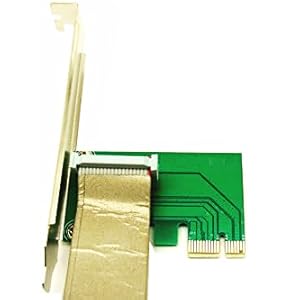
The ribbon cable has exposed shielding for the entire length of the cable if it comes in contact with your RGB or fan header(s) some combination of the following will happen * dead fan or rgb header (and/or controller) * dead motherboard * burned traces on the motherboard * a fire This can be prevented with a roll of electrical tape (you can get the stuff in any color, but black is usually cheapest) I noticed this problem when my onboard audio was not working and i know my board will use the front panel jack if there is something plugged it and thought there is no way that cable is bare metal it must be a config issue, but it is easy to rule out so i grabbed my meter ---------------- This can be mounted in the lower 3 slots of your ATX case while using a mATX board and allow you to use your old PCI cards with a modern motherboard, it consumes 2 slots worth of space, sadly it uses a molex plug, i would prefer sata or a floppy disk power plug, that thing does not want to unplug, glad i made a extension cable Also the ribbon cable's shielding is not connected to ground so it is only armor and not functional emi shielding ---------------- I informed the manf. of this short circuit hazard/issue as they probably source the cable from some supplier, so hopefully this can be fixed on future batches ---------------- Both this adapter and my creative sound card just work with linux 5.15
N**N
Worked first time out the box
I had an old PCI video tuner/capture card that I wanted to put into a modern computer without a PCI card. Sintech to the rescue. It was simple to install, just slot you card into the adapter, plug your adapter into a PCI-E 1X slot and you're done. I used this with Ubuntu Linux and the capture card was recognized as if it was plugged directly into the motherboard. No dealing with drivers or anything else. Literally plug and play (literally) using TVTime.
J**R
does its job, mostly - Sintech PCI-E Express 1X to PCI 32bits Adapter with Flex Cable
Review of Sintech PCI-E Express 1X to PCI 32bits Adapter with Flex Cable - This little board makes it possible to install a legacy IDE add-in card in a modern PCIE computer. - This PCIE adapter board, and the attached IDE card are functioning in my system, recognized by my computer without any drivers, although the IDE has drivers installed by 3rd part software to support the IDE card (not this adapter). - One of the problems I am having is that the ribbon cable from the PCIE board to the daughter is NOT quite long enough to fit. My current goal is to install my system into a computer case with "vertical GPU" support and use the vertical GPU mount to install the added in IDE card there, that is if the ribbon cable from the PCIE adapter is long enough. - I hope I can find a compatible, longer, ribbon cable to run between the PCIE card to its daughter board that connects to my legacy, high-end - IDE Sharc DSP audio synth card. - This card worked for me without any drivers or anything. The speciality Sharc DSP audio/synth card I am using is fully recognized. - This hardware problem solver is good, but with the caveats described above. - ~~~ enjoy ~~~
T**P
Works with FULL LENGTH x4 pcie slot, the bottom one.
Works with the DDL sound cards X-Mystique, Xonar, probably all of them. *****Works in a FULL LENGTH x4 pcie slot (bottom pcie slot) so it CAN be mounted below the board cleanly in a ATX case with a MATX mobo.***** Ribbon cable can be flipped, but both ends must be flipped! Awesome. I get to keep my card. Thank you! EDIT: To this day, 1/30/20, this has worked brilliantly in a full size 4x SLI slot. Whenever I get that sweet DD surround sound like I love, I literally always smile and think of this thing. Works absolutely flawlessly (gigabyte B450 board). EDIT 2: Oh yeah. Micro ATX. This fits and mounts neatly below a SLI micro ATX board.
A**R
It works well on Gigabyte Z390 M Gaming (mATX motherboard - for the space available underneath the board) with HT Omega Claro XT PCI soundcard (Windows 10 Pro). You will need also a power supply with the available cable with Molex plug in order to power up the adapter board.
P**K
Der für die Fritz!Card PCI benötigte Treiber kann nicht installiert werden, weil die Fritz!Card PCI nicht erkannt wird. In einem anderen PC, der noch mit PCI-Steckplätzen ausgestattet ist, funktioniert die Fritz!Card sofort, der Treiber wird dort automatisch installiert! Lediglich mit Karten, die keinen Treiber benötigen, kann sie verwendet werden (z.B. in einer Karte mit zusätzlichen Steckplätzen für SSD-Festplatten funktioniert sie). Für diesen Zweck ist sie zu teuer, der Preis übersteigt den Aufwand für eine entsprechende PCIe-Karte!
C**N
Wish the pci side of the adapter was easier to mount, and or was better insulated underneath from short circuit. Worked as expected.
J**O
tutto ok
S**P
Didn't work with my setup (Asus motherboard). When installing a sound card into this adapter, my computer wouldn't complete boot process because "no video card was found". Tried telling bios to use video card on motherboard only, with no success.
ترست بايلوت
منذ 3 أسابيع
منذ يوم واحد