Buy anything from 5,000+ international stores. One checkout price. No surprise fees. Join 2M+ shoppers on Desertcart.
Desertcart purchases this item on your behalf and handles shipping, customs, and support to EGYPT.
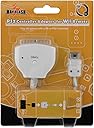
🎮 Level up your Wii gaming with PS power—no lag, all swag!
The MAYFLASH W004 adapter transforms your PS/PS2 controllers into powerful Wii/Wii U gamepads with plug-n-play ease, featuring 8 customizable turbo buttons for enhanced gameplay. Compatible with classic controller-supported games, this compact device requires no drivers and instantly upgrades your gaming experience.
| ASIN | B002OJ8S7C |
| Best Sellers Rank | #26,050 in Video Games ( See Top 100 in Video Games ) #11 in Wii U Adapters #71 in Wii Adapters |
| Brand | MAYFLASH |
| Color | white |
| Compatible Devices | Wii, Wii U |
| Connector Type | USB |
| Customer Reviews | 3.9 out of 5 stars 66 Reviews |
| Finish | Finish |
| Finish Type | Finish |
| Global Trade Identification Number | 06936985475844 |
| Item Dimensions | 2.5 x 2 x 0.5 inches |
| Item Weight | 1.6 ounces |
| Item dimensions L x W x H | 2.5 x 2 x 0.5 inches |
| Manufacturer | MAYFLASH |
| Mfr Part Number | W004 |
| Model Number | W004 |
| Number of Items | 1 |
| Number of Ports | 1 |
| Package Quantity | 1 |
| Power Plug Type | No Plug |
| Smart Home Compatibility | Not Smart Home Compatible |
| UPC | 796594298892 |
| Unit Count | 1.0 Count |
| Warranty Type | Limited |
C**R
A ton of PSX Controllers for the Wii
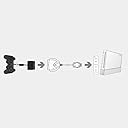
There are some Wii games that can be played with a Wii Classic Controller. Odd that the Classic Controller looks very similar to a PS2 Dual Shock. I have so many PS1 and PS2 controllers that I really did not need another controller just for the Wii. I already have a couple of PS2 to Gamecube adaptors and wanted to play Wii games this way. Discovered the Mayflash Adaptor thru a Google search. What I like about the PSX to Wii adaptor is it plugs right in the remote and is hot swapable, no need to reboot the Wii. All the Playstation controllers become wireless in a sense in that they are not direct attached to the Wii. Turbo Button for Auto Fire For setting up to eight buttons on the Playstation controller in rapid fire. Simply hold the Turbo button on the Mayflash and press a button on the PSX controller to enable. Now when an enabled button is pressed the Mayflash will flicker the LED. To disable Auto Fire simply hold the Mayflash Turbo buton and tap the PSX button again. Auto Fire only works on the PSX controllers and only on Wii games that support the Classic controller. So how does an Analog sticks compare to the Remote? I tested a standard PS2 Dual Shock controller. A Wii Classic Controller has almost the same layout as a PSX controller. So both should work almost identically. PSX ......................................... Wii Start .......................................... + Select ......................................... - Gamepad ........................ Gamepad Analog Sticks .............. Analog Sticks X .............................................. b O .............................................. a SQUARE ..................................... y TRiANGLE ................................... x R1 ........................................... ZR R2 ............................................. R L1 ............................................ ZL L2 .............................................. L R3 L3 .................................. Home Wii Opening Menu The PSX Analog sticks mover the cursor around okay, but the remote is a quicker "Light" gun response. So much simpler to point with the Remote for accuracy. Both the Remote and PSX controllers still work, point the remote away from the Sensor Bar to use a PSX controller. Geometry Wars The Robotron inspired twinstick game with "Vector" graphics like Black Widow. The Remote works great, but now with a Dual Analog, its even better! One analog stick moves the ship while the other analog stick controls the rapid Fire shots. Nice moving one direction while shooting in another. Note that Rapid Fire is in the game itself, the Mayflash Turbo is only for the buttons. Arcade Twinstick At first I was disappointed that the gamepad and four Face buttons are not utilized on the Dual Shock. This would kill using any PSX Digital Arcade Stick. I plugged in my Two Player Arcade Blaze Twin Shock just to see what would happen. Flawless accurate gameplay control! Twinstick Heaven! The digital stick actually works!!! The Arcade stick acts just like the left Analog stick and the four face buttons default to the right analog stick of Geometry Wars. Very strange considering that the Stick normally defaults to the direction pad on a regular Playstation. This is perfect considering that I have modded the Player Two stick to operate as the face buttons of Player One. Geometry Wars is played just like the Arcade game Robotron, not with tiny thumbsticks, but full sized Arcade Sticks! So was Geometry Wars the only game that offered the unique Digital Twin Stick mode? I have another game to test and see if this was just a lucky chance. Sin & Punishment Strange that the game case does not show the Classic Controller Icon on the back cover. The original N64 import used one Analog stick for aiming and the buttons for sideways movement. Wii actually plays better with a Remote for aiming and the Nunchuck for full movement. Now to try out the PS2 controller. The PS2 Dual Shock works after I adjusted the settings menu to a better button layout. Left Analog stick moves the gunsight, the Right Analog stick moves the character. Trigger buttons are the weapons and evade. Works great, though the Wii Remote does offer a quick instant point to where you want to shoot. The modded Blaze Arcade Twinstick also works just like the Dual Shock. After reconfiguring the game settings, Player One stick is the gunsite, the four face buttons are for movement which is also controlled by the modded player two stick. The trigger buttons are set for weapons and evade. Works okay but a trick tapping the fire buttons with both hands on the Arcade sticks. The Wii Remote is still the best aiming device. Mayflash Value So is the Mayflash adaptor better then just going with a Wii Classic Controller? I can't give a true assessment since I don't have one to compare. But the adaptor allows use of all the various controllers that are available on the PS1 and PS2. Some others to try include a Driving Controller, Dance Pad, Flight Sticks and even the unusual ones such as Beatmania and a Densha De Go Train controller. The Playstation has tons of controllers to try with the "Classic Controller" games, offering a different way to play a game.
P**O
Minor Ticks, but Awesome Adapter
While I haven't fully tested it, it did work pretty well for the most part. The only real gripes I have are the trigger button control scheme (Why is L1 and R1 assigned as ZL and ZR respectively?) and the three buttons assigned as the HOME button (I'm okay with just the Analog button being the home button, L3 and R3 don't need a function at all). Other than that, I'll definitely buy three more when I get the money and the chance.
L**5
Works like a charm!
This is great and works like how you would expect it to. This is the only product I have found that allows you to use a PS2 controller by attaching it to the Wii Mote itself, not the gamecube ports on the side of the Wii. The advantage is that you don't have to be close to your system to play, as it makes every controller wireless. Keep in mind how the Wii works though. This will NOT allow you to play Gamecube disc games using a PS2 controller. Those MUST be plugged into the side gamecube ports on the Wii. This WILL let you play any of the virtual store bought games though, all the NES, SNES, and Turbografx ports etc. Also this WILL let you play Wii games using a PS2 controller instead of the Classic Wii Controller. So if you have PS2 controllers or prefer the layout of the buttons to the classic controller, get this. Special note, for those DDR fans, this DOES work with the PS2 dancepads turning them all into wireless dance pads for the Wii versions of DDR!!
A**L
Works with Nintendo Switch /
I tested this adapter that is connected to the Wii Remote with Mayflash MAGIC-NS adapter and it seems to work like a classic controller so you can now play your PS1/PS2 controllers on Nintendo Switch. It also works fine with 8bitDo GBros. adapter too but the buttons are posessed (All the triggers, ABXY buttons and select and start buttons) so it doesn't work. I know this adapter works only first-party PS1/PS2 Dualshock 1/2 controllers, Here are some controllers I've tested. I've tested with my PsychoPad III PS1/Sega Saturn Arcade Stick for arcade games and 2d fighting game as well but it doesn't work. PS1 Pop'n Music Minicon Controller doesn't work with it too. If you're gonna be playing Taiko no Tatsujin Drum n' Fun using PS2 Taiko No Tatsujin Tatacon Drum contorller connected to this adapter, I tested this out but it's not working! Even if you like to play Nintendo Switch with first-party PS2 controllers left off, I kinda recommend this adapter but you need a MAGIC-NS adapter, but not for Taiko Drum gamers.
C**N
Did not work
The adapter I received did not work correctly, buy at your own risk
G**O
I messed up, this DOES work
I returned this because I thought it was not compatible with a PS2 dance, dance revolution pad. It actually probably is but only with an OEM pad. (Can’t say for sure, test at your own risk) but it’s totally compatible with OEM PlayStation controllers. If you need it for a wiistation, with an oem Wii remote, this WILL work.
R**Z
Almost perfect, two problems and they're doozies if you don't like it
Almost perfect if not for a couple of problems in design. One of those problems is that the triggers and shoulder buttons are swapped. So instead of the L2 and R2 being ZL and ZR they're L and R and the L1 and R1 are the Z triggers. For N64 VC games this can simply be fixed in the controller settings screen. But you wonder why it's not the proper way around to begin with. No consistency with the default controller which is the Gamepad on the Wii U. The other problem is that the R3 button is the Home button in addition to the Analog button being the Home button. This really messes me up in Sonic All-Stars Racing Transformed when attempting tricks because it's very easy to accidentally press down on R3 while quickly moving my thumb to the stick.
P**R
Does exactly what it says on the box.
Works pretty well, although I didn't realize how much power it uses. I'm using it in conjunction with a PS2 to wireless PS4 controller adapter. Even though the wireless adapter is externally powered, this adapter draws a bit of power from the remote. I've noticed I'm getting about 30% less time from a set of AAs than I normally do. Although that may be because of my setup. Great product though, does exactly what it says it does. Note: not all games support classic controller input, which is what this adapter uses. Not an issue with the controller, but it was something I was disappointed by.
E**V
Works with 8BitDo Retro Receiver for PS !
Works as expected when playing compatible Wii / Wii U games. I bought it for usage with the 8BitDo Retro Receiver for PS and works like a charm. I used this adapter with the aforementioned receiver paired with the 8bitdo Arcade Stick and was very happy with the result.
J**Z
Excelente producto
Justo lo que necesitaba
C**N
Bueno, aunque coloca en los gatillos de arriba el y zr
Buen producto, cumple bien con lo que ofrece y es resistente. Solo tengo una queja. Los botones de los gatillos no los configura buen de primeras. Me explico, a,b,x y y quedan exactamente como deben de estar, pero l y R los coloca como l2 y R2 y por el cobraron zl y zr los coloca como l1 y r1. Esto en la mayoría de juegos no hay problema, pero es algo a mencionar, yoblo uso con un arcadestick para tatsunoko vs Capcom y tuve que hacer ajustes en mi juego para que me acomodara con normalidad.
J**O
Hasta el momento uso limitado
Funciona bien con el control de ps2 dual shock 2, pero con arcade stick y guitarra no responde. Espero encontrar la forma de hacerlo funcionar.
Trustpilot
3 weeks ago
2 weeks ago