🚀 Elevate your office game with wireless speed and vibrant color—because your work deserves to stand out.
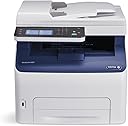
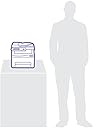
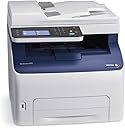
The Xerox WorkCentre 6027/NI is a compact wireless color multifunction printer designed for small offices and professionals. It delivers fast 18 ppm color printing at 1200 x 2400 dpi resolution, supports seamless mobile printing via Apple AirPrint and Wi-Fi Direct, and features a user-friendly 4.3-inch color touchscreen. With print, copy, scan, fax, and email capabilities combined in one device, plus a 150-sheet input tray and automatic duplexing, it offers versatile, reliable performance backed by Xerox’s one-year warranty.


| ASIN | B00STQYFIU |
| Additional Printer Functions | Copy, Fax, Scan |
| B&W Pages per Minute | 18 ppm |
| Best Sellers Rank | #677,405 in Office Products ( See Top 100 in Office Products ) #881 in Laser Computer Printers |
| Brand | Xerox |
| Built-In Media | Laser Printer, Single Function Laser Printers |
| Color | Black And White |
| Color Depth | 24 bpp |
| Color Pages per Minute | 18 ppm |
| Compatible Devices | Laptops, PC, Smartphones, Tablets |
| Connectivity Technology | Wi-Fi |
| Control Method | Remote |
| Controller Type | Android |
| Customer Reviews | 3.7 out of 5 stars 700 Reviews |
| Display Type | LED |
| Dual-sided printing | Yes |
| Duplex | Automatic |
| EU Spare Part Availability Duration | 1 Years |
| Global Trade Identification Number | 00095205867961, 00952058679618 |
| Hardware Interface | USB |
| Ink Color | CMYK |
| Item Type Name | Xerox WorkCentre 6027NI Color LED MFP |
| Item Weight | 43.8 Pounds |
| Manufacturer | Xerox Office Products |
| Maximum Copy Resolution Black and White | 600 dpi |
| Maximum Copy Resolution Color | 600 x 600 dpi |
| Maximum Copy Speed Black and White | 18 ppm |
| Maximum Media Size | 8.5 x 14 inch |
| Maximum Print Resolution Black and White | 1200 x 2400 dpi |
| Maximum Sheet Capacity | 15 |
| Maximum print Resolution Color | 1200 x 2400 dpi |
| Model Name | 6027/NI |
| Model Number | 6027/NI |
| Model Series | 6027 |
| Number of Trays | 1 |
| Other Special Features of the Product | Auto Document Feeder |
| Output sheet capacity | 150 |
| Paper Size | 8.5 inch x 14 Inches |
| Power Consumption | 330 Watts |
| Print media | Envelopes, Labels, Paper (plain) |
| Printer Connectivity Type | Wi-Fi |
| Printer Output Type | Color |
| Printer Type | Laser |
| Printing Technology | Laser |
| Processor Count | 1 |
| Resolution | 1200 x 2400 dpi |
| Scanner Type | Sheetfed |
| Special Feature | Auto Document Feeder |
| Specific Uses For Product | Office |
| Total Usb Ports | 1 |
| UPC | 095205867961 |
| Unit Count | 1.0 Count |
| Warranty Description | One year on-site warranty |
| Warranty Type | one-year warranty |
| Wattage | 330 watts |
K**Y
Ideal compact Multi-Function Printer for a small home office environment
For reference, I have a home office network with mixed Apple and Windows computers. I connected the MFP via Ethernet to the router. With this I got full functionality across the different platforms. A few pointers: although Xerox tried to make a complex installation as straightforward as possible, you still have to know something about networks and how they operate. I ended up with several drivers on my computers, one for network, PCL6 and USB for example. I also found that it was simpler to set up my printer network settings from my PC than the Mac. One thing I discovered is that scan to email only works over USB to a PC. To get around that limitation for Macs, you can scan to a thumb drive in the MFP and then port that to your Mac. As old as Fax is, it is still used for legal documents. The fax function worked well over Comcast's VoiP phone system. Comcast has clarity in their phone lines and this is what you will need for reliable fax. I had a large 30 page fax sent from the IRS and it printed without a hitch. The color touch panel is very nice and the menus are easy to navigate through. If you are a long time Phaser user you will be in a completely familiar environment. I like the quietness of the LED print heads, there is no whine from the spinning Laser mirror. The toner cartridges come pre-installed and they are simple and hassle free to replace. I believe that my starter cartridges are full ones because we printed a lot and the gages are still up...very nice, thank you Xerox! We use our printer infrequently, but when we do we don't want to fiddle with missing ink jets. The toner based "laser" printer wins on this point, toner doesn't dry out. The prints are crisp with good character detail. Color is very nice, but don't expect photographic quality. The WorkCentre 6027 is ideal for a small office and meets my expectations, that is why I gave the MFP 5 stars. It is a very nice package.
A**R
I'm glad it broke after a year so I can throw it in the dumpster!
1 Year Update: Worst color laser multi-function printer I've ever purchased. I can't even express the intensity of the frustration I've received from my coworkers over my choice to purchase this printer. It now sounds like a JACKHAMMER while printing. I'm purchasing an HP or Brother printer next. UPDATE: Using genuine toner has the printer functioning again. It still is a frustrating printer. I'm purchasing my second $275 bundle of toner because the yellow is low. Why? Because even when I'm printing documents that are primarily line-art, it uses all of the colors to print black, if I'm printing any color at all. Why in 2018 is this printer so terrible? I thought we had these wasteful toner practices done away with a decade ago. That was indeed the case with the HP and Brother Machines I've used for the past 15 years or so. I should have put up with the replacement part requirements of those machines because it was considerably less expensive than the toner cost of this one. Original Review: I had high hopes for this, having used high production Xerox machines in the past. In my current office, we've been using Brother printers for some time. Every four years or so, they need replacing, so I thought I would try something that I hoped would have better longevity. This printer does not. The first problem is that it is painfully slow. Printing reports or checks that take seconds with a Brother machine (or an HP, I have one of those that works well) take MINUTES PER SHEET!!! My office manager would glare at me every time she needed to print something! Then, it wouldn't fuse completely on the right edge of the paper; it would place a lighter copy of the text on repeat down the side, making it useless for pretty much anything. The third problem is that it uses all four colors when I print black and white! It burnt through the toner that comes with it like a wildfire. So I ordered some third-party replacement cartridges. That was the end of the line. It started throwing an error code, and when the service technician came out, he said I would have to put genuine Xerox toner in it for him to fix it. The set of toner is currently $50 more than the printer itself. While I wait for this toner to arrive, I am left to ponder how terrible this printer is.
D**E
Excellent full color MF laser printer at a fantastic price!
As a former Xerox researcher for several years I was well aware of the high quality product that Xerox puts out. So, when shopping for a new home office color laser printer I did put Xerox at the top of my shop and compare list. I was surprised to find this unit for such a reasonable price. I received in the typical high quality packing that Xerox uses and immediately set up in my home office. Yes it was a little big - compared to the MF inkjet printers and simple monochrome laser printers I had used in the past - but it’s a fully multifunctional and I add - quite high speed 4 color laser printer. In less than an hour I had it set up, connected to my home network and was wireless printing to it from my laptop and iPhone. So far have printed couple hundred pages. Fast and excellent print quality! Very impressed! In fact so much so that I have been telling friends and family about it Hell I even told a guy I bumped into in one of the office stores that was looking at much higher priced competitive office printers - and shared with him the model and link on Amazon. (I think I pissed off the salesperson in the office store 😄 )! Great printer - good bye crappy ink jet printers!
T**S
Good Printer -- Great Price
I’m going to try to update my reviews as follows: 1 week, 3 months, 1 year. That assumes Amazon will allow me to edit my reviews. I may have to write three reviews. After 1 week, I give it 4 stars. Price – Great Print Quality – Great Paper Handling – Good Flexibility – Good Print Speed – Okay for 1st page, Good for multiple pages Copy Quality – Good This is a quality, well built, heavy good sized machine. I had to move it from the cabinet where I had planned to put it (and where my previous inkjet machine fit nicely) to a table. The machine was too deep for the cabinet. This may not be an issue for most users, but measure. I like the print quality, both text and graphics were great. I did find the copy quality to be a little on the light side, but that can probably be adjusted. Setup was a mixed bag. I have a computer without a DVD/CD player so going online to Xerox’s web site was easy, there were two relevant Zip files. One for drivers and one for documentation. Both downloaded and installed seamlessly. The online user guide is extensive and a bit intimidating, it was obviously written for a techy audience. The WiFi setup was painless and connectivity is good, I haven’t dropped a connection yet. The scanner setup was an entirely different matter. I worked long and hard on it and I never could get the scanner to work with Xerox supplied software, and I consider myself to be relatively tech savvy. What I ended up doing was downloading two programs. MS Windows Scan for images and a PDF scan program for PDF document creation. These programs worked with the Xerox supplied TWAIN drivers without any problems. Paper Handling and flexibility is good. It will work with regular, legal, envelopes and cardstock. The paper tray is designed to easily adjust to either standard, legal or envelopes. My biggest gripe is there is no multipurpose tray to easily accommodate those paper sizes, so to use them you have to remove the paper from the paper tray make the adjustments for the paper you want to print on and reinsert it, then when you’re done printing reverse the process. I wish the printer was able to do duplex, but at this price point I can understand why it doesn’t. Waking the printer from sleep mode is a relatively long process. In general, printing the first page takes a while but multiple pages print relatively quickly. Copying was easy. I like that this printer has an ADF, a sweet feature at this price point. Copying on the glass was easy, and the nice feature of this printer is when you put documents to be copied in the ADF, the printer automatically recognizes them and feeds the documents into the copier without user intervention. My next decision will be to decide whether to pay almost double what I paid for the printer to get Xerox OEM toner or go with the Amazon Choice, Do It Wiser brand (which has a good 4.5-star rating) compatible toner cartridges, at a fraction of the cost. My three-month review may or may not address this depending on how long the original cartridges last. In conclusion, initially at least, I’m very pleased with the Xerox WorkCentre 6027NI, it's a good printer, we'll see how it goes the distance. 3 Month Review (Well, 2.5 month review, but with shelter-in-place there's not a lot to do) My opinion remains the same, I'm very favorably impressed with the printer. While the print is a tad light, it is very nice. There is NO streaking, NO shading, NO blotches in the letters. I'll start with the basics, status: Printed pages Total pages printed 198 Color pages (mixed) 192 Black only 6 Toner Status: Black 63% Cyan 75% Magenta 84% Yellow 83% Extrapolating that out, it means the starter black cartridge will provide you 550 pages. Which means the starter cartridges are filled with 25% of regular black cartridge that is supposed to give you 2,000 pages. YMMV. The debate I'm still having with myself, is do I buy genuine Xerox cartridges $275 for the set, or do I go with the Do It Wiser compatible cartridges for $40 for the set. Both cartridges have 4 out 5 customer satisfaction rating. I'll make that decision when the time comes. As I mentioned in my initial review, the setup guides are very techie, it wasn't hard, with one exception, but it can be a bit intimidating. The exception being the scanner setup, as I said I tested two scanner programs. BTW, of the two I like NaPS2, it is most like the Epson Scan program that I'm familiar with from my old Epson Inkjet printer. This is a professional printer that would work in a small to medium office or home office. If it is in sleep mode, which it usually is in my case, it takes about 30 seconds to fully wake, but once it is running, it has a decent print speed. I would revise my rating to 4.5 stars.
J**S
No more printing hassles, finally!
I was so tired of inkjet issues, and Wi-Fi fails/resets. I took me quite a while to realize that HP, Lexmark, etc.. weren't the only home products available. This machine works without hassles. I hope this lasts for some years because of the price. I spent hours researching before finally taking a risk on this product. So far, so good. We use it for personal business/copies, homework, picture printing. Kind of a lot of money for those tasks, but it works every time, so therefore worth it to me. I just wanted to be done with replacing printers every few years and constant fiddling with a printer to get it to print. Update: Still works everytime. It will sit for weeks, then wake up every time I try to print something. I only had to reset up the WiFi once due to my internet connection failing (Time Warner). Had to reboot the WiFi device (Netgear) after the internet company mentioned did some sort of maintenance, then the printer. I don't know why others are having issues with the WiFi. This printer is the easiest thing to set up with the printer's screen. I am still very happy with this purchase, I just paid a lot more than now advertised for. Now it is a bargain price. Only complaint would be it's size. Big and bulky.
B**L
Great color laser printer for the money!
After spending $50 getting some documents printed out in color at an office retailer, I bought this printer figuring at those prices, it would pay for itself quickly. I wasn't expecting much for what it cost, but it has proven to be a great printer. "generic" printer cartridges have worked well and are very reasonably priced. The print quality is second to none. Very impressed with the vivid colors and high quality. Again, exceeded expectations. Some reviewers have reported issues over time, but after 2 years, and a few thousand pages, it's still working flawlessly. I liked this printer so much I purchased one for my parents for Christmas. They struggled with several inkjets over the years, and so far, have been very happy with it. My dad was amazed he could send a print from his smart phone (Android, but works with my wife's iPhone and iPad too).
A**R
After I sent answered a Xerox survey and explained how poor my experience has been
I have had this printer for months and it has NEVER worked. I have made countless phone calls, spent upwards of SIX hours hours on the phone with customer service, and just as many hours working with on-site technicians who rarely show up when they are supposed to and have still been unable to fix the printer. After I sent answered a Xerox survey and explained how poor my experience has been, last week I received word that they would replace my printer - although no one has been able to tell me exactly when I will receive it or if it has even shipped. Yesterday I received 4 calls from Xerox in the space of 3 minutes. The first two times my phone rang I was in a meeting and did not recognize the number, so I did not answer. The third time I decided it must be an emergency so I excused myself and stepped outside. It was Xerox, calling to “confirm my legal business name.” I have no idea why this is important since I did not purchase the copier on a company account, much less why it merited repeated phone calls spaced only seconds apart. However, I confirmed the name and also corrected the address, which Xerox had wrong, despite my correcting it at least a dozen times – literally EVERY time I have called customer service over the last 3 months. The Xerox rep. then put me on hold for more than 11 minutes. Although this was at great interruption to my meeting and my work day, I feared that hanging up would delay my new printer’s delivery. When the rep. returned, he apologized for my hold and said that was all he needed from me. I questioned why he put me on hold at ALL, and he said he just had to confirm my legal business name. When I asked when I could expect my printer, he told me that he did not know and “someone from the shipping department” will contact me. Overall, this call took 14 minutes. This phone call is typical of every interaction I have had with Xerox since November. My experience with Xerox has at this point been so bad as to be comical and almost surreal. I would NEVER purchase another Xerox product and I will warn all my family and friends not to either.
J**N
Good for the price, except for the toner cartridges
This printer is fairly good for what the price is. It is a little bit simple as far as lazer printers go and not a lot of flash. However, the speed of the printer is quite good, and I was impressed with the quality of the printing. The 3 star rating is because the printer itself is a little glitchy. I initially had issues getting it connected to the network and computers, but once they were all linked, there were no issues. I have also had substantial issues with the ink cartridges. I wanted a printer that would keep printing, even if it ran out of ink. That has not been my experience with this printer so far. However, I have only gone through the starter cartridges (which I got about 50 pages out of before they had to be replaced.) With the starter cartridges, apparently it is a known issue that it will cause a lot of problems if you run out of ink. It comes up with a low color density issue, meaning the ink it stores inside the printer is depleted. (Thus why I think it won't print when it is out of ink.) With the black, it took me several days of troubleshooting and power cycling to get it to work. I had to report an issue with their technical support when I had issues with the color cartridges. The repairman told me that this is a known issue with their starter cartridges, and about half the time it causes the printer to be replaced. I would highly recommend buying replacement cartridges and installing them right away if you purchase this printer, it will help to avoid the issue, and potentially prevent your printer from being down for a week or two. I purchased the "LD © Compatible Xerox 6022 & 6027 Set of 5 Laser Toner Cartridges Includes: 2 106R02759 Black, 1 106R02756 Cyan, 1 106R02757 Magenta, & 1 106R02758 Yellow". It was signifantly cheaper and so far I have had good luck with them. They aren't as snug as the Xerox brand, but it's because Xerox places padding on their cartridges. If this matters to you, you can just remove the padding from the old cartridges and place them on the new ones. Also, Xerox's technical support was very fast and efficient. I had a repairman sent out to my location the next day to fix the issue. I was expecting to have to either drop it off or mail it in, so this was a pleasant surprise. I live in Denver, CO, so I don't know if my location matters with the ease of the repair.
R**D
Excellent home printer
This printer has stood the test of time. It isn't used often in our home, but when we do use it, we print off a novels worth of pages at a time. The toner cartridges are good for hundreds of pages at a time. The color is always quite good quality and has always been economical given the price of compatible cartridges. It is capable of network printing so you can send print jobs to it through your own LAN allowing multiple machines on your network to print to it. It does require some software and set up on the application to work, not the most intuitive set up on the app. That being said the quality and capability of this machine more than make up for extra set up time if you wanted this for a printer.
B**T
There is a reason this is so cheap, the failure rate is exceptionally bad.
Printer worked good for about 30 sheets and then reported an empty yellow cartridge as others have complained about. Xerox service came, updated the firmware and left, and the printer failed with the same problem soon after. I'm surprised because I have a good Xerox, but even it won't let you print black and white with a missing color cartridge. This product line is a lemon, don't buy. I'm sour because I'm past the 30 day return limit on Amazon too.
A**A
So far, it seems good.
So far, everything seems good with it. It's being used in a Home Office situation. Basically printing, and scanning. Connected to a MacOS computer by the USB Cable. I know that the unit offers other features, but for my use, I basically just need to print & scan.
B**N
Was very easy to hook up and install
Prints very clear, quick. And can print via wifi from my phone or device. Delivery was very quick. Was very easy to hook up and install. As well as printer driver install. So far quite happy with the printer, the price was good as well compared to other printers
F**E
Simple duplexing color printer
I bought this for my Mom and it replaced an ancient toner guzzling inkjet. It is simple and pleasing in it's function. spits out great color prints quick enough for our meager needs.
Trustpilot
1 month ago
2 weeks ago