📈 Elevate Your Office Game with Panasonic's All-in-One Wonder!
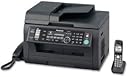
The Panasonic KX-MB2061 is a versatile 8-in-1 multifunction laser printer that combines printing, copying, scanning, faxing, and telecommunication features, including a built-in DECT 6.0 phone system. With high-speed printing at 24 pages per minute and advanced color scanning capabilities, it is designed for efficiency and productivity in any professional setting.
| ASIN | B0043T5DNS |
| Additional Printer Functions | Scan |
| B&W Pages per Minute | 24 ppm |
| Brand | Panasonic |
| Built-In Media | Printer, Phone |
| Color | Black |
| Compatible Devices | PC |
| Connectivity Technology | Wired;Ethernet |
| Control Method | Remote |
| Customer Reviews | 3.7 out of 5 stars 55 Reviews |
| Dual-sided printing | No |
| Duplex | Manual |
| Global Trade Identification Number | 00885170004702 |
| Hardware Interface | Ethernet |
| Ink Color | Black |
| Item Weight | 26.5 Pounds |
| Manufacturer | Panasonic |
| Maximum Copy Resolution Black and White | 600 dpi |
| Maximum Copy Speed Black and White | 24 ppm |
| Maximum Media Size | 11 x 17 inch |
| Maximum Print Resolution Black and White | 600 dpi x 600 dpi |
| Maximum Sheet Capacity | 250 |
| Model Name | KX MB2061 |
| Model Number | KX-MB2061 |
| Model Series | KX |
| Other Special Features of the Product | copying, fax, monochrome, scanning |
| Paper Size | 8.25 inch x 11.7 Inches, 8.5 inch x 11 Inches, 8.5 inch x 14 Inches |
| Print media | Paper (plain) |
| Printer Connectivity Type | Wired;Ethernet |
| Printer Output Type | Monochrome |
| Printer Type | Laser |
| Printing Technology | Laser |
| Resolution | 600 x 600 |
| Scanner Type | Flatbed |
| Special Feature | copying, fax, monochrome, scanning |
| Specific Uses For Product | Office |
| Total USB 2.0 Ports | 1 |
| Total Usb Ports | 1 |
| UPC | 885170004702 777782621494 |
| Warranty Description | 1 year parts and labor |
| Warranty Type | limited warranty |
R**E
For the price you get a LOT
This printer is an amazing deal. For a Black & White laser printer this will do just about everything you could ask of it. I doesn't do color but you can always buy one of those photo printers for when you need to print out pictures. Pros: *Does so many different things your head will spin trying to name them all off. *Low cost of operation. Toner and drum are two seperate items. The toner itself is not very expensive and is comparable with the cost of inkjet cartridges! Since you can get up to 6000 or so pages out of a toner cartridge the cost of toner is a fraction of the cost of the paper you are using! The drum isn't very expensive either so if it every does wear out you can replace that too. This is very slick. I've not bought a laser printer in a long time and this is new to me. It's a GREAT idea to keep the cost down. *Works either directly connected to a computer or plugged into the network directly. Since the unit came without a USB cable I just ran a new Cat5e to the router. Network set-up was a snap on Win7. I don't know what other people were complaining about. It was literally plug and play -Win7 found it and installed drivers with no fuss. Cons: *DOES NOT COME WITH USB cable!!!! This totally threw me for a loop. I bought this for my Dad and had it sent to him. I have about 10 USB cables sitting in a box at home but that was 180 miles from my dad's house. If I had done more research I'd have ordered one off of Amazon. As it was we drove all over town looking for one and places like Best Buy want $29 for a USB cable!!! This sort of annoyed me. In the end we bought a Cat 5e cable and ran it all the way back to the router which was a cheaper solution. BUY A USB CABLE if you intend to direct-connect to a computer rather than use as a network cable. It is literally a $1.68 item here on Amazon [...] *It's sort of a big and bulky unit. All laser printers with this types of features are going to be larger but it does take up a lot of room on a desk. If you have an under-desk printer shelf it probably won't fit and using the scanner will be hard if not difficult -especially if you have to tip up the top to use the flatbed rather than just feeding in a single sheet to scan. *It creates dirty power. It caused the florescent lights to flicker in my dad's recroom quite often -not just when it was printing. The lights would flicker whenever the printer did anything or was accessed on the network. Consider running a dedicated circuit to this printer and not running it on the same circuit as the computer. Having it on the same circuit as fluorescent lights is a really bad idea unless you like your lights flickering. I am an electrician by trade and this used to be a large problem with the larger laser printers and definitely with copiers. Newer/smaller printers don't tend to have this issue as much but the larger ones still do. Even though this isn't a very large printer it does tend to need to have an isolated circuit. This is something to think of if you do not want to hire an electrician to put in a dedicated circuit for you or your computer room suffers from poor power or everything is on one circuit (especially fluorescent lighting. Conclusions: All in all this is a really darn good printer for the price -and it seems it is even cheaper now than it was last week. I'm tempted to buy another one for myself at this price even though my own HP laser printer still has some life left in it. I can't give it anything less than 5 stars even with the few minor issues with the room lights flickering or even cheesily not coming with a USB cable (WTF -really? and how can local stores still charge THAT MUCH for a cable? No wonder Amazon is THE PLACE to buy stuff. I give up on buying anything but groceries and gas locally these days The dirty power issue is something that used to be common with printers and copiers but I was a little bit disappointed that a newer small printer like this would suffer from it, but it isn't that big of a deal at this price. The USB issue is just darn-cheapness by Panasonic. Shame on you! Be sure to buy one if you don't have a USB A/B printer cable laying around. It should have a warning in the main listing to BUY A USB CABLE if you need one.
V**3
Very Nice But...
I give the unit 5 stars because it is a great all in one machine, perfect for the home office, one of two printers in there, but.... Panasonic really ought to have included a hard copy manual with the thing. Yes I know, it comes with a PDF set of instructions on a CD Rom, and yes, I know that I can print out a copy if I so desire. But there's something a little more substantial about a paper manual in your lap when you're trying to set this whole thing up and program all the whatnot. Esp. true when you're punching in codes to set date, time, functions, etc. Why they decided to save pennies by not tossing a hard copy manual into the box is a mystery to me. Also...display/readout on the unit hard to read in all but the most brightly lit room. Consequently, I've taken to keeping a small LED flashlight next to it so I can see what it says. A little backlighting on the display - similar to what's on the phone - would save a lot of bother. Plus, if you're not at least quasi-IT literate, you'll have some problems jacking it into the LAN.
H**Y
The worst product you can buy
A 2016 update: this printer is NOT compatible with Windows 10. And if, like me, you only discover that after upgrading to Windows 10, and your revert to Windows 8, the printer stops working and you then spend hours trying to get Panasonic customer support to help you load a new driver. But you never actually speak to anyone. bUt for the fact that I just bought a new printer cartridge, I would simply throw out this machine right now. Don't buy it. Buy something else. And not a Panasonic. Three hours later I still cannot print. Ordered it because I liked the idea of having everything in one machine. WARNING: It's incredibly heavy and I had a hard time carrying the package upstairs (and I'm 5'6" and in good shape). WARNING: The instructions for assembly are a series of tiny and barely comprehensible diagrams. Then I realized that although I had plenty of USB cords, I didn't have the right cord ... WARNING: Buy a cord when you buy the machine. Then I downloaded the instructions. WARNING: The instructions are totally incomprehensible. Whoever wrote them did not have a clue about communicating with normal human beings. The machine is still not useable, and I've been working on setting it up for days. I'm fed up, and contemplating returning. And to add insult to injury, it's heavy but it also seems really, really flimsy ... a design disaster all round ... [Several weeks later] I've now been using this machine for a couple of months and still have difficulty with those wacky instructions. Also, the scanner is problematic. Initially I had no problem scanning multi-page documents to a file. Now the darn machine will only give me individual JPEGs, not PDFs, and refuses to recognize the existence of my PC, and won't therefore allow me to create a file for a multi-page document when scanning. The PC and the Panasonic are connected via the USB cord and I can print perfectly well, so I don't understand what the problem is. If I only had the strength to throw the thing out the window. This is a nightmare. [Three months into the ordeal] More drawbacks come to light ... I received a cheery e-mail offering me a great deal on a replacement "drum cartridge" - a snip at $91.32! I have never known a printer that required a replacement drum cartridge, but I'm suspecting that Panasonic have arranged for the drum cartridges in these babies to die young, so that one is forced into buying a new drum cartridge as well as toner (which is not cheap either). And talking about toner, the initial cartridge that came with the machine died after only a couple of hundred pages and - whadya know? - the machine seems to be rigged so that you have to replace the toner because otherwise the answering machine does not work - it flashes that there is a message there, but wouldn't play it until I had loaded the replacement toner. Sneaky! I am going to buy a cheapo stand alone HP printer and use that ($30 including toner, which is cheaper than the toner for the Panasonic alone) ... this is crazy, really, really crazy. I would advise anyone against buying this machine. (3.5 months, and things still not looking up). I loaded the replacement toner cartridge a couple of weeks ago - all of a sudden copies are coming out with big black smudges on them - can't figure out how to stop that happening. And I had another baffling session with those instructions recently, trying to figure out how to access the voicemail from a remote location. Oh, and the scanner is going through a temperamental phase - I send documents to scan. it sucks them through at its usual glacier speed and then happily announces something along the lines of "It did not scan!" And indeed, it did not. Is anyone from Panasonic reading this stuff? If so, do they care? Probably not ...
J**N
Nice, but IMPOSSIBLE to get replacement toner!
Ordered this for a business, and it works nicely. But, don't expect to be able to get toner for it. I ordered a new ink cartridge for this 1.5 months ago and the delivery date is between Sept 9th and Nov. 7th! What?! And that date was a push back date of the ORIGINAL backorder date. Total waste of money if you can't get toner. Make sure you can get toner before you buy a printer. Who would have thought that might be an issue? Maybe I am not hip on it, but I would never have though that.
W**R
Does everything I ever wanted - Panasonic hits a home run
This unit is a little large, but I gave it a place on the corner of my desk and am getting used to it. High quality unit. Simple to set up, although the quick-set-up pictures could use an updating to be a bit more explicit. The unit's internal set up menu is easy to use. Two small gripes. #1 I wish Panasonic gave you a printed user manual instead of making you go online and using your ink, paper, money and time to print it from the web site. I'd gladly pay the additional $5.00 it would cost. #2 I wish they would have a back lit menu Light as the LED contrast is difficult to read since the unit is near my window. The Cordless phone is a Blessing as my credenza is on an opposite wall in my office. Both are a small price to pay for this unit which does so much so well.
K**R
I am having a terrible time getting the correct walk around phones to woirk ...
my opinion on this unit and its ease of use is still out. Instructions on a disk are poorly written and organized. I had to buy new drivers to make it work with windows 10. I am having a terrible time getting the correct walk around phones to woirk with the machine. No one at Panasonic can tellme which phones will work with the unit. I have tried 3 different types and one tech rep told me none were available anymore and thus the unit should be returned.!!!! I am having a hard time getting the machine to receive faxes.
J**N
phone/fax
We had a Panasonic phone/fax/copier and loved it for the last 20 years. The fax part was jamming so we looked for a new one. Panasonic is the only brand that sells the combo pack w/phone/fax. We bought it and so far we are happy with it. We won't use some of the features as we have several printer/copiers. However, for the features that we are using it for, it works great.
T**M
Works as Advertised, and way cheaper than at Fry's Ele.
Works as Advertised, and way cheaper than at Fry's Ele. Was easy to setup on the network and just pop in the CD to install the software on each computer on the network. Haven't tried the feature that allows the device to email you your telephone messages but that will be next. The machine is easy to setup for voice mail, reviewing messages and deleting them as well.
E**N
Works as advertised
If I did not have an expert tech helping me with installing this printer on the network, I probably would not need another haircut... Forget about using the LCD menu on the unit, instead go to its url that you have garnered from its printout and make all adjustments there. Even so this product could be friendlier to use. For example, scanning to file (after setting up the destination, of course) requires you to push the set button twice to operate. The supplied software does not seem to make this feature work solely from the computer. The other problem is using the rear paper feed. You can't just stick something in there and expect the machine to figure it out. What it will tell you is there is a paper jam, when in fact you had to use the menu lcd to select the #2 input. I had no problem (after my tech left) setting up fax to email, and the TAM (telephone answering system) to recognize a fax signal - the main reason I bought this machine. So with only 2000 copies rated for a $65.00 toner cartridge you may want to find ways to save toner. Unfortunately, unless I missed something somewhere, sending a fax to an email still prints out the fax, which is a good safety measure I guess, although I would have preferred the option. While having an '8 in 1' machine like this saves desk space, it also makes a machine failure more catastrophic. I am keeping my stand-alones on the shelf just in case.....
Trustpilot
1 month ago
1 day ago