


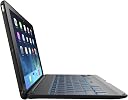


ZAGG ID5ZFK-BB0 Folio Case with Backlit Bluetooth Keyboard for iPad Air - Black
Product ID: 1404809
📏6.9mm ultrathin
🔄135° viewing angles
🔋3 months battery life
💼 Elevate Your iPad Experience with Style and Functionality!
The ZAGGFolio Case with Backlit Bluetooth Keyboard for iPad Air combines sleek design with functionality, featuring a 6.9mm ultrathin profile, versatile viewing angles, and a powerful battery that lasts up to three months. With backlit keys and smart sleep/wake technology, this case is perfect for professionals on the go.
| Additional Features | Backlit |
| Antenna Location | Gaming, Office |
| Asin | B00EXPSEFQ |
| Best Sellers Rank | #4,648 in Tablet Keyboard Cases |
| Brand | ZAGG |
| Built In Media | Folio Case, USB Cable |
| Button Quantity | 78 |
| Color | Black |
| Compatible Devices | Tablet |
| Compatible Operating System Family | iPadOS |
| Connectivity Technology | Bluetooth |
| Customer Reviews | 3.8 3.8 out of 5 stars (1,616) 3.8 out of 5 stars |
| Enclosure Material | Synthetic |
| External Testing Certification | Checkpoint/TSA Friendly |
| Global Trade Identification Number | 00848467018714 |
| Hand Orientation | Ambidextrous |
| Item Dimensions L X W X H | 9.55"L x 6.82"W x 0.3"H |
| Item Weight | 1.2 pounds |
| Keyboard Backlighting Color Support | RGB |
| Keyboard Description | Wireless |
| Keyboard Layout | QWERTY |
| Manufacturer | Zagg, Inc. |
| Mfr Part Number | ZKFHFBKLIT105 |
| Minimum Required Operating System Version | iOS 13 |
| Model Name | FBA_ID5ZFK-BB0 |
| Model Number | ID5ZFK-BB0 |
| Number Of Batteries Required | 1 |
| Number Of Items | 1 |
| Number Of Keys | 78 |
| Number Of Packs | 1 |
| Power Source | Battery Powered |
| Style Name | iPad Air |
| Switch Type | Mechanical |
| Unit Count | 1 Count |
| Upc | 843404095438 819439620686 785528231234 705586984453 897385673581 848467018714 |
User
Quality Case for a reasonable price
I originally had my mind set on a Logitech Keyboard case for my iPad Air because of my familiarity with their products. However, after looking up some review websites, consumers constantly praised this Zagg keyboard above Logitech. Although it is definitely more expensive, the backlit keyboard swayed my decision and I decided to give it a try. I have been impressed!As a graphic designer and web developer, I am keen on things looking good. This case is sleek and looks great. When you snap the iPad into the case, it literally looks like it was built as a small laptop. People have to do a double-take to realize that it's an iPad. I took this with me on a business trip with the President and Vice President of my company, and they both commented on how awesome and professional it looks.It works well and paired up quickly. I have used it every day since I bought it, and still have not had to recharge the keyboard even once yet. I love that some of the keys are dedicated to iPad functionality, such as a Siri button, home button, on-screen keyboard button, etc.Great keyboard case! If I wear this one out, I'll definitely get another one.***UPDATED REVIEW***So after what just happened, I felt compelled to update my review.I was recently on a business trip, and everything was going wrong. I walked out of a meeting with my iPad under my arm (in this Zagg case), and began to pat my pocket to find my car keys. Ugh. I had locked them in my car. So I set my iPad on top of my car so I could retrieve my hidden key from its spot. While retrieving the key, another client called me. I answer the phone, cradle it between my head and shoulder, and lay hands on my key. While talking to the client, I unlock my door, get in, and crank up.I pulled out of the parking lot (still on the phone) and pulled up to the intersection. As I firmly applied my brakes, I watched my iPad fly off the top of my car and slide less-than-gracefully into the road ahead of my car. I screamed like a girl right into my client's ear, and threw my iPhone into the passenger seat as I put the car in park. I jumped out, did a Chinese Fire Drill, retrieved my blessed iPad from the intersection, and jumped back into the car before the light changed. Contrary to it's highly misleading name, the iPad Air does NOT actually fly gracefully through the air at all. Do not be fooled!However, my iPad had not one scratch on it at all, and it still works beautifully. The Zagg case took a beating like a champ, and the casing slightly cracked at the point of impact, but it protected my iPad well. Still to this day (months after buying it), I have rarely had to charge the case (the battery is outstanding), and I still have had no issues. I love this thing.
User
Terrific product
I am not a techie, but I did heavy research on the best keyboard for me when I was given an Ipad Air at work. There are great comparative YouTube reviews. The ones by the female reviewer are especially thoughtful and thorough. For example, she found that some of the expensive keyboard offerings swapped certain key positions into new locations, which made her efficiency suffer.The Zagg case (i.e., full back cover and keyboard) is what I bought, in black, and it has a nice pebble finish, and is obviously 360 degree protective. It turns the iPad Air into a convincing bite sized laptop that looks like it came that way right from the factory. Note that Zagg also makes a cover version (keyboard that covers the screen face). That version is necessarily lighter and thinner, in exchange for leaving the iPad's back exposed. Both are Bluetooth enabled, and turn on automatically when you open, and off automatically when you close (most competitors' offerings also do this).What I love about the Zagg keyboard full case that I bought several months ago: it is clearly made well and thoughtfully. The holes all line up, and the materials (inside and out) are high quality. The keyboard feel and action are a delight. Nice dedicated, labeled function key row across the top: home, lock, voice microphone, undo, redo, screen keyboard (works on some apps), copy, paste, audiovideo rewind / fast forward (work on some apps), pause (works on everything), mute, volume down, volume up (sound loudness works on everything).Another HUGE plus, which was unique to the Zagg when I bought it: the inclusion of keyboard lights! This is a great advantage, and I wish all computers of all sizes had them. Zagg's execution is particularly thoughtful and functional: There's a dedicated light switch key to the right of the space bar. Push once, and two apparent lights peek at you from the front edge of each elevated key. It is amazingly effective. Push again, and lights get brighter, push again and lights get brighter still. Hold light switch key and press a sideways arrow, and the machine cycles through several color options for the lights. When you look dead-on from the top of the keyboard, there is only a barely noticeable soft glow emanating from each front edge. But with your eyes where they normally are when typing, the lights are in perfect position to work beautifully.Because lights are an additional drain on the built-in keyboard's rechargeable battery, there is also a dedicated key to check keyboard charging status. I have had the Zagg keypad IPad Air case for a few months and not yet had to recharge the keyboard. Their literature promises long life from each charge, and that was no exaggeration.I would but this again anytime, and I would recommend to anyone. Two minor disadvantages to be aware of before you buy:1) envisioning it as a laptop, the entire iPad Air is tucked into the lid, and this combination is heavier than the beautifully lighter and thinner Zagg keyboard even given its lighting capability. The resulting drawback of the full cover version is that on a soft surface like a bed, its center of gravity can make it tip backwards as the lid combo outweighs the keyboard. This has not happened to me on a solid surface. Even with this minor drawback, my family and I have never been annoyed while watching movies in bed. You position the screen for optimal viewing and forget about it. I would never bother to take the iPad Air out of the Zagg cover to watch a movie with the family, because the hinged lid mechanism is an automatic and adjustable screen-angle holder. 2) The other minor drawback concerns Bluetooth, and is therefore NOT unique to Zagg's keyboard offerings. Please double check me, but I believe that you may not use Bluetooth devices while on an airplane, which means that you would be relegated to using only the onscreen keys when flying.Two more positives to enjoy: 1) There is a dedicated key for checking the status of your keyboard's charge. By both color that blinks back at you, and how many out of 4 possible blinks it gives, you have a great feel for whether you need to recharge. The recharge cable is small and piggy backs into any AC current adapter that you already carry. 2) It arrives beautifully packaged and safe. Zagg has done its homework, and someone there cares about quality and useability.
User
I am returning this product and suggest you find a different product.
I purchased my first ZAGG for my iPad Air about 3 years ago. It has served me well.Using my iPad on a daily basis off and on throughout the day.I have had the same problems with the hinge but not until the last few months.I would not recommend this for a child or teen as it, in my opinion, would not hold upto rather abusive wear and tear, but for me this was perfect. I bought another becauseI like it's ease of setting up and everyday use. Love the keyboard - just open and beginwhatever task you have in mind. I put in into my purse and off to wherever to read a bookas I wait. Would buy again if my iPad holds up. ( ;I AM ADDING AN ADDITIONAL REVIEW ON THIS PRODUCT - WHY- because I ordered another in Dec.of 2016 it is now Feb. 28th and it is unusable. Screws have loosened again and lodged inside the case so it cannot be closed. I was able to remove the screw but it is impossible to insert the screw in the correct place. Unfortunatelythe screw the come loosened is on the upper right hand corner where all the buttons are. It won't close even with the iPad removed.The case is useless. I would never, I repeat, never order this again. Cost value of this item is way over what it should be, actuallyin my opinion, it should not be sold.
User
Works pretty good and like the case material
I purchased this ZAGG Folio Case based on purchasing a different version for my wife's iPad w/Retina. There are a few differences between this one and the other but I would presume that's to be expected when they make newer products with some improvements.Here are the other reason why I went with this ZAGG Folio:1) The minimalistic protection. I forget what it's made of but I think it's a carbon polymer. It seems very sturdy but light weight. When I close it, it is strong enough to stay closed (for now) without any kind of clasp or snap feature. Again, it's a very simple, sleek design.2) The backlit keyboard. I haven't used the backlit too much as I don't type much in the dark (yet) and I can touch-type with (excluding some random keys) but I have toyed with it to make sure it works and how it works. I think it has seven different colors with three levels of brightness. Again, I haven't used it a lot but it's an added bonus for if/when I do need it.I haven't had the need to recharge the keyboard yet but I have charged it just to be sure it's charged.Connecting via Bluetooth was very easy. I turned on the keyboard, opened up settings on my iPad Air, and connected the keyboard. Bing, bang, boom...done!The screen can be adjusted at various angles. On flat surfaces, it stays pretty balanced at any angle. It teeters a bit without hands on the keyboard at the most laid back angle but as long as you're typing on it, it's not a huge issue.The keys are pretty responsive. I have noticed recently that the 'D' sometimes misses being depressed when I type. It's not all the time but it's occasionally noticeable. I don't know if the key sort of sticks or it's a sensor issue because I'm usually just typing away and then it happens.One thing that takes a bit to get use to is the fact that I can't easily use the iPad Air in portrait mode. Because the keyboard does not allow folding completely back, it's almost like standing a book on it's end to read. Not a huge deal for me but occasionally I have wanted to view things in portrait but instead it's more like carrying around a netbook.I've seen a few reviews or answered questions that say the keyboard has channels for the speakers. They lie. When the iPad Air is in the case, the top of the iPad Air is on the left and the bottom is on the right. This makes the speakers on the right...again when looking at the iPad Air. There are cut outs in the case for the speakers. This particular ZAGG Folio case DOES NOT use grooves to channel the sound from the speakers! Maybe another one that looks similar does but again, the one in the image (as of 07/01/14) does not!Overall, so far, I like the keyboard. It takes a bit getting used to since I'm more of a laptop kind of guy. I will learn more in a few weeks as I'm going to a work conference which is where I really wanted to test out the typing and note taking.
User
Excellent at first, degrades over time
When I first received my ZAGG Folio case back in March 2014, I was in love with it. I purchased one because a friend had one so I got to test it out a little before purchasing. I travel quite a bit for work and was looking for something that would help turn my iPad into something more usable, particularly when I'm on airplanes and a laptop is just- well, impossible. Here's what I like about the case:1) It's slim - this is one of the only keyboard cases I could find that didn't really bulk up the iPad. I have to carry a laptop with me as well, so I really didn't want a second laptop-sized thing in my bag. With the case on, it's so small & light that I can easily throw it into a small purse with no problem and without feeling like I'm lugging around a brick.2) Good protection - this case covers the front AND back of the iPad, which is important to me because I do abuse my iPad a bit: toss it this way, shove it in a bag, etc.3) The keyboard is GREAT and is super responsive. I have not had a problem at all with lagging. The keyboard made my iPad instantly more valuable and easier to work with.4) I really liked that the hinging allowed for the iPad to be set to any angle, just like a laptop, and that I wasn't locked into two or three different options. This allowed me to adjust to varying light settings or work situations.I was in love with it for probably the first 3 months. During those first three months I only had a couple major gripes:1) I wish there was an easy way to use the iPad in portrait view while using this case. There are quite a few apps that only work in portrait view, and your choices are basically to pop the iPad out of the case (not too difficult, but kind of annoying) or turn the whole thing sideways (but now the keyboard is sort of in the way and you get some awkward stares). Over time, I just stopped using apps that require me to use portrait view, but this is not the ideal solution.2) The iOS 7 feature of the bottom pull-up menu (turn on/off WiFi, Airplane Mode, change brightness, etc.) is very difficult but not impossible to access with the case. You have to be very precise- I have to use my pinky finger and a very light touch, and usually takes me a couple of tries.3) I haven't quite figured out the battery indicator function. One day I've got 3 green blinks, the next day the keyboard is totally dead. Generally one charge will last me about a month and a half with regular use. My boyfriend, on the other hand, turns off the keyboard each time he shuts his iPad and rarely charges it. That's just inconvenient for me, so I don't follow the same practice.Somewhere around the 3-month mark, the right hinge broke. The case is still usable, but now I have two additional problems:--- Item 4 from my "likes" list is no longer. When I open the case an try to set the angle, the top portion of the case will not stay, and instead has significant deflection in either direction, and of course then I'm stuck with the furthest-back position. When the hinge first broke, the case would have about 1" freedom of movement, but now I'm at about 3".--- Because the hinge is broken, the case won't stay closed, This increases the risk for something to get between the edges and screen and scratch the surface. But worse: anytime you open the case the iPad screen automatically turns on. So when my case is "closed" and it wobbles between open & closed, the iPad turns on and I lose battery life.--- I've lost the two rubber edges on the keyboard side that are additional protection for the screen.Now that I've owned the case for nearly 5 months it's about at the end of its life. I would expect most iPad cases to last for at least a year, if not two, so this is sub-par for me. I'm a little sad about all the co-workers and friends who I told to buy this case in the first 3 months of my ownership because it's really not as good of quality as it appears out of the box. If I didn't love the keyboard and slim case so much, I'd give it two stars. It's a decent case but just know what you're getting into!
User
Great Keyboard! Pros and Cons.
This keyboard is amazing. Ever since my first iPad i was using Zagg bluetooth keyboards. This one is the best. There are pros and cons to this keyboard.Pros:1. Three month battery life. This is such a convenience to not have to charge it all the time.2. Backlit Keyboard with different colors (So Much Fun!!)3. Works with apple commands so you can use the commanded button for everything4. Great short cuts. The keyboard has some great and easy to use shortcuts above the regular keyboard. There is a, Home button, off button, undo, redo, Copy, paste and basic music controls5. The price is also one of the great things about this. When I bought this the price was $37 or $38. The great price helped a ton in deciding to buy this one.Cons (There are not many of them):1. There is no cut button. If you want to cut, you either need to know the apple command for it or hold don on what you highlighted.2. Automatically disconnects after not being used for while (This is probably to save some of the battery).Other than that this is a great keyboard and what amazes me the most is the battery life. This is truly an awesome keyboard!
User
After trying many others found this to be the best ipad case ever
I received this case as a gift and LOVE it. I had another case from a well known brand and had to replace it 3 times in 9 months. This case has performed outstandingly well for 16 months. Pros:- very small and lightweight - not much bigger than the iPad itself. One of the smallest I have found with a bluetooth keyboard- hard clamshell case, which protects my ipad from falls (several)- keyboard has a good solid feel to it so that it is as easy to type on- backlighting works great and is handy - bonus: you can pick the color of the light- it has shortcut keys which are very handy - e.g. home key, mute, cut, paste, music controls many other useful keysCons:- made to work in landscape mode so when you use your iPad in portrait it can be awkward. I rarely do (please United fix your app) so it hasn't been a big issue for me- flight attendents are always asking me to close my ipad when taking off, because they think it is a mini-laptop. Once I show them it is an iPad they are usually okay. The iPad looks like a mini laptop when inside of this case.I had my case for 16 months and used it every day - throughout the day. I am not gentle on my iPad or case and drop it occassionally and this case has held up even during a particularly hard fall. iPad did not break. After 16 months the connector in the microport stopped working. I had to jiggle the cord to get it to charge. I have read the reviews about the hinges and I did not have the exact problem they described. After about one year the plastic cover on the hinge broke off, but I snapped it back on and secured it with tape. Eventually the tape wore off and the piece stayed in place. The hinge still worked, but before I popped the piece back on you could see the hinge which made the case not so attractive. Given how much I used the case and opened and shut the ipad and the general abuse it got, I found the case to be durable. So I was very pleased to get another one which I expect to use for the next 1.5 years or so.
User
Five stars until it breaks
This case worked perfectly for five weeks. Then it broke. It has such neat features, such as the ability to control what color the backlit keys are. I bought it March 5th. About a month later, it broke. The hinge on the right side came out. It was still usable for a few days, then I realized that because the break was right where the charger was, I'd no longer be able to charge it. But it holds a charge so long that I didn't notice.I figured, I'm a heavy, daily user of my iPad Air. So I got another one on April 14th. That one broke on May 28th - I know the exact date because I was out of town travelling and it was the day before a family member's birthday. It is of note that this time, knowing I needed the unit to be able to charge, when it broke in the exact same place, I pulled the top part away from the bottom so I would still be able to use and charge the keyboard until I got home.I've had two other iPad keyboards when I had an iPad 2, and even with me using the iPad for 70% of my business needs as well as during heavy travel, they typically lasted me six months to a year. It's a shame this isn't sturdier, because up until the moment it broke I was extremely satisfied with everything from the backlit keyboard, used a universal USB size so I could lose the charger and swap any USB charger back in, and the fact that it held a charge for weeks, even with me using the backlighting constantly.
User
Fantastic Addition for my iPad
The ZAGG Folio Case and Keyboard has more than lived up to expectations. I have not had one issue or problem and it has been a perfect pairing with my iPad Air. I have had so many people ask me about it and where they could acquire it. They have all been very impressed just as I have been. I highly recommend this product to anyone.
User
Muy buen producto por un precio accesible
Es un teclado con una cubierta de muy buena calidad. Por el precio pagado creo que es una excelente opción.
User
It's awesome. Especially the battery backup is super
Am loving it. It's awesome. Especially the battery backup is super. When you try accessing a remote computer through rdp the windows shortcuts are not working.
User
Mac book Black
ノートパソコン風になるキーボードを探していて、こちらを購入。スペースグレイairで使用。大変満足しています。質感も悪くないです。畳んで持った触感は手に馴染む感じでした。キーピッチは2ミリくらいで、ストロークはMac book とMac book air の中間くらい。 個人的にはMacbookのキーよりこちらの方が良いです。キーにバックライトが付いているのもグットです。スペースキー右側のライトキーで点灯します。(明るさ3段階)押すたびにoff>弱>中>強>offが繰り返される感じです。光色も7種類あって気分によって変えられるのも楽しめる要素です。(個人的には青が良かった)色はライトキー+カーソルキー(白>赤>黄>緑>水色>青>紫>)で選びます。悪い点ですが…、下の画面淵がわずかで、画面外からスワイプしにくいです。下から出てくるメニューが出しずらいです。縦向きにすれば問題ない点です。あと、L字型のイヤホンはカバーの穴に合わず、奥までしっかり入らなかったです。(L字型でも合うのはあるかもしれませんが…)iPhoneに付属されているようなストレートのものはぴったりでした。良い商品です。これ以上はそう見つからないのではと思わせるキーボードでした。(個人的感想)
User
Easy typing, sturdy case withstands dropping by kids
Easy typing, sturdy case withstands dropping by kids, great for standing up iPad to watch movies while traveling! Excellent product. Keyboard only needs charging a few times per year. Great product even bought it as a gift for family members!
Trustpilot
4 days ago
1 month ago