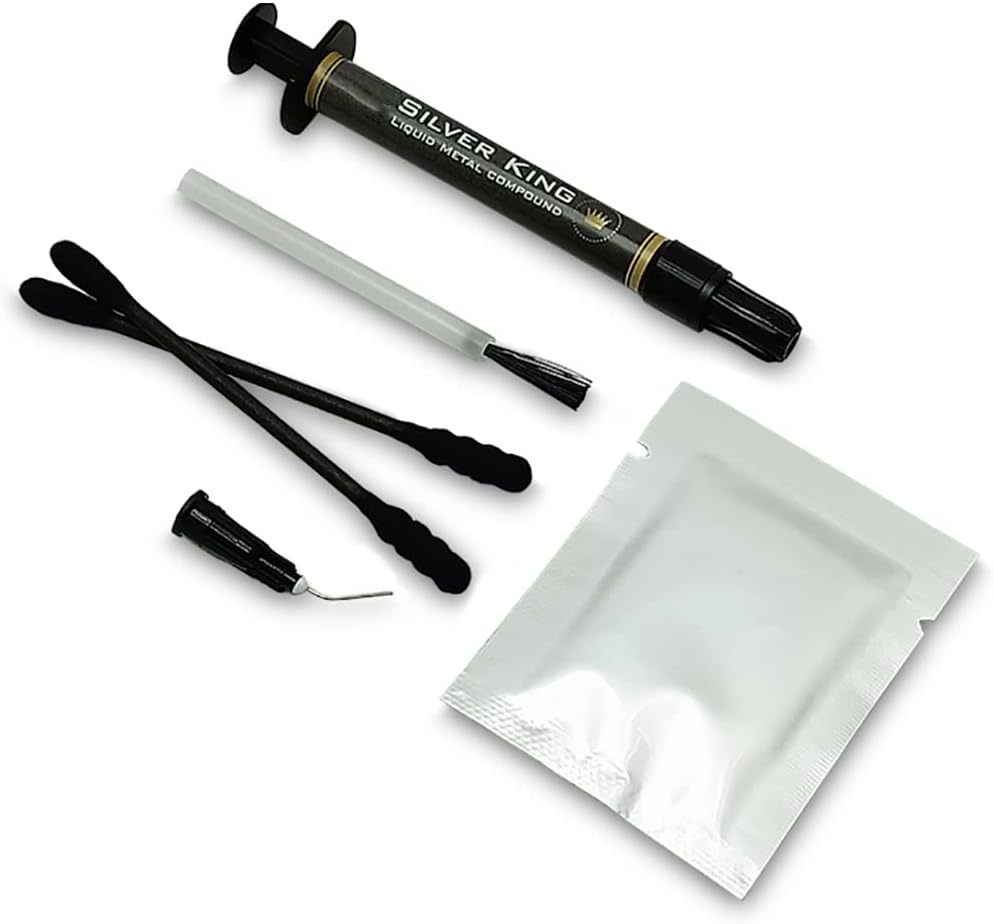


🔥 Dominate your cooling game with Silver King precision!
The 1 one enjoy Liquid Metal Thermal Paste delivers an exceptional 79 W/mK thermal conductivity, making it a top-tier choice for experienced PC builders seeking superior heat dissipation. This 1-gram kit includes a cleanser and spreader for precise application, but requires caution due to its electrical conductivity and incompatibility with aluminum heatsinks. Trusted by over 1,100 users with a 4.5-star rating, it’s proven to enhance CPU/GPU cooling and overall system performance.


| ASIN | B07S8VK1NL |
| Are Batteries Included | No |
| Best Sellers Rank | 6,703 in Computers & Accessories ( See Top 100 in Computers & Accessories ) 23 in Thermal Paste |
| Brand | 1 one enjoy |
| Customer Reviews | 4.5 4.5 out of 5 stars (1,130) |
| Date First Available | 2 July 2019 |
| Guaranteed software updates until | unknown |
| Item Weight | 18.1 g |
| Item model number | SK1G |
| Manufacturer | One enjoy |
| Package Dimensions | 17.8 x 10.2 x 1.8 cm; 18.14 g |
| Processor Socket | LGA (Intel) |
L**E
Well worth the risk good product
Really good thermal paste, takes time to remove old Liquid Metal 😰 as it’s conductive plenty of que tips, spreads easy onto gpu, my fps improved as shown in pictures. Just take your time be careful and the results are worth it. Thankyou
J**D
very good heat retention its worth the money
paste quality very good heat retention not bad ease of application very good functionality does its job
V**X
Major drop in temperature - This is an excellent option for LM
I was battling to get a decent overclock on an i9 9900K CPU using the Intel Performace Overclock Application. After applying the LM to the CPU I have now been able to get a stable 5Ghz on all Cores, this was impossible even using the best Thermal Paste on the market. When applying you need to take your time, keep spreading it over the CPU, it's almost like you have to tease it to take, at first it seems to bead on the surface but with continually spreading it over the CPU you will eventually get an even spread, it will almost be a mirror finish on the CPU when it's ready. Don't use too much at once, you do not need the entire 1Gram, the size is about 2 rice grains in size of what's needed on an Intel CPU, you will see when spreading it, it will cover very well and if you feel it's not enough you can then add a small drop if needed. Take out the CPU from the MB. Clean it with a paper towel and then clean it with the provided wipe. Then apply as above and when ready insert it back into the MB. IMPORTANT - The MB must be flat when placing the CPU, if you do this on the side, the liquid metal (LM) will go everywhere. This is really good stuff. No Bull... Just Take Your Time... Good Luck and Enjoy your lower temps!!!
R**T
Didn’t really change anything
Ehh I don’t know if it’s the Liquid Metal’s fault, but didn’t really change my temps, I’m still giving it 4 starts because I imagine my bottleneck is the actual cooling system, not the heat transfer from the cpu to the heat sink, but yeah a little disappointing.
L**R
Be patient
I am no specialist, but a normal user building my PC every 5-6 years. My first attempt using liquid metal (desktop 7800x3d) so no comparing with similar products - replaced Noctua N1-H2, which, for some reason, sent my temp into the high 50s while idling (re-pasted a couple of times because I know I tend to be "generous" - no improvement). At the moment (1/2 hours after applying this) temps are low to mid 40s (with spikes into the low 50s for no reason, but that's AMD for you). If things change I will update After using Noctua paste and the Thermal Grizzly pad thingy (not too bad, maybe in a few years will be a viable product), this seems like the best value for money, time will tell. It takes a bit of patience to spread properly, so take your time (it is rather difficult to spread properly)
C**S
Be very careful
I've got plenty of experience building, repairing, modding, watercooling high end laptops and desktops. I even once fully custom watercooled the rarest and most expensive graphics card at the time (Asus Ares 2 that's already water cooled, added it to my custom loop) So I'm not shy to have a go. This though, this scared even me, It's my first (and last) time using this. The product Is 10/10 no complaints. It's the using it that's the problem. I decided to try It on a 2080 Super In an Alienware Area 51m. I went with the nail varnish and electrical tape method, firstly I applied the tape just a little off the mark so took It back up, up with it came all the nail varnish that was protecting the capacitors. That left me humming and harring. Decided to leave the tape off in case It peeled up with the heat and took the varnish with it and caused more trouble than It was worth. Anyway Installed It all, all got up and running, got a few degrees Improvement (2-3 nothing major, only at highest temps too) The 9900k seemed to be running a tad hotter than usual though (no liquid metal just normal thermal paste) So i decided to take It all apart again and reseat everything / see how the liquid metal matched up. Took the heatsink off and I was shocked to see blobs of liquid metal over the capacitors, I very sparesly put It one, like a thin film but somehow It turned itself into little blobs and spead on areas of the PCB. Decided It's too risky and to take It all off, go back to the safer methods. Believe me when I say the applying It is by far and wide the easiest part. Removing It is risky and messy. It doesn't want to apply to anything that isn't your computer components. No "q tips" no toilet paper nothing. It just repels off it all like water off a ducks back. I had a bottle of vodka laying around so put some of that on a q tip and that helped MASSIVELY it pooled it all up into a little ball and I managed to get It out. Not all of It though, some of It made it's way Into areas of the gpu I just can't get to. It's there forever and will be in the back of my mind for as long. Computer Is up and running fine though, thankfully. Just be very very careful ladies and gentlemen. I was extremely careful and still had issues. Heed everyones warnings and maybe try It on an old laptop or something first to see If you are comfortable with it. I'm not. Good luck.
U**A
Temps are down and solid.
This isn't the same brand I normally go with, I honestly thought I was purchasing Grizzly again, but that's on me for not looking properly. However, having said that, this stuff works just as well. My GPU was clocking in it over 85 on minimal load and sounding like a jet taking off. After applying this, the temps - under load - are safely sat below 60. Happy with the product, happy with the install (basic as it is) and would purchase this again.
N**A
Perfect for ps5
Perfect to use for ps5 easy to apply good value for money quality of paste is also good not to runny
X**.
🔹 Aspectos positivos: ✅ Alta conductividad térmica: Con una conductividad de 79 W/mK, esta pasta térmica garantiza una disipación eficiente del calor generado por la CPU o GPU, mejorando el rendimiento general del sistema. ✅ Rendimiento máximo: Diseñada para usuarios experimentados que buscan un alto rendimiento, esta pasta térmica permite alcanzar las velocidades más altas permitidas por la BIOS del sistema, optimizando el rendimiento en tareas exigentes como juegos y renderizado. ✅ Compatibilidad amplia: Compatible con Intel XMP y AMD Ryzen, facilita la integración en una variedad de sistemas, asegurando una mejora notable en la gestión térmica sin complicaciones. ✅ Bajo consumo de energía: Funcionando a 1,2 V, esta solución de "liquid metal" ayuda a mantener el sistema fresco y eficiente, contribuyendo a un menor consumo energético durante su uso. ✅ Fácil aplicación con funcionalidad Plug N Play: Incluye herramientas como una jeringa de precisión, bastoncillos especiales y una punta ultrafina para una aplicación controlada, reduciendo el riesgo de salpicaduras y asegurando una cobertura uniforme. ⚠ A tener en cuenta: ❌ Comportamiento del "liquid metal" con el tiempo: Al tratarse de una solución de "liquid metal", es normal que con el tiempo parezca que se ha secado o soldado, y que el líquido se haya infiltrado dentro del cobre. Este fenómeno es parte del ciclo de vida del producto y no afecta su funcionamiento principal. Aunque puede haber una ligera disminución en el rendimiento durante los primeros meses, el rendimiento se estabiliza posteriormente sin necesidad de reaplicar la pasta térmica. Reaplicar esta solución no es realmente necesario a menos que se desee aprovechar el pico de rendimiento extra inicial. Considera que re-aplicar la pasta puede requerir desmontar componentes, lo cual puede ser complicado, especialmente en portátiles, y la diferencia en temperatura suele ser mínima. ❌ Riesgo de cortocircuitos: El metal líquido es electrónicamente conductor, por lo que es crucial aislar adecuadamente las superficies cercanas a la aplicación para evitar cortocircuitos que puedan dañar los componentes del ordenador. ❌ No compatible con disipadores de aluminio: Esta pasta térmica no debe utilizarse con disipadores de calor de aluminio, ya que puede reaccionar negativamente con el material, comprometiendo la eficiencia térmica y la integridad del disipador. 💡 Recomendaciones: ⚙️ Aplicación cuidadosa: Sigue instrucciones detalladas y utiliza las herramientas proporcionadas para aplicar una capa ultrafina y uniforme, evitando el exceso que podría causar salpicaduras y cortocircuitos. ⚙️ Aislamiento de componentes: Antes de aplicar la pasta, aísla las áreas circundantes con cinta adhesiva de poliimida o silicona líquida para proteger componentes sensibles del metal líquido. ⚙️ Monitoreo de temperaturas: Después de la aplicación, monitorea las temperaturas de la CPU y GPU para asegurarte de que la pasta está funcionando correctamente y ajusta la aplicación si es necesario. ⚙️ Mantenimiento mínimo necesario: Aunque no es obligatorio reaplicar la pasta térmica, si se busca mantener el rendimiento óptimo en el largo plazo, se puede considerar una reaplicación ocasional, entendiendo que implica desmontar el sistema. ⚙️ Verifica la compatibilidad del disipador: Asegúrate de que tu disipador de calor está hecho de materiales compatibles, preferiblemente cobre niquelado, para maximizar la eficiencia térmica y evitar daños al disipador. 📊 Valoración: ⭐⭐⭐⭐⭐ 4.6/5 estrellas Esta pasta térmica de metal líquido ofrece un rendimiento térmico excepcional, ideal para usuarios que buscan maximizar la eficiencia de su sistema sin realizar una inversión elevada. Su alta conductividad térmica y compatibilidad con Intel XMP y AMD Ryzen la convierten en una opción versátil y potente para mejorar la disipación de calor en ordenadores de alto rendimiento. Aunque es normal que la pasta térmica de metal líquido parezca secarse con el tiempo, su funcionamiento principal no se ve afectado, manteniendo una disipación eficiente tras los primeros meses. Es una solución recomendada para aquellos que desean optimizar el rendimiento térmico de su sistema, siempre y cuando se realice una aplicación cuidadosa y se sigan las recomendaciones de seguridad para evitar posibles cortocircuitos. ¡Aprovecha esta mejora térmica y disfruta de un sistema más fresco y eficiente! 💻🔥
M**O
L’ho utilizzata per la console PS5, quantità idonea e di ottima qualità.
E**C
Replaced the HDMI port on my PSU and used this stuff for reassembly. Works great but make sure you smooth it out to a mirror finish on the CPU.
J**E
premier essai pour du liquide métal , mes conseils: - par sécurité enlever votre processeur de la carte mère , et faites le en dehors du boitier ! - mettez au début , et en plein milieu , une micro bille de la moitié d'un grain de riz ! - avec la tige , contentez vous de juste appuyer dessus et de tourner en rond sur peine 1 cm , il faut d'abord une première accroche , sinon si vous en mettez beaucoup , le liquide reste en boule , et roule très facilement et hors du CPU , d'où la dangerosité ! en effet , la pate sèche avec le temps , mais avec du recul ( en fouillant sur YouTube , une vidéo en anglais ) il est recommandé de répéter l'opération un mois après la première couche , donc en rajoutant "finement" une deuxième couche sur la première pour la 'réhydrater" ! c'eqt ce que j'ai fait apres 1 mois . j'ai été surpris en démontant mon boitier de voir que 2 grosses "billes" avaient coulé en dehors du CPU/rad , malgré la très fine première couche ! ce qui ma sauvé , est que mon boitier est couché , et non debout , sinon je pense que j'aurais perdu ma carte mere ASUS B450 strix + mon CPU RYZEN 5900X si mon boitier avait été debout . donc oui , j'ai eu peur , en hésitant à continuer , en cas de court circuit 500 € poubelle pour moi , et c'est beaucoup de sous , sachant que c'est une nouvelle config ... donc oui , faire très attention , s'entrainer sur un petit bout de métal , et commencer en dehors de votre boitier / carte mère. mon 5900X frôlait les 84 ° sous cinebench R23 , même si c'est un gros processeur cela me paraissait beaucoup . après application ( attendre quand même 24 heures de stabilité du liquide ) ,je suis 67/68° tous les Cores à fond ! donc oui , très content et cela malgré la canicule de Septembre dernier ( d'où ma grosse panique ) . Cpu refroidi par le gros noctua Double / tour , config montage vidéo sous filmora pour ma chaine YouTube .au final , mon SSD NVME profile d'une meilleur température aussi . donc oui , c'est risqué , mais entrainez vous avant et à peine l'équivalent de 2 petits grains de riz , vraiment !
M**.
İnternette duyduklarınıza inanın. Abra A5 15.2 için kullandım. Sonuçlar tatmin edici. Oyunlarda 75 derecelerde dolaşıyor ve çekirdekler arası sıcaklık farkı çok az. Uygularken CPU ve GPU kenarlarına, komponentlerine şeffaf tırnak cilası uyguladım, erime vs ile karşılaşmadım. Sıvı metal umarım uzun süre bu performansı korur.
ترست بايلوت
منذ شهر
منذ شهرين