🎮 Elevate your game with precision, power, and style — don’t just play, dominate!
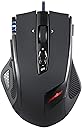
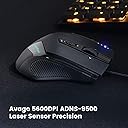
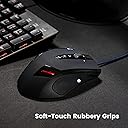
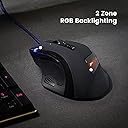
The Perixx MX-2000B is a high-performance programmable laser gaming mouse featuring a 5600 DPI Avago ADNS-9500 sensor, 11 customizable buttons, and 24 RGB lighting modes. Designed ergonomically for right-handed users with rubberized grips and adjustable weight cartridges, it ensures comfort and precision during extended gaming sessions. Durable braided USB cable with gold-plated connector guarantees longevity, while plug-and-play compatibility spans Windows 2000 through Windows 10.


| ASIN | B0083H4NG4 |
| Additional Features | 4 Way Scrolling |
| Antenna Location | Gaming, Office |
| Are Batteries Included | No |
| Are Batteries Required | No |
| Best Sellers Rank | #135,863 in Video Games ( See Top 100 in Video Games ) #3,469 in PC Gaming Mice |
| Brand | Perixx |
| Built-In Media | Gaming Mouse |
| Button Quantity | 11 |
| Color | black |
| Compatible Devices | Windows 2000, ME, XP, Vista, 7, 8, 10 |
| Connectivity Technology | USB |
| Customer Reviews | 4.4 out of 5 stars 2,041 Reviews |
| Enclosure Material | Plastic,Rubber |
| Global Trade Identification Number | 04049571620008 |
| Hand Orientation | Right |
| Hardware Platform | Pc |
| Item Dimensions L x W | 4.92"L x 3.35"W |
| Item Type Name | Gaming Mouse |
| Item Weight | 0.57 Pounds |
| Manufacturer | Perixx |
| Mfr Part Number | 11095 |
| Model Name | MX-2000B-11019 |
| Model Number | 11019 |
| Mouse Maximum Sensitivity | 5000 Dots per Inch |
| Movement Detection | Laser |
| Movement Detection Technology | Laser |
| Number of Buttons | 11 |
| Operating System | Windows 10, Windows 2000, Windows 7, Windows XP |
| Power Source | Corded Electric |
| Range | 5.0 meters |
| Special Feature | 4 Way Scrolling |
| Style Name | 5600dpi Laser Mouse |
| Theme | gaming |
| Unit Count | 1.0 Count |
| Warranty Description | One Year Limited Warranty |
P**K
Best mouse I've ever had
This thing is loaded with features I'd expect to see in mice that cost twice as much. The build quality is solid; it looks much better in person and the rubber grips feel nice in my hands. The braided cable is really fancy-looking too. Coming from a Toshiba X20 laser mouse I immediately noticed how much more accurate and smoother this one is. All this time I thought I was just bad at video games but it turns out it was my mouse! I can aim so much easier with this one in FPSes. Now there's a couple things I should point out. First off, the description says that there's four DPI settings -- in actuality there's 7. Yes, SEVEN (500/1000/1500/2000/3000/4000/5000). Seems ridiculous at first but it means you can have extremely precise aiming for sniping, or responsiveness so fast that the tiniest flick of the wrist will completely turn you around, even with the game's sensitivity at its lowest. Secondly, the description says 11 customizable buttons. This includes left, right, and middle click, the two horizontal scroll buttons, the back/forward buttons, the DPI +/- switch, and lastly the two extra buttons on each side of the mouse. Yes, you can remap every single button, but I don't understand why anybody would want to remap the DPI switch unless they're not a gamer or photo editor. Also, the description mentions that the mouse comes with weights, but it doesn't say that there's six of them in a nice tin case; personally I think the mouse is heavy enough without them, but they're there if you're into that kind of thing. What's nice is that the driver doesn't even use 1MB of RAM. However, the software looks straight out of the 90s, but it gets the job done nicely. You can program the buttons to do things like copy/paste, close a window, lock the PC, adjust volume, etc. or map them to any key on the keyboard. You can also program macros. Besides the default Windows mouse settings like mouse speed, double-clicking speed, and scroll wheel speed, there's also settings for adjusting the sensitivity of each axis individually (i.e. move up and down at a different speed than left and right), as well as setting the polling rate and default DPI. Lastly, you have 23 colors to choose from for the logo LED; you can also make it pulse or turn it off completely. Unfortunately, though, the DPI LEDs are unchangeable so I hope you like blue. The mouse wheel moves in notches, which is ideal for gaming since it's usually used for weapon selection, therefore 1 notch = next weapon. If you prefer a smooth scroll wheel then look elsewhere. It's hard to find any cons, but there are a couple. Firstly, any time you switch profiles the mouse shuts off for about five seconds; not really a deal-breaker but I could see how it might annoy some people. Also, the polling rate doesn't get saved in the profile, so whatever you set it at it stays at. I just set it at 1000Hz (1 ms) and forgot about it since there's really no reason to change it. Like I said, minor things. Before I conclude this review, let me leave you with a little tip to get the most accuracy out of this mouse or any other for that matter: Leave the Mouse Speed in the middle (5), and uncheck "Enhance Pointer Precision". Without going into detail, setting the speed at anything other than default causes the mouse to skip pixels, thus reducing accuracy. If you want to fine-tune your sensitivity, use your game's built-in sensitivity setting, or the Sensitivity setting on the right in the software. "Pointer Precision" is just a fancy way of saying mouse acceleration. With "Enhance Pointer Precision" checked, you will not be able to play consistently. For example, you might move the mouse 6 inches to turn 180 degrees, then you move the mouse 6 inches another time, and depending on how fast you move the mouse you might turn 100 degrees, you might turn 270. This uncertainty in mouse response limits your accuracy, so turn it off. It might feel weird at first but soon you become so much more accurate with your mouse movements. To sum things up: You can't get a better mouse for the price. Stop blowing $70 on a pimped-out mouse when you can have everything you could ever want in a $35 one. Stop hesitating and buy this mouse.
L**R
Gaming Mouse
I was terrified to order this mouse because there were no reviews on it. However, I have been using it for the last few days and have loved the mouse. I went from a plain desktop mouse to this gaming mouse, so pretty much anything is an upgrade. I really like how this mouse feels. It's a laser mouse, so it will work on any surface, really. The shape of the mouse fits my hand (I'm a medium sized hand...) it looks good, you can customize the buttons, it's really great. However - when they say 11 customizable buttons, don't take that as true. It means you can customize your left and right click, scroll wheel click, scroll wheel left/right click, DPI +/-, forward/back buttons, and two buttons on either side of the mouse. One of the buttons is defaulted to a double-click, and the other changes the color of the LED that shows the Perixx symbol. I remapped the two buttons to the side for 3 and 4 so I can use my 3 and 4 items in League of Legends without having to use the buttons on the keypad. Items 1 and 2 are mapped through League to forward and back. The responsiveness of the mouse is great. The clicks are nice. I like that you can add weight - I like a heavier mouse. All in all, it's a great mouse. The software is a little bit weird - you have to restart your computer twice to get it to work properly, but once you do, you can fully customize the mouse. You can change the color of the logo LED to pretty much whatever color you want. I'm very happy with the mouse so far, but I will come back if any issues arise. EDIT 12/19/2013 I've had this mouse for a bit more than a year, around 15 months. Unfortunately, this mouse has reached its life expectancy. I've already ordered a Logitech G602 as the replacement, but I will keep this mouse as a replacement in case something arises. My issue with this mouse now is that I'll be in the middle of a game and it will just die. I have to unplug it, re-plug it in, unplug it again, and then re-plug it one more time to get it to work. It still "works," just inconsistently. Will keep it for my backup. Also, another thing, if your hands are at all sweaty or oily when you use it, then this thing will pick up A TON of crud. I need to clean it almost daily or else it gets pretty nasty.
V**D
Great Mouse. Definitely worth the money.
Recently I had a problem with this mouse, that was later rectified. HOWEVER. It was not the fault of Perixx. One of the Microsoft Updates caused this mouse driver to be confused with the Wacom driver I had also installed on my computer, causing this mouse to malfunction in a number of very irritating ways. Frankly, the mouse usually didn't work at all. However, as of the last Microsoft update, the problem has ceased. The mouse now functions perfectly. I've recently updated my review to reflect this. Good points: Responsive. Excellent tracking. Can adjust the weight of the mouse with metal inserts. Excellent switches (Omron). Excellent construction (for the most part... keep reading). Intuitive software (not a lot of flash, but it serves it's purpose well). Braided cable is nice. On the fly DPI settings are great. Cons are minor: Personally, it's a bit "low to the ground" for my hands. This mouse was designed so you can rest your palm on it, but it's a tiny bit off for me (probably not a problem for most people). I have long fingers, and prefer a slightly longer mouse that rises up a bit higher. Because of that, even though is a relatively decent size mouse, my hands sometimes feel like they're swallowing the device. My hands have to form a bit of a "claw" to handle it properly. The Gigabyte mouse I had earlier rose up just a tiny bit higher, and it made a big difference. The thumb button placement isn't really convenient. It's kind of hard to reach during normal operation. The only "real" issue I have is with the "forward/backwards" buttons. They're virtually featureless, making it hard to tell if you're pressing them in the right spot. Most forward and backwards mice give you some kind of tactile hint. Not this model mouse. Even a space between the two buttons would have been acceptable. Other than that, the mouse is great so far."
J**S
Amazing mouse for an amazing price!
Let me just start out with that this mouse is amazing! I really wasn't expecting much for the price. Before i get to the review, let me get to the contents of the box. You will get the Perixx MX-2000B Gaming laser mouse, extras of the little things that go on the bottom of the mouse, weight cartage to add weight to the mouse, and the driver disk which is really small. The drivers for this mouse are really user friendly. You can program each of the 11 buttons (including left and right click) to do something different. You can set them to key binds, double click, lock your pc, copy, paste, and so much more with a total of 5 different profiles including a factory default one Now to the review of this mouse. Pro's: This mouse has a very sturdy feel to it, comfortable shape, perfectly placed buttons, cool little LED illuminated perixx logo that you can change the color,illumination, and pulsing pattern of. Along with all that, the mouse has a nice rubberized finish on where you put your hand for if you start sweating, the mouse doesn't slip. The cable for this mouse is also really long and braided so i wont have to worry about accidentally pulling it out of my pc or ripping the cable The DPI switch is an amazing feature for this mouse as a play a lot of battlefield 3. One thing i never liked about mouses before this is that the DPI switch would be a pain to reach. Now why i like the DPI switch easy to access while playing FPS games is for when i'm sniping or shooting at ranged targets. With the DPI set too high i would overshoot my target and miss completely. When i play i usually only have the 3rd bar on the top left illuminated and when i am a sniper, i have the DPI set all the way down to only the first bar is illuminated so i can do precise shooting. The DPI is also good for catching details or adding them in Photoshop or any kind of editing. The scroll wheel on this mouse is also a plus for me. most gaming mice i have tried and used have a free floating mouse wheel. So when you go to spin it, it will spin on its own for a little which is irritating for me. This mouse wheel doesn't have too much resistance but has just the right amount. Now for the hard part. Trying to find anything wrong with this mouse Con's: The flap over the weight cartage was hard to get off. It took me about 5 minutes and involved a small flat head screw driver to get it off. I don't know if its just my mouse but that was a little irritating. The DPI lights can not be changed on how bright they are or what color they are. They are a constant bright blue which isn't too bad for me but some might find that irritating. As you can see i cant really find much cons with this mouse. The overall pro's extremely outweigh the cons and for the price. I was really expecting more cons. Overall this mouse is worth the price. You can not go wrong with this mouse at all!
C**Y
Great mouse
This mouse is very good for the price (I got it for 30 bucks). It feels great in my hand and buttons are all reachable. The button on the side in front of my thumb is a little annoying to press if you have it programmed for a button you press a lot, however I don't have it programmed for anything special so does not effect me. I put all of the weights in it right away (my friends who game on pc and have nice mouse and keyboards tell me to put all weights in right away so I get used to it) and starting with all the weights you get used to it within a day, for me it least. The lights on it are a cool feature since I love things with custom colors. It gives you 8 different color options. Only bummer about this is that the four lights for dpi settings do not change, they stay green no matter what. But not a big deal! The only thing about the lights I find annoying is that for me it least, when my screens turn off 10 minutes the led lights stay on. I just have a custom profile with them off so I click it to that real fast so not a big deal, but sometimes when I turn my computer on or have it come out of the screen off the led light wont turn back on and you have to re-apply the profile. But honestly not a big deal still a great mouse. I do not know what this blue light thing that some people talked about is? because the lazer does not even light up so I have no clue what people say when they say they wish they could turn down the brighness??? Overall great mouse, besides the led lights not coming back on sometimes (maybe 1/10 times) it is a great mouse. I have had it a month now or so and I have no problems with it, maybe I will in future but honestly I would buy it again. Get it!!!
P**T
gamer review.
Hello all who are interrested in buying this mouse. I am an avid gamer and play regularly. I also am learnjng programming and use my pc a lot. Now for the mouse pros and cons. Pros: it feels good to palm. The weights were easy enough to install. Came with extra teflon slider pads for bottom of mouse. The ridges on the thumb shelf were a great feel. the softwsre was good for programming mouse keys. The price is good and the lights are easy to see what DPI setting you are on. Cons: I did not like the forward mouse button for the thumb, I have a good size hand with long fingers and I can't even reach the button without moving my hands palm off the mouse to stretch my thumb forward to click it. Which then causes me to look randomely around while playing. The shelf button and the back button for the thumb were fine and are easy to press. The led color changer only changes the palm perixx logo color and doesn't change the profile or the super bright blue LED's by the left click button. even though this mouse claims 8, 000 DPI it seems more like 4, 000. I have a 6, 400 DPI mouse that is far more sensitive at half DPI setting then this one on max. conclusion. For the price its nice and a great stsrt for a gaming mouse. I reccomend the logitech G700 if you got the cash. Or the R.A.T7 mmo. Thnx. Good hunting.
J**E
Very Pleasantly Surprised
I recently was in the market for a wired mouse to replace a wireless mouse; I swear was experiencing some interference. (Lots of folks in the office use Logitech mice) I typically do not purchase a peripheral with such little feedback but reviewing the specs of this mouse and the price, I was willing to give it a shot. I have to say I'm Very Pleasantly Surprised. Prior to purchase, the deciding factors for me: Omron switches (once a Technician, I'm familiar with Omron), braided cable, rubberized coating, added buttons, and the price! The switches are responsive with clicking sounds including the thumb button at the base. You can't "flick" the wheel which is something I miss, but it does have a distinct bump feel I'm pleased with which should prevent ghost-scrolling. I forgot how light a wired mouse is! It came with weights (I have two in currently), but coming from a wireless mouse holding two AA batteries it didn't matter considering all weights in would still render the mouse light. No complaints, I can whiz around the screen now and despite the weight doesn't make the mouse feel cheap. The bottom has four teflon pads for easier gliding, seems many of the mice I have only have 3 pads. I love the feel of the rubberized, ribbed grips on the sides. I'm indifferent about the rubberized top which I imagine will begin to look used with hand goo in short time; although, I find I'm not palming the mouse like I was expecting, may be moot. Programming the buttons was fairly simple, I did have a moment of confusion when it came to trying to assign a CTRL+W to the under thumb button. Typically it would be considered a single keystroke configuration, but it's not, it's actually a macro displaying the following: CTRL(down arrow), W(down arrow), W(up arrow), CTRL(up arrow). You'll get the ah ha moment just like me and realize how extensible that becomes for more complex operations (there is an option to insert a pause, haven't tried it). The advanced settings allow you to change polling rate and other settings including the LED color of the logo which makes sense if you had multiple profiles, but... Couple very minor gripes. No button assignment option for changing profiles. Since you can change the LED color, I expected you could assign a color to a profile; then cycle profiles with a button assignment displaying the associated color assignment. Nope. That may have been an item cut from the schedule to complete cause you can assign a button to change just the LED color only, worthless, imho. Moving on, I like the quality of the braided cable, but think it's just a bit stiff. It doesn't get in the way, but it won't lay flat - if you have OCD it could keep you busy. LOL! Final thoughts. Don't let the couple gripes deter you from giving this fine peripheral a shot. I did, will again and I've recommended it to others. The price was great and you get a great mouse that typically would be priced higher. It earns 5 stars. If it was priced higher, I would only give it 4 stars just for the lack of profile switching on the fly. I'm now looking seriously at other Perixx products.
M**N
Large and affordable gaming mice
I was looking for a replacement mouse, specifically one with adjustable DPI and a sturdy feel. I've been using a Microsoft Trackball mouse for years and although it is great I am now seeing the weakness when it comes to gaming. I also was using a Microsoft 4000 Bluetooth mouth, but the jittery response and sporadic battery life before charges left me wanting more. I narrowed down my selection to this mouse, but admit I've never heard of Perixx. I saw that they were a German company and received decent reviews so gave them a shot. Pros: Nice sized mouse DPI settings on the fly Weights to add to the feel of the mouse comes in nice tin can responsive and programmable extra buttons. Scroll wheel is responsive without being overly sensitive Cons: Not too much to gripe about...but I thought they could've put a little more contour into the right side of the mouse where your ring and pinky finger rest. Sometimes, even though I have big hands, I felt like it made me almost have to grip the mouse when I'm used to letting my hand lay easily over other mice. Not that big a deal though. Cord is crimped a bit but that is all aesthetics. Getting the weights out of their tin can and into the bottom can be a pain because of how tight the cushioning is. After playing Far Cry 3, Battlefield 3 and Alan Wake, I found the mouse comfortable to use (minus the awkward shape of the right side) and responsive enough for FPS. It might not cost a whole lot like Logitech or RAZR but it does what it is supposed to do. The software that comes with it is easy to use and should work on windows 7 or 8. I recommend this for anyone who is looking for a wired gaming mouse with adjustable weights and dpi but don't want to spend over $50 just for a name brand.
C**O
Ótimo mouse
Muito produto para quem quer um mouse com botão esquerdo lateral independente.
T**A
レーザーマウスで反応が良く、ウェイトで好みの感覚で操作!
デザインがいかにもゲーミングマウスですが、レーザーマウスで反応はとても良いです。ウェイトで好みの感覚で操作出来るのも 良いですね。コスパが素晴らしいです。
L**A
Ottimo, economico e duraturo
Scrivo questa recensione dopo che sono passati 2 anni dall'acquisto di questo prodotto. Nella confezione oltre il mouse, troviamo 7 pesetti da 5 grammi ciascuno e degli adesivi (da mettere se quelli pre-applicati si rovinassero) che permettono al mouse di scorrere in modo fluido su qualsiasi superficie. Il software fornito nella confezione (e scaricabile dal sito ufficiale di Perixx) è davvero molto completo, permette di mappare tutti i tasti del mouse compreso il click della rotella, di scegliere il colore della luce (verde, blu, viola, bianco, rosso, azzurro e giallo), di impostare i DPI e di salvare fino a 4 possibili, in modo tale da avere diversi comandi assegnati ad ogni tasto, funzione molto utile se giocate a giochi differenti. Anche se il prezzo è di soli 30€ questo mouse è capace di tenere testa alle altre marche, che si sa, hanno prezzi molto più alti a causa della loro popolarità. PRO: ► Prezzo mooolto competitivo rispetto altre marche più blasonate ► Materiali ► Cavo molto lungo e sleevato, quindi molto resistente ► Presenza di 8 tasti programmabili CONTRO Dopo avere giocato per 2 anni a svariati titoli Open World, adventure e soprattutto FPS (specialmente i titoli di Battlefield), devo costatare che in questo mouse non ho trovato alcun difetto, anzi mi ha portato ad acquistare altri prodotti di questa marca (auricolari, tastiera e tappetino del mouse)
S**O
El raton por excelencia
Mas que un comentario doy mi experiencia y hago un análisis, el ratón es perfecto en todos los aspectos, tiene buen diseño, buena ergonomia, esta muy bien elaborado y manufacturado, sus materiales son de muy buena calidad. Por la parte de arriba es una goma muy fuerte y resistente no te suda la mano y eso que vivo en una zona costera, en los laterales tienen una superficie de goma antiderrapante muy buena para fijar los dedos, los botones laterales son también gomosos, difíciles de que se te resbale los dedos. El conector USB viene chapado en oro, el cable creo es de 1.80 o 2.00 y viene trenzado, tiene 8 botones programables a tu antojo con 4 perfiles, tiene iluminación rgb, en 4 modos, todo esto desde su software. Este mouse se le parece demasiado tanto en apariencia, aspecto y hardware, como en su software al mouse Sharkoon Drakonia, incluso en su sensor. Los aspecto técnico basados en mi experiencia son los siguientes: - En la pagina oficial de Perixx el tamaño del mouse indica que es de 125.48 mm, esto no es del todo cierto porque físicamente es mucho mas grande, para medir, use cinta métrica, es mejor porque mides las curvaturas del mouse y el resultado es de 15 cm. - A mi punto de vista es para manos con agarre palm grip (toda la mano). Para saber mejor tu medida usa una cinta métrica y pon tu mano en forma de cucharita midela y veras la media real y exacta de tu mano. - El sensor es laser Avago ADNS 9500, esta en un buen rango comparado con marcas reconocidas (no estoy muy seguro pero creo que este sensor lo fabrica Pixart). - Tiene 5600 DPI, programables desde el software, puedes poner desde 100 DPI hasta los 5600 - Lift off o distancia de elevación: lo probé con 2 cds y funciona a la perfección. - Velocidad maxima de tracking - 150 ips - Lag o retraso - no tiene - Skipping de pixeles - no se desplaza suavemente pero no se salta pixeles. - Jittering - no tiene - Pixel walk - tiene poco - Rattle - cuando se agita no suena nada, no tiene partes moviles y nada esta suelto - Aceleración - no tiene - Spin out - tiene poco - Diseñado para palm grip (agarre de mano) - Su software contiene los drivers y se pueden programar macros eso es fantástico y a cada botón se les puedes asignar las macros que ayas creado.. - Tiene 5 deslizadores o surfers de teflón muy buenos que son de lo mejor, y funcionan mejor si lo usas con un mouse pad. - En la caja, viene con 5 repuestos de deslizadores, mas 7 pesas (SI 7 PESAS) para estabilizar mas el mouse. Mi veredicto final, es un excelente mouse a muy buen precio que lo tiene todo igual que una marca reconocida como steelseries, que te puedo decir solo recomendartelo, no encontré algo negativo en este mouse, estas ante una buena opción y una buena oferta. Te dejo las imágenes para que puedas comparar mas aun lo que menciono.
Á**O
Buen producto
Cumple perfectamente con lo que ofrece. Yo no utilizo este tipo de ratones para jugar, sino para trabajar con programas de ordenador, y poder acceder rápidamente a órdenes del programa mediante los macros que puede incorporar el ratón. En este sentido, la posición de todos los botones es muy accesible en el uso cotidiano y el software ofrece suficientes opciones de configuración para sacar un gran rendimiento de ellos. Creo que las opciones de configuración del ratón son más que suficientes para la gama de este producto. Los botones de "dpi" también son configurables, pero éstos sí que no son fácilmente accesibles, por lo que preferí dejarlos con la configuración por defecto. Tiene buen agarre, se adapta muy bien a la forma de la mano y el tacto es agradable. Presenta un acabado sólido y bien terminado en materiales y en el "click" de los botones.
Trustpilot
1 month ago
2 months ago