
قم بتنزيل التطبيق


معلومات عنا
حقوق الطبع والنشر © 2024 Desertcart Holdings Limited
قم بتنزيل التطبيق
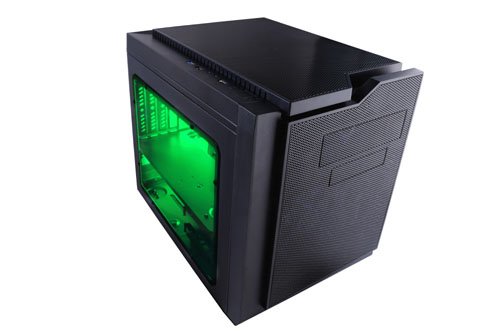

🖤 Cube your gaming style with Apevia’s sleek, green-lit powerhouse!
The Apevia X-QPACK3-GN is a micro ATX cube case designed for gamers and professionals seeking compact power. Featuring dual green tinted windows, a flip-open design for hassle-free installation, and a pre-installed 140mm green LED fan, it supports GPUs up to 320mm and standard ATX power supplies. With multiple USB ports and excellent cooling options, it balances style, functionality, and easy upgrades in a budget-friendly package.
| ASIN | B00ZPU5RHQ |
| Best Sellers Rank | #4,781 in Computer Cases |
| Brand | Apevia |
| Color | Green |
| Customer Reviews | 4.3 4.3 out of 5 stars (440) |
| Date First Available | June 15, 2015 |
| Is Discontinued By Manufacturer | No |
| Item Dimensions LxWxH | 15.25 x 10.25 x 13.75 inches |
| Item Weight | 9.5 pounds |
| Item model number | X-QPACK3-GN |
| Manufacturer | APEVIA CORP. |
| Number of USB 2.0 Ports | 2 |
| Number of USB 3.0 Ports | 1 |
| Product Dimensions | 15.25 x 10.25 x 13.75 inches |
| Series | X-QPACK3-GN |
S**.
Excellent cube case on a budget!
Excellent little cube case for one of my kid's PC builds. Easy to work inside of, and plenty of room. I built it with the following components: AsRock H87M Pro4 mainboard, 2x4GB DDR3 1600 G.Skill, Pentium G3258A, Cryorig H7 (plenty of clearance with or without top exhaust fan!), 640GB HDD, DVD drive, a EVGA GTX660OC, and an EVGA 500W KR PSU to power it all. Fit great. I also installed a Cooler Master 120MM fan at the rear exhaust, and have both fans on a quiet speed. The system keeps cool and quiet, is super stable and the case looks neat. My son loves this PC and uses it frequently, shows it off to visitors. Having the case hinged also helps with installing components and getting into hard-to-reach places. Just keep in mind with cable management if you want to be able to use the hinge feature or not. The minor annoyance of the extra screws to unlock the hinged part are actually a good idea, but for someone like myself that builds 100s of systems that's wasted time for a feature I actually like to use. But in the same breath it is also a safety and point of strength to keep everything together. Overall I would highly recommend this case for a nice budget mATX/mITX build. The case is clean in appearance, looks modern without being too over-the-top. It is super easy to work on and in, and has all the decent standard features at a very appealing price point. I've used Apevia for years...back when they were named Aspire...in-fact one of the older mid tower cases from over 10 years ago is still in service today. This is one of my favorite cases from them and I will continue to be using them for builds for some time to come.
C**F
A tale of customer service done right.
I purchased this for a new computer build utilizing a Micro ATX board. The case is an awesome color of orange, and the LED fan runs very quiet. It is very easy to disassemble and the "clam shell" feature helped immensely when installing the motherboard and water cooler radiator to the top of the case. Only "knock" is that the SSD slot is too far away from the DVD-drive slot for a typical SATA daisy-chain connector to connect, but that's probably my PSU's fault for not having enough length, but a cheap extension will solve this problem. Make sure your PSU has at least 3 SATA plug ends or get an adapter or extension as needed. I wanted to write a note about how awesome the customer service is at Apevia. The case was shipped to me with the protective plastic film on the wrong side on one of the windows. I attempted to carefully get it out, but wasn't able to do it all and popped one of the plastic grommets in the process. After an attempt to superglue the thing back on..... yea.... I ended up with a 4in diameter smear of superglue on the window and it looked really bad. I emailed the company's tech support division and after a nice exchange they said that I could ship it to them on my dime and they would replace it and ship it back for free which was really cool of them. After looking them up, I realized their corporate headquarters was only 10 miles away from my house. After telling them this, I was able to simply drop by and they exchanged it on site. After saying hi to some of the workers there, I bid them farewell..... and then went to Disneyland :) Great customer service, great product. Looks amazing and will be a great addition to my computer family!
R**A
Neat little case!
The Good: Design is pretty nifty Clamshell case allowed for easy installation Quiet machine, due to large 140mm intake fan The good (in depth): The case is pretty neat to look at. It's a lot bigger than I was expecting, but I went with a micro-ATX MOBO and this would allow me to expand upon it later. There is plenty of airflow with the intake fan and I ended up investing in an exhaust fan to keep the temps down. The case has rubber grommets to allow water cooling or radiators at the top. I haven't had any issues with the installation of the components due to the open space. I installed a Gigabyte R9 380 video card and it has about an inch of clearance. Because I was unsure of clearance, I didn't buy an aftermarket cooler for the CPU but it looks like it has plenty of space for expansion. The Bad: Cable management is sometimes good, sometimes bad, if you are willing to remove some drive bays due to the PSU Motherboard brass screws were either too tight or spun in place Manual was pretty awful, lacking directions Power button light is EXTREMELY bright, and blue, which doesn't quite match the green light The bad (in depth): With the lower drive bays in place, your PSU is in for a tight squeeze. I found myself having to tug and wind the cables to make it fit around the drive bays, later on realizing that with the tight squeeze, especially since the PSU cables were shielded with a resilient meshing. And I'm not sure if all PSU cables are similar in lengths but stretching the PSU power cable into the motherboard from the holes in the MOBO panel was impossible so the cable had to be run along the side of the case. I had to remove the lower drive bays from the case entirely to accommodate the PSU. Thankfully there was a spare drive bay below the DVD bay which worked in a pinch. Because I removed the lower drive bays, there is a lot of dead space next to the PSU. I wouldn't be too upset but it does make me worry for the future if I wanted to install another hard drive down the road. While I was troubleshooting the OS installation, I left the case open and was shocked by how bright the power button light was. In a really well lit room, you can see the blue light beaming against the ceiling (picture is attached). In start contrast the front light on the fan is nowhere near as bright as I was expecting (I'm kind of glad it isn't as bright). The MOBO panel screws were REALLY scewy (pun intended). Sometimes it went in super tight other times it just spun in place. During my first installing, I wasn't sure if I had done something wrong so I had to reinstall the MOBO and was stymied by how difficult it was to install. In addition to hinky installs, after all of the components were in, I had to somewhat squeeze the clamshell design back in space for screwing. This is going to sound incredibly pedantic, but with the weird geometric shapes this case makes, you will see there is some dead space where there are creases in the case. I'm looking at 1/4'' crevices here and there which is just screaming for dust to get stored in. And because I'm being pedantic, I do think it's weird that a case this current has a diskette drive.
P**N
PCケースを選定する時に私が求めたものは以下の通りです。 ・Micro-ATX対応であること ・マザーボードが水平配置であること ・300㎜以上の拡張カードに対応すること(ハイエンドVGAが搭載できること) ・5インチのオープンベイを備えること(光学ドライブが搭載できること) ・簡易水冷対応であること(120㎜ファンの増設ができること) ・フルメッシュでないこと(多少の静穏性があること) これらをすべて叶えるのがこのケースでした。 中身が見える事と独自の開閉機構によるメンテナンス性はオマケ程度に 考えていました。 要求的には問題なく満たしており、概ね満足しています。 ただ、残念な点もありました。主に2つです。 ・サイドパネルはクリアだがグラボを載せてしまうと グラボ以外のイルミネーションがあまり見えなくなってしまう ・電源スペースが狭く、160㎜以下のものでなければ搭載困難 イルミネーションはまぁちょっと残念くらいだったのですが 電源は買い替えを検討するか考えさせられるくらいタイトでした。 (オウルテックの660W電源を使用していましたが、160㎜でかなり厳しかったです)
ترست بايلوت
منذ شهر
منذ أسبوعين