🎮 Control Your Universe!
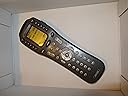
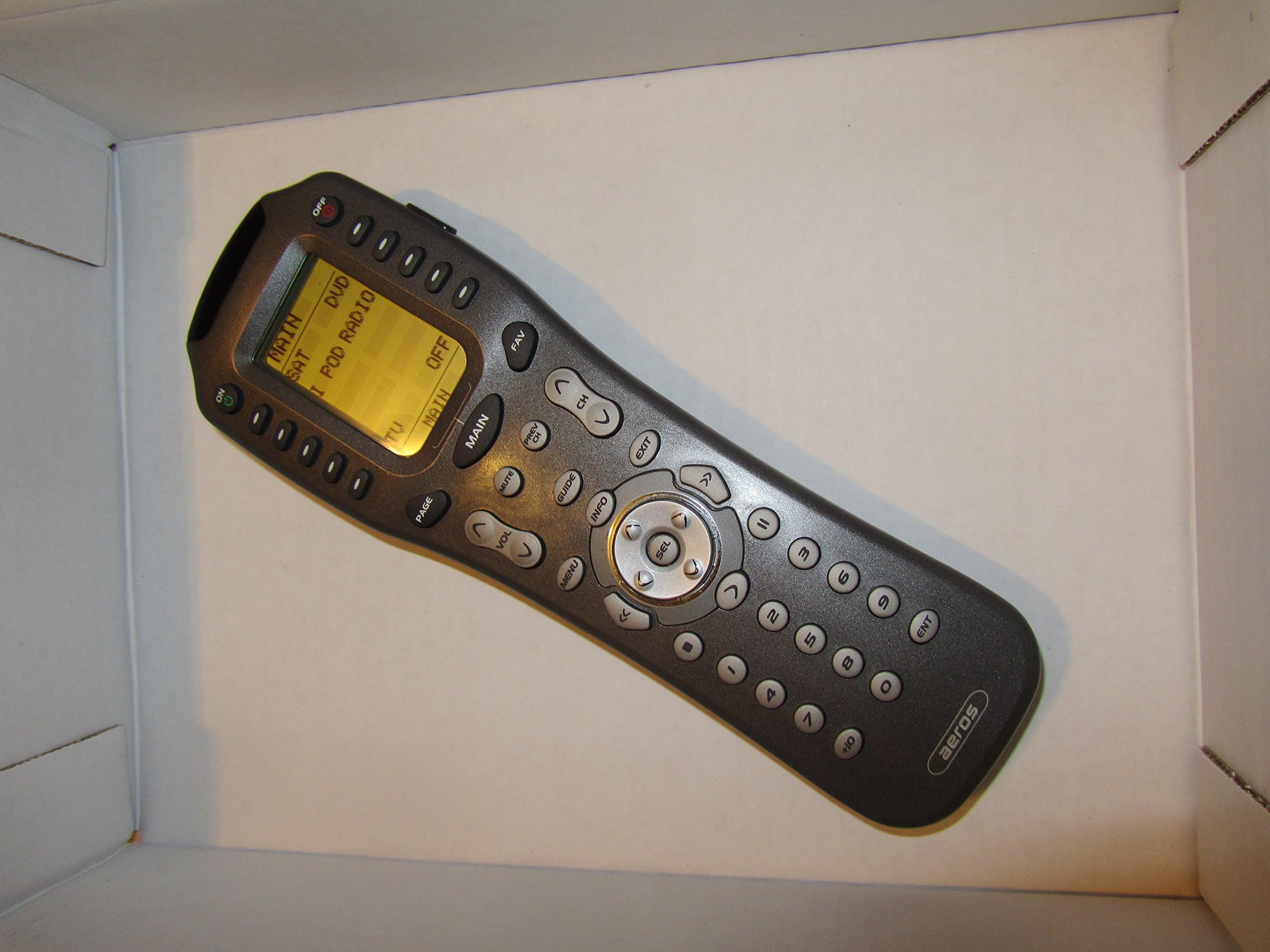
The Universal Remote Control MX-850 IR/RF Aeros Remote Control is a versatile device that allows you to program and control up to 20 different components, featuring a user-friendly LCD interface, extensive macro capabilities, and a robust memory backup system. With compatibility for over 1500 brands and an impressive RF range, this remote is designed for the modern home entertainment enthusiast.
| ASIN | B0007N5XPW |
| Additional Features | Universal |
| Battery Type | AAA |
| Best Sellers Rank | #484,630 in Electronics ( See Top 100 in Electronics ) #43,445 in Remote Controls (Electronics) |
| Brand | UNIVERSAL REMOTE |
| Button Quantity | 4 |
| Color | black |
| Compatible Devices | Television, Home Theater, DVD/Blu-ray Player, Set Top Box, Stereo System |
| Connectivity Technology | Infrared , Radio Frequency |
| Controller Type | Button Control |
| Customer Reviews | 3.3 out of 5 stars 73 Reviews |
| EU Spare Part Availability Duration | 10 Years |
| Global Trade Identification Number | 00656787208506 |
| Item Weight | 2 Pounds |
| Manufacturer | SMARTHOME INC - 3RD PARTY |
| Max Number of Supported Devices | 20 |
| Maximum Number of Supported Devices | 20 |
| Maximum Range | 10 Meters |
| Mfr Part Number | 8062 |
| Model Name | 8062 |
| Model Number | 8062 |
| Number of Batteries | 4 AAA batteries required. |
| Special Feature | Universal |
| UPC | 656787203501 656787208506 |
B**N
Arguably the best PC programable remote on the market.
I've tried them all. Touchscreen remotes. Big remotes with scads of buttons. Learning remotes. Pre-programmed remotes. They all had their pluses, but they all had lots of minuses too. They were either to big, or bulky, or clumsy to handle. I thought the touchscreens were the answer, until I found out that I was spending a lot of time looking at the touchscreen, to find a button location, when I should be looking at the TV screen. Let's face it, with todays technology, there are just way to many menu selections on the TV for all the equipment (TiVos, DVD/CD players, etc.)we have hooked up to our TVs, and Stereos. If you don't want to be constantly looking down at your remote when you should be watching the TV screen to make menu selections, or just change modes, or channels, or volume. Only two things fit the bill to do that. One is a mind control remote, and to my knowledge they haven't got one on the market yet. That leaves the remote with tactile buttons. Buttons you can feel. Even in the dark. Try watching a tennis match with a touchscreen remote. I love tennis, but sometimes I dont want to watch every minute while a player mills around for over a minute before he serves. With tactile buttons you can fast forward while never taking your eyes off the TV, and hit the play button precisely when the player serves the ball. Equally great for all sports, not just tennis. Touchscreens just don't cut it for this kind of control. Now to this particular remote. It's so great I just bought a second one, and am seriously considering a third. It will control (directly) up to 20 different units, but with a little creative programming, you can control as many units as your budget will allow. Macros: You can program about 99% of the buttons with a macro of almost unlimited keypresses. You can download control codes for hundreds of pieces of electronics equipment. PC programming: All the setup can be done on your PC, and then downloaded to the remote. Got another new MX-850 remote? It takes about 30 seconds to mirror the settings from the first remote to the second or third remote. It's also an IR/UHF remote. You can use as either an IR, a UHF, or both. You can use it with Universals Remote Receiver, or as I did, with a PowerMid receiver. Don't know if it works with any others. One more thing. It handles well, and doesn't take up much space on the coffee table. I know, thats two things, but I haven't found anything yet that I can't do with this remote. Oh yeah, you can still program it by hand, if you want to. But that's no fun.
E**O
Required Software not Included and not for sale
Suppose a car company sold you a car but said you were not allowed to drive it. They had given the keys to a chauffeur whom you would pay every time you needed to go somewhere. That is, in effect what Universal Remote Control Inc has decided to do with the MX-850 and many other products they sell. You may purchase the remote control itself but, regardless of how skilled you may be at programming, the dealer is supposed to program the remote for you (for a charge, of course). Every time you add or change a component of your system the chauffeur, that is the retail dealer, will have to come back to program the changes as well (for an additional charge). This makes the MX-850, potentially, the most expensive controller in the world. Most people who buy this product are probably unaware of this (or very rich). If you ever bought B&K equipment you may know that they sell a branded version of this product, the SR10.1, but are kind enough to supply the software through their license agreement with URC. Should you happen to have that software DO NOT assume it will work with the generic model of the same controller (the MX-850) because URC has rigged the process against you so that neither Uploads or Downloads of programming done using SR10.1 software will work on the MX-850. Granted, programming this remote may be too hard for some people and URC would be justified to decline to provide free technical support to these people. However, their approach does not appear simply to be aimed at avoiding unsustainable costs in the sale of this remote. It is a calculated move that allows them to sell a software license, at a high price, to their dealers but have the dealers be very happy to pay the license fees which they can easily recoup as your chauffeur. I would call this a SCAM. While some dealers may provide an alternative to this egregious approach and there may be ways to obtain unlicensed copies of the software, even if you are able to jump this hurdle, be aware there are more problems to overcome. First, you will need a COMM port. And if you have a laptop do not assume that the USB to DB9 type COMM ports will work. Most will not. Should you decide to use the ExpressCard slot of your laptop to create a COMM port be advised that you'd better not be using a 64 bit version of windows since communications will only work on the 32 bit version. The above mentioned drawbacks of this remote control are, of course, more an issue of a very user hostile attitude by URC in its marketing than an indictment of the MX-850. The fact is the MX-850 is one of the best remotes on the market. It is extremely flexible and there are only a few drawbacks in its design. One of them is that Macro coding is "compiled" rather than "assembled" at run time. So, if you get a new DVD player - even if the power on button is in the same place - any Macros that use its commands must be reprogrammed. Unlike VB, for example, they will not treat the new DVD player as a replacement subroutine with the same name. Rather, they will work like older mainframe programming languages that create a compiled version of code that includes all of the old components IR codes (like compilation of a subroutine) and be completely unaware of the new component. This is, quite frankly, old technology and perhaps URC made the marketing decision it did to disguise this. But old technology is not necessarily bad technology. We still have the zipper, even though it snags sometimes, don't we? And it's unfortunate this product is now marketed as described above. I hope URC changes its mind. Perhaps enough internet chatter will encourage this. The product would otherwise have gotten a much better review.
J**E
A bit old-school but works beautifully
PROS: RF works flawlessly, can learn to control anything, excellent usability and ergonomics. CONS: Must buy from an authorized dealer to get updateable software, programming is via RS-232 and can't be done in Vista, no rechargeable battery. I decided to ditch my old IR repeater system and go with an RF remote when I started adding LCDs around the house and they made the IR stop working. At first, I went with a Logitech Harmony 890 because it had none of the cons I listed above and its IR database contained all the codes I needed for even the most obscure products. But in the end, the Harmony's terrible software and poor ergonomics drove me grudgingly back to URC. I don't like URC's support policy or their failure to move away from old technologies like RS-232 and throwaway batteries. But the MX-850 is so good that it was the only option I could live with. I own four MX-850s, one MRF-350, and one MRF-260. I will probably buy more MX-850s in the future. They all work absolutely perfectly from anywhere in the house. I rarely have to look at the remote to find the most important buttons because the layout is so good. And I never have to worry about pointing the remote anymore, let alone pointing, pushing buttons, cursing, and repeating when things don't work. That's what I've become accustomed to, and words can't convey how happy I am to be free of that. I gave this product five stars based on how well it is currently working in my system compared with the alternative products I've tried and read about. Sure, there's room for improvement -- I really wish it had a USB interface, more frequently updated software (available to everyone) that doesn't require WinXP, and a rechargeable battery. But once programmed, it works so well that I am still willing to give it five stars. If you are afraid of the word "programming", don't have good troubleshooting skills, and don't have any nerdy friends to help you, then this is probably the wrong product for you. But if you have patience and a good basic understanding of how these things work, go for it; you won't regret it!
W**L
Remiss about Remote
It was great to get a replacement remote, yet it is impossible to reprogram to work with the television and therefore, a waste of $$$.
J**P
great remote
Needed this unit to go with the host rcver. Previous unit took a small 1 foot fall from coffee table to hard wood floor and it was destroyed. Sounded like a babys rattle toy. These things are delicate and do not hold up well to drops. However treat them as fragile and they're great.
P**T
Great Remote; Poor Support
I'm a little torn on how to rate this. The remote works almost flawlessly, especially compared to the Harmony remotes I previously had. On the other hand, because the manufacturer obviously prefers to favor professional installers, there are a number of artificial impediments that make it difficult to get up and running, even though the programming of the remote is a fairly rudimentary exercise once you finally get started. Because of my prior experience with two Harmony remotes, a lot of this review is basically a comparison to that. As for the remote itself, it works my devices much better than the Harmony remotes. In particular, the interface with my Moxi DVR is much much better, and the center ring buttons have a much much better feel to them. It's really like night and day. It also doesn't have the annoying Harmony "feature" of storing so many "volume up" key strokes in memory and then slowly but surely transmitting those requests over the course of several seconds and raising the volume to ear splitting levels while the user desparately tries to reverse course and lower the volume (all to no avail because the Harmony must faithfully transmit each and every volume up request first before it recognizes the volume down requests). That little Harmony quirk is a real problem when you have small kids handling the remote. Also, this device seems a lot better as far as build quality that the Harmony remotes I had. Those tended to wear out and require replacement (I wore out two of them in about 3 years). I haven't had this long enough to know, but I suspect it will last much longer. It also doesn't seem to burn through batteries as quickly, but that could be my imagination. So, from a functionality standpoint, I couldn't be more pleased with this remote. I'd give it 10 stars on that part if I could - and I'm not even taking advantage of the RF feature yet. About the only functional complaint I would have is that the device libraries are not quite as extensive as the Harmony, and at least one of my devices (Cary CD player) has discrete on/off (rather than toggle) codes available that this library didn't have. But in general I get the feeling that, because the Harmony libraries were supposedly supplied by users themselves, that the code libraries for this remote are more accurate and reliable for those devices included. So that's a trade off I'll accept. I may feel differently if new devices come out that aren't covered by any software or library that I can download (see below on that). But getting up and running is a bit of a pain. First, no software included in the box, and the instructions for getting it are pretty cryptic. In fact, if my memory is correct, I would not have known how to get the programming software if not for online reviews. Secondly, no manual for programming is downloaded with the software or available at their site. I had to go find the manual at Remote Central. Lastly, no USB interface meant I had to spend a fair amount of time figuring out how to communicate with their serial com port connector. Also, as others have said, the software you can download doesn't seem to have the automatic update feature which goes out and updates the product libraries for you. I don't know if that means I can just download the software again to get a more up to date library, or if I am SOL on that. Maybe there is something I am just doing wrong here. Anyway, once you get the preliminaries ironed out, the programming this remote is not nearly so bad as others have made it out to be, but it's just a pain getting started. Once I got started and got used to the software, I liked programming this more than the Harmony remotes. It's more flexible and gives the user a little more credit for native intelligence. Also, working with software on your own machine (as opposed to interfacing through the internet for every slight change) is much better. Downloading from the Net to my Harmony for every tweak in timing was a hassle, especially since I was forced to constantly experiment with delays and such to try to get the Harmony to work better as a volume and Moxi control. Being able to store different configurations in different files is a plus as well, since one might want to go back to an old device and not have to start all over. As far as hiring a pro to program it, I would recommend that you push through it on your own instead. Everybody's preferences are different, and your preferences for page layouts will evolve as you get used to the thing. Also, most of our setups change over time. Calling the installer back out for every little tweak would be a royal pain, and probably expensive. The value of the remote to me would be greatly reduced if I had not programmed it myself. If you're not sufficiently tech savvy to feel comfortable with that, this remote may not be for you.
T**K
Be Careful! Required software may be very difficult to find.
I have had a previous model (MX-700) for about 10 years. It came with the necessary sofware (mx700editor.exe) and a programming manual. The MX-850 comes with no software and unless you are willing to pay an authorized dealer to program it for you, you may be in for quite a frustrating experience. First, I contacted URC and they told me that they only allow their dealers access to the software. I suggested that I would be willing to pay extra for the software and that I was very familiar with the programming environment. They again told me that only authorized dealers are allowed access to the program. Second, I contacted a local authorized dealer to see if I could get a copy of the program and even offered to buy another MX-850 from them (for my dad) and they not only said no, but treated me with a condescending attitude and reminded me that only they were trained and capable of programming the device. Third, I figured that I should be able to find it somewhere on the internet. After looking for some time and reading many blogs, I became desparate enough to give my credit card number to one of the more legitimate looking software download sites that indicated that they had the mx850editor.exe program from several servers. After paying the fee, they no longer could find it with there search... Now I have to go to the trouble of canceling my card, reversing the charge, and paying the credit card company to expedite sending a new card to me. You may wonder why I have gone to this much trouble and why I just don't send it back. It is partly because of the shipping cost and 20% fee that Amazon charges for returning home electronics. I feel that giving them more than $40 for nothing would only encourage them to continue to profit from selling URC products. The other reason is that I already have a previous version that I use in another room and I want to use the same interface for my new theater system. URC sells a limited function home series, but they don't have nearly the flexibility of the professional series. If you are interested in how difficult it is to program these devices, it took me about 8 hours to read the manual, layout the interface, download specific IR device codes, and program macros to switch between 5 sources with an av receiver. There is bit of trial and error to get something that works well for the entire family. After that, it took about a month of making small changes to add everyones desired features such as adding their favorite channels. I have a strong professional programming background using many programming languages and programming environments over the past 30 years. However, I wouldn't say that a great deal of experience is necessary to get favorable results. I would say that programming the MX series remotes is about as difficult as writing very simple Microsoft Visual Basic applications or writing macros for Microsoft Excel. If you don't have the inclination to program and solve problems and/or what I just said doesn't make any sense, you should add in the cost of the professional installer or consider another device. The only other brand I am familiar with is Logitech and friends have found that they are reliable devices. However, if customization is important to you (such as adding descrete on/off codes, dual function buttons based on press duration, adding variable delays to macros, scheduled events, etc.), Logitech is not in the same league. Final thought: There is no warning of this limitation when you buy the MX-850 from Amazon. Amazon may not even be aware of URC's policy. If you have to use an authorized dealer, programming services over time would add up to many hundreds of dollars. Every time you buy another a/v device that uses a remote, you have to purchase additional programming services for the change. Even adding one more favorite chanel to the screen is another $100 or so. URC is happy to profit by selling directly to end customers through Amazon and their suppliers - even though they know the device is useless without the programming environment. If they were an ethical company, they would live with the consequences of their policy and only allow you to purchase through an authorized dealer that would explain the need for their services. I am deeply disappointed with their policy. I hope this helps...
A**R
5 stars to counteract the ID10T complainers
Really, I only give it 4 stars due to CONS stated below. CONS: It does not support any OS but the ever-insubstantial Windows OS. It uses bleedin' 70's tech to connect: 9-pin RS-232 Serial Port w/ proprietary (non-standard) cable. Guess what, URC? Modern computer systems often ship with NO serial port. Gosh, ya' think a web based interface that is OS and browser neutral might be a good idea? My Cannon camera has a mini-USB to USB connector, very standard. And modern. Pricey: I'd rather have 650 but the case color is too light for me. 850 is a dark slate, which works for me. PROS: I was able to program it under FC6 Linux, using native WINE. Not pretty, but it worked. This is where IQ and understanding come into play. I bought this on account of a previous review that said basically, if you can't program it you have an ID10T error, and we can't fix that. You also have an RTFM problem, as well as a PEBKAC error. Do hire a professional, but not a programmer... I also bought this because MX-500 does not have a code for my AIWA DVD player. The one thing I needed, it didn't have, but MX-650 and above does. I got the programming right on the 850 on the first try: This makes it unusually good hardware and software.
Trustpilot
2 months ago
3 weeks ago