We remain fully operational. Our teams are working around the clock to ensure your deliveries continue safely.

قم بتنزيل التطبيق


معلومات عنا
حقوق الطبع والنشر © 2024 Desertcart Holdings Limited
قم بتنزيل التطبيق
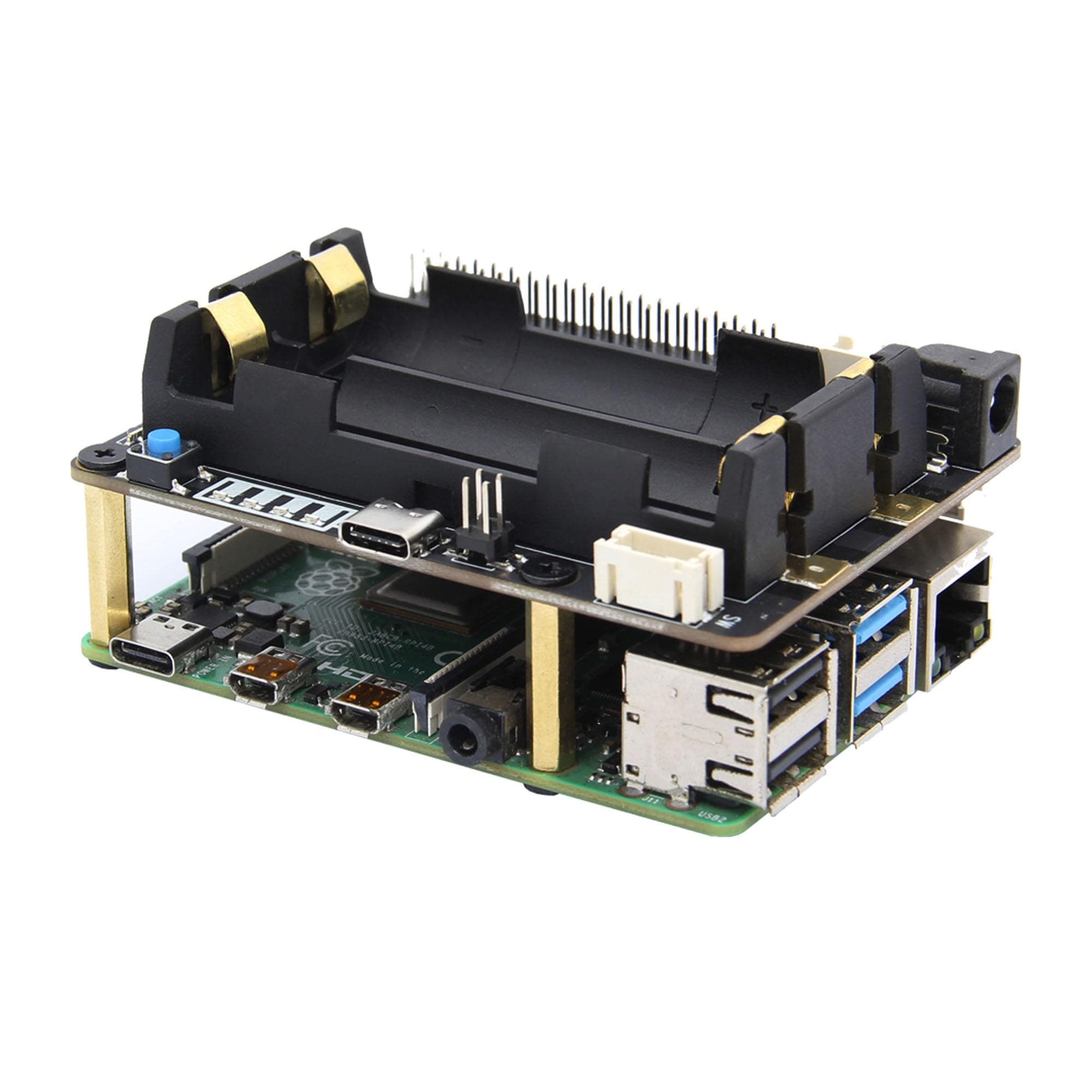
🔌 Power your Pi like a pro — never lose a beat, even when the grid does!
The Geekworm X728 UPS & Power Management Board delivers a reliable 5.1V 6A backup power solution for Raspberry Pi, featuring intelligent AC power loss detection, auto power-on, safe shutdown, and real-time battery capacity monitoring. Its compact design supports stacking with other Pi accessories, making it ideal for mobile labs and critical projects requiring uninterrupted power and data integrity.


| ASIN | B087FXLZZH |
| Best Sellers Rank | #154 in Computer Uninterruptible Power Supply Units |
| Customer Reviews | 4.3 4.3 out of 5 stars (86) |
| Date First Available | April 22, 2020 |
| Is Discontinued By Manufacturer | No |
| Item Weight | 2.11 ounces |
| Item model number | X728 |
| Manufacturer | Geekworm |
| Product Dimensions | 3.35 x 2.52 x 1.38 inches |
E**S
Reliable UPS for my Pi 4 mobile lab
I put this UPS HAT on a Raspberry Pi 4B as part of a little “mobile lab” setup and it has been great so far. My stack is a Pi 4B on Raspberry Pi OS, a GeekPi PWM cooling hat with a small screen I am not really using yet, and a Panda PAU0F USB Wi-Fi adapter, all powered through this board with two 18650 batteries. Setup was easy. I watched the video the seller links, dropped the 18650 cells into the holder, plugged USB-C power into the hat, and let the hat feed the Pi through the GPIO header. It powered up on the first try and after that I mostly stopped thinking about it. The real test for me was what happens when you pull the plug. When I unplug the USB-C input, the Pi just keeps running. No reboot, no undervoltage icon, no SD card complaints. I have let this setup run on battery for a little over three hours and it stayed completely stable the whole time, which is more than enough for how I plan to use it. I actually started with a regular USB power bank and assumed that would work as a UPS. It did not. As soon as I unplugged the power bank from the wall, the Pi died instantly. That is what pushed me to try a proper UPS hat, and this one does exactly what I wanted. It turned my Pi 4 into something I can unplug, move around, or briefly lose mains on without worrying about corrupting the SD card.
S**N
Easy To Use With Clear Documentation
Product works very well, and and provides much more power than other similar systems. I'm able to power a Raspberry Pi 4 as well as a 5V USB powered router from the 5V pins on top of the board. They likely don't link to it because Amazon blocks them, but they also have extremely good documentation on their wiki which is easily found by google searching "X728 Geekworm." Their documentation provides both hardware specifications, as well as links to code repos to see how you can read current voltage and battery life status in for either display, auto timeout features, etc.
J**9
Really useful UPS for my RPI
I bought this for my RPI to power it through blackouts, and it works really great. I tested it and it lasted over 24 hours with six 18650 batteries. Recently I was having problems with it rebooting randomly and the customer service was very responsive and helpful! As others have mentioned I do wish it was possible to dim the LEDs via software or switches, but I have a packet of Light Dims which work okay.
R**N
Power Management and Battery Backup on a Raspberry Pi Hat
The Raspberry Pi is a great piece of hardware, but it does not have a way to power on and off using hardware. Turning off power without proper shutdown runs the risk of corrupting the SD card. I needed reliable power management for several Raspberry Pi's running OctoPrint, a media control server and security server. I could not find a working system. In frustration, I had resigned myself to building my own system using an Arduino. That involved writing a bunch of C++ code, as well as designing and ordering my own printed circuit boards. Doable, but not a lot of fun. That's where the X728 system comes in. It does power management well but also includes a battery backup using 18650 lithium batteries. It's a hat, so it plugs in on top of the Raspberry Pi. Standoffs and screws are included so you can securely mount the hat on your Raspberry Pi. It has connectors for a lighted power switch and additional lithium batteries. Instructions are available on the GeekWorm web site. There is a script that needs to be downloaded and then run. It installs several scripts on the Raspberry Pi. You run a few commands to register startup and shutdown scripts. About 15 minutes work and it's done. Easy peasy. My first X728 V2.1 had a problem. It would not shut down. I purchased several X728 V2.1 boards, so it was easy to swap boards. Yep, the first board was defective. GeekWorm tech support was awesome so I'm only knocking one star off. This is the best Raspberry Pi power management solution I have found. Being able to safely control power is essential. The addition of battery backup for critical servers is HUGE! I wish GeekWorm had better quality control, but support is quite responsive. Support is based in China so there is a 24-hour delay to get a response. They start with very basic questions, so it takes a few iterations to find a solution. Update: I have purchased several more X-728 boards and almost each one has problems. Connectors not soldered on, boards that do not work, the list goes on. I want to love this board. I really do. But if you purchase one, resign yourself to dealing with Geekworm's quality control issues. Too bad, because there is a lot to like about this board.
R**O
tal cual la descripción del vendedor, se ve de buena calidad, aun no lo he probado
N**N
Not a good fit
Works, but the GPIO socket is offset, while the GPIO standoff holes are the same spot so you can't secure any HATs above this . It's also slightly wider than a PI causing cases to not fit
J**N
Geekworm UPS and RPi 40-pin height mismatch
Using the included 2.5 x 20 mm standoffs created an initially annoying problem. The 40 pin header extenders I have were about 6 mm too long, making the UPS float way above the Pi and preventing the stackup from fitting in the Geekworm metal case. I first trimmed down the pins on the header extender. That didn't get the UPS board low enough to fit in the metal case. I finally trimmed down the plastic on the header extender, that dropped the UPS by another 2 mm and solved the problem. Nowhere do they mention that a non-standard-height 40-pin header is required to get the stackup to work in the case. That was kind of annoying. Second annoyance is the "ac power" input. Where/what is this? The UPS board doesn't take ac power. So I'm guessing that it's the 5521 jack? As well, why would that jack be rated for only 5 Vdc? This should be designed to take a wide voltage range (10-30 Vdc would be great) that that I could power it in the truck without having to custom build yet another 12 to 5.1 stepdown converter. Other than these significant annoyances the UPS seems to work fine. I haven't yet installed the software to enable the autoshutdown feature. Since this is for the truck, I appreciate a UPS to prevent glitches getting to the RPi.
ترست بايلوت
منذ أسبوعين
منذ شهر