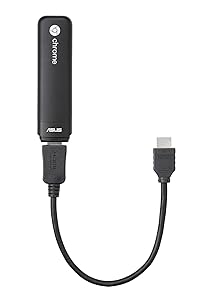
🚀 Tiny Tech, Massive Impact: Your Pocket-Sized Powerhouse
The ASUS CHROMEBIT CS10 is a sleek, ultra-compact Chrome OS stick PC powered by a RockChip 3288-C processor, 2GB LPDDR3 RAM, and 16GB eMMC storage. It plugs into any HDMI display to instantly create a full desktop experience with access to thousands of Chrome OS apps and 100GB of Google Drive cloud storage. Featuring dual-band Wi-Fi and Bluetooth 4.0, it supports fast wireless connections and peripherals. With an energy-efficient 18W power draw and included accessories for flexible setup, it’s perfect for professionals seeking a portable, low-cost, and eco-friendly computing solution.


| ASIN | B0181JTPCU |
| Additional Features | Chrome OS Stick |
| Aspect Ratio | Unknown |
| Best Sellers Rank | #104,423 in Electronics ( See Top 100 in Electronics ) #499 in Streaming Media Players |
| Brand | ASUS |
| Built-In Media | 1 |
| CPU Model | Apple A4 |
| CPU Model Number | Intel® Celeron 3865U |
| CPU Model Speed Maximum | 1800 MHz |
| CPU Speed | 2 GHz |
| Color | Black |
| Connectivity Technology | Wireless |
| Cooling Method | Passive |
| Customer Reviews | 4.0 out of 5 stars 1,325 Reviews |
| Display Resolution Maximum | 1920x1080 |
| Display Type | LCD |
| Global Trade Identification Number | 00889349249970 |
| Graphics Card Description | Integrated |
| Graphics Card Interface | PCI Express |
| Graphics Card Ram | 2 GB |
| Graphics Coprocessor | Integrated Rockchip Mali T764 |
| Graphics Description | Integrated |
| Graphics Ram Type | DDR3 SDRAM |
| Hard Disk Description | Flash |
| Hard Disk Interface | Unknown |
| Hardware Interface | Bluetooth |
| Human-Interface Input | Buttons |
| Item Dimensions | 4.84 x 0.67 x 1.22 inches |
| Item Height | 1.22 inches |
| Item Type Name | ASUS CHROMEBIT CS10 Stick-Desktop PC with RockChip 3288-C 2 GB LPDDR3L 16 GB eMMC Google Chrome OS (CHROMEBIT-B013C) |
| Keyboard Description | Not Included |
| Keyboard Layout | QWERTY |
| Manufacturer | ASUS Computer International Direct |
| Memory Clock Speed | 1066 MHz |
| Memory Speed | 1066 MHz |
| Memory Storage Capacity | 16 GB |
| Model Name | CHROMEBIT-B013C |
| Model Number | CHROMEBIT-B013C |
| Model Year | 2015 |
| Native Resolution | 1920 x 1080 |
| Number of Component Outputs | 1 |
| Operating System | Chrome |
| Personal Computer Design Type | Stick PC |
| Power Consumption | 18 Watts |
| Power Plug Type | Type A - 2 pin (North American) |
| Processor Brand | Intel |
| Processor Count | 4 |
| Processor Series | Apple A4 |
| Processor Socket | BGA |
| Processor Speed | 2 GHz |
| RAM Memory Installed | 2 GB |
| RAM Memory Technology | LPDDR3 |
| RAM Type | DDR3 SDRAM |
| Ram Memory Maximum Size | 2 GB |
| Resolution | 1920 x 1080 |
| Screen Size | 23 Inches |
| Security Features | Chrome OS security features |
| Speaker Type | External Speakers Required |
| Specific Uses For Product | business, personal |
| Specification Met | Energy Star |
| Style Name | Chrome OS |
| Total Number of HDMI Ports | 1 |
| Total Usb Ports | 1 |
| UPC | 889349249970 |
| Video Output | HDMI |
| Video Output Interface | HDMI |
| Video Processor | Intel |
| Warranty Description | 1 year warranty |
| Wireless Compability | 802.11abg |
| Wireless Network Technology | Wi-Fi |
| Wireless Technology | Bluetooth, Wi-Fi |
G**O
Now that's what I was looking for in a small gadget.
I love Android, and I love ChromeOS. I have an Acer chromebook, an Amazon Fire, an Apple iPad, and a Samsung Galaxy, and so far, and oddly enough, this chromebit is my favourite piece of technology. First things first. This is NOT a fast machine. It is slower than the chromebook I bought three years ago, yet not that slow: I've watched Rio 2016 on streaming and there is just the barest hint of lag, and I think it is my ISP's fault rather than the chromebit. It's completely portable. Just this morning I did a presentation by plugging it into an HD monitor instead of looking for an overhead projector. It does everything a chromebook or a chromebox can, except that this thing, sadly, does not have USB 3.0 capabilities. I also miss having a microphone, but at least it paired nice and easy with my bluetooth hearphones and keyboard. Wifi reception may be a little bit compromised behind the monitor or TV, but at least you can use an expander cable (I got one that was a meter long and got a coupler, and it works like a charm). Using google drive eases the lack of internal capacity: it has barely 16 GB on board, but I've tested it with USB drives up to 128 GB and external SSD drives up to 256 GB; however, cheap drives tend to use more oower and some of them can be read but not write. Mechanical drives, using too much power, are simply not up to the task. Or to the power supply available, to tell you the truth; you need a wall outlet to power up the chromebit, because there isn't enough juice available from the USB ports of any standard TV. So if you want to connect several drives or accessories, you need a hub that supports an external power supply. My only complaints are that the only USB port available is 2.0 instead of 3.0, and that it lacks a microsd expansion slot. Except for that, it's a perfect little machine for under a hundred bucks.
C**Y
I really recommend this device if you need it for the same reasons i bought it..updates below...
This little device does everything i was hoping it would do. I wanted this device for mainly streaming movies and tv shows, but i wanted a browser so i could browse other sites to watch shows or movies on which things like the fire tv or other streaming devices do not do as far as i am aware. So after watching a movie in hd through amazon i found it played with less glitches then my computer. I always thought my computer glitched playing hd movies or any videos because of my internet connection but i guess that is not the case because this little device seems to handle the hd videos a hundred times better, which i love because i wasn't expecting it too so that is a win for me. So i mainly bought this for watching movies and tv shows from amazon, netflix and all other sites on the web and it works great, better then i thought it would. The other reason i bought it was because my desktop computer i have hooked up to my tv uses at least 200 watts or more of electricity an hour so i bought this device knowing it uses i think about 18 watts of electricity an hour which means i could leave this running 24/7 if i really wanted to and it would use about the same power in 24 hours has my desktop use in may 2 hours of use. So if this device keeps working great for movies and tv shows i will save another 5 to 10 dollars a month on my electricity bill which will be awesome. If you are looking for a setup like the windows 10 this device is not for you but if you are looking for a great way to watch your shows or movies this will work great specially if you watch them from other sites on the web and the plus thing is google chrome comes with adblocker which makes watching shows or movies online a lot easier.. As of now i recommend this device for 85 dollars it does everything i want it to do. And for other things i need like printing papers or other things this device does not do i will still have my desktop computer for that type of stuff but for the most part that computer will be shut down 99.9 percent of the time now unless the device quits working but i hope it doesn't. Buy this if you just need a way to save electricity and a way to watch all your shows online with out all the extra stuff you don't need just to do that.. Update July 4th 2016.... So it has been 6 months since i bought this device and i am happy with it and have zero problems with it. I use it to watch tv shows/movies online and also watch shows from amazon to. Anyways i have this device on 8 to 12 hours a day mainly watching tv shows and this device handles it perfect. I could not be happier because i think i have gotten my money worth out of it. So for a little over 80 bucks with heavy use of streaming movies and tv shows and it still works great is a great deal and i will be back in another 6 months to update again. So if this device last me a full year of heavy usage i would for sure buy this product every year or two if i had to because it does a lot for such a cheap affordable price. Update June 27th 2018.... I know my last update i said i would be back in 6 months. Well i guess i wasn't back but beside that i have now had this asus computer stick for 2 years and 6 months and it is still going strong. This device has been very reliable. The past year i have not used it as much per day because i have upgraded to apple tv for my streaming uses but this device still works great and i still use it here and there for watching shows i can not find else where. So with that said this device is well worth it and from what i see the price has not gone up so that is a bonus...
D**Y
Chromebit for Digital Signage? - Read This!
Please excuse the long review, but I personally spent WEEKS researching and testing methods of being able to "serve" content to 1 or more flat panel TVs used as "digital signage". I want to share what I've learned, in hopes I can save someone else the trouble! (Or maybe even to teach others about an AMAZING use for this device that they haven't even thought about). Warning! This item cannot be managed through Google Device Manager (Google for work) because it does not include a license! Found out the hard way. It functions fine as a stand alone Chrome OS device, however it cannot be managed through your Google Admin Console without buying a separate license. You can buy them WITH an included license, but only through Google's authorized partner (Promevo). If you buy it anywhere else, you can buy the stand-alone license seperately, but it takes 2-5 days to provision!! Other than that, what a great piece of hardware. Just wish you could Cast to it natively. I will be using mine (with my newly bought license) to stream content for digital signage in our lobby. I chose those device over a Chromecast, PCstick, Android TV, etc.. because of its amazing low price point, it can be managed centrally via the web (anywhere in the world), plus it supports screen rotation! So I can mount a standard flat panel TV in portrait, and the Chromebit will display content from the web (that I serve it) in portrait mode (very hard to find a device for digital signage that supports this without spending big bucks) You just have to rotate the screen once via a keyboard, and the Chromebit will retain its rotated state even after reboot.. My requirements for a digital signage device were, it had to be cheap, it had to support portrait and landscape mode, it had to be zero maintenance (can boot up, connect, load signage stream..without any user interaction). I plan to deploy these all over the country to our different branches, so the last thing I wanted to do was have to train someone how to get it working, or have to turn it on, log in, etc each morning. Being able to manage it through Google for work device manager means it just needs to be powered, and near a working wifi internet connection to work! To serve the content, I'm using a free, open source product called Dashkiosk (which picked up where Groupon Greenscreen left off when they gave up on it). It's a little tricky to get set up, because it must reside on a web server, and to do it yourself requires knowledge of the Linux Operating System, but if you have a serious need for bulletproof digital signage, and you don't want to pay a monthly price for cloud based digital signage software, The Chromebit + Dashkiosk is the cheapest, best way to go! If you opt to enroll the Chromebit into a managed Google for work or education environment, you can literally deploy Chromebits anywhere you need them (that has an internet connection), and program them centrally to boot up in kiosk mode, open Chrome Browser, and connect to your signage stream. I even programmed ours, at close of business each day, to automatically switch over to a simple website I created which shows the feed from nearby IP security cameras, so at night, our digital signage acts as a big, bright, "how do ya do" to anybody peaking through the windows at night, thinking about breaking in. (Nothing says, "think again" better than having a thief peak in your businesses window, and seeing a nice, close-up, live shot of their own mug with the words "Motion detected - Main entrance (door 1) - [alert notification sent!]". I've also customized the stream with simple HTML/CSS so it overlays a "stock ticker" across the bottom of the screen - the content is fed from a simple shared Google Sheet that anyone in our company with share access can modify (even the receptionist) who has ZERO knowledge of HTML or programming, they just modify the spreadsheet to add the headlines they wish to display, and Dashkiosk refreshes the feed every 60 seconds automatically. We use the ticker to "Welcome" important customers by name. I can do all of this, for the cost of a Chromebit, a cheap flat panel, a spare PC (or access to a web hosting environment with a shell login) and some free software! This used to be a $10k plus job, the Chromebit makes it an $85 one! The "feeds" can be programmed in Dashkiosk admin panel (a web interface), and they can be timed to rotate (with a nice smooth transition), and can include ANYTHING that can be normally displayed in a Chrome Browser window (video clips hosted locally or on YouTube, Google slide shows, websites..including custom pages you make that have jquery slide shows, still images hosted anywhere on the web, Facebook and Twitter feeds, or like in my case, a custom locally hosted webpage that includes my security camera feeds. PS! (super important), Dashkiosk utilizes i-frames in such a way that the more recent versions of Chrome will not work with (natively), there's a super easy work-around, you need to download a chrome extension on each Chromebit called "Ignore X-Frame Headers" - without this, Dashkiosk will NOT work on the Chromebit! If anyone needs more info, or a little guidance, feel free to drop me a line.. I'll do my best to try to help! (Lord knows I would have loved a little help from someone who actually has a working setup). Jumpshoutmedia at gee-male dot comm. Good Luck!
M**K
Chromebit simplified
Your first question: "All the Asus Chromebook Flip owners (with the same Rockchip RK3288 processor) swear you need the 4gb version, but this only comes in 2gb - will it be ok?" Answer: Yup. The Chromebook Flip is TOUCH-enabled, a rarity among budget Chromebooks, and I suspect that is why the Flip probably runs better with 4gb of RAM. That, or because reviewers' idea of a "test" is to run YouTube at 1080p in one tab, Spotify in a second, and browse an intense website (lots of junk including self-running videos and Flassh content) in the remaining tabs. And open 20 tabs to boot. Your second question: "Does this get hot?" Answer: Nope. Compared to my Lenovo Ideacentre Stick (basically a re-branded Intel Compute Stick - I think Lenovo is the Intel supplier) it runs as cool as a cucumber. Even though the Chromebit doesn't have an annoying fan, like the Lenovo Stick. Your third question: "How do I hook up the keyboard and pointing device (mouse/trackpad)?" Answer: When you first boot up your Chromebit, it automatically fires up in Bluetooth discovery mode, so you are good to go. Asus and Google pretty much assume you will use a Bluetooth keyboard and mouse. If you have one lying around, you should really go ahead and pair it to the Chromebit when you first activate the Chromebit, because it ONLY boots directly into Bluetooth discovery mode on its own the VERY FIRST TIME you fire up the Chromebit. If you pair with a dongle-powered 2.4gHz wireless keyboard/mouse the first time, or use a wired mouse/keyboard, you will need to enter Bluetooth discovery mode manually, using your existing keyboard/mouse, before you can switch to Bluetooth-based hardware (for this reason you may wish to leave Bluetooth "on" during your initial Chromebit set-up). Question: "Do you have any recommendations for keyboard/mouse?" Answer: Thank you for asking, yes I do. First, I have and like the Microsoft Wireless All-In-One Media Keyboard (N9Z-00001) because it is as compact as my normal desktop keyboard, thanks to removing the keypad and replacing it with a built-in track pad. The Chromebit works poorly with a mouse - point and click are fine, but scrolling is slow and jerky and in the "wrong" direction compared to finger-swiping a trackpad. Other folks, including Lon Seidman (do a YouTube search), swear by the Logitech version of the all-in-one keyboard, the Logitech Wireless Touch Keyboard K400 Plus with Built-In Touchpad for Internet-Connected TVs . The set-up I'm actually using is, ironically, mouse-based - the Dell (made by Logitech) wireless keyboard and trackpad that came with my micro desktop (Inspiron i3050). NOTE THAT I AM NOT USING BLUETOOTH. This isn't because Bluetooth is inferior, it's because I have 3 computers on my desk - Windows, Mac, Chromebit - and switch between them. Switching keyboards is MUCH simpler with a 2.4gHz wireless dongle, all I have to do is move the dongle to the set-up I want to use. No re-pairing required! (I have a Fosmon automatic source-switcher for HDMI to the monitor). Q: "Is there any typing lag with your keyboard?" A: Nope, never, not even if I stop typing for 5 minutes or so. In fact, none, ever, except when multiple "remembered" tabs are busy loading at the same time. Q: "Is there any lag in general?" A: Only when loading multiple tabs when rebooting. For that reason, I recommend either (1) go into Settings, Advanced Settings, Start Up and set "Open a New Tab" NOT "Continue where you left off" so you don't get bogged down while your last 10 tabs re-open themselves, OR (2) close all EXCEPT FOR the tabs you actually WANT to reopen when you reboot. Q: "Can I run 720p video smoothly?" A: Heck yes, you can even run 720p/50fps (normal is 30fps) on YouTube smoothly. You can run 1080p/50fps smoothly, which is simply amazing - that chokes my low-end (but otherwise quite good) Windows notebook. It will run Google Play (Google-sourced) videos. It will run Amazon Instant Video. It will run YouTube Red paid content. It will run Netflix. All perfectly. It will NOT run any iTunes or Apple-streamed content at all. For that, you need a Mac, a Windows machine (even my low-end "win"book), an iPad, or an Apple TV. Q: "Can I run my old DVD/BLU-Ray collection, converted to e-files on my USB stick?" A: Assuming you have decided converted one medium format (disc) to another (e-file) is within your "fair use" copyright limitations, the answer is, "maybe." The built-in video player in ChromeOS is pretty basic, and doesn't support common audio coding formats often used by video-conversion software. Some will play with sound. Some won't play with sound. Google has been working on this. For years. Which means nothing is likely to change for more years. Q: "Can I view my pictures?" A: Easily, if you install Google Photos on your Android phone/tablet and/or on your Apple phone/tablet. Not very easily or reliably from an SD card or camera. Not photos on iTunes iCloud. Oddly enough, yes to Microsoft if you use OneDrive to upload your photos, since OneDrive is browser-accessible on Chrombrooks. BTW, your question goes beyond Chromebit-specific questions. The Chromebit is not better - and no worse - than Chromebooks and ChromeOS (the Chrome OPERATING SYSTEM not the Chrome browser!) in general. If you are using this for photos or do a lot of printing, see Lon Seidman's guide to Chromebooks on YouTube). Q: "Well then what do YOU use your Chromebit for!!!???" A: Uh...ultra-secure web-browsing, banking, filing my tax return, etc. That and because I'm a gadget head and love to play with tech. BUT RIGHT NOW, THERE IS NO MORE SECURE OPERATING SYSTEM THAN CHROMEOS. And the Chromebit is just $85. Heck, if you have roommates, kids, or friends who want to use your "computer," let them log into the Chromebit with their own account or a guest account. Never let them near a Windows machine! They'll infect it more quickly than a toddler brings home a cold to his or her parents. And for videos. I mean OMG their isn't a better video processing chip in most mid to high end desktops (we are talking hardware decode here, not GPU). The Rockchip RK 3288 flies! And for a relative (mom/dad/grandma/grandpa) who thinks YOU are their technical support when they get infected with malware. You will save yourself a lot of headaches and time setting them up with the Chromebit. Then, your toughest question will be "when did you replace the batteries last" if their keyboard suddenly goes non-responsive. Q: "Any set-up tips? Operation tips?" A: Yup: 1. Research your keyboard; wireless usually reaches a little further than Bluetooth. 2. I picked up a dual-port expander Plugable USB 2.0 2-Port High Speed Ultra Compact Hub/Splitter (480 Mbit/s, USB 2.0 Windows, Linux, OS X, Chrome OS) since the Chromebit only comes with a single USB port. I wanted to be able to use the wireless dongle for my keyboard/mouse and also a USB thumbdrive at the same time. If you use a Bluetooth keyboard, you will have the existing built-in port free. Amazon makes an Amazon Basics 4 port expander. Keep in mind these un-powered port expanders will only power very, very low-power devices like a wireless dongle, wired keyboard and wired mouse, or one thumbdrive at a time. If you plug-in more demanding devices, get a powered port expander, I like Amazon Basics. 3. If you use SD or micro SD cards, you will need an adapter - Transcend has a good rep on Amazon. 4. This comes with a short cable in case you can't plug the Chromebit directly into your HDMI monitor. I recommend using it anyway, to relieve potential stress on the monitor port and Chromebit end-plug. 5. Tape the end-cap that comes with this to the body, or you will lose it. 6. My monitor has a regular minijack (headphone jack) style output, so I set my monitor output to 75% volume level, then control the volume from the software audio controls within the desktop (not on the monitor). Monitors vary - you may have to control audio output level from the monitor. Whatever you do, never set any single part of the "control chain" to 100% volume level. I did this once and it produces distortion even at low actual output levels. So don't set the volume control in YouTube to 100% and expect to dial it back with the keyboard, or output 100% from your monitor's amplifier level to your external speakers (assuming you aren't using the monitor's built-in speakers). 7. This thing can only REALLY be shut off by unplugging the power jack after "powering down" from the desktop, since it doesn't have an on-off switch. What happens is, it WILL power down, but "watches" for a Bluetooth or wireless 2.4gHz keyboard "signal" to turn itself back on, since it doesn't have an actual power switch. So any accidental jiggle of the mouse will turn it back on. Of course if you have the all-in-one keyboard trackpack combo, this isn't likely to happen, but either I or my kids jiggle the mouse accidentally all the time (while doing other stuff on the desktop). Or I guess I could turn off the mouse physically, d'oh. Well since I am usually switching to the other computer, I like to manually unplug the Chromebit. Any questions, I will try to answer them in comments.
B**A
Possible quality issue; Great OS
Possible quality issue Our family has used the Chromebit for about two months. When it works, it works very well, however it does not work all the time. Over the last two weeks, the Chromebit does not seem to respond to the wireless keyboard almost on a daily basis. Removing the power plug for about two minutes seems to allow it to reboot. The unit runs warm and we measured the outside case temperature at up to 140 deg F (125 deg F nominal). This might be causing the unresponsiveness. The device was moved from a plasma TV to a LCD TV in hopes that the TV type could affect the device, but the problem persisted nearly daily. A call to ASUS tech support suggested that the 5 GHz WiFi was causing it to become unresponsive and so we changed it to 2.4 GHz signal. Since we are in the warranty period we can return it, at our shipping cost, to have it repaired. The unit still runs warm and waiting to see if the lower frequency WiFi signal helps. It all seems like a hassle. For now we will keep the Chromebit and maybe find an easier way to cycle the power until we get frustrated with that. In hindsight, we should have purchased a more expensive Chromebox. Great OS Our children use Chromebooks at school and so the Chrome OS ecosystem is a great way to allow them to access their Google accounts at home and seamlessly integrate. We also appreciate the speedy start up of the system, constant updates to protect against malware, and simplicity of operation. We also have an ASUS Chromebook Flip with no issues. For general web surfing, emails, and lightweight Microsoft Office Online access, the Chrome OS is perfect for the price. UPDATE: Changing to 2.4 GHz wireless frequency did not help the issue. The ASUS customer support did read this review and replied with some tips. Although not previously mentioned we did try to different wireless keyboards with fresh batteries. We will return to the supplier for repair or replacement in hopes that solves the issues. We do want a second Chrome product for another TV and will likely purchase a Chromebox.
R**I
BUYER BEWARE! 100% Defective
Short Story : I cycled through 3 units of the Chromebit CS10: bought from/replaced by Amazon, sent in and got back from ASUS’s repair center, all non-functioning no matter what I or ASUS did. My only conclusion is ASUS has put out a novel product of unreliable quality that they cannot repair. Long Story : Impressed by the concept, I purchased a Chromebit from Amazon (even got a Logitech KS400 Plus wireless keyboard with trackpad to boot) just after Thanksgiving. Few days later, it arrives and I plug it into the HDMI port of my Visio screen, selected the HDMI input, but it displayed “No Signal”. With or without the adapter cable, with or without the wireless keyboard, “No Signal”. Tried all options on my other Samsung screen, “No Signal”. I contacted ASUS, and they directed me to turn it into the repair center. Followed their RMA process, but it got stuck there for weeks from 12/17/15 with no word from ASUS (not on their site, not when I contacted them, nothing other than a “WIP” or “Parts on order”). Worried about the delay, I contacted Amazon in the new year 2016, and they sent me a free replacement to use until the original unit was returned by ASUS which I was to then return to Amazon. The 2nd unit arrived 01/13/16, I plugged it in, “No Signal”. Went through all the options again on both my screens, “No Signal”. Confused, I contacted Amazon again, and they sent me another free replacement to use and I was to return all the others. The 3rd unit arrived 01/19/16, I plugged it in, this time the initial setup screen displayed for a second, then I got a “Resolution not Supported” for a few seconds, and finally “No Signal”. Yet again, I went through all the options again on both my screens, all ultimately “No Signal”. Even more puzzled, I contacted ASUS, they directed me to send the additional 2 units in for repair. I followed the RMA process for both, sent them in 01/27/16, waited a couple more weeks, and finally got all 3 back at the same time on 02/12/16. I just got done going through all the options with all 3 units on both of my screens, and NONE OF THEM WORK. I JUST CANNOT BELIEVE IT ! Regardless of how supportive both ASUS and Amazon were, end result is about 2 and half months of effort and no functioning Chromebit. Either I’m the unluckiest ASUS consumer there is, or their production, QA and repair process on this product leave very much to desire.
S**O
Exceeded expectations
Pleasantly exceeded my expectations. Wanted another computer to replace my desktop computer, but I primarily use my laptop and have another laptop for work, so I couldn't justify the expense of a new computer that I didn't really need. My job uses Google, and I've been a Google user since it was invitation-only, so I tried a cheaper Chromebook (which I ended up giving away to my teenage niece,) and I looked into Chromeboxes which were still a little more than I wanted to spend. I was pleased to discover the Chromebit, but I was skeptical. I was worried about speed based on some reviews, but since I didn't plan on doing anything heavy on it, I figured I'd try it if the price dropped. It did, so I bought one. Set up was much easier than I expected -- very intuitive. I use it with a wireless keyboard with a built in trackpad. Using Windows and Mac laptops, I miss a few features when I'm using the Chromebit's Chrome OS, but those are minor. My main concern was processing speed, so I did a little Netflix marathon one day using the Chromebit. No problem. It played flawlessly except for a few little freezes that I attribute to my internet connection rather than Chromebit. The freezes also occurred less often than when I watch on my computer, Apple TV or tablet. Now that I know it's dependable, I might bring it along with me on some trips this summer. Update: It worked at one hotel, but I probably wouldn't bring it with me traveling again. I brought it along on a week long trip that I just returned from. I stayed in three different hotels, all with wi-fi. At one hotel, then HDMI port was on some multimedia gadget box (sorry for my overly technical language, haha) where the HDMI port was slightly recessed making it too small for the Chromebit to plug into all the way (an HDMI extension cable might have helped). At the second hotel (vacation timeshare,) the Chromebit worked perfectly, although I just used it for Netflix and online music videos. At the third hotel, the hotel chain pretty much commandeered the entire television for their own tv service, so I couldn't change the source on the tv. At the one hotel where it worked, I didn't use it because, with an iPhone and iPad, we didn't need another computer even with a huge flat screen. If we traveled with kids, I think then we would have used it more, but overall, we usually don't stay in our rooms very much anyway, kids or no kids. In a nutshell, it works while traveling -- and if it doesn't, it's through no fault of the Chromebit.
L**N
It's a ChromeOS PC on a stick. Snappy performance, reasonable price.
If you see this selling for more than $85 - wait for Amazon to get it back in stock. I bought mine direct from Amazon for the $85 price tag. So what is this? It's a ChromeOS powered PC on a stick. It can plug into the back of a TV and then pair up with a wireless keyboard and mouse for what is a pretty decent PC-like experience. Just note that ChromeOS is a little different than Windows (it mostly boots up to just a Chrome web browser), so I do suggest you check out my video explaining exactly what ChromeOS is here: https://youtu.be/iNPkvr7F82Q It performs exceptionally well for the price tag and looks great on a 1080p display. The device boots up in seconds and feels snappy and responsive. Web video services like YouTube, Amazon, Netflix, etc. all look and play great and perform on par with what a more powerful computer can typically do. There are faster Chrome desktops out there but none at this price point. I do not, however, recommend this as strictly a media player as using its desktop PC-like interface and web browser can be a bit cumbersome from a couch. If you must I do like the Logitech K830 which is a nice living room keyboard/mouse combo. My only real gripe is that the device will not automatically request a bluetooth keyboard after the first boot. So if you initially set it up with a USB keyboard/mouse you can't get into the device with a wireless device unless you first log in with the USB connected keyboard and pair it up. On the first boot it requests a connection to a bluetooth device during the initial configuration. Given this is an ultra portable computer it would be nice to have it look for a bluetooth input device if something is not plugged in. Other than that this is a great Chrome device that's perfect for someone looking for a desktop PC experience who just needs a web browser.
ترست بايلوت
منذ يومين
منذ شهر