Desertcart purchases this item on your behalf and handles shipping, customs, and support to EGYPT.
📸 Capture. Dock. Print. Relive your memories in vibrant 4x6 perfection!
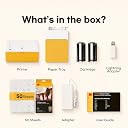
The KODAK Dock Plus is a compact 4x6 photo printer designed for smartphone users, featuring an integrated docking station that charges your device while printing. Utilizing advanced 4PASS dye sublimation technology, it produces durable, high-resolution prints resistant to fading, water, and fingerprints. With Bluetooth connectivity and a dedicated app, it offers quick, borderless photo printing ideal for home use, gifts, and everyday memories.
| Additional Printer Functions | Print Only |
| Asin | B088PRX3BD |
| B W Pages Per Minute | 1 pages_per_minute |
| Best Sellers Rank | #360 in Office Products (See Top 100 in Office Products) #1 in Desktop Photo Printers |
| Brand | KODAK |
| Built In Media | Paper, Toner Cartridges |
| Color | Yellow |
| Color Depth | 24 bpp |
| Color Pages Per Minute | 1 pages_per_minute |
| Compatible Devices | Smartphones, Tablets |
| Control Method | App |
| Controller Type | Android, iOS |
| Customer Reviews | 4.2 4.2 out of 5 stars (20,051) 4.2 out of 5 stars |
| Duplex | simplex |
| Global Trade Identification Number | 00192143002628 |
| Hardware Interface | USB Type C |
| Ink Color | Yellow, Magenta, Cyan, Black |
| Item Dimensions D X W X H | 4.5"D x 8.5"W x 2"H |
| Manufacturer | Prinics Co., Ltd. |
| Maximum Copies Per Run | 1 |
| Maximum Copy Resolution Black And White | 300 dpi |
| Maximum Copy Resolution Color | 300 |
| Maximum Copy Speed Black And White | 1 pages_per_minute |
| Maximum Media Size | 4 x 6 inches |
| Maximum Print Resolution Black And White | 300 dpi |
| Maximum Print Resolution Color | 300 |
| Maximum Sheet Capacity | 20 |
| Model Name | Dock Plus |
| Model Number | PD460 |
| Model Series | Dock Plus |
| Number Of Drivers | 2 |
| Number Of Trays | 1 |
| Other Special Features Of The Product | Borderless Printing, Docking |
| Output Sheet Capacity | 50 |
| Paper Size | 4 inch x 6 inches |
| Print Media | Glossy photo paper |
| Printer Connectivity Type | Bluetooth, Docking |
| Printer Output Type | Color |
| Printer Type | 4PASS Dye Sublimation |
| Resolution | 300 |
| Scanner Type | Photo, Portable |
| Specific Uses For Product | Home decoration, gifts, holiday presents, printing photos, sharing with friends and family, Office, School |
| Total Usb 2 0 Ports | 1 |
| Total Usb Ports | 1 |
| Unit Count | 1 Count |
| Upc | 192143002628 |
| Warranty Description | 1 year |
| Warranty Type | Limited Warranty |
User
Grea little photo printer
Works great. I love it. Very simple. Great photos
User
Love this product!
Although I’ve only had this for a week, I’m loving this printer! I’ve printed nearly 200 photos with it and it’s worked very smoothly. There have been a few times where I had to restart it (maybe twice in all of the photos so far). But it adjusted itself and went about its business. Honestly, my favorite purchase in like 5 years. Having tangible photos on demand is amazing! Simple, affordable, and practical.
User
People take pictures with their phones, I would not recommend
Great small printer. I would probably not buy again due to people using their phones to take pictures. I would send it back but directions don’t tell you how to put it back so it will fit in the box.
User
Very poor instructions. For something so simple, instructions should have been easy.
For something you might think should be simple... print a picture from my phone, Kodak made it incredibly difficult. First, the instructions are so TINY I had to scan them into my computer and enlarge them. Even then, at the largest I was able to clearly make them, they were so small they were difficult to read. I suggest buying a microscope with this product to read the instructions. Then again, the tiniest instructions were just the safety precautions, so I suppose you can get by without reading those.The instructions leave so much out. "Just launch the app, choose photo, select print number, select printer icon." Right. Very little in those steps matched what we experienced on our phone. In the instruction images, step 3 has a hand pointing to the lower right icon that says “copy.” The instructions call that “Select print number.” I can’t imagine how those relate. The instructions just leave it there.There is an extraneous asterisked note: "*Select SNS if you want to print the photo from it." Nothing else about SNS in the instructions, just a random phrase in the "Printing in the App" portion. Nothing in the text above that linked to the asterisk.First, don't download the app until you have the printer connected to your phone through your Bluetooth configuration. Otherwise, on Android, you'll repeatedly be taken to the system app settings page instead of the app. You'll have to uninstall the app, turn off the printer, turn on the printer, connect the phone to the printer through Bluetooth, and reinstall the app to get it to work.In the app, the Bluetooth icon starts red. When the App's Bluetooth icon is YELLOW, it's ready to print. Yellow doesn't indicate to me something is ready. Green or blue would have been more appropriate for "ready" or "go."For some reason, the phone's native photos received a warning about low resolution. So far, only photos received from another phone seem to be full resolution. We didn't notice a difference in print quality, however.If you get a "jam..." good luck. On the second photo we tried to print we received a paper jam. It didn't look crumpled or mutilated, it was just half-way through the printer. We followed the instructions on "Paper jam." The printer made a bunch of noises. The paper stayed in place. We had to remove the paper tray and the ink cartridge and pull very hard to get the paper out. It ruined the paper in the process. It appears we can only load one page into the printer at a time or it "jams." We don't want to waste the paper, so we're hesitant to load more than one sheet at a time.Finally, the printing process is slow and cumbersome. It prints the photo in four SLOW passes. Yellow forward and back, Magenta forward and back, Cyan forward and back, and a clear coat pass called "Protect" forward and back. I expected more advanced technology at this stage in the game.We're very disappointed in this printer. If I had known how poorly designed it is, we'd have paid a bit more money and chosen a better product.
User
Took a while to get it working.
The setup was some what easy but the instructions were terrible. If you know how to do a simple setup and are somewhat familiar with your phone you'll be ok. The picture quality was ok it's a little grainey, i had to uninstall and reinstall the app to finally get it working. So if you have trouble and it just says aligning paper for a while do that and it should work.
User
UPDATE!!! With a humongous thanks to KODAK
Shout out to Kodak Photo Printer Support for EXCELLENCE in customer care.This company has the absolute best customer service I've encountered in a long time. This thing was a huge frustration and I was clear about that. They responded and offered to "trade" my yuk one for a new one. Their communication was courteous, respectful and PROMPT! They reached out after my complaint - within a day. And from there, communication was consistently excellent. I am so appreciative of my new printer! I have not gotten to try it out yet - I will this weekend and will add pictures. I just had to take a moment to send a huge shout out to Kodak Photo Printer Support | Prinics.#kodakcares #kodakphotoprintersupport #Prinic #kodakWhen I see or experience excellent customer care, I like to share share share the joy!First time I went to print, it printed yellow and pulled the page in to print magenta and stopped, then spat out a strip of ink-film with my yellow layer and apparently the ink cartridge was destroyed.I took so long to try it that I am past return period so…will order another film cartridge and hope for the best.What a totally frustrating situation!
User
A huge hit for family gatherings and personalized gifts!
I’ve used this Kodak Dock Plus printer several times now, and it works wonderfully! It has been great for making Christmas presents and printing off favorite photos for friends and family. I also bring it along to family gatherings—it’s so convenient that everyone can easily connect and print their favorite phone pictures on the spot right before heading home. The print quality is great, setup is simple, and it makes sharing memories effortless. Highly recommend!
User
AMAZING
LOVE LOVE LOVE! So much nicer than having to print at CVS! I have no problem connecting wirelessly. Super user friendly interface. Fits well in my small apartment. I only wish the printer cartridges were more efficient and had more ink!
User
Very good
the macanin is easy to use and beauitful ,i used is very handly and easy to use at home .
User
Amazing Product
This was amazingly great… It arrived in proper condition and it’s working was too good
User
Amazing
This printer is small and compact. Very easy to use. Printer quality is good.
User
Goede kwaliteit
Bijzonder klein maar terdege professioneel printertje
User
とても良い
操作が簡単で、とても綺麗に印刷されます。
Trustpilot
2 weeks ago
2 days ago