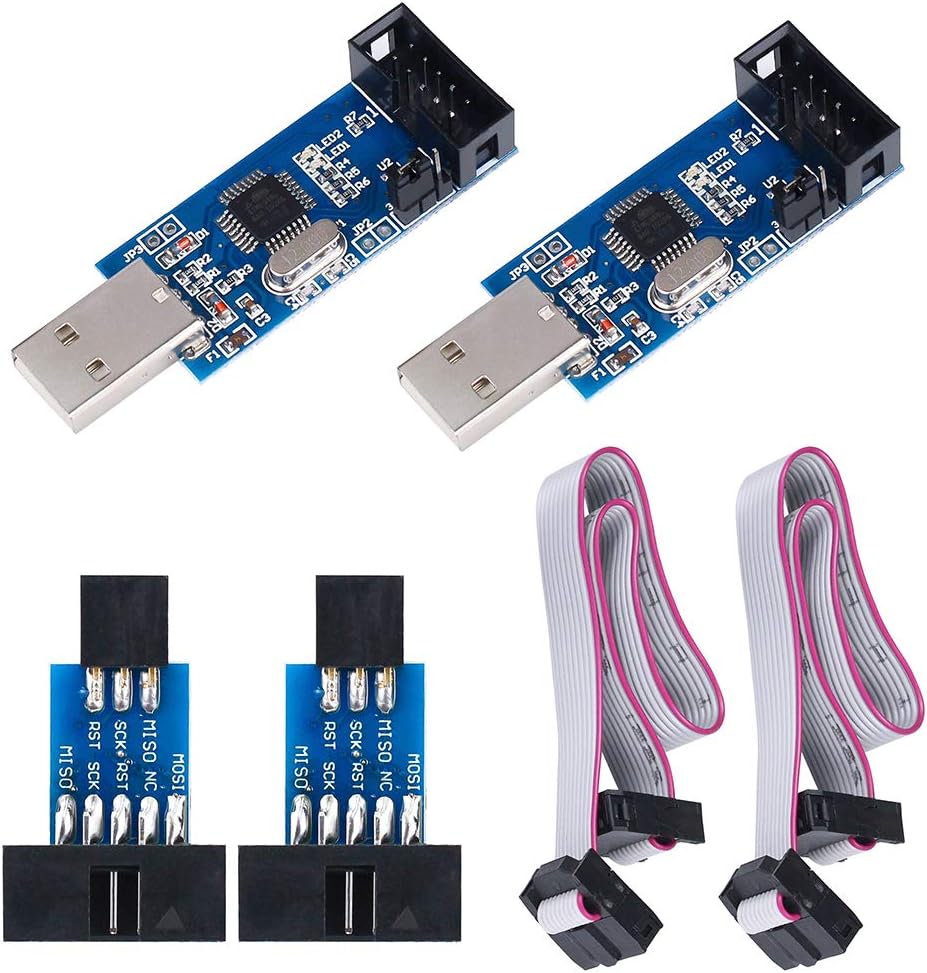
2pcs Downloader Programmer for USBASP for ISP with Cable and 10Pin to 6Pin Adapter Board for 51 for AVR Series Microcontroller
Product ID: 208560900
⚡Dual 3.3V/5V output voltage
🔄AUTOSPEED auto frequency tracking
🔌10Pin to 6Pin ISP adapter included
Desertcart purchases this item on your behalf and handles shipping, customs, and support to EGYPT.
⚡ Power up your programming game with smart speed and universal voltage!
This 2-piece USBASP downloader programmer kit supports both 3.3V and 5V microcontrollers, featuring automatic speed regulation firmware and a handy 10Pin to 6Pin ISP adapter. Compatible with a wide range of AVR and 51 series chips, it connects directly to Windows XP through 8.1 PCs via USB for easy, reliable in-system programming. Firmware upgradeable and equipped with onboard protections, it’s the essential tool for efficient microcontroller development and prototyping.
| Best Sellers Rank | #4,519 in USB Cables |
| Customer Reviews | 4.3 out of 5 stars 155 Reviews |
B**E
Beware of the high memory glitch !
My boards worked right out of the box and had the 1.04 firmware. I was programming UNO's right and left. But I hit a glitch when I tried to program a Mega2560. It seems to work fine under the Arduino IDE but loading a big program (FlashForth) with avrdude was a total failure. It seems there is a firmware glitch in the 1.04 firmware for memory > 128K. After 2 days of effort I found an excellent website that explained the glitch and had a revised firmware 1.05. I flashed one of my usbasp's , uploaded Flashforth to my Mega2560, and it worked flawlessly! I don't know if I can put a website address here, but search for "Mega2560 usbasp mystery" and you will find it. On a side note, I see different jumper numbers on the reviews from the boards I got. Next to the 3.3V/5V 3 pin jumper is a 2 pin jumper labeled JP1. This is the pin I needed to short in order to program the usbasp module. Sitting by itself on the other side is a jumper without pins labeled JP3. I think this is the sck jumper but I have not needed to use it for anything. I would upload a picture, but I have a new Mega2560 FlashForth computer to play with right now!
A**D
Works perfectly
These worked perfectly to do some ISCP programming on freshly manufactured Arduino-compatible boards with blank microcontrollers. I was also able to use it with a board with a ZIF socket for DIP parts. I've programmed about 200 boards without any issues.
J**0
Upgraded to the latest firmware, worked perfectly for my needs after that
The product came sealed in individual static bags per part. Unfortunately, it was shipped in a rather soft envelope, which didn't provide much protection. Lately I've had several packages shipped this way that were damaged in transit. In this case, I got lucky! No damage. Flux was generously applied, and not removed from the smaller boards, but is easy to do gently with some rubbing alcohol. Do this first, as it's sticky stuff, and can make a mess. Some connectors are at minor angles, but everything was soldered solidly and fully functional. When going to use your programmer, you may see the following message. avrdude: set SCK frequency to 500 Hz avrdude: warning: cannot set sck period. please check for usbasp firmware update. To upgrade the firmware, you will need to first populate JP3 and JP2. Attached image shows my board, with those two jumpers populated. If you don't have the ability to solder on the jumpers, a wire, or clip can be used as it will only need to be there for a few minutes during the upgrade process. Just make sure you have a solid connection. JP2 will enable “ISP self-programming” JP3 will enable “Slow-SCK” These both need to be jumped on **the device that you are upgrading** they do not need to be jumped on the other device. I then used one programmer to program the other, and then reconfigured and did the same process a second time, to have two fully up to date devices. I used avrdude on windows. Drop the default avrdude.conf and firmware file into the same directory as avrdude if you want to reuse this line as-is. avrdude is included with the arduino ide application, so if you have that installed, you already have it on your machine. avrdude -C avrdude.conf -p atmega8 -c usbasp -U "flash:w:usbasp.atmega8.2011-05-28.hex:i" -F -P usb The next time I used the device, the warning was gone. I programmed an atmega328p successfully with several different sketches, and changed out a bootloader on another arduino board to test it out. Everything worked as expected!
H**E
Works well with AVRDude
Both boards work as expected. The boards I received had outdated firmware, but it was easy to solder a jumper at JP2, and upgrade to the latest firmware (from 2011!) using AVRDude. Use one device to update the other, then swap JP2 from one board to the other, and update the second board as well.
F**M
Works Great
These are really nice for programming microchips (for me ATMEGAs and ATTINYs) without having to put the ArduinoISP sketch on the Arduino, upload the code to the microchip, then upload a new program to the Arduino. I am not sure if this is normally the case with USBASPs, but this one does not show up as a serial port on Arduino. The Arduino IDE still uploads to it just fine. However, if there is a connection issue between the USBASP and the microchip, the Arduino IDE will say that there is nothing plugged into my computer. If I use an Arduino as a programmer instead, I get en error like "avrdude: yikes! Invalid device signature: 0xFFFF [or 0x0000]".
R**N
Works, with some modifications.
I bought this to flash updated firmware to an Ender 3 3D printer with a 8 bit v1.1.4 mainboard. They work, but they need some modifications before they're truly usable. They come with outdated firmware and lack the pins and jumpers required to flash new firmware to the USB ASP programmers. I was able to solder in pins I had laying around from a different project to get them to work, but they should have been included by the manufacturer. Zero Amps Electronics on Youtube has great tutorials on how to set these up. I found the libusbK driver to work better than the one he chooses to install, but your mileage may vary.
C**S
They work!!
Can’t speak for other suppliers programmers but these work very well with Aatiny chips. Ease of use is a real asset. Download the correct driver and start programming.
B**N
EVERYTHING I Needed. Worked great
I needed to flash update one of the new little ATS-20 multi-band receivers. The programmer, cable, and 6 pin adapter provided all the hardware I needed to smoothly accomplish the project. No hidden issues.
A**N
USBasp.
Envio muy rapido. Los programadores bien trabajados. Win 10 los reconoce pero hay que actualizar el driver y el firmware.
B**S
Works on Linux running the Arduino IDE
Yes, the firmware is ancient. However, even with the old firmware it was possible to program an Arduino Nano plug and play using the Arduino IDE in Linux. The serial port does not show up in the IDE but the avrdude software connected and uploaded the project file. No USB driver installation required. Updating the firmware is easy in the Linux environment following the instructions available online.
Y**Y
Naja ...
Wie schon viele andere geschrieben haben, ist die Firmware nicht auf dem letzten Stand und es ist keine Anleitung dabei, was das Update angeht und leider hat es hier auch sonst niemand geschrieben. Man findet dann raus, daß man nach USBASP und Firmware googlen muß, findet "fischl", stellt fest, daß man den J2-Jumper selbst nachbestücken muß, lädt sich von fischl das Hex-file und liest sich in AvrDude ein, fragt sich kurz, welchen Prozessor-Code man braucht (bei mir für diese Programmierer m8) und presto: avrdude -P usb -c usbasp -p m8 -e -U flash:w:usbasp.atmega8.2011-05-28.hex Das Vorgenannte funktioniert für Linux. Unter Windows könnte das Port-Argument (-P) anders aussehen. Dann will man mit seinen eigenen Platinen weitermachen. Also, generell geht es. Vermutllich kann man es nicht der hier gekauften Hardware anlasten, daß AvrDude im Zweifelsfall blind mit zu hoher Geschwindigkeit arbeitet und einfach nichts erkennt, außer man sagt ihm extra, daß er langsamer machen soll. Also beispielsweise: avrdude -P usb -c usbasp -p m168pb -B 10 -t wobei "-B 10" sagt, daß ein 10µs-Takt zu nehmen ist. Ohne diesen Parameter wurde mein mit internen 8 MHz laufender ATmega 328PB nicht erkannt. Was ich außer der alten Firmware und nicht vorhandenen Doku kritisiere, ist die nicht so tolle Qualität. Die Platinen sind teilweise dick mit Flußmittel (?) verkrustet und bei mir läuft nur eine von beiden stabil, die andere wird oft am USB gar nicht erst erkannt. Ein weiterer Kritikpunkt sind die viel zu fest sitzenden Steckverbinder. Das ist grenzwertig. Reinzu und auch rauszu. Last not least: Die Kabel sind falschrum durch die Zugentlastung geführt. Dadurch will das Kabel immer in Richtung USB-Stecker, d.h. quer über die Tastatur des Notebooks. Sehr nervig, wenn die eigene Hardware nur paar Gramm wiegt und das Notebook ein Metallgehäuse hat. Das kann leicht nen Kurzschluß geben. Ach ja .. Im Original sind es eine rote und eine grüne LED, hier sind es zwei winzige rote dicht beieinander, d.h. man kann nicht so leicht erkennen, was da gerade leuchtet. Aber es ist ein preiswertes Angebot, keine Frage.
M**.
Perfetto, ottimo prodotto a ottimo prezzo.
USBASP già aggiornato alla più recente versione di firmware. Impiegato con AVRDUDENESS e AVRDUDE, non è stato necessario installare alcun driver particolare sotto WINDOWS 10. Consigliato sia per "riflashare" Arduino, sia per programmare AVR in applicazioni dedicate, senza la necessità di ricorrere alla scheda di sviluppo e risparmiando eventualmente l'area di flash memory normalmente impiegata per il loader.
J**S
Works. AVR ISP revived a 2560 board
I could revive my 3D printer main board. An Arduino 328 could have done the trick, but it's nice to have this programmer available when needed.
Trustpilot
3 weeks ago
1 month ago