We remain fully operational. Our teams are working around the clock to ensure your deliveries continue safely.

قم بتنزيل التطبيق


معلومات عنا
حقوق الطبع والنشر © 2024 Desertcart Holdings Limited
قم بتنزيل التطبيق
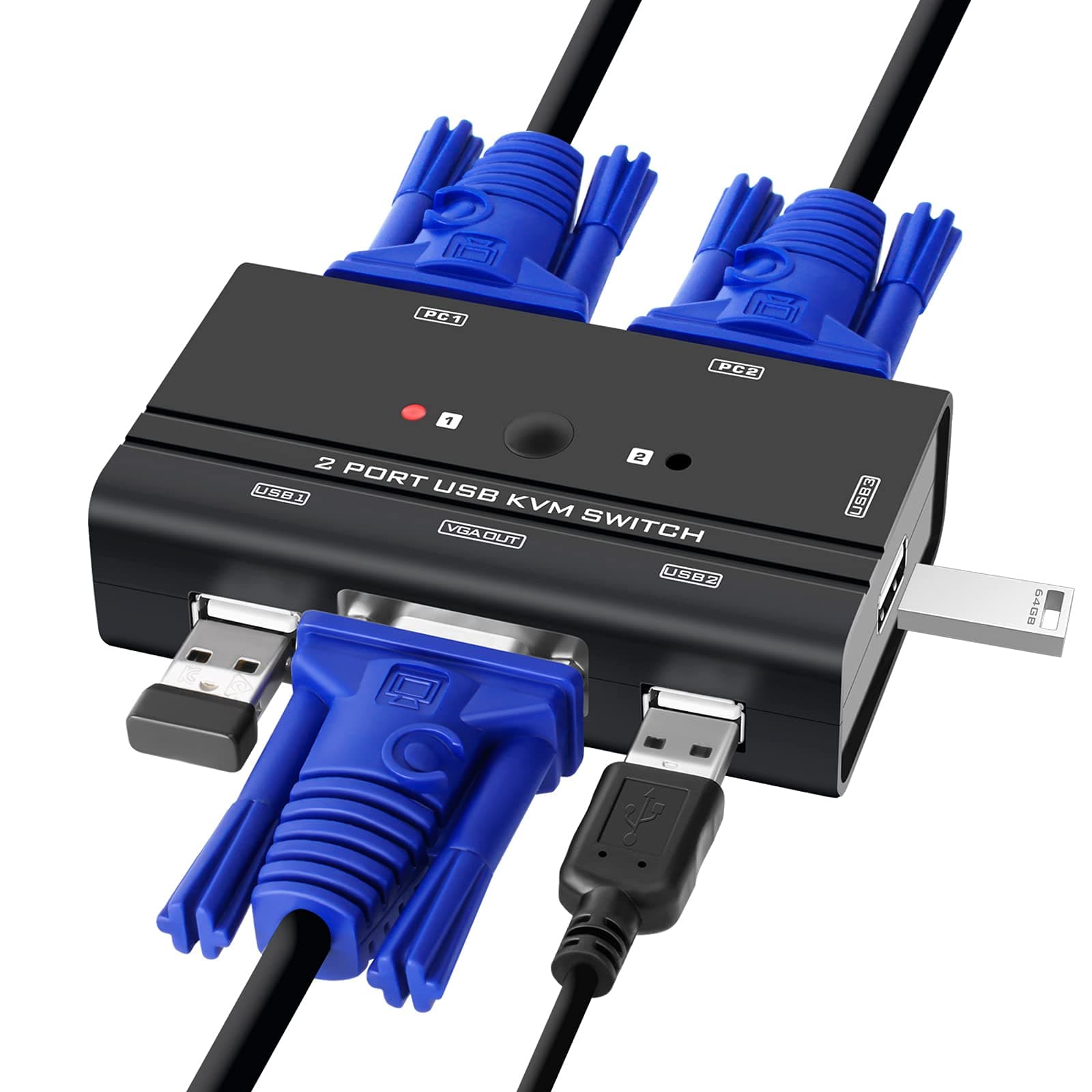
🔄 Switch Smarter, Work Faster — Own Your Multi-PC Command Center!
The TCRAYCH 2-Port VGA KVM Switch lets professionals control two computers with one keyboard, mouse, and USB devices. It supports up to 1920x1440 resolution for crisp visuals, requires no external power or software, and is compatible with major operating systems. Its compact design saves desk space while delivering seamless switching via a simple push button and LED indicators.


| ASIN | B077QC7GNV |
| Actuator Type | Push Button |
| Best Sellers Rank | #304 in KVM Switches |
| Brand Name | TCRAYCH |
| Circuit Type | 2-way |
| Color | Black |
| Connectivity Protocol | Usb |
| Connector Type | Plug In |
| Contact Material | Metal |
| Contact Type | On-on |
| Control Method | Touch |
| Current Rating | 1 Amps |
| Customer Reviews | 4.2 4.2 out of 5 stars (1,020) |
| International Protection Rating | IP54 |
| Item Dimensions | 3.54 x 1.97 x 0.79 inches |
| Item Weight | 200 Grams |
| Manufacturer | TCRAYCH |
| Material Type | Acrylonitrile Butadiene Styrene |
| Model | VG-2P |
| Mounting Type | Plug-In |
| Number of Positions | 2 |
| Operating Voltage | 5 Volts (DC) |
| Operation Mode | ON-ON |
| Switch Type | MOSFET |
| Terminal | Insert |
| UPC | 604339701883 |
| Unit Count | 1 Count |
C**N
Works
Works just as advertised! Good quality!
D**E
Best purchase ever!
So i have an old monitor from my basement which uses dvi ans also vga. Im using 2 laptops, one is a lenovo ans the other is a surface. Im using docks for both of them, one is a mini usb-c dock with the lenovo and the other is a mini display dock with the surface. It was challenging to try get the right cables. I bought the dvi to mini display output and the monitor still wont connect. There is no vga output on the surface or the surface dock. So i ended up buying a vga to mini display converter. After returning 5 different cables since none of them is working, i found this! Attaching the main vga from the monitor to the device and then attaching the vga from the device to the lenovo dock and doing the same thing, vga to the converter and to the surface dock, now it works. A simple button and it goes from one laptop to the other. No hassle at all! However, as one review did mentioned is that, the quality output on the monitor screen is very compromised. Just keep that in mind but it does the job. So thank you to the seller for selling this at an affordable reasonable price!
J**G
Great price and works well but limited uses a lot of ports
Maybe it's a standard thing with a KVM switch as that I really don't know much about them but it requires not only a connection to the VGA port on each PC but also a free USB port on each. This forced me to move some things around a bit. Other than that, the setup was relatively easy and didn't take much time. So far, it seems like the pictures on the monitor from each computer are crisp and clear and I couldn't ask for more in that regard. Great price too compared to some of the other options. All thing considered, it is a solid buy.
R**H
204 single mouth and single keyboard and single monitor for
I actually have it use this yet. I bought this to work on two different computers while I’m changing one over I don’t wanna have to have two sets of keyboards two sets of my two sets of monitors. The customer that I was doing some work for had something like that, they had eight ports, which is kind of cool, but I really just need it for two just to switch back-and-forth so I don’t have to have a bunch of keyboards and a bunch of mice and a bunch of that terminal display terminal
M**K
UPDATE
I am changing my initial rating to 1 star. Port 1 stopped working after 3 months, along with the USB slots. It also burned out the USB dongle for my wireless keyboard and mouse. The switch worked perfect right out of the box. It DOES work with Linux. I use Linux Mint, but I'm sure it will work with any other Linux OS. The only gripe I had is that the cables are short. I had to buy a longer cable for one of my PC's that sits further away. Here's the link for the longer cable I bought: https://smile.amazon.com/gp/product/B000P24YBY/ref=ppx_yo_dt_b_search_asin_title?ie=UTF8&psc=1
J**K
Perfect Solution
I wanted my single monitor, single keyboard and single mouse, colocated on my stand up desk to quickly and painlessly switch between 2 laptops (home and work laptops). This was perfect! Easy to set up to both laptops to the KVM switch and the monitor to the KVM switch, plugged in my keyboard/mouse wireless receiver into one of the 3 USB ports on the KVM and presto; with a simple button press on the KVM switch I can switch between the two laptops (1-2 second delay on my monitor). I also found that I can plug a thumb drive into one of the KVM USB ports and can access by whichever laptop I have selected. For some reason, I can’t charge my iphone from the KVM switch (it does for a second then stops). I’ve been using this for a little over a month and it has been a game changer for me. I do have 2 cables to disconnect/connect each time I want to take my laptop somewhere else (one monitor and one USB) so take that into account if you are considering.
A**R
Very Useful Switch
I have a home PC and work PC that occupy the same space and this has allowed me to consolidate the screen for the work PC & double my home PC. For those long term working from home professionals or students, this is a great piece of hardware to have. It has been dependable, discreet and functional. For the techies, I have work laptop and a home desktop that I tie into 1 desktop screen. Since the space is tighter than I like (I have a standard size hutch, so largest screen to fit is 27 inches) and the switch allows me to expand the work PC to the larger 23 inch screen or return to my home PC. All I can say is a great set up.
C**E
Downgrades video quality
Good price and arrived on time. Your ONE VGA monitor/screen cord attaches to this KVM switch. ONE USB mouse and ONE keyboard you want to share between two computers also goes into the KVM switch. (It has 3 USB inputs) Two cables are included with the product. The two cables also attach to the KVM switch. The other end of each cable is a joint VGA/USB. Attach both VGA and USB end of the first cord into Computer A. Do the same for Computer B with the second cord. Turn both computers on. The KVM switch has an A/B button. When you press it, it'll switch between the two computers. But it's only one monitor you're using. Whichever computer you've selected will come up on the screen. And the same singular mouse and keyboard will be operable regardless of which computer you've selected. CON: For me, there was a noticeable loss of video quality. The screen for either computer looks fuzzy/blurry. If I DON'T use the KVM switch and hook up the monitor to one computer at a time, the video image looks fine. Filtered through the KVM, quality is lost. Basically, the KVM switch causes the two attached computers to have a loss of video quality when they go into the monitor. Not terrible, but definitely noticeable. The mouse and keyboard work just fine regardless of which computer is selected, no complaints about the USB functionality. FOR ME: My monitor actually has two inputs, so I got two separate VGA cables and ran each from the ONE monitor to the two computers. I still use the KVM switch for its USB switching. The ONE mouse and ONE keyboard are used for both computers, I hit the A/B button on the KVM switch to change computers, but I don't use the VGA connections from the KVM because of video quality loss.
K**R
Mine was dead. No sign of life. Not the first time a China-made product was a dud. Last time it was a thermostat panel with an incomplete circuitboard that didn't connect to power.
ترست بايلوت
منذ يومين
منذ أسبوعين