Desertcart purchases this item on your behalf and handles shipping, customs, and support to EGYPT.
🎬 Elevate your video calls with studio-grade clarity and sound — don’t just show up, stand out!
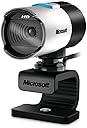
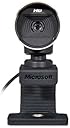
The Microsoft LifeCam Studio 1080p HD Webcam delivers professional-grade video and audio with a 1080p widescreen sensor, TrueColor Technology for vibrant visuals, and a high-fidelity microphone for crystal-clear sound. Featuring advanced auto focus with precision glass optics and digital zoom controls accessible via Skype, it’s designed for sharp, natural video conferencing and streaming. Compatible with Windows and USB-enabled PCs, this sleek gray webcam offers a durable, long-lasting solution with a 3-year warranty, perfect for professionals seeking standout presence in every virtual meeting.


| ASIN | B0042X8NT6 |
| Best Sellers Rank | #285 in Webcams |
| Brand | Microsoft |
| Built-In Media | USB Cable |
| Camcorder Type | Video Camera |
| Color | Silver |
| Compatible Devices | Personal Computer |
| Connectivity Technology | USB |
| Customer Reviews | 4.2 out of 5 stars 722 Reviews |
| Digital Zoom | 3 x |
| Display Resolution Maximum | FHD |
| Effective Still Resolution | 5 mp |
| Effective Video Resolution | 1080 pixels |
| Exposure Control Type | Automatic |
| File Format | JPEG |
| Flash Memory Type | SD |
| Flash Memory Video Speed Class | V10 |
| Focus Type | Auto Focus |
| Form Factor | Standalone |
| Global Trade Identification Number | 00885370139808 |
| Image Aspect Ratio | 16:9 or 1.78:1 |
| Image Capture Speed | 30 frames_per_second |
| Image stabilization | false |
| Item Dimensions D x W x H | 7.5"D x 2.66"W x 8"H |
| Item Weight | 4.48 ounces |
| Lens Type | Wide Angle |
| Manufacturer | Microsoft |
| Maximum Aperture | 1.8 f_stop |
| Maximum Focal Length | 192 centimeters |
| Minimum Aperture | 1.8 f_stop |
| Minimum Focal Length | 108 centimeters |
| Model Name | Microsoft LifeCam Studio |
| Model Number | Q2F-00001 |
| Photo Sensor Technology | BSI CMOS |
| Screen Size | 3.5 |
| Sensor Type | BSI CMOS |
| Shooting Modes | Automatic |
| Special Feature | Low Light |
| Style Name | Retail |
| Supported Audio Format | MP3, WAV |
| Supported Image Format | JPEG |
| UPC | 999996731916 885370139808 |
| Unit Count | 1 Count |
| Video Capture Format | MP4 |
| Video Capture Resolution | 1080p |
| Video Resolution | 1080p |
| Warranty Description | 3-year limited warranty |
| Water Resistance Level | Not Water Resistant |
| White Balance Settings | Auto |
| Zoom | Digital |
A**N
Great webcam
Looked around for a while for a webcam for chatting with my wife while she in France, and it came down between the Lifecam Studio and the Logitech C910. I saw a couple of reviews demonstrating the Lifecam Studio and the Logitech C910 side by side. After seeing the reviews I decided to try the cheaper Lifecam Studio because it seemed to have better performance overall. I have had this camera for almost a month now, and this camera does not disappoint. This camera has better colors and adjusts its brightness in low light conditions better than the C910 seemed to. The auto focus is very responsive and the microphone is sensitive enough so that you don't have to raise your voice louder than normal speaking levels to be heard, and does an ok job cancelling out background noise. Don't let the "1080p HD" fool you. This does not record or display 1080p video. It only takes pictures in a 1080p resolution. But it does have a better output than any other camera on the market as of this review that I have seen. Overall, for the money, you won't find a better webcam with a better picture. The Lifecam Cinema has an ok picture and the microphone is almost as good, but for $15.00 more just buy the Lifecam Studio and get the top of the line. You won't have to buy another webcam for at least 5 years with this camera in my opinion.
S**R
Works fine with Windows 10, settings can be adjusted via Skype!
This review is for the "Microsoft LifeCam Studio 1080p HD Webcam - Gray" in case you find it under another product. I was looking for a new webcam for the frequent Zoom meetings I attend. The main requirement was the camera's viewing angle had to be narrower than the wide-angle view provided by nearly every other less-expensive webcam. This can only be obtained via optical zoom (preferable but unavailable at this price point) or some form of digital zoom effect. The reason this is important for online conferencing via Zoom and related systems is that the normal wide-angle view makes your face too unimposingly tiny, especially in "gallery" view. Imagine my surprise when I found a whole slew of camera controls in the Skype settings menu (ridiculously, they aren't even available via the Windows 10 camera app.) Among the controls that are adjustable is a digital-zoom setting -- exactly what I was looking for! How to take advantage of this in Zoom: Open Skype, adjust the settings for the camera using the Skype Audio and Video settings controls. Remember to hit the "Apply" button on both settings windows. Exit Skype and start Zoom and the camera settings will have been preserved between the two applications! Using this procedure and sitting about a foot from the camera, I was able to get my face to fill at least 3/4 of the screen height, the exact effect I was after. I've only tested this with Zoom so I don't know if it works with other conferencing or picture/video software. But it's good enough for my purposes, especially since I bought this model back in 2012, way before there ever was Zoom. BTW, this camera's image quality from the start has been extremely good and it is still competitive today.
N**2
Great picture, great sound, need fast machine
Been playing with the LifeCam Studio for a couple weeks now. I really like the quality of the video it produces, though calling it a 1080p camera is a bit of a stretch since it doesn't do 1080p out of the box with the software it comes with. Though, it's not like Skype or Live Messenger will do 1080p video chats anyway, so it's not that big a deal, the 720p video it captures is way better than the other cameras I've seen. If you want to record in 1080p with the lifecam studio, you'll have to use something like VirtualDub (freeware). I do like that it's Microsoft's and they have a much better track record of releasing firmware/driver updates than most vendors <cough-Logitech>. My last camera I had for 3 years with no driver updates, no firmware updates and they didn't even make a Windows 7 driver for it. This camera has had 2 firmware updates and at least one driver update. That means they're serious about improving the experience with it. The camera picks up an image very well, even in super low-light situations. I turned off all my lights and just had the monitor going, it is able to lengthen the exposure or open an iris or something to make my face really clear still. The other cameras I tried didn't fare nearly as well. The camera's microphone is also very sensitive and sounds great. Which is good and bad. While chatting, every move in your chair is caught, every throat clearing heard, and yes, people can hear you belch or break wind. Farters beware, they will hear you. "Did you just fart?" "Uh, no...that was this old chair" The reason I gave it a 4 instead of a 5 is because it needs a fast machine to get the full HD video at a fast frame-rate. I have a dual-quad core computer with 12GB of RAM and a giant radeon graphics card and I get fantastic video at over 30fps. Other people have complained about how bad the refresh rate is, which I didn't see on my computer. When I moved it to my weak-arse laptop however, I did notice a slower frame-rate at the high resolutions. I guess that's to be expected until someone creates a camera that offloads all the image processing to an on-camera chip. I don't really see this as a problem with the camera though, more a problem trying to do more than the computer is able to do. Want it to go faster, use a faster machine. It's like watching full-screen HD videos downloaded from the internet with older machines. You wouldn't blame Media Player if it's choppy, you'd blame the slow processor and weak graphics card. Same principle in my mind. All in all I think it's a great camera at a great price.
A**.
Works with Windows 10
I read a bunch of reviews before buying a webcam. A few on here said this webcam didn't work with windows 10. It does indeed work on windows 10. I ignored the disc that came with it since I assumed everything on it was old and the drivers online would work. The USB plug had a sticker saying to install drivers before plugging it in so I went to Microsoft's website and searched for the driver. The driver I downloaded was intended for windows 7 and would not install so I decided to just plug it in since windows 10 is pretty good at trying to find drivers for anything you plug in. I had one more issue after windows set the device up. I had previously disabled camera access in my windows 10 settings for all apps. After turning it back on I was able to use the webcam with no issues. The auto focus is a little weird sometimes (especially in lower light) but if you put your hand up in front of the camera, it readjusts. The quality is much better than cheap webcams and laptop webcams I've used in the past. The base moves like a snake and is able to be shaped so you can mount it anywhere. The tripod screw also is convenient if you are trying to record on the go.
D**E
Great Webcam
Really satisfied with this webcam! Did the job and set up on Clipchamp went smoothly. So glad I made this purchase. The Solocast 2 mic was a different bad story. Returned the mic for a different one; kept the webcam.
C**R
Pros and Cons ----- Look at my UPDATE
Pros: Great image clarity. Not as "jerky" as most pc video cameras are with moving objects. Fun editing app with fun effects. Camera is in metal casing. Better then most in low light situations, although it does get a little "grainy". Cons: Auto focus feature is quite annoying. It will periodically (ranging every 3 - 5 minutes) "adjust" its focus, making entire image blur for several seconds, then comes back into very crisp focus, where it was before it auto focused itself. It would be better if the operator could tell it when to auto focus, maybe by clicking a button within the software, instead of it randomly doing it. Recommendation: What for it to be on sale. Personally, I would wait for 40% off or more before purchasing another. But would purchase another. ========================================= **UPDATE DO NOT RUN THE FIRM WARE UPDATE FOR THIS CAMERA!!!! I did. Now the camera is useless... no computer recognizes it.. even when manually looking for it via which "drive" it is plugged into. Tried it on 4 different computers. The light on the camera itself does not even light up.. It is now a useless paperweight. And this from such a pricey camera compared to the rest of the market????? VERY DISAPPOINTED!!!! Should have known better then by an MS product.
K**R
Worked on first shot
Tried and true. I've bought dozen's of these over the years for myself, family and clients. They work out of the box, the camera is very clear and the mic works great. I've used many other's from other companies, but this is still my goto is I get a say in the matter.
L**R
LifeCam Studio vs Logitech C270 vs Logitech C920
TL;DR - C920 has best image quality, but C270 is a better value proposition. All three cameras stream video at 720p unless you are using Zoom, in which case the C920 is capable of 1080p. C270 captures less background due to smaller sensor, not as good if you are trying to record an activity or more than one person but better if you are trying to only capture your head and shoulders for work meetings. I ordered the LifeCam Studio($64), Logitech C270($22.99), and Logitech C920x($59.99 with $10 'limited time' discount) cameras to compare. All three cameras worked immediately upon being plugged in on a Windows 10 Enterprise laptop from Dell. I will be posting this review on all three cameras. All three of these cameras stream at 720p using WebEx, and indeed the fine print on the LCS and C920 state '720p video calls', so they are not capable of streaming at 1080p despite the 1920x1080 sensor (C920 can do 1080p with Skype only). My limited testing was using the drivers Windows assigned upon plugging in the devices in a relatively high-light environment. I will update with observations in low-light scenarios. C270: The cheapest of the cameras with a 1280x720 sensor, this camera had the worst color accuracy but surprisingly decent picture quality in terms of sharpness considering price. As seen on the photos, there is a blue tint to the image but that may not be the case in low-light environments with warm light. Since it has a native 720 sensor, it looks a little more zoomed-in than the other two, but that means less background which I actually prefer. ** I'm cheap when it comes to equipment I'm buying myself for work and the other cameras didn't offer sufficiently better performance, so I'm keeping this camera. ** C920x: Best color accuracy, best picture. You can tell it has a 1080 sensor as there is a lot more background than the C270, I don't want more background so this is a tick against in my view. Life Cam Studio: Color accuracy is off, in high-light environment it gives a reddish tint and makes my face look like I'm flushing.. but you can tell I'm not from the other pictures. Again, 1080 sensor includes more of the background which I didn't want for WebEx meetings. I was also disappointed with the auto-focus, picture is a little blurry even after auto-focus does its thing (which is sporadic, I was blurry for a while before it did anything)
C**E
Excelente camara
Ya tenía una cámara como estás, y la volví a comprar, excelen, muy buena imagen, plug and play, todo muy bien, súper recomendada, y al vendedor también, recomendado
U**1
Below expectations
Received not sealed, without catalog and defected (Autofocus is not working)
注**屋
MicroSoft 自身の Web 情報に虚偽がある
MicroSoft 自身の商品説明の段階では、ズーム8倍、ただし公式データ・シートでは3倍、事実は後者なので、いざ争いをするならあちらに有利でしょう。が、MicroSoft 商法?の一端が見えたようです。 商品にはソフトの添付がない、一切の説明がない - 客が調べてダウンロードしなければ機械も使えない。 もし、これが MicroSoft 自身のやり方なら 「いつもの通り」。一方、私に届いたパッケージがそういう バルク製品だったとしたら、業者が詐欺に近いことをやっていると言えます。 お値段がこの程度なので、法的に争うメリットがありません。どうであれ、そういう価格帯で そういう売り方をするのは、一種のサギ、ペテンです。
J**C
Bon achat
Je l'aime bien!
L**.
One Star
This webcam is outdated
Trustpilot
3 weeks ago
3 weeks ago