


Desertcart purchases this item on your behalf and handles shipping, customs, and support to EGYPT.
💡 Upgrade your MacBook SSD legacy—desktop style!
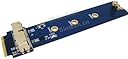
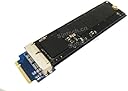
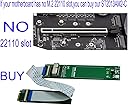
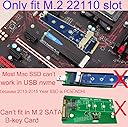
The Sintech M.2 NGFF 28Pin SSD Adapter enables professional users to read and write SSDs originally from 2013-2015 MacBooks via a desktop M-Key slot. Designed exclusively for desktop use with a slim 10mm profile, it supports key Samsung and Sandisk SSD models, offering a seamless bridge for legacy MacBook storage on modern desktop systems.



| ASIN | B0173ODBCE |
| Best Sellers Rank | #367 in Computer Memory Card Adapters |
| Brand | Sintech |
| Color | Blue Board |
| Compatible Devices | Desktop |
| Connector Type | M.2 NGFF PCI-e |
| Customer Reviews | 3.9 out of 5 stars 80 Reviews |
| Finish | Pci-e |
| Finish Type | Pci-e |
| Item Weight | 0.01 kg |
| Manufacturer | Sintech Electronic |
| Mfr Part Number | VAR7407 |
| Model Number | 2013AM2 |
| Number of Items | 1 |
| Number of Ports | 1 |
| Package Quantity | 1 |
| UPC | 701017251842 |
| Unit Count | 1 Count |
C**E
A+ reclaimed my 256 extra Apple pie SATA drive. Now dual boots linux
Easy to install IF you're a techie which I am but I can see some people not getting it right the first time because you would think that you put the drive in the mount first and then attach it to the computer but doing it that way blocks the whole you need to screw the mount into the motherboard to hold it steady so you actually screw in this first and then hand tighten in one of the carrier nuts, then insert the drive, and then insert the last screw to hold it all in. once you realize that it's literally a 30 second install and reboot and then format the hard drive from Mac if you don't want to use it as HFS and you have an additional hard drive for your machine. It will not, I repeat not run at nvme m. 2 speeds this is a satta adapter that will run at roughly 500 megabits per second, not the 3500 like most nvme drives wood in a native m. 2 slot so just know that before buying it, the Apple drives that this is made for are not nvme drives they are m. To pcie SATA drives which are much slower than nvme
B**.
Good to have aroun for testing SSD
Works fine for testing SSD at my bench.
M**N
Works, but not bootable
I was wanting to use the SSD from my dead MBP as a boot drive on my PC, but this device does not make the SSD bootable. It does however work just fine from within the OS. It only fit in my motherboard because I have two M.2 slots. The first slot had components too close to the adapter. Luckily, it just barely squeezed into the second slot. This isn't really the device's fault, though, and I can't see how it could be made much narrower. Just be sure you have enough room around your M.2 slot. All in all, I'm mostly satisfied, but very disappointed I couldn't boot to the SSD.
K**Y
Didnt work at all
It didn't work at all...the computer didnt even detect it. Too much work to return it to get my 10 bucks aback. It is what it is.
C**N
Great product!
Awesome and super useful. A little big and can be difficult to install in tight places.
A**A
Five Stars
Very difficult to find product, so it saved my life.Thanks.
A**R
Five Stars
Item received exactly as described. Fast delivery.
K**D
Works as advertised!
Installation was a breeze except for the support post for the Apple NVMe drive, that posed a bit of a "catch-22". I couldn't screw the adapter to the motherboard while the NVMe drive was attached, and I couldn't attach the NVMe drive with the board screwed onto the motherboard. In the end I just didn't screw the adapter to the MB since it felt secure. So far it works great! I haven't had any errors and the speed doesn't seem diminished by using the adapter. I am very satisfied, and happy that my 2TB drive isn't going to waste.
Trustpilot
4 days ago
1 month ago