


🖋️ Elevate your iPad Pro experience—protect, perfect, and create without compromise!
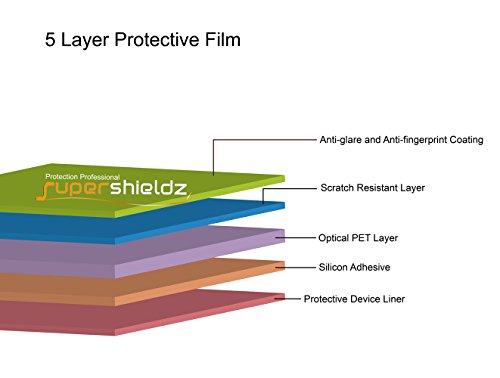
Supershieldz offers a 3-pack of high-quality matte screen protectors tailored for the Apple iPad Pro 12.9 inch (2015 & 2017). Crafted from premium Japanese PET film, these protectors reduce glare and fingerprints while maintaining flawless touch sensitivity. They shield your screen from scratches, dust, and scrapes, and are engineered for easy, bubble-free installation with no residue upon removal.


| ASIN | B015BOKLO4 |
| Best Sellers Rank | #449 in Tablet Screen Protectors |
| Color | Anti-Glare (Matte) |
| Customer Reviews | 4.3 4.3 out of 5 stars (1,537) |
| Date First Available | September 13, 2015 |
| Is Discontinued By Manufacturer | No |
| Item Weight | 4.8 ounces |
| Item model number | 3349064 |
| Manufacturer | Supershieldz |
| Product Dimensions | 12.7 x 10 x 0.2 inches |
| Special features | Anti Glare, Scratch Resistant |
C**1
An UNDERATED matte screen protector.
Screen protectors are inherently going to have inconsistent reviews. It’s hard to make a product that requires patience, skill, or common sense. I have never installed a skin protector in my life on any device. I’ve had several smart phones, and a couple tablets. I’m not clumsy, and have never felt the need to protect my screens. However, with this massive iPad Pro, I really wanted a little texture and drag for when I’m drawing, so I decided to get this protector. Supershieldz includes 3 protectors, but I was able to get it 1 try. 1 try - no bubbles, no dust, and centered... with no experience. I do not get any of the reported “rainbow” effect that people are talking about in these Amazon reviews. Upon a couple mins of research, I found that this effect is caused by cleaning the screen’s surface with the wrong type of liquid. This leaves a residue after it dries, and stays in between the iPad and the protector. I use Screen Mom because it’s 99% plant based, which is free of alcohol, ammonia, and other chemicals. In order to apply this screen protector, you really need to have patience. Seriously, prepare your screen the right way, and you’ll get what you paid for. Tip: Do not have the iPad directly below your head, this will limit the amount of dust touching the screen. You’ll want to go to Supershieldz’s YouTube video and watch it a couple times before you begin. I do NOT get the “rainbow” effect. The protector does not reduce the resolution or the image quality of the screen, but it does reduce the brightness somewhat. The matte feeling on the Apple Pencil feels good, and as a result, I see a little bit of this texture on the screen. This issue most likely caused by dirt and oil, which just needs the occasional cleaning. Does it feel exactly like paper and pencil? No, but that’s completely fine. It just gives it some texture and drag (similar to writing on very thin and smooth computer paper). This is a quality product and I was able to apply it in one try with no prior experience.
O**S
Excellent product! Also some installation tips
Overall this is a FANTASTIC product! It makes drawing and writing on the IPad SO MUCH BETTER. I can’t believe the quality for the price to be honest. There are three in the pack. It my husband try mine and he immediately wanted me to put one on his. Any protector with a lot of flex requires some finesse to install or you will have bubbles. Tips: -turn off central air, fans or anything else that stirs up dust particles in your environment -wash your hands and dry them thoroughly! -work on a flat, clean, non-slippery surface -remove any prior screen protectors and clean iPad thoroughly. Alcohol or windex on a lint free cloth works well. Do not spray liquid directly on your device. Don’t use anything that is more than slightly damp on your device. -have some tape (scotch tape or masking tape) handy -in a well lit environment polish screen with lint free cloth after cleaning. Make sure there are no streaks or spots. -if you see any lint or dust particles wrap some tape around your finger and very lightly let the tape grab any particles without leaving finger prints -lay a screen protector WITH BOTH masks still on, with “side one” down on the screen. -line the screen protector up exactly how you want it and place three to four strips of tape across the top edge of the screen protector and iPad , creating a hinge. -lift it up, make sure no lint has settled on screen. Then begin peeling the “side one” mask off starting at the hinge while gently pressing protector onto the screen as you go - leave side 2 mask on while you gently “squeegee” out any air bubbles using a credit card or something similar -if you notice that lint has gotten trapped gently lift up the screen protector at the edge closest to the problem spot using tape so you are not touching the sticky side of the protector. While holding up the area with the problem use a piece of tape to pull off the lint, then gently squeegee the protector back down working from the center of the screen outward. -when you have it smoothed out as much as possible, peel off the side b mask. Peel across the screen, not lifting straight up If you take notes or draw on your iPad this is a game changer!
R**S
Perfect anti glare protector. Perfect for use outdoors and in bright lit areas.
Works perfectly! Make sure to apply it correctly and not get any dust and you’ll have a perfect screen protector for fingerprints and anti reflection. A nice matte view so if there’s lights or the sun, it won’t affect it as badly. You can see the before and after in my pictures. Much less reflection with the protector. Fit perfectly and generally easy to apply it. Stays put and doesn’t come off easily from my experience.
P**E
Nice but might not be what I need
PROS: Installation as easy as any other screen protectors. Seems durable. Fit is perfect. Matte finish provides textured surface that feels nice with Apple Pencil. CONS: I chose the matte finish for use with the Apple Pencil and it works great. Feels more like writing on paper. The problem with the matte finish (and this may apply to any matte screen protector) is that it reduces the brightness of the screen so you will need to increase the brightness to compensate, thus using more juice. I also find that my fingers don't slide as well as they did on the glass. More resistance and a bit of stickiness. It might just be because of my unique combination of skin and oils or the humidity levels. Not sure yet. For those experiencing installation issues (no different than any other screen protector), I recommend cleaning screen first with dry paper towel to remove any oils and fingerprints. Continuously rotate towel to a clean portion of towel so you are not just spreading oils around. Use included cloth for final cleaning. My kit did not include a squeegee card so I used an old plastic library card. All bubbles squeezed out fine. If dust is a problem I have read that installing in a bathroom and running the shower for a bit may reduce dust in the air.
J**S
Cut to size and used to protect my LCD on my AnyCubic 4k Resin Printer. Used on 60% light brightness with successful prints.
4**S
I purchased this to use instead of Paperlike. I thought it was going to be a tempered glass screen protectior, but turns out it was a film. No biggie. I ended up putting it on top of my screen protector and it still worked fantastically - both with fingerprint touch and with my Apple Pencil. I use my iPad 12.9 for school exclusively and it's so much more enjoyable with the Apple Pencil when writing on a matte slightly grainy surface. There were no problems with the installation over the tempered glass screen protector eithe! Just be patient and do a good job applying both. The only problem is that the film doesn't like my case that I had purchased to use with it as it pops it up slightly in the corners; however, I've fanaggled it to behave and only have 1-2 very small 1/16" of a bubble at the top and bottom corners - not a big deal. Don't give two hoots. It fits, it does the job, and feels great. It gets rid of MOST glare, not all. I think it takes away a lot of the intensity from the external lights & provides a more pleasant writing surface. No gripes. Buy this. I ended up purchasing this for about $54.00 AUD (because there's no one here is Australia that sells a comparable product). BUT, you get 3 screen protectors in one shipment, so for me it worked out to be $18.00 per screen protector - meh, is what it is. Supershields is a great brand, this is a great product, and there's no competition or contest when compared to the mystery box quality you get from eBay (China) - shudders too many problems with eBay & Chinese knock-off products Tl;dr - Fantastic product. Even though it was expensive to ship to Australia - worth it. If you're in the states - DO NOT HESITATE. BUY ALL THE SCREEN PROTECTORS! LOL. Then sell them to me at a more affordable price XD - only half kidding.
M**R
Me gustó mucho 😍 Efectivamente es antireflejos, hace mucho más cómoda la lectura en el iPad como cuando hay un foco detrás o estás al aire libre, también al escribir con el Apple pencil se siente mucho mejor, menos liso y más "como papel", además el sonido al escribir está padre, los colores no se ven afectados, además ayuda a que no se marquen las huellas digitales; y el único detalle es que si tienes grasita en los dedos se queda la manchita en la pantalla, pero limpiando la pantalla se quitan.
أ**د
حلوه ستايلها نفس الورق واجب اكثر من وحده داخل العلبة انصح فيها
A**O
Después de empaparme de reseñas acerca de las micas Paparlike y lo sobrevaloradas que están, decidí comprar estas micas accesibles gracias a la reseña de una chica británica en YouTube, efectivamente, hace se sienta como papel al utilizar el Apple Pencil; aunque no tiene la superficie más pareja posible, con la pantalla apagada se notan ciertas imperfecciones. Recomiendo instalarla en el baño después de una ducha caliente, ya que el vapor hace que el polvo caiga al suelo y no se entrometa entre el pegamento de la mica y la pantalla mientras se pone.
ترست بايلوت
منذ 3 أسابيع
منذ 3 أيام



