Buy anything from 5,000+ international stores. One checkout price. No surprise fees. Join 2M+ shoppers on Desertcart.
Desertcart purchases this item on your behalf and handles shipping, customs, and support to EGYPT.
🖱️ Elevate your workflow with comfort and precision — because your wrist deserves better!
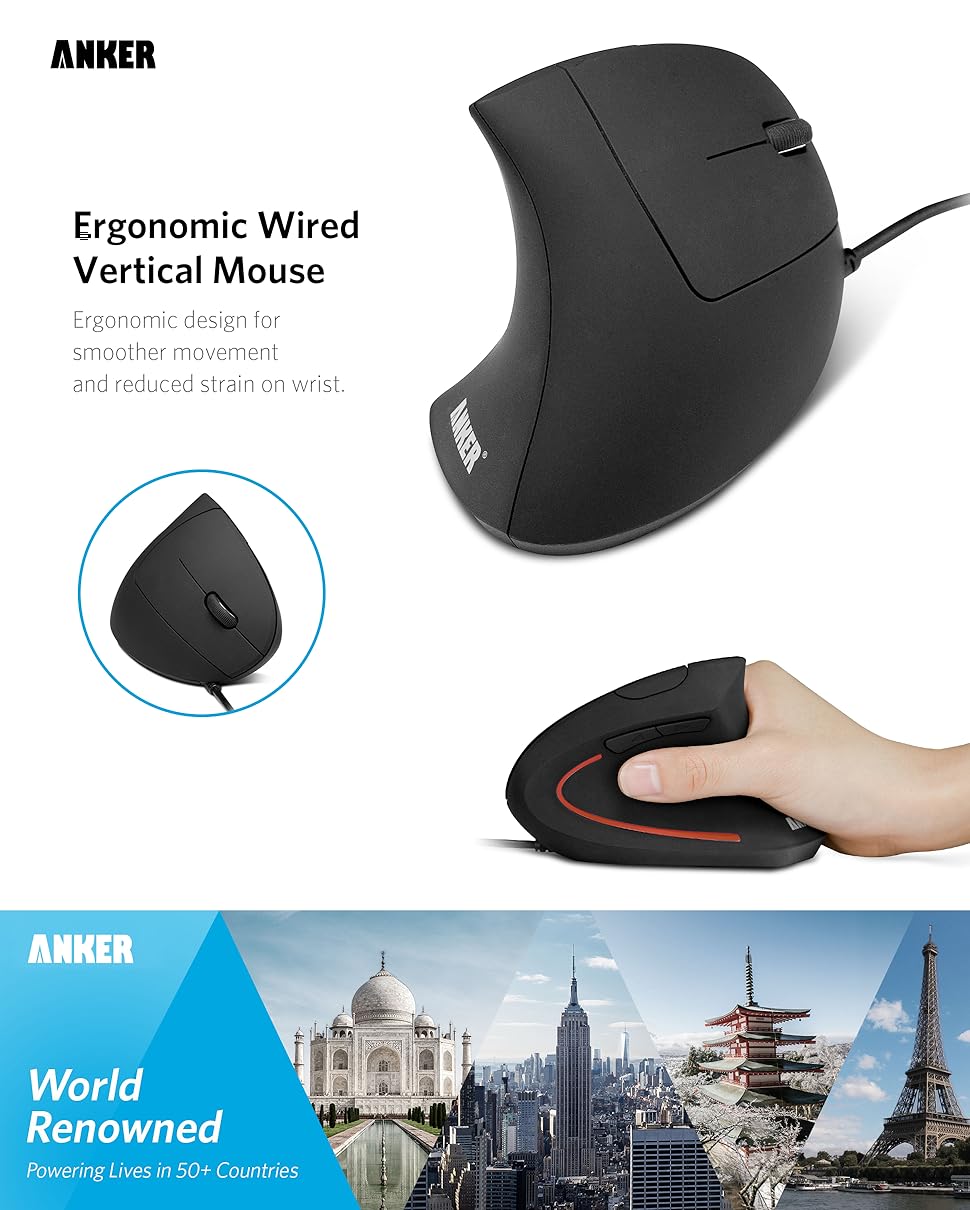
The Anker USB Wired Vertical Mouse features an ergonomic vertical design that promotes a natural wrist position, reducing strain during extended use. Equipped with 5 buttons including next/previous navigation, it offers enhanced productivity. Its optical sensor supports adjustable DPI settings of 1000 and 1600 for precise tracking on multiple surfaces. The wired USB connection ensures lag-free performance, while its lightweight and compact build makes it ideal for professionals seeking comfort and reliability.

| ASIN | B00FPAVUHC |
| Additional Features | Ergonomic Design, Optical Technology |
| Antenna Location | Gaming |
| Are Batteries Included | No |
| Are Batteries Required | No |
| Best Sellers Rank | #90 in Computer Mice |
| Brand | Anker |
| Button Quantity | 5 |
| Color | Black |
| Compatible Devices | Personal Computer |
| Connectivity Technology | USB |
| Customer Reviews | 4.4 out of 5 stars 8,984 Reviews |
| Enclosure Material | Plastic |
| Hand Orientation | Right |
| Item Dimensions L x W | 4.72"L x 2.47"W |
| Item Weight | 0.21 Pounds |
| Manufacturer | Anker |
| Mfr Part Number | AK-98ANWVM-BA-0013 |
| Model Number | AK-98ANWVM-BA |
| Mouse Maximum Sensitivity | 1600 Dots per Inch |
| Movement Detection | Optical |
| Movement Detection Technology | Optical |
| Number of Buttons | 5 |
| Operating System | Linux, Windows 10 |
| Power Source | Corded Electric |
| Range | 4.9 feet |
| Special Feature | Ergonomic Design, Optical Technology |
| Style Name | Modern |
| UPC | 848061077568 |
| Unit Count | 1.0 Count |
A**H
Good ergonomic mouse, great price
This mouse is great. It’s ergonomic, so it feels good for those long sessions. Smooth overall
P**S
Noticeable relief for wrist/arm strain. Wish I switched sooner!
I started using this vertical mouse after feeling some discomfort in my arm from a traditional mouse. I work from home and within a short time, I noticed a real difference in how my arm felt during and after work. The vertical design feels more relaxed and less “twisted” during long work sessions. I genuinely wish I had switched to a vertical mouse sooner! The difference in comfort over a full workday is incredible. If you spend long hours on a computer and experience any wrist or arm discomfort this is an easy switch that can make your workday much more comfortable.
J**B
Great mouse, some caveats included though
Oh where should I start off with this mouse. I bought this mouse because I noticed I've been getting pain after using my traditional mouse for extended periods of time, and it's only been worse and worse. So for $20 this mouse wasn't much for me, figured I had nothing to lose. When you first put your hand on this mouse, it feels incredible, the hand rests really well, almost like a glove. However, you may notice that for the first hour or two, you might actually feel incredibly uncomfortable, not painful but you may not like it. But once your hand gets used to it, oh man there is a night and day difference. I can't even go back to my old mouse. It's all well good but there are some caveats, you may need to get rid of some your old "mousing" habits.. For example, I didn't realize some people use three fingers when using their mouse — index finger on the left button, middle finger on the scroll wheel, and ring finger on the right button. Me, I'm a two finger kind of guy, index finger for left button and scroll wheel, and middle finger on right button. So to say the least, I wasn't very enthusiastic when I realized I would need to use three fingers for this mouse. Why, you ask? Well I don't have particularly large hands however I realized that if I used two fingers, the angle between my two fingers was so great that my pinky finger would always try to get off the mouse, and consequently it would rub off on the table even if I tried squishing my ring finger and pinky finger together on the portion where your fingers rest. So that means I have to use three fingers so that only my pinky finger is resting, it will take a lot of getting used to but oh well. Had they made the mouse a little taller this probably wouldn't have been much of a problem. Scroll wheel kinda sucks, I was used to my scroll wheel being able to move side to side and downwards, but this wheel only clicks downwards. Not a big probablem, that's what those buttons to turn the pages are for but it just feels really weird for me. Scroll also requires quite a bit of force to scroll and push down although I think it just needs to broken into, I'm sure it'll have less friction with time. While the computer is shut off, the glowing red light on the side stays on, I keep my computer in my bedroom but thankfully it hides under my desk, anyone buying this mouse should know that, unless you unplug the computer or mouse. Then there's the issue of heat transfer. Now my old mouse didn't fit in my hand like a glove, so I was only coming into contact with it with my finger tips and two contact points off the palm of my hand, so there was always air moving through. With this one though, since you're making 100% contact, it's as if you were holding another hand so a lot heat gets transferred to the mouse but it doesn't go away easily resulting in a sweaty hand, especially when you're grabbing it for extended periods of time. To me it's not much of an issue, just remove your hands for a few seconds every now and then and swipe it on your shirt or something, a small annoyance but not much. That is about all for this mouse, it's great, and I think it's miles better than a traditional mouse but it does have its caveats.
E**C
works great, looks sharp - very comfortable
Outstanding ergonomic mouse! I use a KVM so I needed a corded mouse - works great, looks sharp - very comfortable to use for long periods of time.
C**X
It's working for me.
I originally bought this for a few reasons. 1. My wrist pain was coming back, again, with the use of the traditional mouse. 2. At the time, the mouse I was using was a Death Adder 2013. It was getting old. In addition, while the app for the Death Adder was good, there were a few of times where I had to either reinstall on the PC, and eventually, I had to drop back a revision on both my Mac and PC. This made it pain to switch back and forth from PC to Mac. Quite simply put, the company, Razer, shot itself in the foot with one of the updates, and the mouse could no longer function on either machine, even with the firmware update. 3. While I found the concept of the Vertical Mouse an interesting prospect, I didn’t want to spend a ton of money on something that I wasn’t sure would actually help. With that said; I originally bought this mouse back in September of 2018 and, I’m surprised to say, it has worked for me. I never needed to use the wrist brace that I bought at the same time. I’m using this mouse daily and I’m content with the product. So, because of the price point, I later came back and bought a second one, just to have as a back up. But, the first one is still working, while second is still in the box. It’s now May of 2019. Now, I’m not a big gamer, at all. In fact, I’m not suffering just because of gaming, but really, from years of fatigue using a traditional mouse. However, I can say that extreme gamers will probably not find this mouse to be the best in serving their extreme gaming needs. But, hey, if you’re suffering, well, it works and personally, I’d rather have the longevity of being able to still use a mouse rather than barely using one while having to wear brace which really impairs one’s movement. So, can it be used for games? Yes, I do. The reality is, after my version of a real world testing, I think this method of holding a mouse is actually better and it didn’t take me long to adapt to the change. I think hardcore gamers, or even hardcore computer users, in general, might find this to be adequate at relieving their wrist pain. Because, it’s working for me. Which means, if this company steps up to making higher resolution mice, I might want one. Or, if companies would stick to making this approach more affordable in gaming mice, I would be interested. Either way, this product is priced well, and the methodology helped relieve my wrist pain. Obviously, not everyone can benefit from new designs, but it’s working for me. The one fall back is that the scroll-click is awkward, and if you use a lot of scroll-clicking, it might frustrate you. But, the two side buttons are well placed, right next to your thumb. Also, this is a wired mouse. I like wired mice, because, I hate having to replace batteries. I especially hate it when I’m in the zone of doing something and then the battery starts to die. lol Either way, from what I remember, they do have a wireless version of this mouse. They’re just not for me, I just hate wireless mice. Note that if you’re multi-platform user, there are no drivers. Just plug and go. I switch back and forth on my A/B switcher for Mac OSX [Yosemite] and PC [WinX Pro 64]. It just works. Woot!
A**S
A solidly functional and reliable mouse.
I have bought several of these mouses -- not because of problems, but because they are a reliable workhorse. I really like the vertical orientation, as I rarely have wrist fatigue. Would recommend it.
K**Z
Scroll button is hard to press. Wireless version is better.
I have only used the mouse for about a day and a half and will try to update as my opinion may change. But for what it's worth my thoughts so far... As a drafter using CAD sofware all day long every day, I get intense pain in my wrist on occasion. I am actually still using the same mouse that came with my company issued Dell desktop about 12 years ago. Of couse the computer has been replaced several times with newer machines but the new mice that came with them were always too small for my hand and never felt right. So I just kept using "ol' reliable." A co-worker of mine has the Anker mouse and likes it and it seemed like a quite an intriguing idea - the vertical mouse. So at $15 I figured I had nothing to lose but my wrist pain. Upon arrival, I took it to work, tossed the old Dell aside, and plugged it in. Drivers loaded instantly and I began to work with it. After getting over the initially awkward feeling, I was quickly impressed. It fit my hand like a glove, and became very intuitive. My one and only complant though became obvious rather quickly. There is a significant of amount of pressure required to press down on the scroll wheel when panning in a drawing. This is a major problem for me as I am constantly zooming and panning. After a day and a half of use, my wrist pain began to surface again so I went back to the old Dell and the pain has gone away. Initially I thought the problem could simply be that the button seems harder to press since the vertical orientation requires the user to squeeze rather than simply pressing down against the resistance of the desk. I do believe this could be a contributing factor that makes it worse, but I did confirm there is a big difference between the two mice in the resistance of the scroll wheel. Perhaps the old Dell is so worn out that the button presses easier than it used to. But the bottom line is that the Anker causes pain that could easily be eliminated by reducing that tension on the scroll wheel. I intend to keep using the Anker intermittantly in hopes that it will break in and require less pressure. By the way, the detents on the scroll wheel are great. There are definite postive notches that allow for precise yet effortless scrolling and zooming. The problem arises when panning. I will try to update this review as I use it more. Otherwise it's a very good and comfortable mouse. UPDATE: A few days after posting this review, I got an email from Anker customer support asking if I would like them to send me their wireless model which has a different scroll wheel that is easier to press. I was very surprised to receive such an email as I never contacted Anker directly. I just wrote this review. Well Anker customer service must read these reviews and follow up with people who are less than satisfied. Impressive! Having nothing to lose, I agreed to have them send me the wireless model but I was skeptical it would be any different. It arrived in a few days and I immediately took it to work and began using it. Again, the drivers instantly loaded when I plugged in the USB stick and turned on the power. Right away I noticed a difference. I have been using it all day long for a full week now and have no wrist pain yet! The wireless model is in fact different in design. It is sleeker and scroll wheel is easier to click. I didn't measure it, but it does feel just the slightest bit smaller in my hand but that has not caused me any problems yet. Bottom line is the wireless version is much better than the corded version. And Anker customer service is first rate!! Thanks Anker!
D**A
Can a computer mouse change your health? Yes
Anker Ergonomic Optical USB Wired Vertical Mouse REVIEW: Life is short, ergonomics matter tremendously in today's world. DISCOVERING THE WIRELESS SHARK MOUSE I first stumbled upon this mouse design while cleaning up a computer office for family. Someone had bought the wireless version, back when it's brand name was "SHARK". It was still sealed/unboxed and was given to me for helping out. This was a perfect way to test out the design with nothing to lose. I will say, the wireless version of this mouse was a total waste of time productivity-wise. It lagged, would intermittently stop working (batteries were fresh and replaced twice), would disconnect while holding down a scroll bar, and it was hard to pinpoint anywhere on the screen with certainty. I even used a USB extension cable which rested the USB RF transmitter directly beside the mouse and it still was not signalling well! When my CPU was performing heavy work, it disrupted the feedback to the mouse. Tested it on various devices--same thing. That really disrupts work when using spatially explicit software or just in general. 2.4GHz is a disruptive, bombarding frequency because too many things, including routers, are using it nowadays. WIRELESS HAD A TERRIBLE SIGNAL, BUT THE DESIGN WAS INCREDIBLE While those old RF chips are faulty as usual, the wireless Shark DESIGN was amazing, both ergonomic and beautiful. For the first time in my life I was not stopping work and shaking out my hands to relieve the strain. Using the mouse came so naturally I never had to "get used to it" and obviously traditional mice are medieval relics that need to disappear...that is ergonomics in a nutshell. After using the wireless SHARK for the first week I realized just how much pain I was in for years...it just became normal. Everywhere you go there lies the dumb traditional mouse--you get so used to fighting them with your hand and their prevalence and supposed normalcy. You would not believe how important ergonomics are for your tendons and ligaments. Humans even write out on paper at the same angle as holding this mouse, hence, keyboards are also ancient relics that are inflaming people's ligaments and leading them to the doctor. THE MOUSE THAT SHOULD REPLACE THEM ALL Whoever designed this mouse got it right! Traditional mice are like wearing clogs. The Anker wired mouse is like wearing modern shoes...which have an industry standard for ergonomics. The form is near perfect, and I am thinking the patent is so simple yet spot-on that that is where the value lies...otherwise they are simply putting buttons in different places in a new mold. So, I knew this was the mouse for me, but it needed to be wired (we are 10 years away from having real performance for wireless mice. Safe yourself the trouble and never buy one--I do not hold that against Anker). I found the Anker Ergonomic Optical USB Wired Vertical Mouse as the new licensed retailer using this mouse patent. It should still be named the SHARK, because sharks stopped evolving as their form became so efficient there was no need to change it. There is almost no excuse to make traditional mice anymore--they are PROVEN to go against our natural form and hurt people! If you work 8 hours a day at a computer full-time, just imagine how much time that is twisting your arms into unnatural positions FOR HOURS...even days, weeks, months, or years of your life. BRAND LOYALTY IS GROWING It arrived unboxed and quality sealed, no funny business. Anker's version has a high-quality logo print on the mouse and looks great. My computer office setup is all Red RGB-based lighting, and the Anker's red LED in the mouse looks stunning with my system. I am saying goodbye for now to my HP OMEN Mouse X9000, as it helped for years with its bigger design, but its still causing ulnar and carpal strain being horizontal. The Anker is much cheaper in price, but to me far more valuable than my X9000. I am very impressed with the packaging, the mouse hardware quality, and the response on the screen. It has a good heavier weight for easy gliding. I also have owned an Anker USB 3.0 extender with built-in Ethernet dongle for over 3 years and that has been a high-quality workhorse for my data needs to this day. I am beginning to trust Anker products. They may invent some items or rebrand a patent, but they seem to endorse only quality designs. PRICE DOES NOT GUARANTEE A BETTER MOUSE FOR BIGGER HANDS After researching all other ergonomic mice, I realized that I may never find a reasonable one for hands of my size that work as well as Anker's. I am a tall man, and my hands are 8 inches long. You will notice most "large" ergonomic mice designs support 7.8" hands and the more material they use the higher the price. The more volume the product, the more bells and whistles they squeeze into its housing to up sell it. I used to think, if I am going to find a mouse that works, it surely will cost a lot of money and I was right. Some "large ergonomic" mice had the size I needed, but poor reviews outlining problems such as with silly placed back/forward buttons which as we know can completely erase what you write out and destroy it with one accidental back button click. A lot of otherwise good designs were only wireless...a complete waste of time and energy. There is 0 latency with wired mice, but nothing is guaranteed with any wireless mouse, Bluetooth or RF. Well, it appeared difficult to get both the proper ergonomics coupled with increased size without spending $100+ and poor reviews. So the Anker meets me half way for a reasonable price and size. Its back/forward buttons are above the thumb, letting your hand "rest" the way it should. My hands are still bigger than being able to fully grip the mouse (try 99% of them), but because my hand can rest on the desk in a natural angle, it has little bearing on the ergonomic factor. I believe Anker is providing a very clever mouse worthy of being the standard replacement of any traditional mice. Ergonomics = better health. Ergonomics matter. Stop paying money for technology that doesn't adapt to YOU. SUMMARY With virtually none of the mice are looking like they will meet my size needs without some hidden flaw, at least I found one that doesn't hurt my wrists anymore and is award winning, made to help change the world, help people's health and productivity. It seemed wise to buy this renowned design as my first entry ergonomic mouse, and go from there. My carpal tunnel has vanished and my hand can somewhat hug this mouse! That is a first. It was the right place to start for a good price. Thank you Anker and Shark! I love it!
A**N
Gute, fast ergonomische Maus
Sie funktioniert gut. Am Anfang dauerte es ein paar Stunden, bis ich genau so zielsicher wie mit einer alte Logitech war. Auch passierte es öfter, beim Wechsel von der Tastatur zur Maus, dass ich die Maus umwarf, da die Unterkante der Hand an der oberen Spitze streifte. Die Oberfläche ist überall gummiert, fühlt sich gut an. Die Tasten haben einen leichten Klick-Druckpunkt, das Rädchen bewegt sich leicht genug mit leichtem Einrasten. Das Kabel ist mir einen Tick zu (dick und zu) störrisch. Ich benutzte sie bisher nur auf einem Mauspad mit blauer Stoff-Oberfläche. Wenn sie kaputt ginge, würde ich sie aber glatt noch mal kaufen. Verbesserungsvorschlag: an der rechten Seite unten findet der kleine Finger/kaum Halt, dort sollte auch eine Vertiefung hin, so wie die Große Delle an der linken Seite für den Daumen. Die Maus rutscht beim abheben/versetzen bei mir zu leicht nach unten durch. Für meine Handschuhgröße 8,5-9 könnte die Maus einen cm flacher/kleiner sein. Auch werde ich sie mal öffnen um zu schauen warum sie nicht leichter ist, ab da Gewichte drin sind. Oder nur das Gehäuse ist dick, sie wirkt stabil und knarzt nicht. Hätte ich eine Mausfabrik, würde ich versuchen für die rechte Seite eine Heizung einzubauen.
H**N
Perfect
I like it, it's so comforting
L**Y
I still use it every day; hands are much less sore.
The mouse gets a lot of use; I have to say it is quite comfortable once you get over the initial weird-ness of having the mouse this shape; I can deal with many more hours of computing before my hands feel stiff.
A**R
helps with wrist strain
Works great, bought it to ease the strain on my wrist and help with carpal tunnel etc, and i think it is helping. Takes maybe a day to get used to using a vertical mouse compared to the traditional mice.
D**S
Buena ergonomía.
Empecé a buscar alternativas a mi viejo mouse debido a que recientemente comencé a padecer síndrome del tunel del carpo. Escuché que este mouse era muy bueno en cuanto a ergonomía y pude comprobar que sí lo es. Si bien tardé un poco en acostumbrarme al modo vertical, he notado mejoría en mi salud (junto a un buen teclado, por supuesto) . Algo que particularmente me encantó es el botón para cambiar la velocidad del puntero, requiriendo el mínimo esfuerzo para mover el mismo, esto es muy útil, especialmente si cuentas con 2 monitores o más.
Trustpilot
2 weeks ago
1 month ago