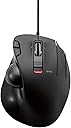
🎯 Elevate your desk game with precision and comfort — don’t get left behind!
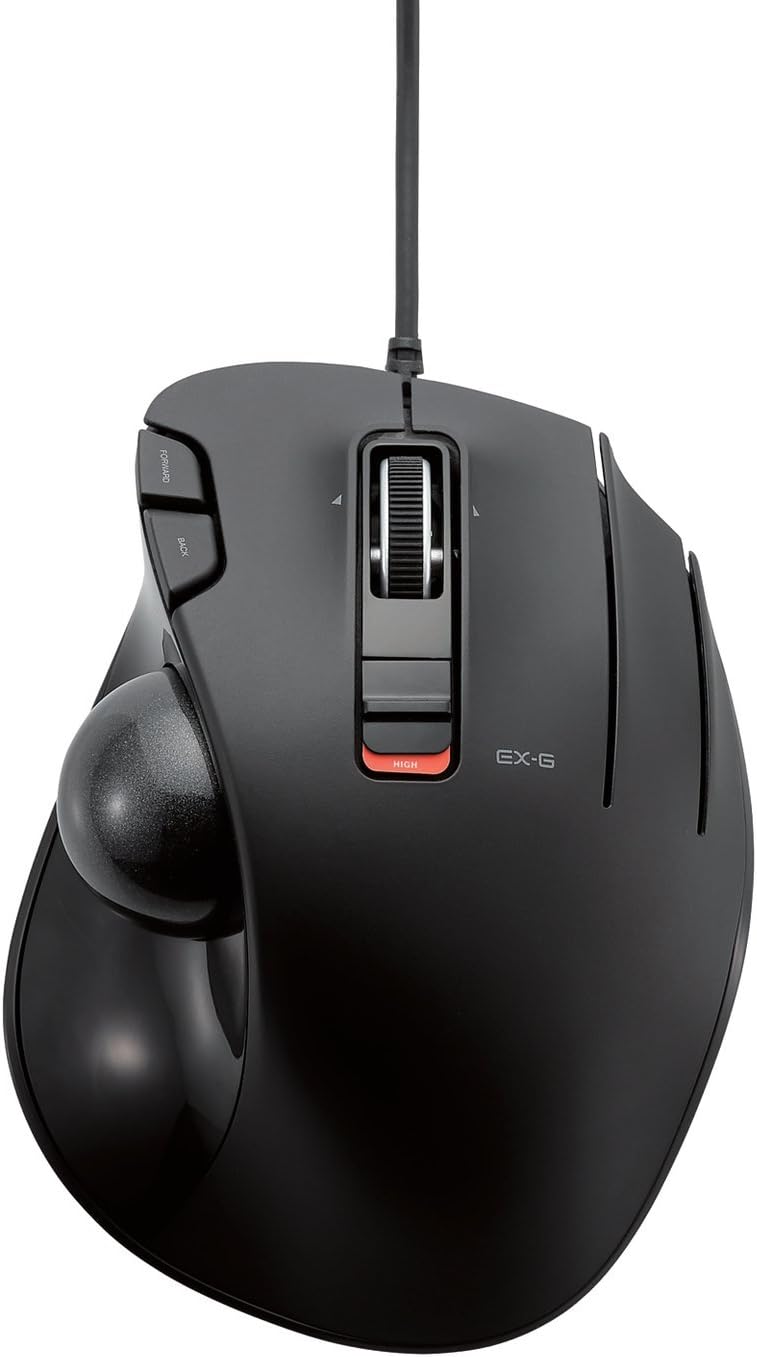
The ELECOM EX-G Wired Trackball Mouse combines high-performance optical tracking with an ergonomic thumb-controlled design. Featuring 6 programmable buttons and adjustable DPI settings (750/1500), it offers customizable precision and workflow efficiency. Its smooth artificial ruby ball bearings minimize maintenance, while wired connectivity ensures reliable, lag-free use across Windows and macOS platforms. Ideal for professionals seeking comfort and control in a compact footprint.


| ASIN | B016QCPO0G |
| Additional Features | 4 Way Scrolling, Ergonomic Design, Programmable Buttons, Wireless |
| Antenna Location | Gaming |
| Are Batteries Included | No |
| Are Batteries Required | No |
| Best Sellers Rank | #31 in Computer Trackballs |
| Brand | ELECOM |
| Built-In Media | English manual, Japanese manual, Trackball mouse |
| Button Quantity | 6 |
| Color | Black Ball |
| Compatible Devices | Personal Computer |
| Connectivity Technology | Wired |
| Customer Reviews | 4.2 out of 5 stars 2,849 Reviews |
| Embellishment Feature | Logo |
| Enclosure Material | Plastic |
| Global Trade Identification Number | 04953103473737 |
| Hand Orientation | Right |
| Hardware Platform | Laptop, PC |
| Item Dimensions L x W | 4.9"L x 3.7"W |
| Item Type Name | ELECOM Wired Thumb-operated Trackball Mouse, 6-Button Function with Smooth Tracking, Precision Optical Gaming Sensor (M-XT3URBK) |
| Item Weight | 0.44 Pounds |
| Manufacturer | ELECOM |
| Model Name | EX-G |
| Model Number | M-XT3URBK |
| Mouse Maximum Sensitivity | 1500 Dots per Inch |
| Movement Detection | Optical |
| Movement Detection Technology | Optical |
| Number of Batteries | 1 AAA batteries required. |
| Number of Buttons | 6 |
| Operating System | Windows 10, Windows RT 8.1, Windows 8.1, Windows 7, Windows Vista, Macintosh OS X 10.10 |
| Pattern | No pattern |
| Power Source | Corded Electric |
| Range | 5.0 meters |
| Special Feature | 4 Way Scrolling , Ergonomic Design, Programmable Buttons, Wireless |
| Style Name | Wired_BlackBall |
| Theme | Office, Home, Telework, Cafe |
| Unit Count | 1.0 Count |
| Warranty Description | 1 year manufacturer |
A**R
Great mouse, might want to change out the ball.
Had the mouse for over a month now and it's great! I'm going to break down the main points and recommendations for people who are thinking of buying this mouse. --- The included black ball doesn't work consistently. Mine seems to have a "dead spot" on the ball and I have no idea why. Best recommendation is to swap to a red colored ball from another mouse or purchase one, but unfortunately, they aren't cheap. https://www.amazon.com/gp/product/B071NX7Y2J/ref=ppx_yo_dt_b_asin_title_o02_s00?ie=UTF8&th=1 I bought this along with the mouse as a "just-in-case" and I'm glad I did because it works flawlessly. There could be cheaper options out there so feel free to look. --- The trackball companies have said that a matte finish is better for precise and fine movements for text editing but the one on Amazon is sold out with the "we don't know if it's coming back" dialogue. I found one on Newegg if anyone is interested. https://www.newegg.com/p/0J2-01FT-008W3?Description=logitech%20mouse%20trackball&cm_re=logitech_mouse_trackball-_-9SIAMTFB6X3276-_-Product I don't have a matte finish ball so I can't say for sure if it actually does what it claims. --- Depending on how you place your hand on it, you will accidentally right click multiple times until you get a good rotation and hand placement. Don't worry, it sounds worse and harder than it really is. --- I don't use the third mouse button and I haven't downloaded the software specifically for this mouse because I have 2 mice plugged in all the time. One is a gaming mouse with its own software that I don't want to break by having conflicting software from this mouse. This mouse works just fine after being plugged in. No muss, no fuss. Both mouse buttons work, scroll wheel works, forward and back buttons work, and DPI switch all work. --- Play around with the DPI switch on the mouse as well as the mouse options in Windows or whatever operating system you're using. TURN OFF enhanced pointer precision, it is not your friend and will send your pointer to the moon. The 4th tick on pointer speed in Windows works well for text editing, for me, anyways. --- It can be used for gaming but I keep it to certain types of games (ARPG like Diablo, Path of Exile) or single player. Online FPS games require more precision and speed than I can do with this. If you can, you should get a medal.
W**N
Glad I took a chance
OK, so I had Logitech's original trackball back in the old, old 386SX days, and that thing was a tank. It was reliable, lasted forever, and rarely needed cleaning or maintenance. I think it finally died after about 14 years of service. I replaced it with the newer models from the same company and was slightly let down. The new ones were less sturdy, got mucked up and needed cleaning frequently, and were wireless and tended to burn through battery quicker than I'd like. I went through two of those because, honestly, there weren't a lot of other options that had the same shape and form. In fact, I still have one of those, and while it works, it gets gummed up and I lost one of my Unifying receivers and was not keen on spending fourteen bucks to get a replacement. So I looked into third-party alternatives. And here we are. This Elecom was affordable, and works just as well as the older model of my favorite trackball. I can't attest to sturdiness yet, as I just got it, but it feels great and because it's wired there's no worry about battery life or keeping track of a proprietary dongle. The thing just works. I did swap out the black ball for the blue ball from one of my older ones. It fits perfectly and seems to make it a tiny bit more precise. All in all, this was a good purchase. I'm glad I went for it. My wrist thanks me, and the other trackball can go into the living room and be used some of the time on my HTPC where I have my other receiver. Five stars. This is a good trackball.
L**Z
Decent wired thumb trackball for the price, but sensitivity and palm comfort are lacking
This mouse does the job. It is a reasonably good wired thumb trackball mouse. For the price, it's really reasonable, but I won't be using it in the long run because it doesn't fit my hand well. I only use this for office work (no gaming). I bought this because my work computer's bluetooth stopped working with my beloved Logitech MX Ergo (not Logitech's fault--corporate IT...). I simply don't find it as comfortable in the hand as the Logitech MX Ergo -- the shape doesn't fit me as well, I guess. I have very small hands and am very sensitive to ergo. I expected the smaller mouse to be better! The good: 1) The ball is smooth. It is really easy to pop out for cleaning. 2) I like the scroll wheel--it feels nice. The "it just is" (not good, not bad): 1) I'm using this thing on a corporate Linux machine, so all the extra features of the software aren't usable for me. That includes the extra button. The bad: 1) The two DPI settings are very very far apart. Low DPI is too low, high DPI is jittery. I find I have more trouble confidently getting the pointer on what I want versus the Logitech. 2) It slides around much more easily than the Logitech. I use a keyboard tray that has a slight tilt, so I realized I'm pushing it forward all the time to keep it where I need it, causing fatigue. No good--trackball mice should stay put. 3) The cord is a bit short. Another reviewer mentioned that the buttons are too sensitive. That might be causing me issues too, but I wasn't cognizant of it if so.
J**E
Productive and a huge upgrade from a tradition mouse and touch pad
I didn't realize there was a third button which is customizable, so i made it into the ctrl button to zoom in and out. The scroll wheel could also be pressed from the sides to scroll sideways. This mouse made scrolling and reading through pdfs much easier. No need for a mouse pad since this stays stationary, making it possible to have my mouse on my lap and still being just as productive. I chose a wired mouse instead of a wireless to avoid delay and the "click to wake up" function which is typically found in wireless mouses. Great for my college pdf readings. BUT ON THE OTHERHAND one thing i am having trouble with is highlighting. The trackball can be difficult and maybe even frustrating to use since it has trouble moving the mouse smoothly across one letter. (This is common in all trackball mouses, not necessarily this product). Use a graphite pencil and cover the studs that hold the ball in place to reduce the friction a bit. Overall, happy with the product
C**R
Surprisingly good for medium and smaller hands. Not so much for mine.
I wish they made this just a little bit bigger because other than the hand-feel, like my hand is hiding it from bandits, drooped over it so as not to crush it, I LOVE this mouse. The trackball position is perfect. The scroll buttons on the left are great. The dpi switch while not in an optimal place provides something special. You can feel with your palm where it is positioned. You start to remember. You can also quickly verify visually. Having a physical sliding dpi changer isn't something you know you wanted until you use it. The extra finger mouse button is just, perfect for binding mouse-look in games so you can quickly look around. It's not heavy but it's not light so it doesn't wander, but it's not hard to get it out of way quick to put down a pizza or drink. It feels quality. While the page buttons on the top near your pointer finger don't lend themselves to rocker style pressing without moving your finger, they do have positive click and feel very natural to use by curling your pointer finger and pressing them deliberately. This makes them better for precision actions in games like firing a secondary weapon or precisely dropping a bomb on a target. The scroll wheel has the most amazing left-right panning tilt I've ever seen on a trackball. Logitech could learn something here. instead of being completely useless because of hard switches like almost every single other device in existence, they are just compliant enough that you can actually use them for useful things in games that recognize them. If you are an elite dangerous player, this trackball would be perfect for left-right menu navigation binding. If you don't have a good hotas yet (rolls eyes). But if you have bigger hands, all this awesome still won't feel good because you feel like you are riding a childs bicycle. Or you accidentally bought the travel version. And it's just so frustrating because its not that far off. 4 or 5 more mm of base length and it might be perfect for big hands. It's still an outstanding device. Superior to even the MX Ergo I'm using again in many ways, but it doesn't feel good with my big paws. If you have the regular hands they designed this for, you'll love it.
B**E
Nope
I have been a trackball mouse user for decades. I loved the old Logitech Trackman wired and was saddened to learn that it has been discontinued. I spent comparatively huge bucks and got the new Logitech MX Ergo, only to have the buttons develop the dreaded "Logitech switch click" problem within a year. I have a Logitech M570 and have been relatively happy with it, but something about my new laptop and dock setup causes interference in the signal if I get the trackball too close to my Logitech Craft Keyboard. After reaching my frustration limit in trying to diagnose or compensate for the interference and after reading a complimentary review of ELECOM trackballs, I decided to give the EX-G a try. Mistake. The device fails in two critical ways: Pointer Control The unforgivable sin is the erratic movement of the trackball. It feels like the rollers are sticking, or the ball is somehow getting hung up on something. The motion is not smooth at all. Worse, the erratic nature of the problem means pointer control is terrible. Weight These kinds of "mice" need "clingy feet" and enough weight to stay in place with minor hand movements. The ELECOM device is very light, and its base does not keep it in position on your desk. It feels more like a mock-up or toy than a mouse. If the cursor movement were smooth, I probably would tolerate the weight issue. As I indicated, I am a long-time "trackballer" and while I am discerning, I am not picky. I bought the ELECOM hoping for the best. After I got it and experienced this problem, I did a deeper dive into the reviews here and found several where people complain of "jerkiness" and discussed how movement is not smooth. I confirm this issue and encourage you to heed the warning. I do not recommend this product.
P**T
Never a mouse shall touch my desk again
I love this trackball. I use setups with 3 monitors, one is 40''. Tracking across that much screen was a pain with a mouse; the trackball allows me to accurately track from one side to the other with a swipe from my thumb. PROS: 1. Trackball rocks, never use a mouse again (opinion). I do 3D modeling so the trackball is far easier to use to accurately rotate objects and whatnot. 2. Speed switch. Having a quick speed switch is sweet. IF i am doing some tasks, I like the pointer moving faster; one little flick and it is on the other side. When more precision is needed, I simply flip the switch to slow it down. 3. Third programmable main button is awesome, I use it for shift, works great once you get used to using third finger. 4. I like the wheel button. Has three axis functionality with a great tactile responce (click) 5. Programming software is intuitive. CONS: Doesn't come in red UPDATE after almost 7 years... Lasted almost 7 years of heavy, professional use. Purchasing another one!
S**E
Not bad but not for gamers.
I used to love the old thumb ball logitech (the red ball one) and I had used that for a number of years before it started go on me. I picked this one up due to the decent reviews and the fact it showed higher DPI settings and a "gaming" sensor. Truth is the mouse isn't that bad, but is not very precise. Its plug and play (unless you want to use the 3rd mouse button and then you need to download the program). Its comfortable enough, the ball feels a little bit further back than I would like, and the 3 mouse buttons feel good. My complaints though are thus....the ball feels like its scratching on something every so often and it doesn't feel "smooth". I tried swapping the ball out with another brand just to see but it wasn't much better. The mouse has 2 dpi settings ,low and high, but I feel it was a missed opportunity for them to just make a variable DPI setting which I think might have helped out a bit. My biggest complaint though is that no matter what DPI you choose the mouse still is not precise enough for my taste. I like to play games and do artwork. The mouse is only "ok" for these in my opinion. When you try to go slow and be precise the mouse seems to move in small increments no mater what I do which makes it over shoot or undershoot what I am trying to do by small fractions...in games and art small fractions matter.... alot.... I believe this is the fault of the ball or the support structure holding it. I may be a bit biased since I am used to a laser mouse for games but I had used my old logitech mouse for years of gaming and it never had this issue. I also recently bought a new logitech 570 which I actually bought so I could do a comparison. The logitech is much smoother but with lower dpi. So if you want the mouse because the idea of a high dpi thumb ball peaks your interest for gaming then I would suggest looking for something else. Its ok for daily computer work but honestly I feel the logitech is still a better product at this point.
ترست بايلوت
منذ يوم واحد
منذ أسبوعين