Buy anything from 5,000+ international stores. One checkout price. No surprise fees. Join 2M+ shoppers on Desertcart.
Desertcart purchases this item on your behalf and handles shipping, customs, and support to EGYPT.
🖋️ Label smarter, organize faster, impress always.
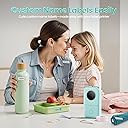
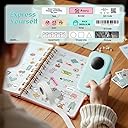
The Phomemo D30 is a sleek, portable Bluetooth label maker featuring a high-resolution 203 dpi German thermal print head for crisp, inkless printing. Weighing just 160 grams, it pairs effortlessly with iOS and Android devices via Bluetooth 4.0, unlocking over 1000 symbols and customizable templates through its dedicated app. Perfect for professionals and creatives alike, it streamlines home, office, and small business organization with cost-effective, high-quality labels that fit your fast-paced lifestyle.


| ASIN | B08HV3MPFD |
| Additional Printer Functions | Print Only |
| B&W Pages per Minute | 60 ppm |
| Best Sellers Rank | #239 in Office Products ( See Top 100 in Office Products ) #1 in Portable Thermal Printers |
| Brand | Phomemo |
| Built-In Media | Charging Cord, D30 Label Maker Machine, User Manual |
| Color | Green |
| Color Depth | 1 bpp |
| Color Pages per Minute | 1.0 |
| Compatible Devices | Smartphones, Tablets |
| Connectivity Technology | Bluetooth |
| Control Method | App |
| Controller Type | Android, iOS |
| Customer Reviews | 4.3 out of 5 stars 26,517 Reviews |
| Display Type | APP |
| Dual-sided printing | No |
| Duplex | Manual |
| Hardware Interface | Bluetooth 4.0 |
| Ink Color | Black |
| Is Electric | No |
| Item Dimensions D x W x H | 1.14"D x 2.95"W x 5.17"H |
| Item Type Name | Mini Bluetooth Label Maker |
| Item Weight | 160 Grams |
| Manufacturer | Phomemo |
| Maximum Copies Per Run | 1 |
| Maximum Copy Resolution Black and White | 203 dpi |
| Maximum Copy Resolution Color | 203 dpi |
| Maximum Copy Speed Black and White | 40 Pages per second |
| Maximum Media Size | 0.55 inch |
| Maximum Print Resolution Black and White | 203 Dots Per Inch |
| Maximum Sheet Capacity | 1 |
| Maximum print Resolution Color | 203 dots_per_inch |
| Model Name | D30 |
| Model Number | CY-D30-GN-1 |
| Model Series | Phomemo |
| Number of Trays | 1 |
| Other Special Features of the Product | Cable identification, Home supplies organization, Name tags, Personal item identification, School and office files classification |
| Output sheet capacity | 1 |
| Paper Size | 0.59 Inches |
| Print media | Labels |
| Printer Connectivity Type | Bluetooth |
| Printer Output Type | Monochrome |
| Printer Type | Thermal |
| Printing Technology | Thermal |
| Processor Count | 1 |
| Resolution | 203 |
| Scanner Type | Portable |
| Series Number | 30 |
| Special Feature | Cable identification, Home supplies organization, Name tags, Personal item identification, School and office files classification Special Feature Cable identification, Home supplies organization, Name tags, Personal item identification, School and office files classification See more |
| Specific Uses For Product | Home supplies organization, School and office files classification, Cable identification, Personal item identification, Name tags, Small business price and jewelry tags |
| UPC | 788703522493 |
| Unit Count | 1.0 Count |
| Warranty Description | 2 |
| Warranty Type | Limited |
| Wattage | 7 Watt-hours |
L**A
Compact Label Maker That’s Simple to Use
This label maker is super easy to use and has a nice compact size that makes it convenient to keep on hand or take anywhere. Pros: Small, portable design Easy to set up and use with Bluetooth Prints clear, clean labels Works well for organizing around the house or office Lightweight and easy to store Overall, a great little label maker if you want something simple, portable, and effective for everyday organization.
J**.
Excellent Handheld Printer
This is a really cute inkless handheld printer. It works great. You download the app to your phone and print directly from there. The app does take a bit to figure out but once you do, you can print out tons of labels rather quickly. Amazon offers several different styles and colors of labels from individual labels to continuous labels. If you’re a smart and savvy shopper, you can get a great price on your refill labels. One thing I love about this printer is that it so quiet. It prints very quickly and it’s incredibly easy to load the labels. I got this at a great deal and will likely buy the case at some point. I did purchase extra labels later and got some really great colored ones. The printer prints in black - no other colors. It charges with a standard usb cable so use caution when connecting and disconnecting the cable. It charges fast on a 5volt charger. Higher powered chargers are NOT recommended. To tear off the printed label, tear downward, as the teeth are on the bottom. Additionally, when you are setting up the type and size of your labels, measure them if they don’t come with a QR code, as you will need to specify the width and length of the labels. If you choose to purchase additional labels, make sure you write these measurements on the box they come in. Especially if you like switching up the colors and you get a bunch of different ones. Also make sure your labels are compatible with your printer. Search for D30 if you get this printer. All in all, I am very satisfied and absolutely recommend this product.
J**Z
Great, compact machine. Exceptional customer service.
This is a great little machine! Price is exceptional and it printed well. Easy peel labels and the app to print from is pretty user friendly. I’m not great with Tech. 6 months after purchase it did start to print poorly. Not crisply. I reached out to tech support and received exceptional and timely service. In the end there was an internal issue with the machine but thy acknowledged the problem and have shipped out a replacement. The follow thru and feedback was great. I’d buy from them again.
A**S
Great little label maker for everyday use
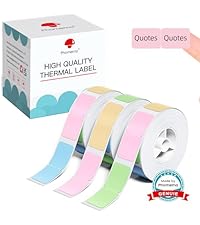
Great little label maker. The color I selected and the color I got aren’t the same, it’s definitely a lighter pink then the on that’s shown (picture attached of the color on the box compared to what you get) You don’t get many fonts to choose from, unless you subscribe. Connected right away to my phone but the QR code on the side of the box of labels doesn’t register on the app, it kept coming up “couldn’t be found”. Very easy to install the paper, prints at a reasonable speed, small, light and compact, definitely easy to carry and store. Labels seem to stick pretty well, with being washed over and over and over the only issue I really have is the labels fade after a while. Overall very happy with my purchase, would definitely recommend!
A**I
Lovely Labels
This is the second time I've purchased this label maker. I had the same one for about a year before i dropped it on a concrete floor and it broke. Luckily when I went to repurchase it, it was on sale! I love this little label maker. I use it almost every day for my crafts, in the kitchen, and I like to put a date label on things I buy (like cosmetics) so I know when they should be tossed out. It is so easy to use with the app on my phone. I don't pay for a membership and I still think there is plenty of font and icon choices to keep most people happy. I also like the size of the labels it prints - they are perfect for most everything around my house and in the office. It stays charged for a long time, too. I would suggest purchasing a little case or bag to keep it clean and safe. This is a great label maker and definitely worth every penny.
J**Z
Handheld, Bluetooth and iPhone compatible, quick, easy and super cute!
First off, this is so cute and tiny! Its super easy to use, just download the app to your phone, thread the tape through and its ready to go. I was printing labels in 5 minutes. I've been have fun making labels for everything and everyone. Its quick and efficient. Can't speak to battery life yet but it comes with a charging cord, so should be easy to charge. It has one button features and the rest is done on the phone. Labels are included (and tiny) so order extra if you want bigger labels, more paper capacity or longer labels. Compatible with my iPhone. So far so good!
C**S
Mixed feelings
The printer itself is fine and works well. Lots of options for different label tape, which is cool. The app has different icons, fonts, and borders you can add to your labels to make them cute and custom. Easy to connect printer to your smartphone. The downsides: The app is very glitchy and could be designed a little better. There are a lot of things (fonts, designs, icons, etc) that require the premium subscription and there's no way to filter them out (which of course, is to tempt you to get a subscription, but it's very annoying). My main gripe is trying to save a template. You can save a template (so if you want to make multiple labels over time that are formatted the same, it would be a lot easier) but it's like a 50/50 chance if the app will load your saved templates when you log in. I've also had issues with fonts not loading at various times. Very frustrating to not be able to just use the printer as you want to use it 100% of the time.
E**Y
Super Easy To Use - Get Labeling!
I'm kind of a freak about organization and I label EVERYTHING, so thank goodness this little printer is almost effortless to use. Similar in size to a cell phone about twice as thick, but way lighter, making it easy to pop into your purse, backpack, or briefcase if you need to. The biggest issue I have with thermal printers is normally loading the paper correctly. This printer is easy to load. Just seat the spool onto the raised circle and feed the end of the label into the narrow slot. Close the lid and press the button on the top of the machine and it will auto-feed the label to the correct position. You will be sacrificing the first label, but that's typical in my experience. It doesn't matter if you feed a little or a lot into the slot, the auto-feed will correctly set the label regardless. As you can see in the picture, the ends of the label are perfectly centered, which is because of the auto-feed setting positioning the label in the right place. The border, however, is pretty tight to the bottom of the label, but that's more likely a software issue because from the print screen on my phone it looks perfectly centered and the paper is seated properly in the printer. The print quality is good, but I find that it helps if my text is medium to large in relation to the size of the label for the best quality. I generally prefer labels with larger text anyway, since the point of putting a label on something is to be able to identify what it is at a glance. The uses for this label printer are virtually endless. From spice jars to file folders and everything in between, if it needs a label, you can make one with this printer. I have another label printer similar to this one, but it's difficult to get the label tape perfectly installed and it has to be plugged in when you want to use it because it's not rechargeable. This printer is rechargeable which makes a big difference because I can easily take it into the kitchen or the office depending on what I need to do with it. It uses a micro USB for recharging and a charging cable is included for your convenience. Mine arrived without a usable charge, but it only takes a few hours to fully charge it. I plugged it in to charge around midday, and it was already charged when I checked it around dinner time. It has a little cutout on one end where you could easily attach a lanyard (not included) if you wanted to which might be handy depending on your individual usage habits. The app you need to create and print labels is easy to use and there's a huge selection of fonts, icons, borders, and templates. You can also create and save your own templates if you have a particular type of label you make frequently. I find this useful for creating food storage labels so that I know the date I put something in the freezer or pantry. Phomemo also has a lot of different label styles, so you're not just stuck with the plain old boring white ones. It's nice that you can get different colors to showcase your own personal style. There's no comprehensive list of labels that are compatible with this printer, but it supports thermal labels that range from 12-15mm wide, and you can use either the precut or continuous labels. If you search "D30 labels" on Amazon, you'll see there are tons of choices out there. The device is almost genius in its simplicity. There is a single light that illuminates when the device is turned on, blinks when it's charging, turns solid red if there's a problem like the cover is open or there are no labels installed, and blinks red when you're running low on power. I initially thought the round black circle was some sort of display when I unboxed the printer, but it's purely decorative and makes the printer look kind of like a vintage radio. As I already described, the labels are easy to load, and the only other part of the device you'll use is the charging port. Everything else is controlled via the app. The app has a lot to offer, but as with anything new, it will take some time playing around with it to discover all the features and how to apply them. When you open the app, you'll see at the very top there is a section labeled "Operations Guide." If you click it and select the model of the device (D30) you'll see a number of topics to help you navigate and get to know the software including how to create a label, how to center text, and so on. When you click on them, it takes you to an instructional video which is infinitely more useful than reading a manual. If you just want to go for it, I have found that just playing with the different settings and features has worked well for me. The label I made as a test for this review took around 5 minutes to create, so it's pretty easy to intuit your way around. There are hardware instructions as well, and from there you will find the entire instruction manual (great in the event you lose your paper copy) as well as a video showing how to clean the print head. If you still need help, there is a "contact us" link from your profile page in the app as well as a live chat. So, no need to be intimidated by this cute little machine! All in all, this is a great label maker that you can use throughout your home and office. I find myself using it every week, mostly for food-related stuff, but also in my office when I need a file folder labeled. It's also great for labeling things for storage. The labels themselves are easy to use and easy to remove from most things. If you're putting them on food storage containers that you intend to refill, you can even wash the container, and the label will stay put and not smudge - although they won't do as well in the dishwasher. What I really love is that I'm no longer tethered to my computer to make labels with this compact rechargeable printer. The only thing I wish this printer could do is recognize the label size automatically. Maybe AI will get us there eventually. As it is, it's hard not to love this little cutie!
A**C
Good machine.
A good machine so far. Easy to use with my phone. Printing is clear and crisp. Doesn't smudge. Wastes a label every time you have to use it. Maybe i just haven’t figured out how to avoid that yet.
N**N
Brilliant value and very easy to use.
I hardly ever leave reviews but I had been struggling to find a supplier to do some small labels for some of my products so decided to have a go myself, it only arrived today and I've printed my labels in minutes it's so easy to use and the app is so straightforward, the print quality is great, wish I'd have found this sooner.
M**N
رائعه
رائعه جدا, بتطبع ستيكرات بدون مشاكل حتى الان
J**.
Freiheit bei der Etikettenwahl & sauberes Druckbild – Ein starker Konkurrent ohne RFID-Zwang
Ich habe mir den Phomemo D30 zugelegt, um im Home-Office und in der Küche für mehr Ordnung zu sorgen. Besonders wichtig war mir bei der Auswahl, nicht in ein geschlossenes System mit teurem Verbrauchsmaterial gezwungen zu werden. Hier sind meine technischen Eindrücke nach den ersten Nutzungstagen: Kein „DRM“ beim Papier (Der größte Pluspunkt) Viele aktuelle Mini-Thermodrucker (wie z.B. einige Modelle der Konkurrenz) setzen auf RFID-Chips in den Papierrollen. Das bedeutet oft, dass der Drucker den Dienst verweigert, sobald man günstigere Dritthersteller-Rollen einlegt. Der Phomemo D30 verzichtet erfreulicherweise auf diesen Zwang. Ich konnte problemlos günstigere Etikettenrollen aus dem Zubehörhandel verwenden. Man muss lediglich die Maße in der App manuell kurz bestätigen, und der Druck läuft. Das macht das Gerät langfristig deutlich wirtschaftlicher als vergleichbare Modelle mit proprietären Systemen. Druckqualität & Performance Der Thermodirektdruck ist für ein Gerät dieser Preisklasse und Größe überraschend knackig. Kontrast: Das Schwarz ist satt, nicht ausgeblichen. Randschärfe: Auch bei kleineren Schriftarten fransen die Buchstaben kaum aus. Ausrichtung: Der Papiervorschub arbeitet präzise; der Druck landet mittig auf dem Etikett, sofern man die Rolle korrekt eingelegt hat. Konnektivität & App Die Verbindung via Bluetooth klappte im Test mit meinem Smartphone auf Anhieb. Die App „Print Master“ ist funktional. Sie bietet genügend Templates, allerdings erfordert die UI anfangs etwas Eingewöhnung. Positiv ist, dass die Verbindung stabil bleibt und keine unnötigen Registrierungszwänge für die Grundfunktionen bestehen. Hardware & Haptik Das Gehäuse ist kompakt und gut verarbeitet. Es knarzt nichts, und der Klappmechanismus zum Wechseln der Rollen wirkt solide. Ein kleiner Wermutstropfen: Der Anschluss technisch nicht mehr ganz auf der Höhe der Zeit ist der Ladeanschluss. Der D30 setzt noch auf Micro-USB. In einem Haushalt, der mittlerweile fast komplett auf USB-C umgestellt ist, bedeutet das, dass man immer noch ein extra Kabel vorhalten muss. Das ist kein „Dealbreaker“ und schränkt die Funktion nicht ein, wirkt aber für ein aktuelles Gadget etwas altbacken. Fazit Wer einen zuverlässigen Label-Printer sucht und sich nicht von den Herstellern vorschreiben lassen will, welche Etiketten er zu kaufen hat, ist beim Phomemo D30 genau richtig. Die Druckqualität überzeugt, und die Unabhängigkeit von RFID-Chips wiegt den veralteten Micro-USB-Port für mich definitiv auf.
M**L
وسهله ف التعامل
جميله اوي اللهم بارك
Trustpilot
1 week ago
3 weeks ago