We remain fully operational. Our teams are working around the clock to ensure your deliveries continue safely.

قم بتنزيل التطبيق


معلومات عنا
حقوق الطبع والنشر © 2024 Desertcart Holdings Limited
قم بتنزيل التطبيق
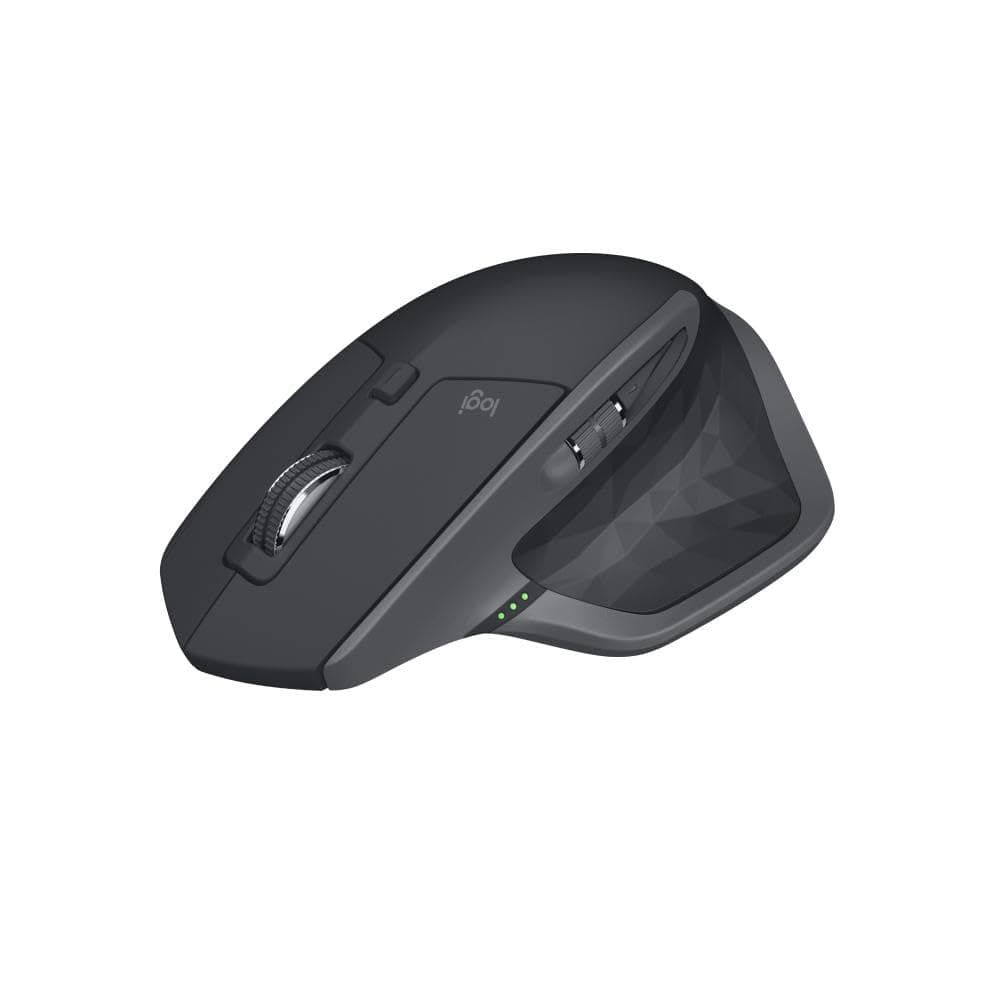






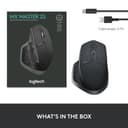
🚀 Elevate your desk game with the ultimate productivity mouse
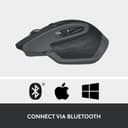
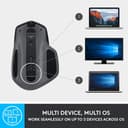
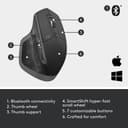
The Logitech MX Master 2S is a premium wireless mouse designed for professionals who demand precision and efficiency. Featuring a 4000 DPI Darkfield sensor for flawless tracking on any surface, multi-device Flow control to seamlessly switch between computers, and an ergonomic design with 7 customizable buttons, it redefines productivity. Its fast rechargeable battery lasts up to 70 days, making it the perfect companion for intensive work sessions across Windows, Mac, and iPadOS platforms.


| ASIN | B071KZS3MF |
| Additional Features | Wireless, Programmable Buttons, Adjustable Sensitivity, Lightweight |
| Antenna Location | Personal, Work |
| Are Batteries Included | Yes |
| Are Batteries Required | Yes |
| Battery Average Life | 70 days |
| Best Sellers Rank | #2,330 in Computers ( See Top 100 in Computers ) #90 in Computer Mice |
| Brand | Logitech |
| Built-In Media | batteries |
| Button Quantity | 2 |
| Color | gray |
| Compatible Devices | Laptop, Personal Computer |
| Connectivity Technology | Bluetooth, Unifying |
| Customer Reviews | 4.2 4.2 out of 5 stars (23,244) |
| EU Spare Part Availability Duration | 2 Years |
| Embellishment Feature | LED |
| Enclosure Material | Glass,Plastic |
| Finish | Matte |
| Global Trade Identification Number | 05099206073029 |
| Hand Orientation | Ambidextrous |
| Hardware Platform | Computer |
| Item Dimensions L x W | 12.6L x 8.6W centimeters |
| Item Type Name | Wireless Mouse - Graphite - 2.4Ghz/Bt - Control Up To 3 Apple Mac And Windows Computers (Bluetooth Or USB). |
| Item Weight | 0.15 Kilograms |
| Manufacturer | Logitech |
| Model Name | Master 2S |
| Model Number | 910-005139 |
| Mouse Maximum Sensitivity | 4000 Dots per Inch |
| Movement Detection | Optical |
| Number of Batteries | 1 C batteries required. (included) |
| Operating System | Windows 8, 10, macOS 10.13 or later, iPadOS 13.1 later |
| Power Source | Battery Powered |
| Range | 10 meters |
| Style Name | Modern |
| Theme | No Theme |
| Unit Count | 1 Count |
| Warranty Description | 3-year manufacturer’s guarantee and full product support |
P**R
Endgame Productivity Mouse. Not for left-handed.
Before buying the MX2S, I have owned/currently owning the MX Master v1, MX Anywhere v1, Logitech G Pro, and Logitech G903. This mouse is the best mouse for productivity professionals. The Good : 1. Multiple customizable buttons. I typically use the buttons on the side to move between spreadsheets on a single excel (Ctrl + Page Up). 2. Horizontal Scroll. Its has a great use case specially when working with spreadsheets. My only gripe is that the scroll activation takes ~ 1 second longer when using vertical scroll. 3. REALLY long battery life. The battery is rechargeable (through micro-USB in the front) and the battery has lasted weeks for me on a single charge (despite running for good 10-12 hours daily for a 5 day work week). 4. Soft matte texture on top. the top of the mouse has a nice soft feel to it 5. Hyper scroll - Meant for the spreadsheet ninjas. Super smooth scrolling on those really long documents/spreadsheets. The Bad 1. Not sold on the MX Master Flow : The MX Master flow is a great way to use mouse across multiple devices at the same time. However I havent come across any worthy use case until now 2. Not great for carrying around : this mouse is big. put it in a case, and it bulks up your office bag. Its best it stays on your desk. 3. Heavy compared to the other gaming mouses. I've used Logitech Gaming mouses for productivity purposes and I feel a lighter mouse, sub-consciously helps move faster between programs and apps. After switching between a G903 and a MX Master - the MX Master was visibly heavier and if 'felt' as if the mouse was slowing down my speed. But its purely a feeling. No way to objectively prove it. All in all - a great endgame productivity mouse.
P**H
comfortable
Very good mouse for my hand rest
A**U
One of the best mouse on the market
Very comfortable, excellent connectivity, easy to jump in between devices. Allows a very flexible configuration. Love it. Works perfect on every surface. Despite the fact that this is not a small mouse I am carrying it in the bag with my laptop wherever I go, worth the effort. the re-chargeable battery last a lot and recharge is fast. I have no experience with the 3S, but at the actual price this is the best mouse I owned.
G**M
Generally great, pretty heavy, read if buying for inter-device connectivity
I bought this mouse primarily because I needed a wireless mouse with the capability to connect to multiple devices, and also the capability to switch between devices seamlessly. One of the biggest reasons to go for this mouse was the fact that everybody touted it as the productivity king, Which it rightfully is thanks to the side scroll button, and the logi+ software it comes with which lets you customize how the buttons, and scroll wheels behave and perform, even on an app-by-app basis, has a charger which isn't on the bottom and is instead in the front of the mouse, and has that fantastic middle scroll wheel which can keep scrolling for ages. But,: THE WEIGHT The mouse if very hefty, I come from a Logitech G502 Hero (Wired), and that is considered a heavy mouse, but it feels feather light every time I use it after getting used to this Master 3. THE ANGLE While one would imagine the angle as being fantastic, do be warned that this is fantastic mostly for people with a palm grip. I have a slight claw grip, and it felt slightly uncomfortable at first (This is not a flaw), but I got used to it. The unfortunate part is that due to the angle, the bottom left part of my palm (unsure what it is called), now often touches the table, and starts feeling a little sore, and turns dark brown, which was never the case with the G502. THE MULTI-DEVICE SITUATION It is fantastic that I can connect it between 3 different devices, and control which device it is on by a switch underneath, or you could set up logi+ to make it such that the two devices could use the same mouse, and the mouse would switch over to the other device when you drag the cursor to the edge of the screen (Which edge you prefer is also configurable). The really unfortunate part here is the fact that while the cursor does indeed move to the other device, the keyboard does not. For this, you will need to buy a logitech mx series keyboard. This is topped by the fact that the move to the 2nd device is not smooth whatsoever. There is a delay, a decent 200-500ms delay, which is enough to stop your flow. It is not particularly intuitive as it can quite often cause a solid 1-2 second delay if you happened to move to the 2nd device by mistake. All this is due to the fact that the software commands the mouse to switch over to the other device, rather than the software using one device as a server, and the other as a client. All this is rather unfortunate because I love the capability to copy and paste between two devices of completely different operating systems.
M**N
loving it
it has a software support to change the buttons in each application on your desktop
D**N
Horrible
I've been using ergonomic mouses like this for years, however, this is easily the most horrible mouse I've ever had the displeasure of using. The grip is atrocious, requiring a conscious effort to hold the mouse, with a tense hand. This is because the grip area is thin, and worst of all, the mouse buttons are flat unlike any other ergonomic (or even regular) mouse.
C**R
Great wireless mouse for office but has some drawbacks
Comfortable to operate and the battery charge appears to last a while (still on the initial charge after a few weeks and shows the battery as full). Horizontal scroll works well on excel, but you need to get used to it a bit. The only downside of the mouse is the awkward position of the back and forward buttons on the side. You will slowly get used to it though. Update: After using the mouse for more than a year, I have barely used the vertical scroll wheel. If you are buying this for excel, you most probably wouldn't be using its features most of the time (Except for the infinite scroll which is pretty great). Still, I feel a lightweight mouse would have benefited me more.
C**R
Being that i have been a LONG time user of my Scimitar Pro both at work and at home (yes, i took my mouse to work with me, perks of a family business :D) and i've been debating getting a more work focused set of peripherals to use at work for a long time, this is part 1 of the puzzle, so lets just jump into it. Let's start with aesthetics and the physical stuff, I bought the Midnight Teal version, and it is beautiful, the colour pops enough to show off all the little details but is discrete enough to use at work, great! The mouse is "Hand-Crafted for Comfort" and yeah, it really is, like, my Scimitar Pro is a comfortable mouse and a really comfortable gaming mouse, but this just blows it out the water, its quite amazing just how comfortable it really is. It has 6 Programmable buttons (the side scroll wheel is counted as a button as well for some reason? idfk): one in the thumbpad, the back and forward buttons, the side scroll wheel, the mode switch button, and the middle mouse button, the left and right click are not customisable. Also as a side note the forward and back functions ACTUALLY WORK IN macOS. boom shock horror, was totally expected though :3 it's also equipped with a beefed up Darkfield Laser Sensor, with a 400 - 4000dpi range compared to i believe it was 400 - 1600dpi on the OG MX Master. Ok then, Connectivity, how does it do? Bluetooth 4.0 "Smart" and the Tried and True Unifying Connector, which i am using at the moment (My Work Computer is a Mid-2011 Core i5 iMac 21.5' and that has BT2.1+EDR so no Bluetooth on there, but it works flawlessly on my P20 Pro (the only Bluetooth Smart Ready device i have on me at the time of this review) so thats good) and connects super fast and has no stuttering in macOS, though the side scroll wheel is a bit temper-mental, no clue why though. It can connect to 3 devices at any given time (not all at once though), which does give me incentive to actually take it home and use it for video editing and such. i'd need another unifying receiver though. The new Generation of MX mice have support for Logitech's Flow software, bundled as an option in Logitech Options. It's basically Synergy (which allows you to share one set of peripherals between multiple computers/laptops) but only for these Logitech mice and MUCH simpler to setup. What is this "Logitech Options (LO)" Software? If you have ever used the Logitech Gaming Software (LGS) with the Logitech G peripherals, its similar to that but LO has way less bugs, a much cleaner and less gamer-y interface and everything is laid out in places that make sense. its a fantastic piece of software and makes me wonder why Logitech don't just rebuild LGS with LO as a base and then add the gamer-y stuff (but hey, thats just an opinion, my opinion, take it with a grain of salt pls kthx), LGS would work so much better. Overall: 7/10 - Needs more water - IGN Yeah Nah, but seriously its a 10/10 from me chief, definitely worth the mini investment for it!
T**M
Magnífico ratón, lo compré sobre todo por la marca y duración de la batería. No me he equivocado. Llevo varios meses probando y va perfecto. Trabajo delante el ordenador y quería un ratón bueno al cual le durará la batería. La batería dura muchísimo, semanas... lo pongo a cargar de vez en cuando y nunca me he quedado sin batería. Te avisa y en unos minutos se carga para varias horas. Otra cosa muy positiva es el peso, va perfecto en la mano. No es ligero ni pesado. Multitud de botones para diferentes acciones.
A**O
Excelente para no forzar mi mano. Tengo tres equipos y solo un mouse
P**D
Produit de qualité, donc pas de mauvaises surprises !! Je recommande vraiment !
S**E
Questo Logitech MX Vertical è stato regalato per un compleanno ed è stato davvero molto apprezzato. La forma ergonomica verticale fa subito la differenza: la posizione della mano è più naturale e riduce notevolmente l’affaticamento, soprattutto per chi lavora molte ore al computer. Dopo un breve periodo di adattamento, l’utilizzo diventa molto intuitivo. La qualità costruttiva è elevata, come tipico Logitech. I materiali sono solidi e piacevoli al tatto, e i pulsanti rispondono bene. Ottima anche la possibilità di collegarlo a più dispositivi tramite Bluetooth o ricevitore USB, con passaggio rapido tra uno e l’altro. La precisione del sensore è molto buona e personalizzabile tramite software, rendendolo adatto sia al lavoro che all’uso quotidiano. Pro: - Ergonomia eccellente, riduce lo stress su polso e mano - Qualità costruttiva alta - Connessione multi-dispositivo - Precisione e personalizzazione Contro: - Richiede un po’ di tempo per abituarsi - Prezzo più alto rispetto ai mouse standard Conclusione: mouse ergonomico di alto livello, perfetto per chi passa molte ore al PC. Ottima idea regalo utile e di qualità.
ترست بايلوت
منذ شهرين
منذ 3 أسابيع