Desertcart purchases this item on your behalf and handles shipping, customs, and support to EGYPT.
🖥️ Elevate your view, own your space — the ultimate desk mount for pros who demand more.
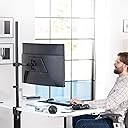
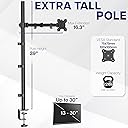
The VIVO Extra Tall Single Monitor Desk Mount features a robust 39-inch pole enabling smooth height adjustments for ergonomic comfort. It supports monitors from 13 to 32 inches and ultrawides up to 38 inches, holding up to 22 lbs with VESA 75x75mm or 100x100mm compatibility. Offering full articulation with 90° tilt, 360° swivel, and rotation, it allows portrait or landscape orientation. Installation is simple and drill-free via a heavy-duty C-clamp or optional grommet mount, complemented by integrated cable management for a clean, professional setup.


| ASIN | B01BO42XK0 |
| Best Sellers Rank | #12 in Computer Monitor Arms |
| Brand | VIVO |
| Color | Black |
| Compatible Devices | Monitor |
| Customer Reviews | 4.5 out of 5 stars 20,327 Reviews |
| Enclosure Material | Alloy Steel |
| Global Trade Identification Number | 00641020645880 |
| Item Weight | 9 pounds |
| Manufacturer | VIVO |
| Material | Alloy Steel |
| Maximum Tilt Angle | 90 degrees |
| Maximum-Supported Screen Size | 38 inches |
| Mfr Part Number | STAND-V011 |
| Minimum-Supported Screen Size | 13 inches |
| Model Number | STAND-V011 |
| Mounting Type | Tabletop Mount |
| Movement Type | Articulating |
| Number of Items | 1 |
| Number of Packs | 1 |
| UPC | 641020645880 |
| Unit Count | 1 Count |
| Warranty Description | 3 Year Warranty |
R**.
Sturdy...and moddable!
For the past few years I've been on a quest to find the perfect mount for my preferred triple-27-inch-monitor setup. The first was a cheap unit from a fly-by-night drop shipper, 'nuff said about that. The second carried the monitors on a massive cross-beam that worked well in and of itself, but the outboard monitors could not be slanted inward enough to avoid straining my unfortunately aging eyes. (The setup is fully six feet wide with all monitors flat to the wall.) The third had gas-charged arms, and was recommended by several tech sites. I have no idea what people see in gas-charged mounts. This one (also a VIVO) was finicky as heck to get positioned, you still have to tighten a bunch of screws HARD to get everything to stay in place, and the slightest bump to the desk makes it wobble to an almost dangerous degree and knocks the outboard monitors way out of alignment. So I was browsing the other day looking for ideas for a way out of my dilemma; a stand that (1) lets the left and right monitors tilt inward about 20 degrees so I'm not constantly craning my neck back and forth to see everything, and (2) would allow you to sneeze without one or more monitors dropping and/or tilting. I was growing discouraged. Then, in the middle of a thread on reddit, it was like a heavenly beacon of light sprang up to highlight a comment reading, simply, "The best triple-monitor mount is three single mounts." And so here we are. Vivo's mounts are nothing if not complete. You have your choice of clamp-on or through-hole mounts. There are plenty of fasteners, cable clips, and such to do just about anything you'd want to do. Instructions are simple and clear. The units are also quite sturdy; heavy-gauge steel with serious hex bolts at all the pivot points. It takes some doing to get the arm set the way you want it, but once in place and tight it does not move. A smack on the edge of my desk that made the previous gas-charged mount nearly bounce the outboard monitors' edges off the desktop just makes these wiggle about 1/8 inch for a couple seconds. The only thing I would change is to beef up the desk clamp, maybe with two side-by-side screws instead of the one, to prevent what little side-to-side motion they have. (This was the issue with the gas mount as well - it was simply too heavy for a single clamp.) Assembly was straightforward. As noted above, I used the edge clamps instead of through-hole, of which my desk has none. Getting the three monitors to sit side-by-side on their three stands was, as you might expect, rather more involved than positioning gas-sprung arms. I had a real problem at first with all three, owning to the limited range of motion of that jointed arm. The arm will not fold flat on itself, or even close to flat. No matter how I positioned it, I could not get the outboard monitors to sit up against the center one at the right angle and tilt. The center monitor also sat too far out over my desk for comfort. But, Vivo's apparent preference for using a limited number of robust parts came to my rescue. It turned out that I was able to remove the part of that jointed arm closest to the vertical tube on all three. It takes some muscle, but it can be done without breaking or stripping anything. With that limited center joint out of the picture, I was able to get everything positioned where I needed it to be. As a bonus, the center monitor sits even closer to the wall than it did with the gas-spring mount, putting it at just the right distance for me. Bottom line: Whomever posted that comment on reddit is a genius. This setup Just Works, due in no small part to Vivo's quality and modular design. And, as icing on the proverbial cake, the three stands together cost a little less than that gas-sprung octopus. Five stars.
C**R
Sturdy mount at a good value
TLDR: Experienced installer, and I chose this mount for my personal office for its ease of installation and its sturdiness. For any monitor mounting operation, careful thought and planning is required, and this mount solves more headaches than is causes. I read over several reviews of this product prior to purchase. I've seen many that offer criticism of their sturdiness and various other features, but I feel most of them are unfounded. My first purchase was for work... about 20 of the shorter dual monitor mount by the same company. When we installed them, they easily held the 32 and 27 inch monitor pairs we were attaching to them. Mounting any monitor of this size can be difficult, but with a little patience, all 40 monitors were mounted, aligned and ready to go. After installation, they were quite well fixed in place, and we have had no problems in the year since we bought them. No signs of joints getting weaker, or mounts leaning over or any of that in all that time. Of course, when it came time to by for my home setup, I looked for the same company. I bought 2 of these mounts, which are higher, so that I could elevate 2 heavier 24 inch monitors above an ultra-wide monitor which will reside below. Even at their highest setting, which provides the most stress to the mount, I found them to be quite firm in their support. When I wiggle my desk (within reason) I get no more than 1/4th to 1/2 of an inch in deflection; nothing that appears dangerous. And trust me, there is no way I would mount 2 cheap monitors over my quite expensive ultra wide monitor if I did not feel they were sturdy enough. A couple tips on setting them up. Do NOT place anything in the clamp other than the surface of your desk. If you are worried about marring your desk, you likely should be looking for a floor or wall mount. The rubber grommet included for inside the clamp is not meant to protect your desk, but rather to act as a shock absorber to the system. It will provide some protection to the top surface, but do you really want to be clamping something to a really expensive desk? If you install it, and your mount is leaning, you either did not tighten it enough (this one will squeeze to nothing if adjusted right) or your desk is not sturdy enough to hold the mount. When properly adjusted, a gentle shake of the desk should cause a slight rocking, but nothing should be out of place when they stop. Attach the monitor to the mounting plate, but do not attach the mounting plate to the extension arm until after the extension arm is attached to the vertical support. It says the opposite in the instructions, but if you lock the extension arm in place firmly, it is safer and easier to do it my way. I did knock off one star on the range of movement. Each joint allows only a 90 degree bend. This somewhat limits some of your options, but should not preclude any use case you might have in mind. It just means you might have to think about it a bit as you install it. I did not feel this affects the use of the mount enough to have it affect the overall rating. In fact, it likely is a trade off which contributes to the sturdiness of the mount. This mount does provide a reasonable throw, which is the length of the extension arm in this case. If you need more than this one provides, you likely need to look at a spring loaded mount. Throw in this case is the horizontal distance a mount can place the center of the monitor from the mounting location. Besides sturdiness, the ease of installation is of note. I've mounted hundreds of monitors and this one is quite strait forward. You have enough factors going for an installation, and extra doodads that provide little function are not appreciated. This one fits the bill nicely. This extends to the cable control devices, which are critical if you don't want to slice a cable in half. All in all, a good, but simple mount with reasonable throw and good sturdy construction. A++
M**P
It holds a monitor, slightly tilted, which frees up a little desk space.
I purchased two of these, and so far I have installed one of them. I decided to move, so I'm waiting until I am in my new place before I use the second monitor stand. The first one was easy to attach to the VESA mounts on my monitor, but I didn't want to move my desk out from the wall because it would require that I unplug almost everything on the desk, so I stretched and reached and wiggled my way under the desk to place the stand with the monitor already attached in the correct place and then tighten the stand so that it was firmly attached to the desk. In retrospect, if you will be reaching across a desk like I did, you should definitely wait to attach the monitor until after you have the stand clamped to the desk. Now that it is attached, it seems to be doing its job fairly well. The monitor is off my desk, so I can use the space for other things, and I feel fairly confident that the stand will remain attached and my monitor will remain safe. This stand does not adjust easily. I don't remember it claiming to do so, but just in case you think it will, I can tell you that it will not. It will adjust the height and angle of the monitor, just not super easily. You might actually have to use the included hex wrenches to loosen the stand arm in order to adjust the height, which would mean reaching across the desk again, so I probably won't try to adjust the height until I have to reinstall it at my new place. The construction quality seems fine. The stand seems strong enough to do the job it claims it can. The price was good. So, overall, amazon basics offers a decent quality item at a good price, unlike the backpack that I purchased in 2017 that is just about a joke. It has so much padding around the "laptop" sections that I was only able to carry two textbooks at a time to class. It had a special place for my cell phone with a small port that you could feed your headphones through, which seems neat, but is worthless because the idea of putting your phone in the backpack where you can't easily get to it is just dumb. I did not do anything good for myself when I bought the amazon basics backpack, but these monitor stands are pretty good, so I can recommend them to anyone looking for cheap, decent, not particularly impressive stands, but that do what they are supposed to, to anyone looking for stands that attach to a desk with a screw down clamp. If that is you, then buy them...just don't buy the backpack, cause it is not good.
A**A
perfect
very easy to install it fit my monitor perfectly and was pretty much exactly what i wanted. i like how you can adjust the height of it but i wish i could move the monitor farther to the side. it seems pretty stable but obviously if you shake your desk the monitor will shake too. it also hid my cords very well.
E**Z
Fantastic Arm, Easy Setup, will support 32" monitors easily
Was looking to reduce clutter on my desk (Ikea Hilver desktop with beveled edges, this VIVO easily clamped on) as i began to rebuild a home music studio. This VIVO desk stand is fantastic. It's very sturdy and well built and easily supports my LG IPS 32" monitor with ease (Note: my monitor falls under the maximum weight for this arm, which is why I was confident it would work) Setup took a little longer than it needed to but that's not necessarily VIVO's fault (more on that below). As far as parts, everything is really straight forward and does not require many steps to have this up and running. A few things to consider - I set this up on an Ikea Hilver desktop which has beveled edges. Despite the Vivo sliding in deep enough that I could clam it, I decided to buy a set of nice solid wooden hexagonal coasters on amazon. I used 2 coaster on the top and one under the desk to clamp this on to. I did this because the Hilver is not solid wood, rather, it is bamboo with honeycomb filling and I was afraid that the weight of the monitor could eventually cause the desk to break and I didn't want this falling. So far, it is on there really tight and sturdily and I do not see it having any issues. The 4th coaster I use on the desk for drinks. The hexagonal pattern under the clamp looks nice and gives contrast to the bamboo color. My only gripe with the VIVO is that the holes on the VESA mount are a tad small. For whatever reason, LG decided to use a 200x100 VESA pattern rather than the more common 75x75 or 100x100 patterns. So, I bought a vesa adapter plate as an intermediary between the monitor and the VESA mount. The hardware I needed to pass through the VIVO Vesa Mount was slightly bigger than the hold on the mount - but i solved that with my drill and drill bit and simply made the holes bigger on the VIVO vesa plate. Took all of 5 minutes. But had I not needed to used a VESA adapter, the vivo mount would have mounted to the LG perfectly with zero modifications needed so I don't hold that against VIVO at all. all in all - i love this thing and i don't know why I waited so long to mount my monitor this way.
E**A
Small Desk & Single Monitor Owners ~ You CAN REMOVE One of the Arms to Fit Your Space!!!
I’m writing this review because I think it could be useful to other people like me. I was taking the stand apart annoyed I was going to have to return it until my boyfriend told me he had an idea. He got creative and removed one of the arms and now it fits my space perfectly! Before it was so bulky and an eyesore, now it’s perfect! I honestly think it’s more stable now than before built the way it was meant to be built with both arms. So so perfect and I just wanted to leave this review so others like me know this is a possibility! :)
R**6
Solid Desk Arm
Excellent and sturdy
N**N
A Solid Mount For The Price
For the money I think this is worth 5 stars. I used the clamp mount on a desk (with a lip), and so far so good. The option to mount via grommet is nice, and would probably be the better option for my desk based on the lips that run underneath. However the clamp is strong, and works even with a lip - feels sturdy. The adjustability and range of motion of the the arm is decent. Horizontal movement of a monitor mounted on this works well, and is easy to adjust. Vertical movement of the monitor is more difficult as you actually have to loosen a screw that allows the arm to travel up or down on the pole. So ideally you'd mount this at the height you want and rarely adjust the height. I see this as obvious based on the design, but I thought it was worth mentioning. If anything goes wrong I will update my review.
R**T
horse dung
terrible, came broken, literally made me cry
B**R
Great Quality, Highly Recommend for Your Secondary Monitors/Office Setup
Would Buy Again - Really easy to build and is very stable. Only slight complaint is how on my 24 inch monitor, the back VESA mount rattles a bit when moving it due to the thumb screws not going in the full distance, but i believe it's the monitors issue, and not the screws. The arm has very smooth movement and the included cable clips really tidy up the space and they are a great addition. Highly recommend this for Dual/Trio/Quad Monitor Setups on Secondary Monitors!
D**3
stabilny z monitorem 38"
działa dobrze z monitorem lg-38wn95cp-w mogłoby być wyższe o 10cm
H**R
Buon supporto Monitor
Ottimo supporto Vesa per monitor, esteticamente molto gradevole, solido ed efficace. Facile da assemblare, permette di guadagnare molto spazio poichè il monitor appare sospeso sulla scrivania e si sfrutta tutto lo spazio. Usato con LG 27GP850 dopo un mese di utilizzo regge perfettamente senza dover mai fare correzioni, tutti gli accessori per il montaggio inclusi nella confezione risultano efficaci e privi di problemi. Non è un supporto per chi ha continuamente bisogno di alzare o abbassare il monitor ma per il resto è perfetto.
B**Z
Good product
Item as described
Trustpilot
2 weeks ago
2 days ago