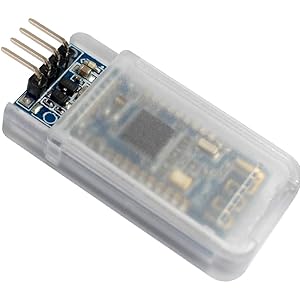
📡 Elevate your IoT game with HM-10 — Bluetooth that just works, so you don’t miss a beat!
The DSD TECH HM-10 Bluetooth 4.0 BLE module offers low energy wireless connectivity optimized for iOS devices and Arduino projects. Featuring a convenient 4-pin base board for easy wiring, LED status indicators for connection monitoring, and iBeacon support, it empowers developers to build smart, connected devices with confidence. Operating between 3.6V to 6V and backed by a one-year warranty, the HM-10 is a reliable choice for next-level Bluetooth integration.


| ASIN | B06WGZB2N4 |
| Are Batteries Included | No |
| Best Sellers Rank | #12,888 in Computers ( See Top 100 in Computers ) #187 in Single-Board Computers |
| Brand | DSD TECH |
| Color | Multicoloured |
| Computer Memory Type | EEPROM |
| Customer Reviews | 4.4 4.4 out of 5 stars (707) |
| Date First Available | 18 May 2017 |
| Item Weight | 5.09 g |
| Item model number | ML-HM-10 |
| Manufacturer | DSD TECH |
| Memory Clock Speed | 3600 MHz |
| Memory Technology | DDR4 |
| Operating System | Android 4.4, iOS |
| Processor Brand | Apple |
| Product Dimensions | 3.05 x 1.52 x 0.25 cm; 5.1 g |
| RAM Size | 32 KB |
| Voltage | 5 Volts |
| Wireless Type | Bluetooth |
M**C
Les matériels Apple n'acceptent de dialoguer qu'avec des équipements bluetooth 4 BLE ( bluetooth low energy), sinon ils font semblant de ne pas les voir ! Cette carte est bien reconnue sur iphone et ipad si l'on utilise un logiciel (dispo sur appstore) comme terminal bluetooh. Si l'on développe soi même l'application coté Apple, c'est elle qui se charge d'ouvrir la connections. On peut facilement échanger entre les deux machines en mode texte (entre un arduino et un apple), dans les deux sens. Bon produit. NB : il est alimenté en 5v mais les signaux RX TX doivent être en 3V. Un adaptateur peut etre utile, sinon une résistance de 330ohms fait l'affaire.
Y**E
Bu modülü tercih sebebim diğer Bluetooth modüllerinin iOS ile olan uyumsuzluğu (Tşkler Apple). İOS App var cihaza bağlanıyor ancak herhangi bir iletişim sağlayamıyorum. Dolayısıyla kontrol etme imkanım olmuyor :) yanıp sönen kırmızı led in bağlanınca sürekli yanması için almış oldum şimdilik. Umarım benim yaptığım bir hatadır. İletişim kurabilirsem memnun kalacağım. Elinizde Windows,android cihaz yoksa arduino Bluetooth Apple ile olmuyor.
J**R
I am developing a system for measuring thermal conductivity in buildings, and need a means of communicating between a units on the exterior and interior of the building. My plan is to place the units either side of a window, so Bluetooth range should be adequate. The units will be battery powered, so power consumption is important, which attracts me to Bluetooth Low Energy. I bought 2 of these boards to evaluate, and here are my findings so far: Connecting to an HM-10 board using an Android phone is straightforward using BLE scanner. I next tried to connect to one of the boards using a terminal emulator (Putty) via a USB-Serial converter, the unit responded to AT with OK, but failed to recognise any AT commands. Conclude that Putty is inserting extra characters. I next tried the same thing using RealTerm, which worked fine. I then set up the second unit running in another terminal emulator window, so that I could get them to communicate. To do this one of the boards needs to be set to receive mode so I do AT+ROLE1 AT+CO<AddressOfOtherDevice> This succeeds in getting the boards to communicate, so anything typed in one terminal window appears in the other, including AT commands, so its quite difficult to stop communication. You should be able to get break the connection by AT followed immediately by an AT command. Actually I am not telling the whole story as I had tried some other things first. The following sequence works reliably to connect: AT+RENEW AT+IMME1 AT+ROLE1 AT+CO<Address> send some stuff AT AT+ROLE0 AT+RENEW Next put the slave board to sleep AT_NOTI1 // To get a notification when the connect is made or dropped. AT+SLEEP The master board can still connect. Next I put both boards to sleep. You need to wake one of the boards with a sequence of random characters until you see OK+WAKE Then you can connect as before. After your conversation is finished you can put both boards to sleep again. I have captured those findings in a console program which runs in master and slave modes on a PC connected to both boards, this reliably puts the boards to sleep, one wakes every few seconds, connects with the other, sends some messages and both boards go back to sleep. I haven't tested the communication range yet, but so far they work well after a bit of investigation/development.
T**D
I originally got a defective item, it would not respond to any commands, but DSD TECH promptly replied to my mail and offered hassle free replacement. Within three days I got the new module and it worked just fine. Now for technical part: - it requires voltage divider for communication (Logic level shifter) if your MCU uses 5v logic level voltage and this is no different to any other Bluetooth module out there. - It is a BLE device and it is, by default, in that mode. That is why your mobile phone can't connect to it. Download an app that knows how to communicate with BLE devices. - Documentation is what you would expect from Chinese manufacturers but I've seen worse. - It does not support AT+VERSION? command but it does have AT+VERR? and AT+VERS? commands - The AT+HELP command only spits out URL of chip manufacturer but not a big deal because documentation contains all supported commands. Bad reviews are mostly from people who do not know what they are doing, did not do enough research on how these devices function or were expecting something that this device is not
C**L
I got this device to add bluetooth capabilities to my Teensy project. Unlike Arduino schematics poster, it's very easy to connect to a Teensy. Simply connect GND to GND, VCC to 5v. Then RX and TX to a RXn and TXn (blue on the pin out sheet.) Then from your code you work with it like the USB serial connection, but instead of Serial.print() you would use Serialn.print() where n is the serial port number you wired too. Thats it! So with some basic code and you can accept Serial AT commands from your computer to relay to your bluetooth module. With an app like nrfConnect you can send commands to the module and get that back out of the Serial connected to your computer. At a very basic transport level these things work well. My problem is likely due to poor planning. I wanted to do a proximity based action where the BLE module would detect my iPhone or Apple Watch and then perform an action as I came into and out of the proximity zone. I've done this on other devices but the snag here is getting the module to see the MAC of my target devices. Turns out that from an iOS app perspective BLE is the right choice, but from a proximity or presence angle classic BT is likely the answer. So at this point I've ordered an HM-05 to test out this theory. There is literally no pairing involved, just a scan to see if a particular device is nearby or not, so it will likely bypass Apples silly bluetooth policies. Anyway, figure out if thing is right first. Otherwise you'll have it on hand for the next project like I do...
ترست بايلوت
منذ أسبوع
منذ شهر