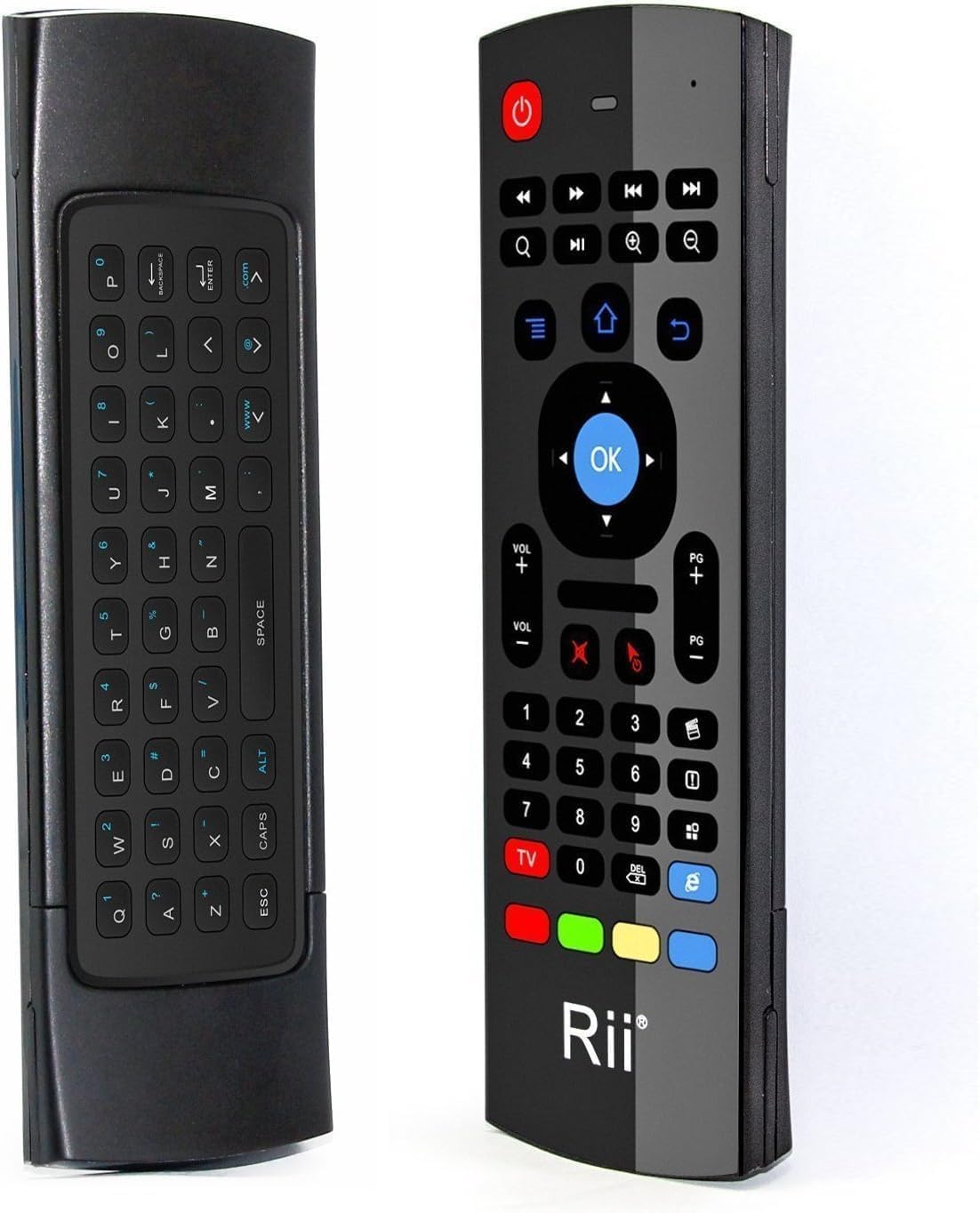
Desertcart purchases this item on your behalf and handles shipping, customs, and support to EGYPT.
🎯 Master your media & multitask like a pro with the Rii MX3 Fly Mouse!
The Rii MX3 is a versatile 3-in-1 wireless controller combining an 81-key keyboard, precision air mouse with 6-axis motion sensors, and an infrared remote with customizable learning function. Operating on advanced 2.4GHz RF wireless technology, it offers up to 10 meters of reliable range and broad compatibility with Android, Windows, Mac, Linux, and smart devices. Its plug-and-play design and ergonomic form factor make it an essential tool for professionals seeking streamlined control over smart TVs, mini PCs, and home entertainment setups.
| ASIN | B01CL3ZXGO |
| Antenna Location | Home Entertainment |
| Best Sellers Rank | #22,520 in Electronics ( See Top 100 in Electronics ) #1,041 in Remote Controls (Electronics) |
| Brand | Rii |
| Color | Black |
| Compatible Devices | Set Top Box |
| Compatible Operating System Family | Android, Linux, Windows |
| Connectivity Technology | Infrared |
| Customer Reviews | 4.0 out of 5 stars 2,406 Reviews |
| Hand Orientation | Ambidextrous |
| Item Weight | 2 ounces |
| Keyboard Description | Indoor |
| Keyboard Layout | QWERTY |
| Manufacturer | OEM Computer Keyboards |
| Mfr Part Number | FMKRFIRAMT1-IV2 |
| Minimum Required Operating System Version | Android 13.0 |
| Model Number | FMKRFIRAMT1-IV2 |
| Movement Detection | 3-Gyro + 3-Gsensor |
| Number of Batteries | 2 AAA batteries required. |
| Number of Keys | 81 |
| Number of Packs | 1 |
| Operating System | Mac OS |
| Other Special Features of the Product | Wireless |
| Power Source | Battery Powered |
| Special Feature | Wireless |
| UPC | 714890657168 |
| Unit Count | 1 Count |
| Warranty Description | International Version (No Warranty). See US Version for warranty. |
B**G
Works As Advertised but Use Caution
I am on a never-ending ergonomic treadmill for my work-from-home setup and while working through some shoulder pain, I though I might try an "air mouse" instead of my trackball. I can tell you that this thing plugged right in and started working basically immediately. I didn't have to calibrate it or run through a config, it just started working (doubly cool because I have my wireless trackball and my wired mouse plugged in at the same time too. I'm seein' double! Three mice!) Here's the problem - I bought this to use for my job as a very important code toucher, specifically I'm building apps by dragging and dropping components hither and yon. I have not yet found a way to hold or click the mouse that doesn't cause the cursor to immediately dip away from my target. I can click big tiles and Youtube thumbnails easily, so this would work for browsing a streaming service, but trying to grab the corner of a rectangular control to drag it bigger was a nightmare. I tried using the mouse sensitivity down button presses but either that doesn't work or it's already at the lowest sensitivity. I have this vision of 3D printing like a little Glock frame/grip with a trigger that clicks the clicker for me, I feel like if I was pulling back instead of pushing down the button, I could be more accurate. But I don't own a 3D printer and I can't design things in CAD so who am I kidding. Anyway, it does what it says it does for a VERY good price but give some thought to what you're trying to use it for. the less accuracy necessary the better.
M**E
Smooth Cursor! Great Responsiveness!
Just received this today, hooked it up to my Pi running Recalbox/Kodi. Worked out of the box (once providing two AAA batteries). The very first thing you will notice when using this remote is how nice the cursor movement is! It will seem sporadic at first, but I now just accept that it is just really eager to please. It is precise, but quick. The mouse cursor CAN be disabled. Moving from there, the buttons all work as they should on Kodi. I would guess that Kodi just sees the remote as a multimedia keyboard (I'm sorry, but I'm not presently interested in polling the raw input codes). My only real complaint here is that the navigation buttons, while feeling nice to press with enough travel, do feel a bit squished together. You CAN feel the difference between them, so you don't feel like operation without staring at the remote is impossible, BUT it is still possible to fat finger if you're rushing to press something. Every button offers exactly as much travel as it SHOULD, so you don't feel cheated out of a satisfying press. For a $12 remote that shipped very quickly, I am absolutely pleased and WILL buy again for every Kodi setup. Addendum: Just noticed this! When operating, only the keys facing up will be usable! So you do not have to worry about pressing a keyboard key while operating the remote side, or vice-versa! This does mean however that you can't get fancy with the remote and try to press a button upside-down or something, but I would still state this as a good feature!
M**L
Good bang for the buck
I love it. I have yet to try to program the infrared (and I might not ever) because it does pretty much all I need it to do in Windows 10 via the 2.4GHz USB transceiver, and it does so very well. Positives: - I plugged it in and it was working in seconds. - When the remote side is up, the keyboard is disabled, thereby preventing accidental key presses. - Similarly, the remote and air mouse are disabled when you flip it over to the keyboard side. - In mouse mode, page up/down works, the arrow keys work, and there are buttons for both app menu and right-clicking. Negatives: - There is a CAPS key instead of a SHIFT key. Like the ALT key, the CAPS key is a lock mode key. So if I want to type "Spider-Man", I have to hit [CAPS] S [CAPS] p i d e r [ALT] - [ALT] [CAPS] M [CAPS] a n... which is very annoying, especially when entering a password with mixed case, symbols, and/or numbers since the characters are typically hidden from view. - Movement with the air mouse works fine until you need to stay in one spot for a few seconds in order to double-click or right-click, in which case the act of pressing either button causes the mouse to move which messes up the double or right click action. - There are no special settings specific to this device--it just uses the system's basic mouse settings. It seems to me that the method the device uses to send mouse movement needs some tweaking and, without device-specific controls, there's no way for the user to overcome this. - It falls asleep extremely fast--like several seconds. So whenever you go to pause or mute, etc., you have to hit the button, see that it didn't work (because it was waking up the remote) then hit it again. - It has no backlight, making the keyboard virtually useless in low-light situations—which seems to be when I use it most often. Aside from all the negatives, it's still very useful and pretty cool, but I would've given it three stars if it wasn't for the low price. *Jan 2019 Update* With so many similarly-designed remotes out there WITH backlights, I'm surprised anyone is still buying this one. I've since upgraded to the Ilebygo Mini Wireless Keyboard/Air Remote Mouse for just a few dollars more.
C**E
Good, but Unreliable
When it works, the air mouse is the perfect pc remote. I use my laptop to reach streaming services I can't get on my PS4, so it's nice to have a remote for it. The air mouse doesn't have any issues, and the keys mostly work (though the alt functions took some figuring out). As a universal remote, I found it useless. The manual is written in extremely broken English, making the pairing instructions indecipherable. Even when assuming what the instructions are trying to say, the pairing doesn't seem to work. Although, mine may have been defective. After about a month and a half, the remote stopped working altogether. I replaced the batteries, which seemed to fix the problem. After less than a week, the remote stopped working again. It seems that the batteries that came with it had corroded and damaged the conductors, but it could be anything. Ultimately, it was a good remote that didn't last long enough to be considered a worthwhile purchase.
G**R
Works straight out of the box
I got this remote to work with my mini PC I got a while back to serve a media center. I got tired of having to use a mini keyboard and mini trackball when I wanted to use my streaming app. I read the instructions and followed them, insert batteries, plug in dongle, turn on PC. The remote was already connected and recognized and ready to go. The keyboard is nice to inter my pin. You can even use the remote to move the cursor like a mouse. The buttons are a good size as is the whole unit for my larger than average hands. I can even turn of the PC with off button so I don't have to get off the couch. The RII MX3 remote is very handy for a PC media center.
D**N
Unreliable Input
I plugged this into a USB extension cable a few feet in front of me with direct line of sight, with new batteries. The mouse worked fine but the keyboard I put was unreliable. After multiple attempts to enter my password and log into my computer, I threw the remote in the trash. I've had another remote from this brand before and it was great. This one felt cheaply made and failed right out of the box. I do not have the time or patience to return things like this, and I refuse to try to work with something so frustrating. Overall, this was a waste of time and money. Not sure if I got a dud, it's an bad design, or user error. I was unable to enter a special character with the "alt" key. It would not activate and I could not log into my PC. I'm getting really tired of low quality junk on Amazon. For future reference: if the price seems too good to be true, it is about 95% of the time.
D**N
Perfect All-Arounder for Media PC
In my time I've gone through a plethora of different wireless input devices for my TV and media PC, from the earliest arcane "universal" remotes to full wireless keyboards to mini wireless keyboards, but I think I've finally hit the sweet spot with the MX3. The size and ergonomics are great using it as both a remote and as a keyboard. The use of the 2.4g wireless and received helps insure it "just works" with the PC. No longer having to scrabble on a touchpad is quite liberating, though I think the remote could benefit from having a scroll wheel. The IR side is a bit more complicated; unfortunately while it features 5 programmable IR buttons, the rest on the remote do nothing in IR; e.g. tapping "TV" and then the volume control will not translate to the TV, even after it has been otherwise programmed. That said, with the five buttons you do have, the remote learns and imitates the signal, so whatever functionality is most crucial can be ported over, even from more than one remote. I set mine up to power the TV on and off and switch the input, and programmed another button with the remote for my artificial fireplace to turn that on and off, allowing me to cache away two remotes for the price of one. The only way I could think to improve it would be to include software for the PC that would allow you to remap the various 2.4g wireless aspects of the remote. In particular my media PC also has a 2.4g remote starter fob and card; if I could set up the remote to talk to that card I'd give it six stars.
A**R
This thing is badass!
I never even knew such a thing existed, after I found myself in a new situation, I began using my computer with my big monitor as my main media viewer and I found out they make these really cool remote controls for your computer now. I really like how you can use the cursor and you can turn the cursor off if you don't want to keep accidentally moving it, and once you learn how the cursor actually works you can get pretty accurate with it. Also the qwerty keyboard on the back is really cool to have, I mainly just use it for the space bar to pause and play YouTube videos or Netflix etc. Great product, great deal, zero problems with it. If you have trouble accurately moving the cursor around, that's a skill issue, it works just fine!
D**D
Good product
Works fine...
Z**K
Really useful and good quality.
Really nice remote, a life saver really. Good functions and nice feel to using it. A couple of glitches here and there between communication to and from the remote, but this is rare and not a deal breaker, for me at least. Battery life is really good too, haven't had to change the batters since purchasing and using it regularly for the past 8 months. Never had the chance to test out the mic, not sure it even has one tbh.
N**K
Do not buy this
it constantly malfunctions
R**M
Nice
Helpful
A**R
Useless
Didn’t work. Ordered twice and both times it didn’t work. Useless
Trustpilot
2 weeks ago
4 days ago