Buy anything from 5,000+ international stores. One checkout price. No surprise fees. Join 2M+ shoppers on Desertcart.
Desertcart purchases this item on your behalf and handles shipping, customs, and support to EGYPT.
🌍 Stay cool, stay ahead — the ultimate temperature guardian for your supply chain!
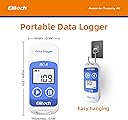
The Elitech RC-5 USB Temperature Data Logger offers professional-grade temperature monitoring from -30°C to +70°C with ±0.5°C accuracy in critical ranges. It stores up to 32,000 data points with customizable logging intervals and supports dual power sources (CR2032 battery and USB). Ideal for cold chain logistics, warehousing, and laboratory use, it features easy USB connectivity and management software for seamless data retrieval and export.


| ASIN | B00MQSCZF2 |
| Additional Features | High Accuracy |
| Age Range Description | Adult |
| Age range (description) | Adult |
| Best Sellers Rank | #17,357 in Tools & Home Improvement ( See Top 100 in Tools & Home Improvement ) #263 in Scanners & Testers |
| Brand | Elitech |
| Brand Name | Elitech |
| Connectivity Technology | Usb |
| Customer Reviews | 4.1 out of 5 stars 565 Reviews |
| Display Type | Digital |
| Included Components | Battery |
| Included components | Battery |
| Indoor Outdoor Usage | Outdoor |
| Item Length | 8 Centimeters |
| Manufacturer | Elitech |
| Model | RC-5 |
| Model Name | RC-5 |
| Number of Batteries | 1 Lithium Metal batteries required. (included) |
| Outer Material | Plastic |
| Outer material | Plastic |
| Part Number | RC-5 |
| Power Source | Battery Powered |
| Product Care Instructions | Wipe Clean |
| Resolution | Alta |
| Response Time | 10 seconds |
| Reusability | Rechargeable |
| Smart Home Compatibility | Not Smart Home Compatible |
| Special features | High Accuracy |
| Specification Met | CE |
| Specification met | CE |
| Style Name | Contemporary |
| UPC | 703430273593 763230863417 841161103083 |
| Unit Count | 3.2E+4 Count |
| Upper Temperature Range | 70 Degrees Celsius |
S**I
The results are good
It is working perfectly
A**R
User comments on RC-5 data logger
Works as described with resect to data acquisition, storage and retrieval (download). Price is very reasonable compared to the prices of competitors units. Have not had the unit long enough to comment on battery life. The following information may be useful. Install the management software that comes on the mini disc and run the executable file. Plug the RC-5 into your computer's USB port and open the RC-5 management software by clicking on the "RC-4&5 Conventional" icon. This icon will be on the computer’s desk top and also will be displayed in the programs (left hand) toolbar when clicking the “home” button of your computer. The toolbar will be displayed on your computer screen when you have activated the management software. Once the management software is opened, click on the "Connection" icon. Then click on the “Parameter Set” icon and then fill in your set of user selected data acquisition entries the parameter fields to control the format of temperature data that are are recorded (logged), how often they are measured. When you have completed entering the measurement parameters, click “SAVE” at the bottom/lower right of the parameters set screen. Then click on “Exit”, which is also at the bottom/lower right of the parameter set screen. Next unplug the RC5 from the computer’s USB port. It will have heated up quickly during the time when it was plugged in to the USB port (while you were entering the data acquisition parameters) and the temperature displayed on the screen of the RC5 will not be an accurate indication of the ambient temperature, the RC5 screen will show a much higher temperature. About 30 minutes after you unplug the RC5 from the computer, it will have cooled down to room ambient temperature. The RC5 unit will not start recording until you push its left (play, start) > button while also holding it down for ~ 4 seconds. When you do so, the temperature that the RC5 unit is experiencing at that time (hopefully it has cooled down to be the same as the room ambient temperature) shows on the screen of the RC5 for ~ 15 seconds along with the >, indicating that the RC5 has commenced recording (data acquisition). To view and download recorded data, you need to plug the RC5 into the computer’s USB port and then click on the "RC-4&5 Conventional" icon to again open the management software. Clicking on the "upload data" icon will display a plot of the acquired data on the computer screen. Clicking on the "stop record" icon will stop the RC5 unit from recording data. Clicking on the "Export to Excel" icon will import the data to Excel.
S**4
Very satisfied so far
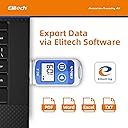
Very satisfied so far. I bought it for a temperature control in a cold storage warehouse (4C) for food at work. For now I just test it in my office and outside but seems to work pretty well. I like the program that came with it. Easy to set parameters. You can export data in text, world, PDF and Excel program. For my use, the PDF is the one i will use. First page is the list of the setting parameter that was used, after you got a graphique with a table listing all temperature taken with the time. You can set a Maximum/Minimum temperature so if you go over/under these the color of the data (red/blue) change for an easy reading, really usefull when your product need to stay in a range of temperature. The price is really good, there is a good chance that I buy more of these after doing real testing in the warehouse. The only little down side for my use is that it would be nice to have a little Alarm that would go on when you go over/under the max/min temperature setting. So I would recommend this product.
J**Z
Bien
Se usa en transporte con control de temperatura, es faul de usar y funciona bien
P**Y
Delivery Feedback
Very good
Trustpilot
2 weeks ago
3 days ago