We remain fully operational. Our teams are working around the clock to ensure your deliveries continue safely.

قم بتنزيل التطبيق


معلومات عنا
حقوق الطبع والنشر © 2024 Desertcart Holdings Limited
قم بتنزيل التطبيق
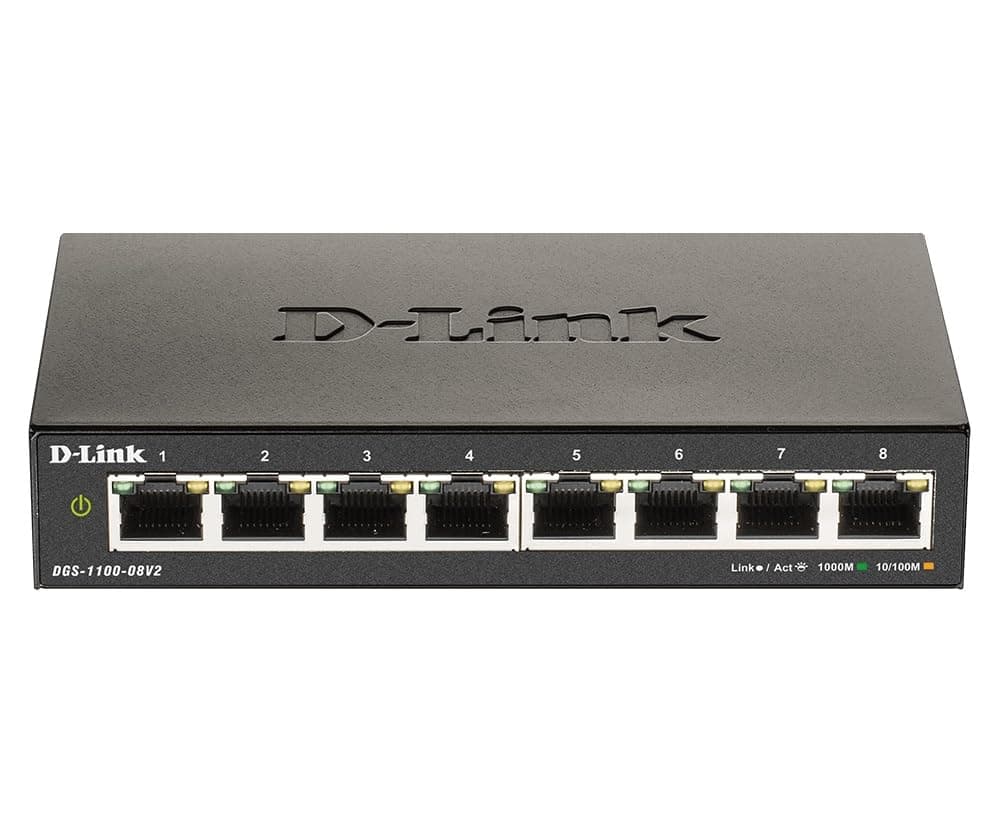
🚀 Power Your Network Like a Pro—Smart, Silent, and Sustainable!
The D-Link DGS-1100-08V2 is an 8-port smart managed Gigabit Ethernet switch designed for small to medium business networks. It delivers high-speed 10/100/1000 Mbps connectivity with advanced traffic management features like VLAN, QoS, and bandwidth control. Energy-efficient IEEE 802.3az compliance and a fanless design ensure silent, low-power operation. Manage your network easily via a user-friendly web interface, with flexible mounting options and a limited lifetime warranty for reliable, long-term performance.




| ASIN | B08P2C2GXF |
| Best Sellers Rank | #163 in Computer Networking Switches |
| Brand | D-Link |
| Built-In Media | Switch, Guide, Power Adapter, (2) drywall anchors & screws, (4) rubber feet |
| Case Material Type | Metal |
| Color | Black |
| Compatible Devices | support IEEE 802.1D 2004 edition, 802.1w, and 802.1s Spanning Tree Protocols (STP). |
| Current Rating | 0.01 Amps |
| Customer Reviews | 4.4 4.4 out of 5 stars (242) |
| Data Transfer Rate | 1000 Megabits Per Second |
| Global Trade Identification Number | 00790069453304 |
| Interface | RJ45 |
| Item Dimensions L x W x H | 5.75"L x 3.25"W x 1.1"H |
| Item Type Name | D-Link Ethernet Switch, 8 Port Smart Managed Gigabit Desktop EEE Network Internet (DGS-1100-08V2) |
| Item Weight | 11.2 ounces |
| Manufacturer | D-Link Systems, Inc. |
| Mfr Part Number | DGS-1100-08V2 |
| Model Number | DGS-1100-08V2 |
| Number of Ports | 8 |
| Platform | Not Machine Specific |
| Switch Type | Layer 2 Managed |
| UPC | 790069453304 |
| Unit Count | 1.0 Count |
| Voltage | 100 Volts |
| Warranty Description | Limited Warranty |
M**.
Perfect.
Works great. Easy to setup and administer.
M**O
Super Simple & Not Super Expensive
At first I was questioning going away from Netgear when looking at network switches, but after receiving this one and just plugging it in I am very happy. I This was the first time I was going to use a switch as I had recently ran Ethernet throughout my house to get the best connection on major appliances, so I was not familiar with switches but after some research I decided a managed switch was what I wanted. The price of the Netgear managed switches with 6 ports minimum were pretty high and I did not really want to get another brand as all my network system is the same. I took a chance and boy am I happy with the outcome. It was plug & play and all my devices quicker when that are all in use. Great product for that mid to high grade category I think.
G**.
the only good SOHO switch!
this is the only SOHO switch that doesn't hide features from you. tplink forces you to use vlan1 untagged on all ports. ridiculous. netgear forces you to buy a 24 port one to access some basic functionality... this ones does it all. I dont use PoE because its not power efficient anyway. this is also the only small device where I can allow admin access to a single port (UI calls it management vlan)... essentially giving me the safety of a dedicated console port option by sacrificing one port. perfect flexibility. (netgear is also close to functionality but does NOT allow this one)
A**R
Works, but setup isn't for the faint of heart.
In the end, I got three of these set up with multiple VLANs, but setup can be tricky. When you click "Apply" on a settings page, the changes are applied, but not saved. So if a change disconnects you from the unit (say, when you change the management IP from its default to your own), then you have to be able to reconnect to the device using the new settings. Otherwise, you're locked out with no chance to reconnect. When you reboot, your settings are lost. I suppose that could be a good thing, but you just have to plan your steps and don't plan to do more than one step at a time. I just found myself spending a lot of time changing the IP settings on my laptop just to get these over the finish line.
D**B
Seems like this is THE best cheap managed Switch with VLAN support
If you read some other reviews of managed switches with VLAN support, you'll find the others usually have some kind of downside like being unable to disable every VLAN from receiving the default VLAN or something along those lines. But not this one. It's silent, it's made of metal so it feels amazing and solid, and it's got lights that make just enough light without blasting the whole room with mini-flashlights. I like it. Thanks, Dlink.
J**R
Very dependable, high performance managed switch
This is an outstanding product for its price. It performs well, it is dependable and it is durable.
A**R
Perfect
Perfect
J**N
Bad product.
When started it would work for a minute and then it would just stop working. I tried looking for support and didn't receive any. I ended up sending product back for a full refund. Now I'm scared to buy a d-link switch. Got a other brand and is doing the job better then I thought.
J**A
muy bueno
J**A
For the money you can not go wrong with this managed switch, it even supports SNMP and bolts into Zabbix for monitoring. If I had any wish I'd love if it had a 2.5G or SFP port for uplink ... Power consumption is low 3-4W, it's nice and compact, and the power cable goes out the back. Setup is a little bizarre, the switch is not DHCP enabled (10.90.90.90) out of the box, but this was easily accommodated. And when you make changes and apply them in sub menus, be sure and click save configuration or every time you have a reboot or a power off of the switch you will loose your changes.
A**N
I brought this network switch to use with a Raspberry Pi4 home brew router running OpenWRT. The switch works fine straight out of the box with no configuration needed for normal operation. The Admin panel to configure the switch can be accessed through a web browser using the local IP address 10.10.90.90(double check manual). It would be best suited for home use, or in a small business with the only downside being the setup & configuration. It can be a bit overwhelming and confusing if you don't have any knowledge about Networking
J**O
I've used many switches from the DGS-1100 range including this -08v2, as well as: -05PD, -08P, and -24Pv2. All have a similar webUI and are easy to configure and manage, once you know the default IP is 10.90.90.90. These switches offer line-rate performance on all ports and in my experience are completely reliable and have very low power consumption. The port stats and cable test features are useful to check cabling issues. My go-to switch.
A**R
It works great as advertised. nice plug and play and lots of options. The price is kinda high and the UI in the panel is similar to a 90's website. Other then that it's really good.
ترست بايلوت
منذ 3 أسابيع
منذ أسبوعين