We remain fully operational. Our teams are working around the clock to ensure your deliveries continue safely.

قم بتنزيل التطبيق


معلومات عنا
حقوق الطبع والنشر © 2024 Desertcart Holdings Limited
قم بتنزيل التطبيق
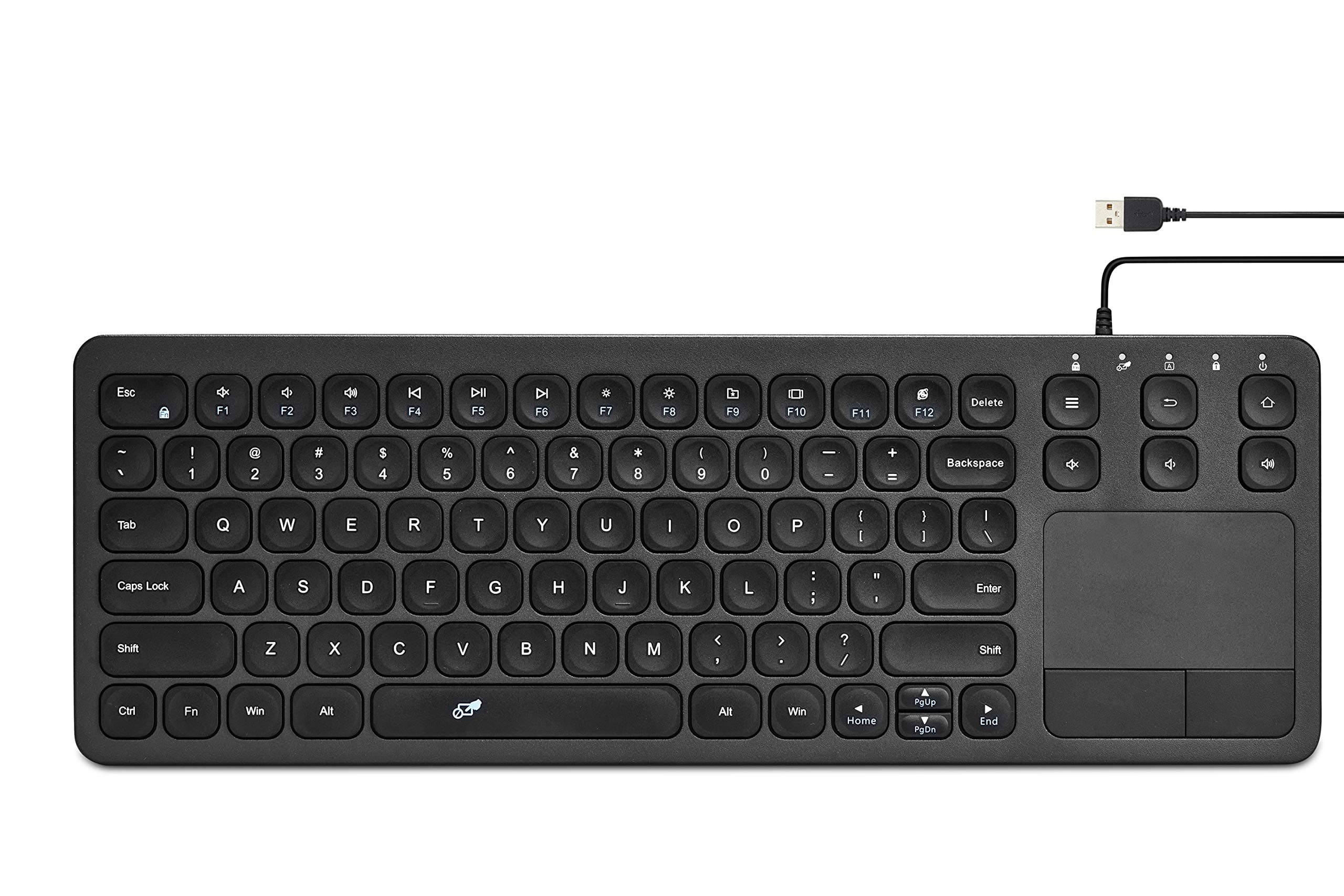
⌨️ Elevate your workspace with compact precision and seamless control!
The Vilros 15 Inch USB Keyboard with Touchpad is a sleek, ultra-slim wired keyboard designed for Raspberry Pi and USB-compatible devices. Featuring a durable metal chassis, ergonomic key layout, and an integrated multi-touch trackpad, it delivers reliable, precise input without wireless connectivity issues. Perfect for professionals seeking a compact, high-quality keyboard with dependable performance and enhanced control.


| ASIN | B08PW3LR3W |
| Additional Features | Trackpad |
| Antenna Location | Office |
| Best Sellers Rank | #137 in Computer Keyboards |
| Brand | Vilros |
| Built-In Media | USB Cable |
| Button Quantity | 78 |
| Color | Black |
| Compatible Devices | Laptop |
| Connectivity Technology | USB, USB-A |
| Customer Reviews | 4.4 4.4 out of 5 stars (281) |
| Enclosure Material | Acrylonitrile Butadiene Styrene |
| Hand Orientation | Ambidextrous |
| Is Electric | Yes |
| Item Dimensions L x W x H | 14.76"L x 5.09"W x 0.69"H |
| Keyboard Description | Ergonomic |
| Keyboard Layout | QWERTY |
| Manufacturer | Vilros |
| Mechanical Keyboard Switch Model | Cherry MX Red |
| Model Name | 15 Inch USB Keyboard with Touchpad |
| Model Number | VILP108 |
| Number of Batteries Required | 1 |
| Number of Keys | 104 |
| Number of Sections | 1 |
| Power Source | Battery Powered |
| Style Name | Contemporary |
| Switch Type | Mechanical |
| UPC | 810043442053 |
| Unit Count | 1.0 Count |
| Warranty Description | 1Year Manufacturer |
L**N
The perfect keyboard for what I was looking for.
Very nice little keyboard. Probably the most solid membrane keyboard I've had. The body is metal and nice and heavy. Feels very well built. The trackpad and mouse buttons also feel great. The keys feel great. Sound is reasonable. This is the perfect addition to my cnc setup, allowing me another point of control. Works great. Perfect size. It even has a function key which seems to be becoming rare. If there is one downside, it's that there is no stand to adjust the angle but I am not missing it.
I**E
Ergonomic, easy to use, perfect trackpad
I had a Logitech wireless keyboard/trackpad combo for the past 8 years and it worked (mostly) fine. This keyboard however blows past that in terms of key feel and ergonomics. I can type more accurately and faster. It also fixes two of the most annoying issues with my old logitech keyboard: - The wireless keyboards (bluetooth or not) tend to drop connection once in a while. This can become extremely annoying as it pops out of nowhere and causes rrrrreepeated keystrokes and jumpy mouse. - The trackpad on my logitech would stop working at a slight dampness. So if I just washed my hands and did not dry them 100%, I would have to clean both my hands and the pad in order for it to work. This keyboard does not have that problem. I can wipe it down with a damp cloth and the trackpad works like a champion. 5 stars overall. Two minor complaints: - Logitech keyboards have the left mouse click button on the left side of the keyboard as well (above Esc key). This comes in pretty useful for two-handed mouse action. Alas, this keyboard does not have it. - The USB wire could have been a little longer but it can be solved by a wire extender.
S**N
Perfect little keyboard for Raspberry Pi
Got this for use with a Raspberry Pi 5 microcomputer that I’m using for development of an AI Home Assistant. Wanted to replace a separate full size keyboard with mouse that is just overkill for what I’m doing with this setup. This keyboard is perfect. I guess I wasn’t expecting such good build quality. This thing feels bulletproof. Low profile keys with a full size layout makes typing easy. The entire thing is only 14-3/4” long by 5-1/8” tall and just 5/8” thick, so it is very compact for storage. The touch pad on the right with 2 mouse buttons works great, eliminating the need for a separate mouse and a place to use it. It was completely plug-n-play compatible with my Raspberry Pi, needing no extras to connect and start working perfectly. The cord is 5ft long, which is a lot more than I need, but it’s thin enough to be easily coiled up with a Velcro strap for cable management. If I were to have a complaint, it’s the fact that the cord exits the top just on the right side with a molded strain relief that requires you to have about a 1/2” of clearance in front of the keypad. Not a significant deal, but something to consider depending on how you’re going to mount or store this in a fixed configuration.
F**E
Right tool for the job
Perfect tool for the job. No complaints. Small, light, portable, functional, and inexpensive. I use it when setting up new PCs and the mouse/keyboard means I just plug one thing in and go.
S**4
Great keyboard as long as you don’t need the Insert key
Pretty good keyboard. My only complaint is that it does not have an Insert key. If this is something you use/need I would look for a different one. If you do not use/need that key, then I would give this 5 stars for you.
F**T
working, plug and play
working, well quality built
R**L
Stopped working in under 6 months
These things are extremely low quality and prone to breaking. I've bought two and both units failed in under 6 months. They have a nice weight, connect easily, and are very functional when they work. Unfortunately, they have almost no longevity and are extremely unreliable.
R**T
The ideal wired keyboard for a mini PC
Pros: Keyboard is well made yet light Not too big or too small, but right in the Goldilocks zone for a mobile keyboard Happily without numpad (for those who don't need one) Ledge is molded into underside so it sits at an angle without having to flip out little feet that can break Touchpad is smooth to the touch and responsive, eliminating need for separate mouse DEL key is in the right spot at the top right, instead of misplaced like on many other keyboards Keys presses are comfortable with nice travel, and keys quickly bounce back, not mushy or 'hard' USB wired so 100% reliable, even in GRUB reboots or other situations where networking is not loaded Generous USB cable length of 5 ft Plug and play Perfect for using with mini PC, Raspberry Pi, etc, or as a mobile keyboard for field work Cons: Not backlit This little keyboard not only ticked every box, it does everything well. I have never seen such a responsive touchpad on a mobile keyboard. I'm very happy with everything about it, with the exception of it not being backlit (like with soft blue) for working in low light, but that would be the cherry on top, and as it is, I never in a million years expected to find the exact kind of keyboard I was searching for. So no stars deducted! So many mobile keyboards have numpads and are too big, others are like toys and too small. Then there are a myriad of layouts depending on how many keys, and none were what I was looking for. Choices become even narrower when looking for one with a touchpad! Was not planning to spend $34 (with coupon that's what I paid) - was looking to spend less. But when I saw it I couldn't believe it. Worth every penny and highly recommended! For a mobile keyboard could not ask for more. Will be picking up a spare to tuck away just in case it should disappear off the market!
L**R
I've tried several USB touchpad keyboards, including expensive Cherry models and found them all wanting in various aspects. This one ticks all the boxes: - Small and light, but sturdy - Full standard keyboard with no oddly placed keys - Responsive keyboard doesn't miss presses - Responsive touchpad which works with 2 finger scrolling, tap-to-click and two-fingered tap to right click. Worth the money.
ترست بايلوت
منذ شهر
منذ 4 أيام