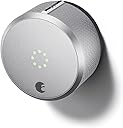
🔐 Unlock the future of home security—smart, sleek, and always connected.
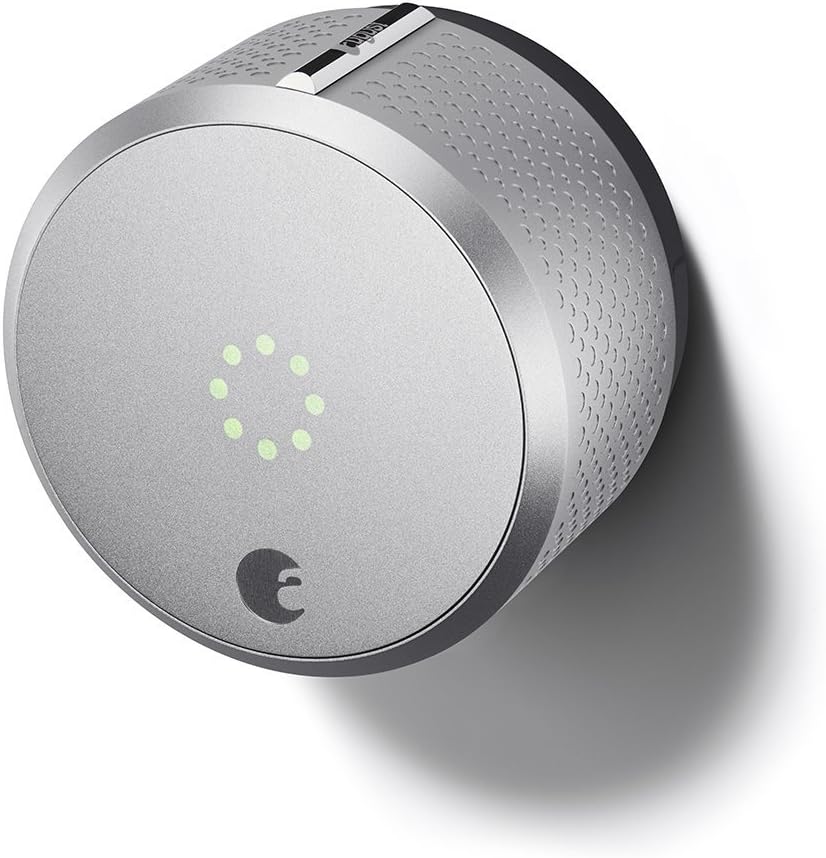
The August Home Smart Lock 2nd Generation is a sleek, silver keyless lock that upgrades your existing deadbolt with smart technology. Compatible with Apple HomeKit and Alexa, it offers voice control, auto-lock/unlock features, and a 24/7 activity log to keep you informed. Easy to install and designed for seamless integration, it ensures your home is secure and accessible without the hassle of traditional keys.


| ASIN | B0168IXO3M |
| Additional Features | Keyless |
| Best Sellers Rank | #398,782 in Tools & Home Improvement ( See Top 100 in Tools & Home Improvement ) #1,060 in Deadbolts |
| Brand | August Home |
| Brand Name | August Home |
| Color | Silver |
| Connectivity Protocol | Wi-Fi |
| Control Method | Voice |
| Controller Type | Amazon Alexa, Apple HomeKit |
| Customer Reviews | 3.7 out of 5 stars 2,324 Reviews |
| Finish Types | Polished |
| Global Trade Identification Number | 00853984006045 |
| Included Components | Mounting hardware |
| Item Dimensions | 3.4 x 3.4 x 2.2 inches |
| Item Type Name | August Smart Lock |
| Item Weight | 13.92 ounces |
| Item dimensions L x W x H | 3.4 x 3.4 x 2.2 inches |
| Lock Type | Key Lock |
| Manufacturer | August Home Inc |
| Manufacturer Part Number | AUG-SL02-M02-S02 |
| Manufacturer Warranty Description | 1 year |
| Material | Metal |
| Material Type | Metal |
| Model Name | Smart Lock |
| Model Number | ASL-02 |
| Number of Items | 1 |
| Number of Packs | 1 |
| Number of Pieces | 1 |
| Recommended Uses For Product | Door |
| Special Feature | Keyless |
| Style Name | Smart Lock Homekit Edition |
| UPC | 853984006045 853984006113 667562895125 |
| Unit Count | 1 Count |
T**E
An excellent product
I am very happy with my second generation August smart lock. I am not using Wi-Fi – just Bluetooth. I also had a Schlage deadbolt that was not included on the approved list. I have an iPhone 5S. Q&A: Before giving my review, let me answer some questions that I had and that I haven't seen answered anywhere else (except for the answers to questions that I added myself): Question: can you still use Siri with the lock if you don't have AppleTV or August connect? Answer: yes. You can still use Siri to lock, unlock, and give you the status of the lock, but you need to be in Bluetooth range. Question: if you use the "auto unlock feature," how can you be sure that when you walk to your door to see who rings the bell, it won't sense you and automatically unlock the door?" Answer: the auto unlock feature will not activate until you've gone several blocks away from your front door. Even if you're out of Bluetooth range – I think that when you get back into Bluetooth range, your phone sends the lock a signal, indicating that you haven't been that far away, so the automatic unlock does not activate. Another example: if you simply walk outside to take out the garbage and lock the door behind you, that is probably not far enough for the auto-unlock to function. Question: If you use the auto unlock feature on your front door, go far enough away for it to function, but then come in through a different door, Will it automatically unlock the front door once you come within Bluetooth range? Answer: yes. For me, I have this lock set on our front door and as I was entering my garage, I received a notice that it had automatically unlocked the front door. I was disappointed at this and have since disabled the auto unlock feature. I am not "penalizing" August for this, as I think the only fix would be to allow the user to adjust the Bluetooth range and I'm not aware of any app that allows that. Question: if your phone is already using Bluetooth to connect to something else, like a headset, will it still also connect with the lock? Answer: yes. It will recognize a lock and you can still use your phone to lock and unlock the door. Admittedly, I have not tried this while being actually on a phone call. SET UP. Set up was super simple. I am getting better at doing home repairs, but I consider myself someone who can replace things rather than put something in brand new. For example, I can't just say "I'm going to install a light here," but if the light is there, I can replace it with something else. I figured it would not be a big deal for me to remove part of our deadbolt and replace it with the August lock. I was correct. I just followed the instructions and it really only took me 10 minutes because I wanted to make sure I went slowly. And I would say that a good two of those minutes was spent on something really dumb – if you have a Schlage deadbolt, then the colored attachment piece you will use has its slot on the diagonal, from upper right to lower left, with a little notch on top. For the life of me, I could not figure out how to get the little attachment piece set that way with the knob on top. For me, it was on the bottom. If this happens to you, here's the solution: flip the little piece around so that the end closest to you is now closest to the outside part of the door! INSTRUCTIONS. If you look at the instructions and get nervous, thinking that they are too long or detailed, realize that August really did a wonderful job in breaking down each step. This makes the instructions longer, but easier to follow. It is the products that try to keep their instructions short that force you to use your own judgment or interpretation of what they're saying, making the install harder. This really was simple. OPERATIONS. The lock works great. The app has been working great – it recognizes and syncs with the lock right away. It is easy to lock and unlock with my phone app and it is still very easy to lock and unlock by hand. The iOS widget make it super-quick to pull up the app if you do not want to use Siri AESTHETICS. Visually, the unit looks cool – modern lines – but it is big. Maybe a hockey puck that is twice the height and 1-1/2 times the circumference? I found a really good way to "hide" the bulk somewhat, while adding additional protection, but it adds to the amount of work involved. There is something called a door lock reinforcer, which reinforces the part of the door around the lock. Since people who break in doors kick them in by the lock because it is the weakest part of the door, this gives added security, and if you match the color of your reinforcer to the color of your August unit, they blend in together and it hides some of the bulk. Following are a couple of links to a reinforcer that should work for the silver and a reinforcer that I can attest works for the black one: https://www.amazon.com/dp/B006GDULOK/ref=cm_sw_r_oth_tai_LNazxbY34J4HB https://www.amazon.com/dp/B00D2K35GQ/ref=cm_sw_r_oth_tai_KPazxbAWVY8CX Of course, if your current lock set is not silver or this dark brown/black, you will either want to forget about this or change out the lock set. I'm giving you links to ones that cover the upper deadbolt and the lower door handle, but they do also sell them for just the deadbolt, so if you did not want to bother removing the lower handles, just look for reinforcers for the single deadbolt. The only other thing you need to know about reinforcers is that other than using a screwdriver, you may need to sand down the portion of your door in order for it to close right since it increases door thickness. I think the extra work was well worth the added security and better aesthetics. Now, if you are like me and use this as an opportunity to change all of your hardware – a new outside deadbolt and a new door handle system, well…that could create a project as it did for me, but the difficult part was following the instructions to install the new equipment. The August lock portion was super simple!
C**H
August - A super flawed product that is only good for iOS devices
What a seriously flawed product. I did a significant amount of research and found that Kevo and August were the only two really trying to innovate in this market. I decided to go with August because it had great reviews, was functional and had more features for the same price, while making it look very beautiful (like an Apple product). Sadly, although they advertise support for both Android and Apple, Apple is where the bread and butter are with this company. From the moment I got this, I was disappointed. I have a supported phone, yet was unable to setup my lock because my phone couldn't find it. I tried another phone I had (not on the compatible list) and it could find it, but couldn't pair via the app. After spending some time on the line with support, I was told I should use a more supported phone, like an iPhone. I don't own an iPhone, but he asked me to find someone who owns one and borrow theirs for setup and that everything would work well after that. I recently moved to a city where I no nobody, so this was a very difficult task. I was finally able to locate someone with an iPhone and was able to get it setup (after calling into support because the lock had already been used by someone else and returned without factory resetting first), but within an hour I was good to go. I have a Nexus 6P on Google's Project Fi. There are now "known issues" while setting up with this phone, but everything else works afterwards (at least that is what support tells you). The sad reality is the issues don't stop there. The device takes roughly 10-30 seconds to connect, then you have to push the button to lock/unlock, which usually occurs within 5 seconds when connected via Bluetooth, or if you purchase the WiFi bridge, within 45 seconds to 2 minutes - yes it really takes that long even if you are connected to your home WiFi with Excellent Bluetooth and WiFi signal on the unit, which can be tested via the app. This isn't a huge deal, and is still super convenient if you need to grant someone else access to your home, because you can just use AutoUnlock, right? Short answer, maybe. My findings with AutoUnlock were that it is super buggy. In fact, so buggy it's unusable. I have collected logs, combed through the logs and outlined for their support team what is happening, and they simply don't care. I was told they would create a bug report for it. A couple of weeks later I was told "it's fixed - we've created several updates to resolve this issue" and its still far from fixed. The issue I experienced is that AutoUnlock simply doesn't AutoUnlock. I find this complaint over and over online, but I seem to be one of few that found where the issue is. The phone isn't accurately determining that I have left my house. If you go into Settings > Lock Settings > AutoUnlock > What is AutoUnlock Doing? you can see what the current status is. I find that when I leave the house, it never knows I left. If I go into this screen each time I leave (after I'm far enough away to trigger it), it is capable of AutoUnlocking when I get home at least 90% of the time (sometimes it still doesn't work). Once you hit back and then come back into this page, you can see that it has finally realized you are no longer on your home WiFi and that your location has changed. I have ran hundreds of tests and dumped tons of logs for August to see that the GPS keeps updating, but isn't actually pulling a valid location. They have not told me that it's an issue with my phone, in fact we know it is not, as Google is still able to tell me everywhere my phone is, and being in a new city, I'm using my GPS a lot, so I know it's not the issue. Onto the other phone that isn't compatible. I purchased the August Connect WiFi Bridge in attempt to get my "unsupported phone" for my girlfriend working as I found on Reddit that it would most likely work. It did, but she had such horrible experiences with it, that ultimately it was considerably easier to use a key. The main issue was that AutoUnlock was not even an option because her phone could not connect to the unit via Bluetooth. To note, her phone isn't "old" and it has Bluetooth 4.1, which should certainly be compatible with this device. That wasn't a deal breaker, but what was is the fact that when she'd take her phone out, it would take roughly 45 seconds to 2 minutes to load, then sometimes it would time out, making her hit reconnect and wait longer. She found the only way she wouldn't have to wait when getting home was to start the process while she was still on her way home and hit unlock a couple miles away so it would be ready when she got home. We are not people who use our phones while driving, so this was a deal breaker. It takes 5 seconds to open with a traditional key, so we returned that product quickly. While working with support, I've gotten very little "quality assistance." Generally I get, this is not supported, or we can't guarantee this will work for an answer. I have been told this is a bug and we'll work to get it resolved, but if you look back at reviews from others, Android has been nothing but a complaint since 2014. In a final attempt to resolve my issue before my chance to return the item was up (Day 29/30) I requested that I be given a timeframe of when I could expect resolution, and that I was a very unsatisfied customer who wasn't happy about spending $230 on a lock that is not as advertised and makes the process to get into my home longer than with a traditional key, and I got the following response: FEB 21, 2017 | 08:25PM PST [AGENTS NAME REMOVED] replied: Thank you, [AGENTS NAME REMOVED] Team August Home Yes, this is seriously all I got in return, a blank reply. So I called in and referenced my long running case, and they claim there is nothing more they can do or guarantee, but they might have a fix for me at some point in the future, but are focused primarily on the Apple Ecosystem at this time. I asked if there is any way I can e-mail/communicate with the Dev team to assist in resolving this issue, and of course the answer was absolutely not. I've done some very limited testing with an iPhone and have found it too has issues, though far fewer than with Android. My last complaint is that they support the iWatch, but not Android Wear. They have been claiming they will via their Twitter feed for over a year, but as usual with August, they've fallen short on their promises to Android users. It's very disappointing seeing Android users globally account for over 80% of all smartphone users and they are so tied to Apple that they leave the majority of the users in the dark. For all of the above reasons, today I am boxing up and returning my August Smart Lock. Sometimes beauty isn't so beautiful. Pros - Beautiful Product Design, can integrate with other smart home products, including IFTTT Cons - Terrible Customer Support, significant Android limitations, must have compatible lock (they claim it fits most locks, which is far from accurate) Takes longer to unlock your door than a traditional key, Price, August promises higher expectations of the device than what they can actually deliver
D**P
My Most Useful Smart Home Device
I have fallen into the HOME Automation Pit. - Google Home - Samsung Smartthings - Several Sensor and several Smart Plugs - Alexa and a couple Alexa Dots - August Connect, Lock, Keypad, - Nest Thermostats - Many Nest Cams - 2/3rds of my home is fitted with LIFX bulbs - Logitech Harmony - Lutron Automatic black out and diaphanous shades My favorite is probably the LIFX bulbs but the one I probably would buy first and is the most "essential" is the August Smart Lock in combination with the August connect. I will lay out two examples: 1) I am about to move and Verizon - of course - has me waiting at my new home for the entire day and does not show up. They give me a replacement date the following week. I manage to schedule two contractors on the same day to start work on Audio Visual and Fireplace install. I get into a very minor accident the morning of, and my 1 hour cushion evaporates. A very close friend lives 5 minutes away from where I am moving. I explain to him what I want each team to do and then grant him access to my August Lock. He drives over, accesses the key that I had given him in the App, and when Verizon happened to be ~2 hours early... he was able to let the tech in. By the time I got the house, Verizon was 80% done and the contractors already started the work. LIFE SAVER! 2) Time opened up one of the contractor's calendar, and he wanted to finish up the work on the fireplace early....and I happened to be on the Plane.. (with wifi). Contractor sent me note saying he was in front of my door and get started immediately... Somewhere past the Rockies, I opened my door on the East cost with the aid of August Smart Lock and August Connect. Install done ahead of schedule. TIME SAVER! Features I really like: Auto Lock: I set me Auto lock for anywhere between 2-5 minutes. I never have to worry about locking the door. Leaving or arriving home, it just manages it for me. If is locked in the App... the door is locked and vice versa. GREAT FEATURE. The Auto Unlock.... WHEN this feature works 90% of time, I will be 5+. When you leave the geofence of the area surrounding your home (based on your wifi connection), your phone takes note. When you arrive and connect back to wifi, the lock will automatically unlock. When this doesn't work, I generally use the August Keypad which is simple enough, but essentially I rarely use my key. When it works, I just walk into my home. It knows who I am. CHERRY ON TOP Other Pros - Works well with Logitech Harmony (can control your lock by remote... thought it is easier in the App) - Don't want to unlock from the App? You can manually twist the lock to open or close it (genius design). The down side is "some" of your guests will yank on the lock when they want to get out - instead of asking how it works. Cons: - If your door has a Mortise Lock. Forget it. I tried to install this, but no dice. Needs to be a standard bolt lock. However, the Mortise locks, I learned, are more secure than standard dead bolt -side note. - If there is any door interference - like weatherproofing, the lock will jam, and you will need your key or some "ingenuity to get in your house" as well as to recalibrate the August. You have to ensure the door closes smoothly. I have weather proofing and it works perfectly, so it is doable. - Does not work with Google Home (yet?) - If you don't want the app to know your movement, then some of the cool features are not for you, but the Lock is still excellent. - Works with Alexa (Lock feature - but not the unlock feature for obvious reasons), but the word choice has to be very precise... so I rarely use it. - Initial set up was painful for me, because my door is old and thick, so I could not find a lock that August recommended. At a whim, I just tried to attach the August lock with the adaptors to my current dead bolt, and it just worked. Lesson learned: try it with your existing lock first before you run around to Home Depot, Lowes, and the web to get a replacement. Photos: Opening signal, closing signal, the outside of lock (which remains the same), the Doorbell (not in the same league-though there is potential) and Keypad (GREAT ADDITION) installed next to one another, August Connect (MUST HAVE for remote unlocking) plugged in less than 10ft from Door.
P**N
I've wanted a smart door lock for quite some time now
I'm always a bit wary when a majority of a product's reviews are not "Verified Purchase" and they are all 5 stars. Not saying that those reviews are not legit, but I always place a bit more weight on reviews that are from verified purchases. So here it is, my two cents. I've wanted a smart door lock for quite some time now, mainly because I'm paranoid about whether my front door is locked, and if not, to be able to remotely lock it. It really didn't help my paranoia that my girlfriend had left the house and forgot to lock the front door a couple of times. The Lockitron was universally panned, and the first gen August Smart Lock had its share of issues. Chalk it up to growing pains! So when August finally released the new 2nd gen Smart Lock HomeKit edition, I knew it was time to give it a try. Before we dive into the details, I wanted to thank Amazon for its excellent customer service. I was actually supposed to receive my new lock last week. But alas, disaster struck. The post office's tracking showed that it was delivered to my mailbox, yet it was not there. After waiting a couple more days and starting an official investigation with USPS, I decided to check with Amazon. To my surprise, the service rep immediately ordered me a replacement without questioning my story. I'm happy to report that I received my replacement shipment today. Funny thing is, USPS finally found my package (it was put into the wrong mailbox) and delivered it to me today, which I will be sending back to Amazon. Great customer service Amazon! Ok, back to the actual product: ---------------------- First Impression ---------------------- It came in an attractive yet compact package, and is heavier than the small package tends to imply (see photo). Tucked inside is the lock, manuals, and mounting accessories for various door lock models. Even though most dead bolts are supported, there are some that are not. Make sure to check the compatibility list first: [...] The production packaging is very Apple-like, which is high compliment indeed. The unit itself feels hefty and well engineered. I like the textured grip surface for when you want to turn the dead bolt manually. The raised ridge helps to show what position the deadbolt is in at a glance from a distance. --------------- Installation --------------- I have one of the supported deadbolts, so I went for the install. The instructions and illustrations are easy to follow, and the installation only involves a few simple steps: 1. Remove stock deadbolt turn-knob. 2. Install the appropriate mounting plate for your lock model. 3. Slip the included plastic sleeve over the metal rod that turns the lock. 4. Slide the August Smart Lock over the whole apparatus, and then lock it in with the two levers on each side (not visible when installed). 5. Remove the plastic strip that stops the battery from draining during shipment. 6. Set up lock with the August Home app It sounds more complicated than it is. But it's really easy to follow. What actually took longer was the mandatory firmware update during the app setup. That took about 15 minutes or so. -------------- Operation -------------- Once you go through the entire setup process in the app (including HomeKit setup), you are ready to go! There are 3 ways you can control your lock: 1. The August Home app. 2. One of the many HomeKit hub apps, such as Home, Ezzi Home, and Hesperus. I used Hesperus (see photo). 3. Voice control via Siri (see photo). ============================================ Q: Do you need an August Connect for remote operation? ============================================ Short answer: No, but only if you have a newer AppleTV. Long Answer: This is a question that I had prior to purchasing the unit but couldn't find a clear answer on. First, a little background: The August Smart Lock uses Bluetooth LE, which is a short range wireless technology. So if you are far away, say at your work, then you cannot control the smart lock... unless you have a wireless bridge. A bridge is a device that can speak to the August Smart Lock via Bluetooth LE, but also has WiFi so it can connect to the internet so you can control your lock remotely. The August Connect is one such device. Prior to the 2n gen August Smart Lock, that is the only way to control your lock remotely. However, the new Smart Lock is HomeKit enabled, which means it works with Siri, including controlling it remotely. Apple actually spells out the requirements: [...] "Control your accessories away from home If you have an Apple TV (3rd generation or later), you can control your accessories with Siri commands when you're away from home. Just sign in to iCloud with the same Apple ID on your iOS device and Apple TV. If your remote access isn't working, sign out of iCloud on your Apple TV, then sign back in. To sign in, go to Settings > Accounts > iCloud." I happen to already have a 4th generation Apple TV, which can act as a bridge. There is not much else to do as long as you've already set up your smart lock for HomeKit. Some other reviewers mentioned having to restart his/her phone or Apple TV, or signing out then back into iCloud to get remote Siri to work. I had no such issue - it just worked. But if you do encounter difficulties, do try those steps first. This is a great reason to get an Apple TV that does a lot of cool things, instead of paying $80 for August Connect, which does only one thing. ======================================================= Q: What should I use to control the lock - HomeKit app or August Home? ======================================================= It's more or less a personal preference. Note that when operating remotely (at least using an Apple TV as the bridge), the August Home app takes quite a while acquire lock status - about 10-11 seconds. HomeKit apps are much faster - for example Hesperus takes about 2-3 seconds. However, the big caveat is that HomeKit apps don't seem to refresh lock status automatically. For example, in both Hesperus and Ezzi Home, after I locked or unlocked the August, the lock status in the app doesn't change until I manually refresh them (by leaving the app then coming back). I emailed the developer for Hesperus about this and this is what he told me: "Sorry for the inconvenience. Hesperus relies on the notification sent by accessory to decide when to refresh accessory state. However, due to an early limitation of HomeKit, most of Bluetooth Low Energy HomeKit accessory won't send notification when state of accessory changes. I'll try to add the ability to manually refresh the state of accessory in future release." The August Home app must have some kind of built in automatic status refresh, as it showed the change in lock status no problem. It's slower, but doesn't have this annoying quirk. But if you have a bunch of HomeKit devices, it would be a lot easier to control them from one app. UPDATE (Dec 27th, 2016) - With iOS 10, there is now the official Home app, which the August Smart Lock is compatible with. See additional notes at the end of the review. =================================================== Q: What if I need to push/pull my door a little to latch the deadbolt? =================================================== I had the same worry and know a lot of doors are like that. My front door requires me to push on it slightly to latch the deadbolt. I was afraid the motor in the August Smart Lock wouldn't be strong enough to operate the deadbolt. But I was wrong. So far it has not once failed to lock the door. UPDATE (Dec 27th, 2016) - The slight misalignment between the latch and the strike plate appear to get better or worsen depending on climate change. See my update about this at the end of the review. --------------- Conclusion --------------- I've been playing with the lock all night and I have to say I'm quite pleased. It has not once fail to lock or unlock, either in the house or remotely. HomeKit functionalities work great. I'm able to query the status and operate it with just my voice via Siri. It has done everything I want it to do. It's a bit spendy, but if you are in the market for a smart lock and have an iPhone, I wholeheartedly recommend the August Smart Lock HomeKit Edition! ===================== UPDATE (Dec 27th, 2016) ===================== It has now been 7 months since I first got the lock, and I still like it a lot. There have been a couple of hiccups, however both both have been resolved: 1. When iOS 10 was released on Sep 13th, 2016, it came with the official Home app for HomeKit enabled devices. However, the August Smart Lock initially did not work with the Home app - it would see the lock but says it needs a firmware update to work with Home. The frustrating thing was, August did not release the firmware update until Nov 3rd, 2016, nearly 2 months after the Home app was available. Of course, this is no longer an issue if you are buying the lock right now. 2. I had mentioned that my door requires me to push on it slightly to latch the deadbolt. Initially the August Smart Lock had no problems with operating in that condition. But at some point as the weather got colder, it started having issues overcoming the resistance and latching. August sells a tapered deadbolt to help with this issue. The tapered deadbolt is thinner on the end of the latch to give it more leeway to enter the strike plate. I ordered one for $40 in Satin Nickel (apparently that color is not available on the August's web store as of today). But by the time I got it, I realized I can't just swap out the latch inside my Kwikset deadbolt. I would have to replace the whole deadbolt. I didn't want to do that, because then I would end up with 2 sets of keys, one for my front door with the new deadbolt, and another set for my original garage and back door locks. So I ended up not installing the tapered deadbolt from August. Eventually, I found out that Kwikset also makes its own tapered latch for their deadbolts, but it's very hard to find. But I managed to track one down. To find where to buy them, search "Kwikset 80391-003 Deadbolt Latch, Tapered ~ Satin Nickel" (also available in other colors). Finally, after I got the Kwikset tapered deadbolt latch and installed it, the August Smart Lock no longer has any issues latching, regardless of the weather. The whole saga was a bit frustrating, so I'm deducting one star from my initial review (4 stars now). ===================== UPDATE (Dec 11th, 2017) ===================== It has been a year since my last update. The lock is still working well. In fact, battery life seems to have improved over time, possibly due to a firmware update. I've been running on the same set of Eneloop rechargeable batteries for the last 4.5 months, and the lock still has not given me the low battery warning yet. Very happy with the current state of product.
D**.
Solved all my problems
I've had the August for about a month and have put it through all the tests. I was very worried both after reading through reviews on Amazon and the Google Play Store. I'd eyed this device for a year or more and wanted one but decided to hold off given the reviews. Reviews are mixed, and now that I have one I can see why really. Bluetooth and Wifi are such awfully unstable and inconsistent technologies... how well it works is really going to come down to your house, your devices, the interference and your network. Bluetooth sucks. It really does... so the fact that this thing is entirely dependent on Bluetooth, and works, is kind of amazing. That said, it works better with some things than with others. I bought this for one single reason, though I'd hoped the other features would work as well. My husband just will not lock the door behind him when he comes home. After years, and years, of asking him to do so, he just won't. He's in and out many times per day so I've just gotten in the habit of going to lock the front door every time I walk by it. Thanks to this gadget, it's a habit I'm now trying to break. This lock locks itself after a time you specify, and that's just solved all my problems. I'm really happy with it! I have it set to lock the door after 30 seconds and it's never failed. It works every time. The other features this thing has are just gravy to me. I'm really happy with them, but they were an unexpected bonus. The auto unlock feature is fantastic if you have an iPhone. It's useless if you have an Android. For my husband (iPhone), the door unlocks every single time he comes home, it's unlocked by the time he gets to the door and then locks behind him. I've never had it work once for me on Android, and I've tried 3 phones. That explains the horrible reviews in the Google Play Store... hopefully, they can sort that out at some point but I'm not holding my breath considering how long they've had to solve the issue. That said the app for Android is fine and works the same as iPhone. Manually unlocking the door via the app etc all works the same and just as well on both platforms - just not the auto-unlock feature. Given how the auto-unlock feature doesn't work on Android I bought the keypad - and that works perfectly. It's a shame that I have to use that and pay more money for hardware because I have Android... but, oh well. It works. I wish August would sell a keyfab instead. I also bought the Wifi connection thing... which is pretty useless. I've decided not to return it in case it does something useful in the future, but for now, it doesn't serve many purposes. It connects your lock to your Wifi which allows you to do exactly two things - lock/unlock your door when you're away from home (do you really need this?) or to ask Alexa or Google Home if your door is locked. Wisely, you cannot tell Alexa or Google to unlock your door by voice. I'm really happy with this gadget. It does what I bought it for and does a few other tricks I wasn't expecting. In a month or so of use, it has never failed (not including the Android auto-unlock). I think we probably unlock/lock our door more than most as we both work from home and are in and out of the house 10-20 times a day each... so after 30 days, that's probably 500+ uses in a month. Given that, it hasn't failed once. Pros: Auto-lock works perfectly Super easy to install Nice/cool looking Auto-unlock works perfectly with iPhone Keypad accessory works great Cons: Auto-unlock doesn't work with Android, at all You have to pay extra to connect it to Wifi Battey life? No idea! There's no way to check it. Probably pretty hackable
T**O
Rock solid (updated)
I moved into a new apartment and went on a mission to smart enable almost everything. Of all my smart devices (lights, switches, locks, sensors, etc) August has been the most stable, consistent and best performing. I have tested things for about anyone. Unlike my other devices that have a varying degree of connectivity and latency issues, August has not had any. Works locally between your phone and the lock so the function isn't dependent on other services, but I have tied into a gen 4 Apple TV for remote control and notifications. This works flawlessly. Real time, never miss anything. I can also open the door for someone verses giving access. It also has the ability to let ou invite people through the app to have access to that door. Can be any time duration or schedule or give them control as well. While this works well my only complaint is that all the people that I have given access to received the notification but the instructions were incomplete and confusing that none could get it initially working until I got hold of their mobile to get it working. August needs to work on that but it does work. Am sure that will come in time. Other than that last item, this product is really the best of the smart device market, along with nest cams, protect and ring (all of which I have but are not compatible with HomeKit unfortunately but am bridging throug iFTTT. - August seems to support both!) update 4/25/2017: All was well until I went out of town on business and the lock stopped working. My pet sitter could not get into my apartment and my pets were uncared for for 2 days. This was exactly the situation I intended for August to help me avoid. Also all the notifications went haywire. I would get 4 entries followed by one lock and then two entries making no sense.i would get unlock notifications in middle of the night. Upon getting back in town I narrowed down the issue of not working to the battery had died. Never got a warning in the app, via email or visually on the lock. Never not once. This is terrible for an IOT device. Spoke to support and they reeet the notifications which seems to have resolved the erroneous notifications but they could not give me answers as to proper expectations of battery notifications. They escalated to level 2. Level 2 called me once, outside the times we ageeed that i would be available. I have since called them back 5 times over the past theee weeks, left messages and cannot get a response or call back despite promises every time. Support is deplorable and battieries for access to your home dying without any warning is just a deal breaker for me. I am going to have to give my relatives and pet sitter an actual key for backup (which defeats the whole purpose. I also had to add door sensors to both doors to get notifications on the door without August and to repudiate the door with the lock. I am hoping that August builds battery level support in the app and takes customer support more seriously at some point so I can depend on these as intended.
H**M
Six months in and can't imagine living without it
I've owned the lock, doorbell, keypad and connect for six months - and while I understand some of the criticisms in the reviews, my experience with the products has been outstanding. The auto unlock feature works 95+ percent of the time, and it feels like a real luxury to have the door unlock for you as you walk up to it (like that magic that Steve Jobs always talked about). The few times the auto unlock doesn't work, it usually is a result of me not having gone outside the proscribed geofence in the app (you adjust the area of the geofence in the app, and if you don't go outside that fence, then when you come back to the house it will not auto unlock). My wife, who was highly skeptical of the idea of installing a smart lock (and generally dislikes technology), is now a strong believer and couldn't imagine going back to a "dumb" lock. For those few instances when the auto unlock doesn't trigger, I would hate to have to pull out my phone, open the app, and unlock the door. Although this method always works and is a fail-safe, I vastly prefer to have the little keypad - punch in my code, and the lock unlocks for me. The keypad is great because (i) when I leave the house, I don't have to bring keys or my phone with me - I simply hit the red button on the keypad to lock the door when I leave (called the one-touch lock feature, which I use every time I leave the house and is a key part of the experience for me), and (ii) when I come back I punch in my code and the door unlocks. It is also nice to be able to assign unique numbers to people on the fly. Recently, I was able to assign a unique code from 1,500 miles away to our dog walker, who let herself in without any problem. The user experience around the doorbell has not been as good as the lock and the keypad, but with recent updates its performance has vastly improved. I thought about purchasing the Ring doorbell to go with the lock, but I wanted one integrated experience at the door, all within one app (and I don't regret that decision at all). In the first few months that I owned the doorbell, it had a lot of connectivity issues - but I think recent updates have fixed most if not all of those problems. The most recent update included a motion detection feature which is really cool - any time someone is in front of my door I get a notification on my phone and the doorbell records high definition video of the encounter. So, I can see various service people coming and going, the babysitter, the dog walker, housekeeper, my kids, and even some sketchy people (most likely door to door salesmen) that you'd never know had approached your house. For the doorbell to work well, you need a pretty strong internet connection. I have an airport express wifi extender about 20 feet from the door - and that seems to do the trick. Finally, the August system has been a real curiosity for visitors to our home. We get lots of questions from people - what is that? How does it work? It's a real conversation piece which I enjoy having with people. Most of all, I feel liberated from the necessity of carrying keys in my pocket. Having lived with the august system for six months, I'm convinced that within the next 5 years, smart locks and smart home entry systems will be as common as smart thermostats and other smart home products. What I'd like to see in the future? Would love the August lock to communicate with my alarm system, so that when I come home, the alarm knows to automatically disarm.
N**7
Works. Has a couple of nice features. Does NOT work with Alexa out of the box without additional device purchase. Too pricey!
Works and does an admirable job... Be aware that it doesn't work with Alexa (exactly) right out of the box. You need the August Connect hub (for another sixty bucks) if you want to control the lock remotely or be able to tell Alexa to lock and unlock it. Was a little miffed that it didn't do that out of the box. My fault partly... Amazon BOLDLY advertised that it works with Alexa, but the details about needing the extra device are in very small print. Unhappy about that detail. Oh well, it does work well. I have it set to unlock automatically when I return home and that works perfectly (have to have your cell phone with you and the app installed). Setting up the lock was fairly simple. We like it. The only thing I'm not crazy about, besides the Amazon advertising method, is that it is so big. I wish it was smaller. I like the light up and lock and unlock sounds (as does my dog who has learned which one means "daddy's home") but I actually had to remove the window frame on the kitchen door because the device was too large to install. Next time I will likely go for a smaller lock solution. All things considered, it works nicely overall. Locks easily with app or manually. Just turn the dial. The app records all lock and unlock events. Be sure you understand that this is NOT a WiFi lock that you can access remotely without the additional purchase of the connect box. You will NOT be able to control it with Alexa or set a lock schedule because that is NOT supported natively without the additional device. We also had a couple of occasions occur where the lock failed to lock. This was probably an install error on my part because the door doesn't pull shut as tightly as it should. I am going to work on this and see if I can't improve that detail. When the lock failed to completely lock the door, it did give me a notification of a failure to lock. That's the good part... but if you're expecting to just trust that this will lock when you leave the house, it's safer to just press the button on the app when you leave and be sure.
B**H
Disappointment
Please change your description to last generation instead of latest generation.
E**.
Excelente producto
Un producto indispensable para una casa inteligente, una cerradura bastante útil que te libera de cargar llaves, con una excelente funcionalidad para desbloquear la puerta automáticamente y muy fácil de instalar y configurar. es la versión con HomeKit.
C**X
Working flawlessly so far!
It's been a week since I installed this smart lock. Anyone with a bit of tech savvy should have no issue setting it up. Installation took a mere 5 minutes. Love that all our original keys can still be used. Make sure your deadbolt slides in and out of the door jam without any impedance. Anything making the motor work harder will wear it out faster or the lock won't engage correctly. Best to check this and have it aligned correctly before buying the smart lock as you don't change out the deadbolt itself. We also purchased the August Connect to access the unit via wifi, and away from home. The August connect does complain during setup unless it gets a "great" signal, but works just fine with just a "good" connection. We have ours inside a closet 2 metres away from the August lock and it works fine. Adding users is a bit annoying, as all new users need to install the app, setup an account, and have authorization from you. Not difficult, just a bit longer a process than expected. Upside is they use 2 step authentication to help with security, and no unauthorized strangers can connect to the lock once it's been paired with an owner (without a factory reset). Auto-unlock so far has been flawless. You do need to ensure both your wifi and bluetooth are on, on your phone, and make sure you don't reboot your phone or shut down the app. If you do while away, it will assume you aren't away and auto-unlock won't work (or you have to manually set yourself away on the app). Note both my wife and I are using iPhone 6 phones. Overall, quite happy with the unit. Now coming home with my hands full, I just open the door. No more fumbling with keys.
X**A
Candado August
Llevo 2 meses usando el candado de August y me ha funcionado perfecto. He podido mandar llaves electrónicas a familiares, y reconoce cuando estoy por entrar quitando el cando de la puerta. No tengo que buscar las llaves, ni miedo a que se me olviden. Es muy fácil y cómodo.
A**E
Poco confiable y gasta mucha batería
En un principio el producto funcionó correctamente, sin embargo ya van 3 veces que deja de funcionar. La primera vez tuve que pagar un cerrajero y esperar a poder entrar con mi familia. Ahora tengo que cargar siempre con llaves por lo que deja de tener sentido el producto. Se deben cambiar pilas cada mes o dos meses lo que es excesivo y no genera un aviso que solicite el cambio, uno se da cuenta cuando no puede entar a casa. Tratar de resolver algún problema directo con el proveedor es inútil, únicamente mencionan que vuelvas a configurar el producto, lo cual es bastante complicado (imposible!!!) cuando te no puedes entrar a casa
Trustpilot
2 months ago
1 week ago