
قم بتنزيل التطبيق


معلومات عنا
حقوق الطبع والنشر © 2024 Desertcart Holdings Limited
قم بتنزيل التطبيق

💿 Restore your discs, reclaim your collection—because scratched discs are so last decade!
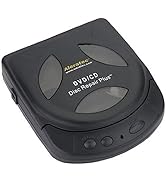
The Aleratec DVD CD Motorized Disc Repair Plus System is a patented, motorized device designed to repair and clean up to 99% of scratches on a wide range of disc formats. Featuring three specialized wheels for repair, cleaning, and buffering, it simplifies disc restoration with precise application of repair solution. Compact and lightweight, it’s ideal for professionals and media enthusiasts looking to extend the life of their DVDs, CDs, and game discs with minimal effort.



| ASIN | B0002A9SJ2 |
| Item model number | 240121 |
| Language | English |
| Product Dimensions | 15.24 x 12.7 x 5.08 cm; 281.23 g |
S**S
First off I see a lot of reviews with people having issues. I don't know if they are reading the instructions or not but you definitely have to read them. This thing fixed every single disc I have used it on which is pretty good because I didn't think it was going to work. I only used it on a couple of discs so I can't speak about the longevity. First thing you should do is get cotton pad with rubbing alcohol on it then wipe the disc with it. Use circular motions. Then use the included (or another one laying around) fine small microfiber cloth. Don't use the other microfiber with the bigger strands/bristles that's for applying or removing wax or cleaning windows. Make sure you wipe from the center out when using the fine microfiber. If that doesn't fix your disc and stop it from skipping then you should use this device. This thing isn't magic and it can't fix really bad discs. This thing does leave scratches on your disc so if that bothers you then shouldn't use this product. I have a large collection of all kinds of discs and this thing is a god send. I love this thing and it is very fun to use for some reason. I just hope that it lasts.
J**H
First thing to know is the instructions are amazingly weak at properly describing how to use this (This works for me and I offer this as advice without any guarantee it will work for you without ruining your discs or equipment) I purchased this item because my 400 disc dvd changer died and I had no intention of buying a second one to replace it and some of my discs are 20 plus years old and needed to have scratches removed through a more professional buffing The first thing to know is the red buffing pads are a worst scenario use only, do NOT start with them. I had a couple double sided discs that needed it because the one side that was not facing inwards in the cd wallet took a beating. If yous use it try it once with the "repair" button and look at the problem area after, if it is still visible give it a second run The yellow pads are the main user here with the repair button, for the discs that have become cloudy this will fix that or even some light scratches, my warning on this is use a very very small amount from the repair tube, if you use too much it will gum up the pad and cause excess friction which will stall out the machine, you will be able to see the disk slowing down or even stopping the machine when this happens (and it will until you get good with it) you can fix the pad by using some dish soap and water and gently rubbing it on the palm of your hand then rinse it off and let it dry fully (give it an hour), once it takes the buffing marks from the red pads out (might take 2 turns, only need to apply the paste the first time if you do it in quick succession the blue cleaning pads are good if you mom would look at the disc condition and pull a kleenex out of her purse and lick it. Warning on using there, while they come with a tank for holding the provided solution, only use it if you are going to be cleaning many discs in a short period, to buy this is expensive on its own and with the bottle you get just apply a little bit to the top of the wet pad and use it that way Hopefully this helps especially all the people that gave it negative reviews, there have been a couple that I tried this on that looking at them (and guessing they lost a fight with Wolverine) I knew I should have just thrown them out but I was curious to see just how much damage this could restore and common sense was correct on each one.
D**H
As advertised pro : works great on discs that have few scratches con: deep scratched discs require more pressure Happy with purchase
R**Y
Wonderful it really works well!!
M**Y
I'm converting my CD/DVDs to my hard drive (then cloud). For most, I just use Novus scratch remover and K&F microfiber clothes. Add in Exact Audio Copy (music) and Recovery Toolbox (data) freeware and I could transfer about 98% of my discs without errors. This product was for the other 1-2%. I strictly use it for it's repair feature which involves grinding the surface of the disc with a very fine abrasive (sandpaper). I also bought. I know someone said throw the red discs out and ignore the instructions in another review but I specifically needed to use the red discs so I did follow the instructions. And it worked! I was able to recover a couple of dozen heavily scratched CDs that are long out of print and not available on streaming sites (or even torrents), so this product was worth it. For most discs, you can get away with the products and software I listed but if you need to try something when all else has failed, this is worth a shot.
ترست بايلوت
منذ شهر
منذ 3 أسابيع