


⚙️ Upgrade your network toolkit — the sleek USB-to-RJ45 console cable that means business.
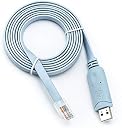
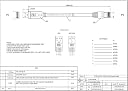
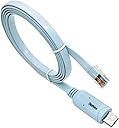
The Moyina USB to RJ45 console cable replaces traditional RS232 serial ports with a direct USB connection, supporting up to 500 Kbps data transfer. Featuring a premium FTDI FT232RL chip, it ensures stable, driver-free operation across Windows, Mac, Linux, and Android systems. Ideal for configuring Cisco, Juniper, Ubiquiti, and other branded network devices, this 6ft cable streamlines your setup with universal compatibility and compact portability.




| ASIN | B01AFNBC3K |
| Best Sellers Rank | #10,238 in USB Cables |
| Brand | Moyina |
| Brand Name | Moyina |
| Cable Type | USB |
| Color | Blue |
| Compatible Devices | Laptop, PC, Router, Server |
| Compatible Phone Models | No Compatible Phone Models |
| Connectivity Technology | USB |
| Connector Gender | Male-to-Male |
| Connector Type | RJ45 |
| Customer Reviews | 4.7 out of 5 stars 3,381 Reviews |
| Data Transfer Rate | 500 kilobits_per_second |
| Ethernet Cable Category | Cat 1 |
| Frequency | 500 KHz |
| Indoor Outdoor Usage | Indoor, Outdoor |
| Item Length | 6 feet |
| Item Shape | Round |
| Item Weight | 2.24 ounces |
| Manufacturer | Moyina |
| Model | FBA_LYSB01AFNBC3K-CMPTRACCS |
| Model Name | FBA_LYSB01AFNBC3K-CMPTRACCS |
| Number of Items | 1 |
| Number of Pins | 8 |
| Other Special Features of the Product | FTDI Chip, Compatible with Multiple Operating Systems, Direct USB to RJ45 Connection |
| Outer Material | Other |
| Part Number | FBA_LYSB01AFNBC3K-CMPTRACCS |
| Recommended Uses For Product | Console Cable for Network Equipment Configuration |
| Special Feature | FTDI Chip, Compatible with Multiple Operating Systems, Direct USB to RJ45 Connection |
| Specification Met | FCC |
| Unit Count | 1 Count |
K**R
Universal console cable; It does it all
I ordered this cable to use on a little Protectli appliance I turned into a firewall (6 ports). So I wanted to upgrade the RAM, put in an mSATA SSD and run a Linux based firewall. Also I wanted to be able to upgrade or change the OS remotely if needed. This cable allows me to "console in" and watch the Protectli reboot remotely via Minicom or Picocom which are like Putty if you are on Windows. It's like out of band management for a small office that's redundantly connected to the Internet. I say "like" because I am getting there via VPN but there are 2 paths I can choose from anway. This little cable can connect to all sorts of devices and I can get to all of the via a single board coputer (SBC), all I have to do is ask someone in the office to move the cable to different labeled ports! I recommend this thing for sure. The drivers are, of course, in the Linux kernel, so unlike Windows; you don't have to pull your hair out trying to find drivers just to get a simple job done. Here is some output while I am plugging the cable in: kernel: usb 1-1: new full-speed USB device number 22 using xhci_hcd kernel: usb 1-1: New USB device found, idVendor=0403, idProduct=6001, bcdDevice= 6.00 kernel: usb 1-1: New USB device strings: Mfr=1, Product=2, SerialNumber=3 kernel: usb 1-1: Product: FT232R USB UART kernel: usb 1-1: Manufacturer: FTDI kernel: usb 1-1: SerialNumber: AD0K102T mtp-probe[8452]: checking bus 1, device 22: "/sys/devices/pci0000:00/0000:00:14.0/usb1/1-1" mtp-probe[8452]: bus: 1, device: 22 was not an MTP device kernel: usbcore: registered new interface driver usbserial_generic kernel: usbserial: USB Serial support registered for generic kernel: usbcore: registered new interface driver ftdi_sio kernel: usbserial: USB Serial support registered for FTDI USB Serial Device kernel: ftdi_sio 1-1:1.0: FTDI USB Serial Device converter detected kernel: usb 1-1: Detected FT232RL kernel: usb 1-1: FTDI USB Serial Device converter now attached to ttyUSB0
B**U
Just plug it in and it works
I had an 8 port SFP+ switch where I didn't know what was going on. It had a separate console port so I purchased this cable. I got it the next day. I hooked it up to the switch. On my Windows 11 system I didn't have to install any drivers. It just worked. I have a couple of 48 port switches and will buy two more of these cables for those cables.
D**Y
Great cable, easy to use and adapt
With the airlines reducing the carryon restrictions I needed get a smaller laptop bag and reduce what I carried. With this cable and a couple of RJ45/DB9 hoods I was able to eliminate all of my other serial cables and adapters, making a rather small and flat package that takes up next to no room and is light. Also requires no drivers on my Windows 10 tablet. I made two adapters to go with this that now allow me to get into everything I need to get into on a regular basis, primarily cisco and hp switches. For equipment that requires a null modem cable I used an RJ45/DB9F adapter, and to turn this cable back into a standard serial port (so that I can use any proprietary cables or any device that uses a straight cable like most commercial UPS systems) I used an RJ45/DB9M adapter. Both adapters slide right into the zip lock bag that is used to ship this cable. The pinouts (and standard RJ45 Hood Color Code) for these adapters is as follows: For DB9M/DTE adapter 1 blue (cts) -> 8 2 orange (dsr) -> 6 3 black (rxd) -> 2 4 red (gnd) (cut it off) 5 green (gnd) -> 5 6 yellow (txd) -> 3 7 brown (dtr) -> 4 8 white (rts) -> 7 For DB9F/DCE/Null Modem Adapter 1 blue (cts) -> 7 2 orange (dsr) -> 4 3 black (rxd) -> 3 4 red (gnd) (cut it off) 5 green (gnd) -> 5 6 yellow (txd) -> 2 7 brown (dtr) -> 6 8 white (rts) -> 8 Verify the color codes on your RJ45 hoods before assembling - manufacturers have been known ignore color standards.
N**N
Works well on Fortinet router
Why I never bought one of these in the past is beyond me, but it sure saved me a massive amount of time on a recent project. I pulled a router from a cluster and we forgot to record where we set an accessible IP on it. This console cable hooked right up and I was able to SSH in to the console port on a FortiGate 200E and set an accessible IP and HTTPS access in a matter of minutes. Turns out we set the IP on a GBIC port, which couldn't be accessed from the home environment. So for, it works great, so I definitely recommend!
T**R
worked with TP-Link T2500G-10TS
Here is my follow up after receiving this product and the TP-Link T2500G-10TS. Plugged RJ45 into the switch and, using a USB-C to USB converter, other end into my macbook (macOS Catalina v10.15.5). I opened a bash terminal screen (note that zsh is default shell but OS upgrade kept my previous default). I then ran (from $ prompt) $ screen /dev/cu.usbserial-AG0JKQ72 38400 cs8 -ixon istrip and it worked fine. I logged into the CLI and commands ran fine. P.S. turns out the TP-Link included a USB-C / USB cable that worked fine with the macbook. /dev/cu.* port was different (do ls /dev/cu.* before and after plugging cable in) but same screen command worked with either cable/port; I'm keeping this FTDI cable anyway.
L**I
Perfect to connect to Cisco equipment
I have used this cable to connect to Cisco VG, Cubes, switches and routers. No issues so far. Highly recommended. The only consideration would be the length a longer cable might allow you to connect to equipment at the top of a tack and still be sitting on a chair or the floor. This one is not that long so you won’t be able to do it, if you don’t mind be standing in this situations this one will do fine.
J**.
Worth the money, perfect for your network kit.
With newer technology, many laptops do not have serial ports. This works perfect! My work Laptop is a 7390 2-in-1. Our security policies disable USB port access, but with this item there is no need to elevate my rights as an admin. Because even as an administrator, I need to elevate my rights and disable the security protocols needed to access USB ports. I have used this item three times with no issues. I plug it in, my OS(Windows 10) recognizes it as serial port 5, 100% compatible with putty. Quality is not cheap, nor does it have that cliche cheap chinese quality. Recommended buy, 100%
P**N
Works great for it's INTENDED purpose.
This product works for what it is intended for. Allowing access to the Cisco router through the console port on the router. This is used for accessing the console on Cisco routers. To control settings and other aspects of the router. If you have any issues with it not showing up in the device manager, getting it to work is not difficult. Keep it plugged in, in device manager find the unrecognized USB device, right click, select Uninstaller, restart your PC. It should work then, as thats what I did to get it to work personally. This product worked exactly as I needed it to. I have absolutely no complaints.
R**S
Cheap insurance
Got me out of trouble on numerous occasions
E**Y
Excellent cable
I was initially skeptical about buying but decided to give it a try. I ordered and it was delivered the next day. I am studying for my CCNA so new to this but have an intermediate knowledge of IT stuff 😁. I went to the website as indicated on packet( no url though, just google "FTDI"), and downloaded the device driver for Windows 10, extracted and installed the drivers. Then I downloaded and installed Putty for 64-bit Windows 10. I proceeded to make my connections. The USB/RJ45 cable installed to COM3 as you can see from the video. I left everything as default. Connection to the Cisco 1921 and 1841 were all a breeze. I didn't even need to reboot my laptop. I will buy 2 more cables( 1 for home, 1 for the office and 1 for off-site/emergency) once I can afford to. I highly recommend it. It is well built and I love the colour. I can't wait to see what it can do via Android OTG.
T**N
Cable was dirty
Cable was dirty when delivered, seems to be used cable
A**R
Very impressed, one straight cable for easy use.
This cable works great. No need for a usb to serial converter. The driver is part of windows 10. Very impressed, one straight cable for easy use.
S**L
Works well without any issues.
Works well and haven’t had any issues using procomm and putty serial connections.
Trustpilot
2 days ago
1 week ago