We remain fully operational. Our teams are working around the clock to ensure your deliveries continue safely.

قم بتنزيل التطبيق


معلومات عنا
حقوق الطبع والنشر © 2024 Desertcart Holdings Limited
قم بتنزيل التطبيق
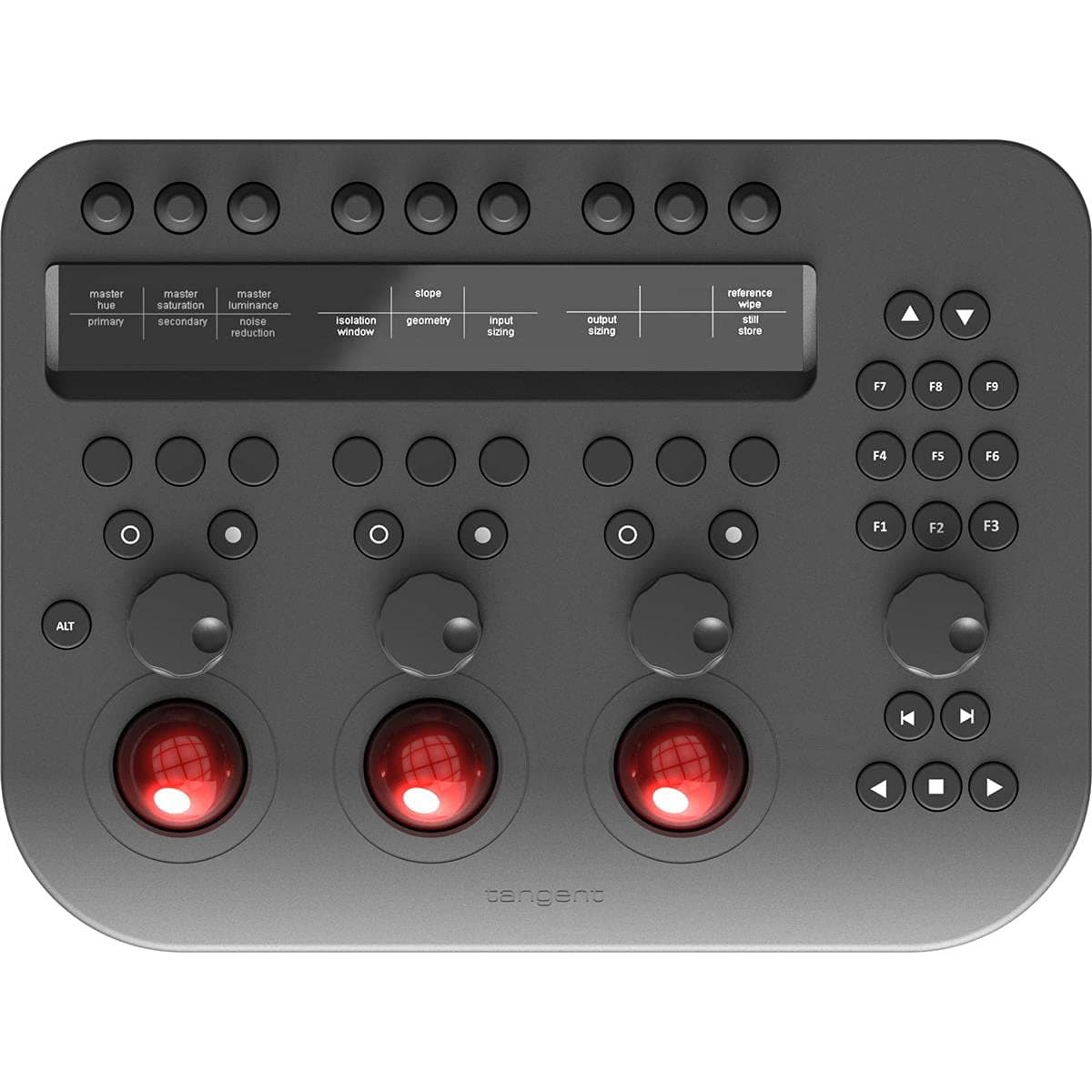
🎨 Elevate your color grading game—because your edits deserve to stand out.
The Tangent Wave2 is a professional-grade color grading control surface designed for precision and speed. Featuring tactile roller balls and a compact, durable build, it enhances workflow by allowing real-time adjustments while viewing your image. Compatible with major software like DaVinci Resolve and Capture One Pro (with minor quirks), it offers a high-value solution for creative professionals seeking industry-standard performance.
| ASIN | B07CCFW6WP |
| Customer reviews | 4.4 4.4 out of 5 stars (24) |
| Is Discontinued By Manufacturer | No |
| Item model number | TD-WAVE2 |
| Product Dimensions | 48.31 x 15.19 x 38.1 cm; 2.04 kg |
V**R
Acabo de comprarlo, no está mal, sin embargo podrían mejorar los materiales. En davinci resolve funcionan varias cosas pero otras no. Aunque esto se puede solucionar con una tabla Digitalizadora o otra herramienta que te permita customizar algunas funciones. Se entiende que sea Davinci quien limite estas funciones. Para acceder a otras funciones debes hacer uso de las flechas, esto limita la velocidad a la hora de trabajar pues las herramientas que vas necesitando no las tienes a la mano sino que tienes que navegar por el panel. Crear memoria muscular es imprescindible para mejorar ese flujo.
D**Y
You can certainly edit photos with online software without an interface, but the tangent Wave2 allows you to edit the photo at the same time you are looking at the image - rather than focusing on putting a cursor on a slider. This dramatically speeds up your workflow. Also, the ability to make subtle fine tuned color adjustments with the roller balls - while you look at the image - dramatically speeding up the process but also giving amazing results. It gets 5-stars BUT, you should know that there are still some quirks in the mapping with Capture One Pro. That is a C1 problem and not with the tangent Wave2...but it is something you should be aware of. For me, the only thing in my workflow is that there is some occasional funkiness of the Shadow slider. I would definitely purchase this again. It is a great value compared to the other tangent products.
R**C
*UPDATE: Going strong but still without native support for FCPX I have added a star to my review because the main issue I originally described has been resolved by the third-party software that makes it possible to use the Wave2 with FCPX. However, running a third-party application (between the Tangent software that also has to be run and FCPX) comes with issues. I think the Tangent website says it best when describing the interface: “…it works well enough for us to recommend using it.” The trouble is, when you rely on something to do your job, you aren’t looking for “well enough,” especially when the company that makes the unit doesn’t take responsibility for how their product functions. FCPX is on the top row of “supported” applications listed for the Wave2. I would think, by now, Tangent would have stepped up and provided native access to FCPX using software they develop and support. All in all, the Wave2 is still a brilliant control surface with some serious ergonomic issues, trackballs that fall out because they aren’t held in by anything except gravity, and FCPX users have to rely on third-party software to make it work. --- There is no question that I would really like to be giving the Tangent Wave2 five stars. It has so much to offer but as an FCPX user, it isn’t quite there yet. Before I purchased this control surface, I did a lot of research. I also contacted Tangent to ask questions about specific functions and learned that the Wave2 did not have native support for FCPX but by using additional software you could access a massive amount of functionality. So, I took the plunge. The plan was to test out the Wave2, see how it worked and then invest in other control surfaces by Tangent. However, after using the Wave2 it is obvious that the technology isn’t there yet, especially considering the price tag. This is mostly because the specific functionality that I asked about, and was assured it had, hasn’t worked yet. DIALS AND BUTTONS: The Wave2 has 9 dials up top, 9 buttons, 6 reset buttons, another four larger dials, three trackballs, and a series of additional buttons on the right (transport and F keys). You would think this was more than you could possibly need but the truth is, I ran out fast. Even with the ALT which allows a completely different set of functions, and other ways to add functionality, it isn’t enough because a number of really important keys/buttons are missing. Don’t get me wrong, you can program everything any way you want but where the buttons are on the device really matters. I have found that I need my computer keyboard just as much as the Wave2. For me, this isn’t too big of a deal (except for the lack of a fourth track ball which for me is a major issue) as I don’t mind using my keyboard and the Wave2 simultaneously. However, a number of people I have spoken with expect to replace their keyboard with this control surface. For me, that isn’t possible with the Wave2. ERGONOMICS/DESIGN: For me, there are some issues with the design that impact my workflow. First, the trackballs fall out. They aren’t attached. The description says, “This means it's equally at home on a desk or on-set.” Absolutely not, in my experience. Carry or tip the board and all three trackballs will fall out. This is not set-ready solid technology. Additionally, the trackballs also do not move smoothly. I’ve been using trackballs for years upon years and never had any trackballs feel scratchy like this. Again, for the price tag, I think we could at least expect them to be secured to the board and smooth (since I am using them for color correction, smooth is key). The vertical layout is not efficient. For me, placing the screen under the small dials just means having to reach farther and since I also have to have my keyboard in front of me, this isn’t great ergonomics. I would LOVE it if it was more compact. If the reset buttons were between the dials, the 9 buttons moved to where the reset buttons are, and the top dials were below the screen, it would be amazing! (Plus, a fourth trackball…). CONTROL: As I mentioned, you must use third-party software in order to program the Wave2 for use with FCPX. Here is my experience… THE PROS: Amazing, intuitive, and easy to use color correction. Once you get it setup the way you want it (which, by the way, is challenging for a number of reasons), I found the quality and speed of my color correction skyrocketed. On that alone, getting the Wave2 may be a game changer for many people. I absolutely love using the Wave2 for color correcting which is precisely why I am keeping it (and hoping for some fixes before upgrading to their other boards). THE CONS: None of the non-color related dial functionality that I need works. I corresponded with people at Tangent and the makers of the bridge software for FCPX, prior to purchasing, and was assured it was capable of doing what I was looking for. For example, I want to use the dials to control rotate (BTW Hue hasn’t worked yet either), scale, crop, and position. They are all programmable and easy to assign but they all freeze when used. I imagine this is something that can and will get fixed and if it does, I will be changing this review! But I can’t give more than half stars for a unit that only does half of what I need it to do – especially when I was told directly that it would. In the end, I think the Wave2 could be great if it was a little more compact in its design and integrated with FCPX better. And if the transform, crop, rotate, and hue dials and sliders get fixed, I will update this review.
M**C
De tenir-la a no tenir-la transforma el procés de correcció de color en una altra cosa. Plug and play. Mil vegades millor que amb el ratolí. Està ben feta, és sòlida. Tant botons, com rodes i knobs són agradables de fer anar. Les pantalletes led són molt útils pq et xiven tots els paràmetres. Els guanys no són top notch, però compleixen perfectament. Ara bé, pel que és li sobren 500€. Està clar que tot allò relacionat amb l'audiovisual pijo té un sobpreu perque sí. I té aquest cost perquè no hi ha més alternatives. Bé per Tangent!
E**R
Awesome. The color panel arrived before of Time. It Is useful tool for colorists and it Is compatible with DaVinci Resolve, Assimilate Scratch... Thanks
ترست بايلوت
منذ 3 أسابيع
منذ 3 أسابيع