Desertcart purchases this item on your behalf and handles shipping, customs, and support to EGYPT.
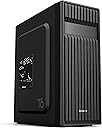
🖤 Elevate your build with Zalman T6 — where style meets unstoppable performance
The Zalman T6 is a sleek black mid-tower PC case designed for gamers and professionals alike. Featuring a pre-installed 120mm rear fan and mesh panels for superior cooling, it supports ATX, mATX, and Mini-ITX motherboards. Its durable powder-coated steel chassis ensures longevity, while front USB 3.0 and audio ports provide convenient connectivity. With multiple drive bays and expansion slots, the T6 offers a versatile and stylish foundation for your next high-performance workstation or gaming rig.


| ASIN | B07R2JBTDR |
| Antenna Location | Business, Gaming |
| Best Sellers Rank | #164 in Computer Cases |
| Brand | Zalman |
| Built-In Media | Contents: 1 piece |
| Case Type | Mid Tower |
| Color | Black |
| Compatible Devices | ATX, mATX, Mini-ITX |
| Cooling Method | Air |
| Customer Reviews | 4.3 out of 5 stars 933 Reviews |
| EU Spare Part Availability Duration | 5 years |
| Enclosure Material | Alloy Steel, Metal, Plastic |
| Fan Size | 12 centimeters |
| Global Trade Identification Number | 08809213769429 |
| Hard Disk Form Factor | 2.5 inches |
| Internal Bays Quantity | 4 |
| Item Dimensions D x W x H | 14.84"D x 7.87"W x 16.92"H |
| Item Type Name | ATX Computer Case |
| Item Weight | 8 pounds |
| Manufacturer | Zalman |
| Material | Alloy Steel, Metal, Plastic |
| Mfr Part Number | T6 |
| Model Name | T6 |
| Model Number | T6 |
| Motherboard Compatability | ATX, Micro-ATX, Mini-ITX |
| Number of Fans | 1 |
| Number of Items | 1 |
| Number of Packs | 1 |
| Other Special Features of the Product | Built-In Fan, Dust Filter, USB 3.0 |
| Power Supply Mounting Type | Rear Mount |
| Recommended Uses For Product | Business, Gaming |
| Supported Motherboard | ATX, Micro-ATX, Mini-ITX |
| Total Expansion Slots Quantity | 7 |
| Total USB 2.0 Ports | 2 |
| Total USB 3.0 Ports | 1 |
| Total Usb Ports | 3 |
| UPC | 823884209099 |
| Warranty Description | 1 Year |
D**M
A great case , good value.
As my PC build went along, the more I love this case. It had room for a full size ATX board. I just built a new system in it with 7 fans total, two SSD, one HDD and a DVD/CD-rw drive. Still has room for two more 2.5" drives on the back of the motherboard tray and several open PCIe slots. The way its set up I'll have great airflow , great cooling, cables are out of the way. I won't complain that I lost a bay where I had card readers.
~**~
Great for what it is
This is a great case as long as you know what you are in for. Can you build a gaming pc in it, yes. Should you, no. Mainly due to cooling potential. This is, however, an ideal case for a workstation. I will be using it to build a new pc for my senior-citizen relatives. Pros: low cost, lightweight, has a 5.25inch bay for optical drive, surprisingly small for an ATX mid-tower case (fits a full size ATX motherboard easily). Meh: metal is thin (contributes to both light-weightedness and top-heaviness). No venting on the top or bottom (good or bad is use-case dependent). Finally a very minor issue, IF you are using this case for ATX build, be aware only 6 of the 9 necessary motherboard standoffs are pre-installed, the remainders/extra are included with the other hardware but must be installed yourself. Cons: Biggest issue for me is the mount for the power supply is at the top and makes it very top heavy, definitely would have preferred psu mounting on the bottom for such a lightweight case. Might not be ideal for beginners as the case is very tight with ATX build and can be difficult to work in, let alone cable manage. No USB-C on the front I/O panel. All the screws come together in one bag with no separation, 3 types of screws, 4 if you include mb standoffs, all in one non-ziplock bag... irritating. Personal: Zalman is a trusted brand. In the last 22 years I've had 3 pc cases and 2 were Zalman, which lasted about 18-19 of those years. Overall, this case is great. But again, it depends on your what you'll use it for. I am using integrated graphics from cpu and a low profile cooler which means there is a lot of empty space in the case, which likely contributes to the top-heavy nature I previously mentioned. That being the case, I wish there was a version where it is half the width and the spot for the optical drive was rotated 90 degrees to remain included, a bottom mounted psu, and perhaps more venting on top to compensate for the smaller size and fan size.
M**A
A MINI Mid-Tower ATX Case
OK, so I thought this $45 case would be a decent start to a PC build for a friend using some of my older FX era components. Mid-Tower, check, fits ATX mobo, check. This isn't a normal mid tower case. It's REALLY small. Yes, it does fit ATX motherboards but I thought initially that it should be made for m-ATX boards and have the PSU mounted on the bottom of the case (PSU is mounted on top making it a little top heavy). At least that's what I though when I pulled it out of the box. Of course I used a measuring tape to compare the dimensions to my other cases before purchase but that didn't prepare me for the actually size of this dinky thing. So, complaining out of the way, I looked it over and it seemed well built. A little flimsy in spots but for the price it was ok. I managed to get a full ATX board with a Hyper 212 Evo CPU cooler in there along with one SSD and one 3.5" HDD, three fans (2 in, 1 out...space for a 4th fan on the side too but that was blocked by the CPU cooler), a standard size PSU and a 5.25" DVD drive since my friend wanted that. The GPU was just a small Radeon 5450 so that barely took up any room. It works and it's actually a great case! I'd build in it again! It could easily fit some of the newer graphics cards like my EVGA 1660 Super or my old R9 280. The 280 might give you a little problems but those could be fixed with some front IO cable extensions. They're a bit short. One tip...Mount the front fans before anything else. I always mount my fans first but since this thing was tiny inside I decided to mount them last because I figured they screwed in from the outside. Nope, they screw in from the inside. I had to remove the RAM and the cooler to get them in. No big deal but kind of a pain. Reading the instructions might have helped. It's a good case even though it's small and cheap. The price and decent fit and finish made it a good random choice for me since there was only one review when I bought it. The biggest outside features I was impressed with were the top mounted power/reset buttons that feel like they are from something at least $20 more expensive. Very clicky and well placed. The side bulges are great for cable management even though I shoved half of cables for my non-modular PSU on top of the DVD drive inside the case. The bulges also gave me the room to mount the Hyper 212 cooler. Without those it wouldn't have fit. I think 160mm is the max and the 212 is 159mm, I believe, The fourth fan slot on the side is also blocked by the massive cooler so no fan there. I also painted the top aluminum fin black so it doesn't show through the vent holes on that side. It all works great and I'd do it again. Small but capable. Just don't expect more than one of each type of drive SSD/3.5" without getting a little creative. Recommended!
B**B
Underrated for Retro Computers
For those looking for ATX cases for Retro Computer Builds (mostly late 90s) it can be extremely hard to find one for a good price sometimes. Many on auction are $200+ for a piece of junk that may not even have all the pieces. Even though this case is more modern it's design fits older computers perfectly. Cables for old PSUs can reach where they need it, I use 2.5" SSDs for retro builds and there is mounting for those. It still has a 5 1/4" drive bay! A 3 1/2" drive bay for a floppy would really be nice, but I don't typical use those anyway.
T**Y
Very basic case for low profile (stealthy) gaming builds.
Update: I’m posting a picture of exactly why I bought this case and of the fifth fan installed where the 5.25” bay is. I bought this handle in a four pack for about $15, it’s for play sets. Original: I like this case more than I thought I would. First thing you should know is that you can fit a fifth fan behind where the 5.25 slot is, on the inside of the case. I highly recommend doing that to keep airflow optimized. I will say that this is a very flimsy and lightweight case. Both would normally be cons, but for my purposes they really aren't. I bought this case to build a gaming PC that I can easily transport. It has a solid top that I can attach a handle to. It's light weight helps keep it light weight, I know, shocking. Compared to my other gaming PC I recently built, this feels a bit lighter. I haven't weighted either but perhaps I will in the future. Honestly, I like this case. I like the solid black panels, the OEM look it tends to have, and the mounting for a fan in the side cover. Although it is cheap feeling, with how thing the steel is, it's really easy to build in and pretty well thought out. The only cable management issue is the power supply cables have to be directly fed through a hole to the "back" side panel. Other than that it seems fine to me. Although I do like this case, if you spend just $20-30 more you can get a better case. You should only buy this if you're on an extremely tight budget and need a case right now or if you want a low profile OEM looking build.
W**R
Inexpensive and Lightweight and just perfect for my build.
The case is inexpensive but sturdy, especially once you start mounting stuff in it. Removing the metal punch-outs for Optical drive and Video Card requires in addition to pushing the with your fingers bending the metal with a pair of pliers and then using a small file (and a paper or tissue underneath to catch the filings) to remove the resulting sharp metal jagged edges. There are about a dozen motherboard stand-offs included, which require a 3/16" or 5mm socket to screw into the case. I used a flat tip medium size screwdriver to start to pry the front panel, after which it came off easily. I removed two adjacent rear punch outs and also the thin section between them (which bent easily) to mount the double width video graphics card. And of course using a small file (and a paper or tissue underneath to catch the filings) to remove the resulting sharp metal jagged edges. I mounted a single 120mm fan blowing air in the front. You have to mount the front panel and then insert the optical drive from the front, and then screw in the drive mounting screws. Tight fit with the power supply and optical drive up top, and tucking in and using cable ties to secure the cables somewhat so they don't fall down or wind up hitting the CPU fan blades. I took some pictures and captioned some of them to hopefully help other people see what could be involved in using this case. I like that this inexpensive case has an option for mounting an optical drive. Some of use still use CDs and DVDs for software and video and music. It took some time to get everything in and doesn't look the neatest, but the result is a small compact unit.
R**8
Where's the pre-installed PC Fan Zalman?
I needed a new mid-sized ATX PC case for my home computer and decided to get this Zalman T6 computer tower case. Description states, "Pre-Installed 120mm Fan", but when I got it today, I got the PC case just fine, but NO 120mm fan to be found....they did not install ANY 120mm fan. I had to use an older 120mm fan for the backside of this Zalman PC case. That's a deduction of 1 star there. Second glaring defect were the motherboard black mounting screws or whatever you call those thingies are so cheap...when I use the screws to screw into those mounting brackets to connect it to this PC case, they warped the case and right now, the motherboard is installed, but not tight to the motherboard....wobbley in fact. I will simply keep it like this and sort it out later and that's a deduction of 1 more star. Cheaply built and it bends easily. Deduct 1 more star for that chinese cheapness factor there. There is a lot of room to work inside this PC case. Install whatever ATX or mini-ATX motherboard into this case before installing anything else....it's not that big inside to work around and will make future stuff to install such as CPU chip and cooler fan, the DVD burner, video card and so on. There is just 1 5.25 slot for whatever....in my case....a CD/DVD player/burner and it installed pretty easily. It has 3 USB ports, mic jack and headphone jack on top with the control panel all located at the top front of this PC case....pretty nice. Seems decent, tho fan ventilation is not the best. I have installed 2 120mm fans and will install a smaller internal fan up front to keep it cooler inside this PC case.....however the front of this case lacks vent holes. Whoever designed this Zalman T6 case, could have most certainly done a better job. In regards to the missing 120mm "Pre-Installed 120mm Fan" situation....I notified Amazon and they gave me a partial refund.....most likely to cover the possible cost of a 120mm PC cooling fan. I rate this PC case 3 stars because it was because of those glaring issues I mentioned earlier. I know it's just a $60 basic PC case, but when Amazon puts in its description......"Zalman T6 ATX Mid Tower Computer PC Case, Pre-Installed 120mm Fan, 5.25 ODD, USB 3.0" and so on.....and the 120mm fan was not there.....that is not a good thing. 3 stars. Thanks.
C**T
Very Good Case at my Price Point
I needed an inexpensive mid-sized case for an ATX MoBO build which I was transferring from a much larger case. I needed this case to fit under a particular piece of furniture. Bottom line, this fit the bill nicely. Couple points: Metal sheet is pretty thin, which makes for a light case, but it's not real heavy duty. I used (and recommend) at least one aftermarket fan in the front to pull air in to the case (I used two). These need to be installed before anything else (another buyer noted that same point) particularly if putting in a full ATX MoBo. You will not have the room after the board is in to get the fan screws in place. The front plastic panel is most easily pulled off from the bottom. Just be gentle and firm and it will pop right off. Goes back on easy as well. Recommend removing the enclosed exhaust fan prior to mounting the MoBo. You'll need some maneuver space. I had 2 SSD's for this build, a 500 GB and 250 GB. These are mounted outside the main part of the case, which takes a little consideration for cabling. Easily done though. ATX MoBo is s tight fight, but it fits. Don't forget your standoff nuts, these are not all in place for the ATX board. I also used aftermarket cooling. The tower is too high to allow for a side mount fan in this case. Back panel is a little loosey-goosey. This is where the thin metal sheet is most evident. To allow for the GPU to seat one must pop out the panels. They will be destroyed doing this so make sure you line up your cards correctly. It looked wonky initially, but once the GPU was in place everything locked down tight, no issues. Power supply mounts on top, which I was initially a little concerned about but it worked out nicely. This particular power supply is not modular, so it's a bit of beast in terms of excess cables, but there was more than sufficient space to store them away. Since this isn't a display build I did not concern myself with fancy cable management, a few enclosed zip ties to keep things tidy was about it. So again, good case for the money. Not sure I would use it for my first build though. I'd recommend laying out a little more to get a more modular and flexible case, something with a bit more room and more heavy duty. However if you've got a build or two under your belt, and you aren't concerned with being the Michelangelo of PC building, this will work fine.
M**L
Unité centrale au top
La tour bien qu'assez light dans sa conception est très bien conçue et accueille sans problème CPU + Ventilateur assez imposant, dans mon cas un "Noctua NH-D15 Chromax Black 140mm" sur un processeur Ryzen 7 + 2 ventilateurs de 120mm supplémentaires en façade. Le nombre suffisant d'ouvertures permet une gestion des câbles assez efficace (*). Autre point positif, la baie 5,25", pour installer un lecteur/graveur Bluray ou DVD, chose assez rare qui mérite d'être mentionnée ! (*) Par contre vu la taille de la tour, je ne saurais que conseiller de prendre une alimentation modulaire. Avec une alimentation standard, vous risquez de galérer pour placer tous les câble inutiles. Sinon, très content de mon achat.
M**A
Worst Quality Ever
I bought this case from Amazon and I’m honestly very disappointed. The metal is so thin that it literally bends and shakes like paper! The build quality is terrible, and with such flimsy materials, the product’s lifespan is extremely short — which means more waste and harm to the environment. I really wish I had spent a bit more on a better-quality case. I do not recommend this product at all.
B**A
PC Case
Good price and arrived on time. Well made for a simple case. No bracket for hanging 3.5" HD, though screw holes on bottom to bolt one down. 3 attachment points for 2.5" ssd which seemed a bit odd. Hole in case front if you want it for 5.25" disk drive BUT no structure to hang it on. No issue for me. Plenty of screws included including mounts for motherboards as the case side is not flat so they are needed if you have an ATX motherboard. Single small fan on rear (80mm) but vent holes for 120mm fan on side. Does what I need so a good purchasae for me.
A**E
Pas cher et bien conçu
Voilà un boitier qui ne paye pas de mine mais est excellent pour construire un PC. La peinture est de bonne qualité, il y a de la place pour une carte ATX et un ventirad Pure Rock. On peut faire du cable management mais c'est mieux avec une alimentation modulaire. J'ai monté 2 ventilateurs silencieux de 120 mm en façade sans problèmes et j'ai remplacé le 120 à l'arrière par le même modèle. Montage d'un SSD, d'un disque dur 3.5 et d'un graveur DVD, c'est juste mais ça rentre. La visserie, les colliers de serrage et les équerres sont fournis et c'est parfait pour le prix.
T**E
A lower end case with an "old school" look.
In the end once set up the case does its job and you forget about the cheap stuff like the permanent no going back after you break out space on the case where the video card goes and a few other little annoyances. This is a lower end case that will still do the job, don't overpay for it.
Trustpilot
4 days ago
1 month ago