Desertcart purchases this item on your behalf and handles shipping, customs, and support to EGYPT.
🚀 Elevate your workspace—plug in, power up, and never miss a pixel!
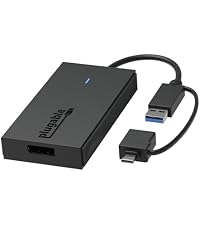
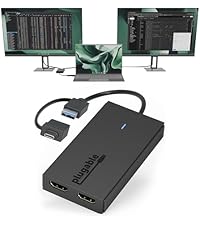
The Plugable USB C to HDMI Adapter is a versatile 2-in-1 video adapter that connects USB-C or USB 3.0 ports to HDMI displays, supporting sharp 2560x1440 resolution at 60Hz. Compatible with Windows, macOS (including latest M-series chips), and ChromeOS, it enables multi-monitor setups with up to 8 displays on Windows/ChromeOS and 4 on macOS. Designed for stability and backed by lifetime North American support, it’s the perfect solution for professionals seeking to expand their digital workspace effortlessly.


| ASIN | B09R45WGHY |
| Best Sellers Rank | #91 in Audio & Video Connectors & Adapters |
| Brand | Plugable |
| Brand Name | Plugable |
| Color | Black |
| Customer Reviews | 4.2 out of 5 stars 144 Reviews |
| Global Trade Identification Number | 00819927012641 |
| Included Components | Item |
| Item Weight | 3.84 ounces |
| Manufacturer | Plugable |
| Model Number | UGA-HDMI-S |
| Number of Items | 1 |
| Number of Packs | 1 |
| Part Number | UGA-HDMI-S |
| UPC | 819927012641 |
| Unit Count | 1 Count |
| Warranty Description | 2 Year Limited Parts and Labor |
T**R
Works well and is stable - Used it to connect a 4th monitor to a laptop that only supports 3
So Plugable has been around for quite a while and they make quality display adapters for computers that don't have extra video outputs or whose graphics card only support limited monitors. My Intel Core Ultra 5 226V supports a total of 3 monitors which includes the display monitor on the laptop itself. Because I have 3 external monitors I'd always have one blank monitor. This is through a Thunderbolt docking station. My other laptops didn't have that problem so I can use the laptop display as well as all 3 monitors at the same time. I finally started looking at another monitor as it bugged me I could only do a total of 3 monitors but then thought - what if I used one of those old school Plugable adapters in my 4th monitor on my laptop and have it output using the older technology? This Plugable adapter plugs into my thunderbolt docking station and connects to my 4th monitor and it works perfect for my Core Ultra 226V so now I can use 3 external monitors plus the laptop monitor at the same time. It's never had any weird display issues and is stable every time I plug the laptop in. When I plug in my other 2 laptops I did disable the Plugable device in the deviice manager and so the other 2 display to the last monitor using their built in graphics cards through the Thunderbolt dock like they used to. So this solved my problem of getting a 4th monitor to display on my setup. If you are just looking for a single monitor or maybe your second monitor this should work with no issues as well.
F**E
Cost effective solution. Works just like it should. Would buy again.
Great solution for a good price. Saved buy a new video card or, worse yet, PC. Now running two 1440 monitors on my old PC. Several year old PC with only one HDMI port. Bought a second monitor and didn't realize that the higher resolution second monitor couldn't be connected to the old style VGA connector (should have realized). I had a USB to HDMI adapter from another company but it would not work with this monitor - probably because of the 1440 resolution. Note my PC has USB 3.0/SS (blue interior) USB A ports. Not sure if you would get the same results with older rev levels of USB. Very happy with the purchase - saved me trying to find a compatible video card (all the manufacturer recommended ones seem to be out of production due to the age of the PC). Video quality appears to be just like that of the other monitor that is directly connected to the HDMI port on the PC. Run my PC monitor about 12-16 hours a day and no issues. Adapter is slightly warm to the touch but that seems normal. It would be nice if they provided hook and loop tape (aka velcro) to secure the adapter. With the length of the USB cable I couldn't put the module on the surface next to the PC or on top of the PC because it wouldn't reach so I had to leave it hanging from the USB port - probably not the most durable solution. I got some hook and loop tape and used that to secure it to the side of the PC.
C**Z
Bueno
Cumple con las expectativas
S**M
You pay for what you get
Did not work, just buy the $70 version. It just kept turning my monitor off and on
T**Y
Good Product. No documentation.
It works like a charm. Love it. But some instructions on setup might have helped in the process. I fumbled for 2 hours, but it works fine now. I used ChatGPT as my tech rep. And it does not lose patience with an 83-year-old non-tech-savvy old codger.
J**Z
Cheap 3rd 1080p Monitor Support for M1/M2 Mac Mini
I was expecting issue with a blurry image, or slow response times. It worked great on my M1 Mac mini for a 1080p display. I've only had two issues with it: - When my computer 16GB of RAM on my M1 Mac Mini goes red with memory pressure, they display may just freeze and I'd need to open up the screen display menu and disconnect and reconnect to fix it. I assume macOS pushes this out of memory. - I have HDMI switchers and every so often when switching between computers, this can freeze or out right crash the software. I just do the same method as above or restart the software and it works fine again. They are not major issue and more edge cases than anything else. Other than that can report, its a much cheaper way to get a 3rd monitor for a M1 Mac Mini. This has been put into USB hubs and still works perfectly fine. One minor thing you will need to understand is that this will take CPU from your Mac machine. I do video editing and software development and its almost never been an issue so you'll never notice it, but it can spike to 120% CPU which is 1 and 1/4 cores on my M1 processor, which has a total of 8 cores.
C**A
Power Station
Awesome. Best I have purchased. Better than a docking station. Smooth transitions when moving browser to different monitor. Some of the USB to HDMI adapters I purchased was nearly impossible to drag the browser to different monitor. Instead of taking up ports on my laptop I plug them in the useless docking station. Maybe the docking station is not so useless now that I have these excellent adapters plugged into them driving 3 External monitors from my Laptop.
J**J
Works great!
Third one I tried and the only one that worked! Thank you!
L**E
Great Product with Plug and Play Simplicity!
First off, I want to state that I have looked at a couple of similar items from this brand, "Plugable" recently and it is fast becoming one of my most trusted accessory brands. Their products do not seem to disappoint and this USB to Single HDMI adapter was no exception. As before, this device has good build quality and is more than durable enough for its intended role. It is quite compact and is a very simple yet very effective device. I appreciate that there is a tethered dongle that will allow you to make use of this with either a "legacy" USB-A connection or a USB-C. However, I would have liked it more if it were the other way around with a permanent USB-C with the legacy USB-A connector as the tethered dongle adapter piece. I say that just because USB-C is fast becoming the norm or defacto standard and if you intend to use this with a newer notebook pc, you will more than likely be making the connection via USB-C and not legacy "A". In any event, it functions very well using either method of connection, so I am not really complaining but just pointing out what my preference would have been. In actual use I am pleased with the operation of this HDMI Adapter. It works just described and it is basically just a straight plug and play device. Just to clarify, I only made use of this with a Windows based system, so I cannot offer opinion on a Mac based setup. In my application, I was making use of this to create a second display for use in a Virtual Pinball setup using a notebook PC that had only a single video output. This Plugable adatper functions perfectly so that I can use the main 15.6" display of the notebook for the "backglass/DMD" screen and this Plugable adapter is feeding a 27" screen, in vertical mode, to function as the main pinball "playfield". Overall, I am impressed with this Plugable USB to Single HDMI Adapter. I have now looked at several differing products from this brand it is seems to impress me each and every time. They also have a 2 year warranty with email technical support so I feel you can purchase their products with confidence. At the current listing price of $89, I feel this is more than reasonable considering the good build quality and how well this item works. My only issue is that as I noted previously, I would have preferred that USB-C was the primary connector in the dongle setup, but I am still giving this product a 5 out of 5. Highly Recommended!
J**E
It works with M1 Mac and supports rotations
I have a Macbook air (M1, 2020). Once download their app 'IntantView', it just plugs and plays. Can change rotation, resolution and refresh rate up to 72 hertz.
あ**め
良い意味で想定外! WQHD 60FPS,4K 30FPSで利用可能でした。
【総合評価】 余っているHDMIポートが無くディスプレイを追加したい際に大いに役立つ製品です。まさかの4K対応は大きなアドバンテージだと思います。 またCPU負荷が殆どないためスペックの低いパソコンでも気軽に利用できます。 62社のオンラインスキャンを実施しましたがドライバにウイルス等見つかりませんでした。 【検証結果】 検証環境 ・Windows11 ・CPU i7-12700 ・GPU インテル® UHD グラフィックス 770 商品説明には1080P 60FPSとありますが、以下の出力に対応している事が確認できました。 WQHD 60FPS,4K 30FPS。 動作状況からHDMI 1.4相当の出力に対応している可能性があります。 1080P 120FPS(未検証),WQHD 60FPS(検証済み),4K 30FPS(検証済み) また本製品と姉妹製品を混在させた環境でドライバの動作テストを実施しましたが、2画面とも問題なく動作することが確認できました。 モニタ1:USB⇒HDMI(本製品)4K 30FPS出力 モニタ2:USB⇒DP(姉妹製品)WQHD 60FPS 【技術的な考察】 USB3.0の通信速度の理論値は5Gbpsであることから、非圧縮では1080P 60FPS,1440P 30FPSの伝送が限界と考えられます。 本製品では実際使用したところCPU使用率に大きな変化はありませんでしたが類似製品がそうであるように、CPUにて画面データを圧縮して転送している物と推測されます。 この事から本気でゲームをする人には不向きかもしれません。 【注意事項】 利用前にドライバのダウンロード&インストールが必須です。 PCの初期セットアップ時やBIOS(UEFI)では使用できないものと考えられます。
N**O
not bad to use
Good to use
C**.
Buena calidad sin embargo requiere alto procesamiento de procesador en Mac como 4 monitor
El producto es de muy buena calidad, pero no es para todos, funcional para PC o para MAC solo como segundo o tercer monitor, tiene un chip silicon motion sin embargo al utilizar en una MacMini con procesador intel para 4 monitor la aplicación consume muchos recursos de procesador lo cual genera un lag que es de perceptible a muy perceptible dependiendo del contenido y la aplicación que se encuentre en ese monitor, tuve que devolver y cambiar a un Dell docking ud22 con chip mas eficiente o poderoso de DisplayLink.
Trustpilot
2 weeks ago
2 months ago