




ANYCUBIC 3D Printer Mega Zero 2.0
معرّف المنتج: 419894786
123
K**N
love the printer does a good job
love the printer, but be careful if changing the print nozzle, you can damage the print head strain gauge, Anycubic sent me the parts for free and I changed out the offending part in about 30 min and back to quality printing. Just took a bit of time to get, was litterly on a slow boat from China.Strain Gauge seems to be the only failure point at this time, need to get a belt and another strain gauge to keep in stock and don't know how to order. Otherwise, a great machine and makes great prints.wondering if it can do carbon fiber filaments ??
A**H
Fantastic Printer!
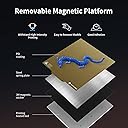
This printer makes my 6th 3d printer that I own. I have had the pleasure of using many different brands of printers over the past two and a half years that I have been loving this hobby. When I first started, I wish this printer would have been on the market.Assembly: Quick...easy...and took like 10 minutes. Great experience there. Also nice that it has a magnetically held in place drawer on the front for the allen wrenches, the nippers and other tools.Leveling: This is my first printer that has automatic bed leveling. I ran the leveling once and then went off and printed my first model. I had enough confidence in this printer that I didn't do a benchy or a calibration cube. I went and printed off something that I actually wanted to have. It came off the printer perfectly. The need to not have a scraper is fantastic. The flex plate (also my first printer with one) works flawlessly and it just makes me happy.Usage: I love how the textured build plate looks with this nice golden color and the texture it leaves on the bottom of the print is fantastic. See the attached photos.Lastly, the touch screen. This is the most responsive touch screen out of any of my printers. You don't have to press hard, you don't have to wait for any input delay, it just......works. It does exactly what you want it to do the moment you press it.I 100% recommend this printer to anyone who has either been in the hobby for a while or is new and just getting started.
M**L
Great bed mapping.
I have a Ender 3D v2. It has only one Z axis screw. Where as the vyper has two. Ender has only 1 fan on the extruder. Vyper has two, one for cooling the part and one for the heat break on the hot end. This is rather new printer. Even though both machines use the Merlin firmware. The Ender had more user options than the Vyper. I hope that there is going to be a firmware update. All I can say is that Unlike the Ender, the Vyper has been a work horse out of the box.
K**N
Great when it worked
The media could not be loaded. I've had my printer about 30 days, and it has done a good job at printing. The auto-level was great, but no longer works due to an issue that seems to be happening quite often with this model. My video shows it starts, then crashes into the build plate. My hotend also seems to be loosened by this. I'm currently waiting for my issue to be resolved, but if you are wanting to order this maybe Anycubic should fix the issue before they continue selling it.
T**Y
So far, the printer functions in all directions.
After purchasing and opening the box, I found the printer did not come with any tools. Fortunately, I had tools to put it together. I had difficulty loading the owl g code file. The file did not appear on the display screen to start the print when I inserted the SSD chip. I will continue this review when I complete my first print.
A**R
A great machine.
There is very little not to like about this machine. What do I like the most. The auto leveling. Not only is it simple to use. It holds its level. I've run 5 full spools of filament through it without needing level the bed again.
R**H
3rd One is a Charm
This is my 3rd 3D Printer and I am in love with this. I wish its build space is as large as my CR10, but I am thinking of moving my CR10 down the chain and buying another one of these again. Such a nice printer with all the bells and whistles.
A**R
This printer is a junk, don't waste your money!
This product is junk. It never worked, it wouldn't auto level, the printer would not connect to my mac, the print head continued to crash against the bed, my Cura software would not recognize the printer and the customer support is a joke. They don't give you a phone number to call so you're forced to revert to email. I scoured the internet for help and was unsuccessful so the only option I had was their email. I opened a ticket with them and presented the 4 problems I was having. I did receive a response two days later which only addressed one issue of the four. I sent them another email restating my initial 4 issues asking them to address each issue; ,and to date, over a week later, I still have not received a response. I have no option but to return the product and I highly discourage anyone from purchasing this inferior product. Let the buyer beware!
T**D
Excellent performance and value for money
Let me preface this review by saying that I have been 3D printing with FDM machines for around 3 years now and own 5 of varying makes and models, including Ender 3s and Prusa machines.I've run the Kobra for around 150-200 hours to date and these are my findings.The printer comes mostly assembled and took all of 15 mins to finish assembling.The LeviQ auto bed levelling worked perfectly and running a test squares print across the full bed came out flat in all corners.The textured bed takes a bit if getting use to but increasing the z offset gives you a nice textured baee to your prints. I opted for buying the smooth PEI coated spring steel sheet as I prefer the finish for gluing together parts but the textured plate works very well.Quality of machine-wise, it is mostly plastic but with a solid base. The dual tensioning knobs on X and Y gantrys work well and I didn't need to adjust the eccentric wheels on the X gantry. Hotend is surprising light for its bulky size but again it's mostly plastic and runs the standard Creality ender 3 style hotend so light all round.The file system doesn't support folders but I got around this by keeping reprints in folders on the micro SD card and just moving them to the root directory when I needed to print them.The touch screen LCD display is responsive and easy to navigate. The auto feed through for loading is a nice touch but don't forget to press stop when the colour's changed otherwise it just keeps feeding through!The bondtech style tensioning lever holds the filament well and makes for easy filament changes and the filament path is short and straight. No problems with jams to date though the fan has started making some interesting sounds.Print quality is nearly on par with my Prusa Mk3S and print speed happily matches it.Setting up the printer profile took a little while but the Anycubic website does walk you through setting up a Cura profile and most of the valuew you need are there for setting up a PrusaSlicer printer and quality profile as I did.I was pleasantly surprised to not need to calibrate my esteps. The PLA printed fine out the box with no under or overextrusion. I've run some overnight prints around 8 hours long with no problems to date. Worth upping the number of top layers to 4 for a smooth top layer but other than that, very happy with the purchase.In conclusion, having bought an Ender 3 and upgraded it to the level of the Kobra manually for more than the cost of the Kobra out the box, I'd choose the Kobra hands-down if I did it again.It is an exceptionally capable little direct-drive printer and, I would say, pretty unbeatable for the price.A good beginner FDM hobbyest printer and workhorse for the print farm, as I bought it for.
J**Y
From box to printing in a couple of hours, with tea breaks, simple to build and built like a tank
This machine I am passing on as a present/inspiration to a mid-teenager godson who wants to get into 3D printing, so I wanted something no-fuss and with potential to upgrade. Shipping box is really well packed, no wiggle room for any of the parts, all in perfect condition. Comes with a full tool kit to build. a print scraper, micro sd card with files, USB adapter and instruction book. Instruction book has clear simple diagrams and colour photos of wiring. I got all the bits out of the box and just stood it all together first to check I had everything, all looks good. Then separated it all, added the bolts to hold the frame together and the control box, PSU (check it is 230V first on PSU). Once bolted together, wiring time, the PSU links with special connector to control box, under the frame, then heated bed and thermistor again with special connector and clip connector. Then stepper motor for bed drive. All the cabling is neat and tidy and has protective weave around it, there are no bare wires exposed and the PSU has a cover over the power area and a proper on/off switch. There are a couple of axis switches to wire, follow the manual as there are two wires and three places to connect, and the x and y cables are marked on the wires, and you need to wire the z stepper. Once double I checked the wiring and bolts, powered up and the LCD shows the machine is alive and ready. did a home and levelled the bed with a sheet of a4 paper (in prep for z offset) and manually moved the x and y around to see it all works, it did. did the pla pre heat, and loaded in a Phil a ment I sliced in Cura (I used prusa I3 mk1 profile) and for a standard test I do a two wall hollow print at .3 layer , 220C/55C and loaded up the included gold sample filament. Printed this 100mm model in 55 mins, print stuck cleanly to the bed (I primed first so no skirt), at 40mms it looks fine and smooth, no layer lines, no flaws. Ideal first printer as it is simple and really just needs a few bolts and screws fixing. For small beds I don't think you need ABL. The bed is a magnetic sheet they you lift off the bed, then peel the print off so that is great. The feed to the extruder (Is a titan model on this, really a good upgrade) is easy to use, I had to trim off the end of the filament to get it to go in, then through the short Bowden tube. The menu system and control knob are simple and easy to use, with menu for z-offset is used to set the right height, then you can print, that's it. a Once built it feels very sturdy and weighty, and the finish is of a very high standard, the machine is pre-built so no special skills are needed to get this machine running, Anycubic's machine will run for years I'm sure.
R**I
Great on paper, died in practice
The media could not be loaded. On paper the Anycubic Kobra is a sound (budget+) printer. With the optional filament sensor fitted it meets the auto-levelling, heated bed, magnetic sprung steel & direct feed combo that simplifies printing. Assembly / Set-up was a simple unhurried 30 mins (including the filament sensor install). It comes well packaged/protected and with a reasonable spares & tool kit. The manual is sufficient without being long winded. The results of PLA test-prints out of the box were excellent (via Cura with main settings 0.4 / 0.15 on 220’C, bed 80, 100% fan). I also tried a couple of PETG prints (ending up at 225’C 0% fan, bed 80 3.5 retract – also 0.4/0.15). Again great results and achieved very quickly. Note: Although Anycubic provide Cura profiles for PLA. ABS & TPU, they don’t give you a PETG set-up. You’ll need to create your own. As at 31-08-22 Cura doesn’t list the Kobra as a printer select option. A slight niggle in that the Kobra received all Cura settings, but did not pickup head temperature from the gcode. Easy to manually adjust on the Kobra, but not a seemless transfer from Cura.Then it went wrong. In set up mode the Kobra worked fine. When you attempt to print it simply stops (soon after starting), the control screen shuts down (nothing on the screen - as if it has no power to it) and the print head just stays where it was when the print stops (this was a 4 day old printer). The main fan continues to run, but there are no lights coming from the circuits around the USB and micro SD ports (as seen during normal operation). Your only option is to switch off/on, at which point it registers a power failure (of course!). Whether you recover and progress the print or start over the same thing happens again. The fault could be hardware, firmware or thermodynamic disruption?AnyCubic did engage via their website within 24h. I am sure the support is well intended but it is also without direction and feels exploratory. When (after several mails) you are asked to take a printer apart, get a multi-meter and start checking voltage differentials across particular live circuit items you know you are no longer a customer but part of a development program and the ‘support’ doesn’t know what is wrong.At that point I returned it to Amazon. Its a new printer, perhaps too new. They'll sort it, but they clearly haven't yet and are currently selling a lemon.It prints great, but how long will yours last and why did my unit fail?
S**R
Great 3d printer for a beginner
Arrived very quickly and was well packaged. Very easy to assemble, it took us around 30 minutes.I had a problem initially with the Z axis not homing properly, but after checking the machine over, one of the wires to the Z limit switch had come loose, once it was properly attached the machine worked flawlessly.Anycubic have done a great job with this, as well as the printer coming partly assembled they provide a nice toolkit for the assembly an maintenance of the machine, some PLA filament, a micro SD card reader, a scraper and a micro SD card with Cura software, device drivers and a sample print.Very easy to operate, both the bed and the nozzle heat up quickly, the print quality is good and the machine is very quiet.I can thoroughly recommend this printer as it is very hard to beat at the price.
H**.
Good prints but broke down after 5 days of struggle :(
The media could not be loaded. To start with, I am a complete newbie when it comes to 3d printing. My partner had recently purchased an Anycubic resin 3d printer and had no troubles at all, so I figured I’d give it a shot with FDMs after some research. Going through the machine’s reviews, it seemed like they had such great success with their printers, so it was kind of a no brainier for me.When the machine arrived I was more than excited. I set up the printer, followed the instructions to a T, and began to use the auto levelling system. This was when I noticed it growling hard when it reached the right side of the printing bed, and it took me 3 hours to find a compromise by loosening the Z axis support bars and somehow having the print head loose enough to “cheat” it into thinking that it’s finally level. Did a test print of the owl, everything was fine. But I knew something was still wrong when I used a spirit level on the bed and it was inclined higher on the right side, so the bed itself was not level in the first place.Side note for new users who are still struggling, I found that by tightening a couple of the hex screws underneath the magnetic plate itself seemed to do the trick, as it tightened the tension of the plate forcing the right side to push downwards. I still don’t know if it’s the way it should be, but at this point I was able to print 3-4 creations without much worry.The true deal breaker came when I started to print a hexagonal cylinder shape. Towards the end of the print at 80%, the print head gears that feeds the filament through started to vibrate and rattle in place, and it wasn’t feeding any filament through anymore. I went through the ordeal of dismantling the whole print head structure, reconnecting the pins and even undoing the motor head to check for blocks, but everything looks pristine. I also noticed that the extrusion motor got hotter and hotter each time I ran the filament extrusion function, especially considering that I give the machine ample time to cool down between each test.At this point I was quite annoyed, and decided to look for answers online. It was here I realized that quite a few users have been massively disappointed by this machine due to various factors, most of which that I have experienced with the machine. It didn’t help that there were no definite solutions to said problems, and after 2 hours of reading I decided to start a return process for this problematic unit.I want to say that the machine itself looked brand new when it arrived, and assembling it was relatively straightforward. I want to believe that I may have not used it correctly to yield such a result, but alas for an “entry level 3d printer” I would not have expected to hit so many barriers using it.Take this review as a small warning, there has been apparently a big percentage of people who absolutely love this little plucky machine, but those who had struggled with issues like I have had given scathing remarks about them, and directed troubled users somewhere else.
ترست بايلوت
منذ أسبوع
منذ 4 أيام