Desertcart purchases this item on your behalf and handles shipping, customs, and support to EGYPT.
💼 Archive your legacy with style and speed!
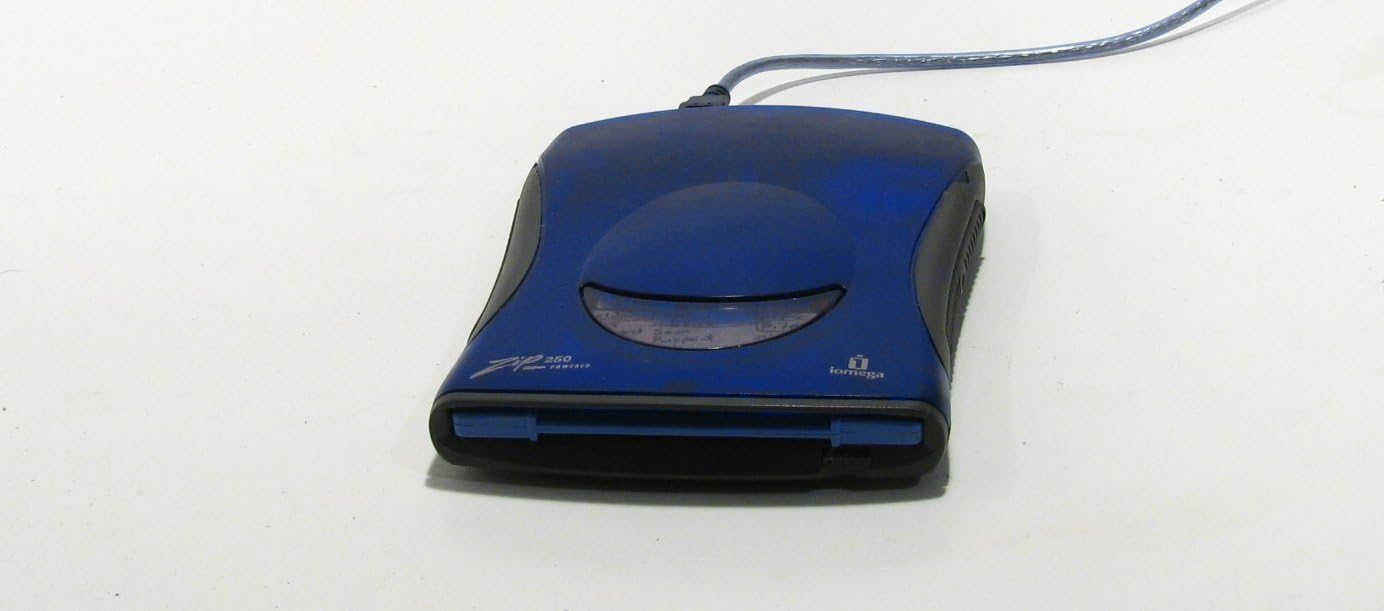
The Iomega Zip 250 MB USB External Drive is a sleek, portable storage solution compatible with both PC and Mac. Supporting 100 MB and 250 MB Zip disks, it delivers up to 0.9 MB/s transfer speeds via USB 2.0. Bundled with IomegaWare 2.1 and Quik Sync backup utility, it offers reliable, instant data backup in a compact form factor perfect for professionals preserving legacy files.
| ASIN | B0000300QN |
| Additional Features | Portable |
| Best Sellers Rank | #7 in External Zip Drives |
| Brand | Iomega |
| Built-In Media | Zip 250 USB drive, USB cable, power supply, and IomegaWare 2.1 with Quik Sync |
| Cache Memory Installed Size | 250 |
| Color | Blue |
| Compatible Devices | Desktop |
| Connectivity Technology | USB |
| Customer Reviews | 3.7 out of 5 stars 160 Reviews |
| Data Transfer Rate | 0.9 megabytes_per_second |
| Digital Storage Capacity | 0.25 GB |
| Enclosure Material | Magnetic Media |
| Form Factor | 2.5-inch |
| Global Trade Identification Number | 00742709111723 |
| Hard Disk Description | Mechanical Hard Disk (Zip Drive) |
| Hard Disk Form Factor | 2.5 inches |
| Hard Disk Interface | USB 1.1 |
| Hard-Drive Size | 250 MB |
| Hardware Connectivity | USB 2.0 |
| Hardware Platform | Mac, PC |
| Installation Type | External Hard Drive |
| Item Weight | 2.4 pounds |
| Manufacturer | Iomega |
| Media Speed | 0.9 megabytes per second |
| Mfr Part Number | ZIP250EXTUSB |
| Model Name | 11172 |
| Model Number | 11172 |
| Number of Items | 1 |
| Read Speed | 0.9 megabytes_per_second |
| Special Feature | Portable |
| Specific Uses For Product | Personal |
| UPC | 742709111723 |
J**C
Good Product
This was the forth one that i purchased. The other three simply did not work. I finally received a new drive and it works great. Very pleased with this drive. Beware of used iomega drives, it's a hit and miss adventure.
N**R
Works On My Apple G5
This drive works as advertised. It was "plug and play" on my Apple G5 computer. So, I was finally able to retrieve my vintage photos from my Zip disc's.
V**E
$230 for a Device That doesn't Work
Not only did this Zip drive not open on my PC; it ate a zip drive that I bought the device to recover, because the eject button doesn't work. I can't get my data out now. This is the worse example of abuse and fraud I've seen on Bezos's Amazon. I now have to return the device with my zip drive in it, because I can't get it out without breaking it open...Thanks and f u to Mr. G. in Pompano Beach.
B**J
Good Replacement
It is replacing a similar USB External Drive that has lasted many years. As a result it was very easy to install and, hopefully, will last several more years. We have stored a lot of information on the Zip Disks and rely on having a reader available to use them, if and when they are required.
D**O
Under Linux - For Expert Use Only :)
Using this was confusing at first, but I quickly rectified the issue. There are two instances in which you will get a seriously annoying error trying to access the disk. 1) If a disk is bad 2) If you click on the mounted drive For #2 -- you are not supposed to click on the mounted drive, as this is simply a reference to the fact that the drive has been mounted at all. There will be a *second* entry that pops up -- that lists the volume label of the media you have inserted into that drive. Please access it using that-- do not click on the mounted drive entry :) If you click on the volume label only to get an error, this means your disk is bad. Now, a bad disk does not necessarily mean "totally unaccessible" just as a bad hard drive does not necessarily mean that, either. Sometimes a zip disk will access under one operating system, but not another -- when it is going bad. It also depends upon the file system you are using. If your zip disk is formatted in the FAT16 / FAT32 Formats -- all OSes should read it fine. If it is in NTFS -- only Microsoft Windows (and unix, linux, etc distros which properly use the NTFS driver) will be able to see it. If it is formatted under Linux and you need to see this in Microsoft Windows -- you will need to Google for and Download a utility called EXT2FS. Be warned -- though they claim it works fine under Vista, it breaks hard under Vista. XP and lower only, please :)
S**R
Oudated Technology. No Need to Buy it New.
Bottom Line: This model of Zip Drive is USB plug and play and powers itself off the USB bus on the machine it is connected to. It is a little on the slow side for reading and writing of data due to its age, but will work if you have Zip disks that you still need to use. Buy it used. USB flash and CD R/W storage effective killed these products in the marketplace. I had some old files I needed to get access to and a stack of Zip 100 and Zip 250 disks that were the best candidates. A couple of desktops ago I had an internal Zip drive, and had been been lugging that machine around from place to place in case I needed it. Finally I opted to let that machine go to free up space, so recently when I decided to move those files onto newer storage I had to pick up a drive. I was very surprised to see that the price for one of these drives is still well over $100 new in 2014. The device I bought was a little under $40 new after shipping was added on, for about an hour of two or use. It gets three stars for being adequate, if outdated, technology. Recommend to borrow the drive if you can find a person who has one, or else buy it used.
M**Y
It works!
I didn't believe this would actually work, because the tech is so deprecated, but it does. I was able to get data off of Zip disks I had from the 90s with this thing. Worked on MacOS Mojave just fine for me. Thanks for making these for those of us lunatics who still need to access Zip disks.
D**S
Doesn’t work with win11
They should have a disclaimer saying it doesn’t work with win 11. There are no up grades to make it work.
Trustpilot
1 month ago
2 weeks ago