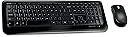
🚀 Elevate your workspace with wireless precision and unstoppable battery life!
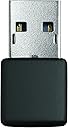
The Microsoft Wireless Desktop 800 for Business combines a secure 2.4 GHz wireless connection with a precision 1000 DPI optical mouse and a compact keyboard featuring easy-access hotkeys. Designed for professionals seeking reliable, long-lasting performance, it offers up to 15 months of battery life, a snap-in USB transceiver for travel convenience, and seamless plug-and-play setup compatible with Windows and select gaming consoles.
| ASIN | B004SUO1R6 |
| Batteries | 4 AAA batteries required. (included) |
| Best Sellers Rank | #1,955 in Computer Keyboard & Mouse Combos |
| Customer Reviews | 4.0 4.0 out of 5 stars (730) |
| Date First Available | March 19, 2011 |
| Is Discontinued By Manufacturer | No |
| Item Weight | 1.95 pounds |
| Item model number | 5SH-00001 |
| Manufacturer | Microsoft |
| Product Dimensions | 21.2 x 1.7 x 6.2 inches |
T**Y
Cannot be beat for the price.
This has become my go-to wireless keyboard/mouse combo. At the typical desktop distances expected in an office environment, you can't lose - this thing is good enough that I can game with it. Setup is stupid easy: just plug in the dongle and go. No pairing - no drivers, everything is recognized by the computer as a standard keyboard & mouse, and this will even work pre-boot. Very handy during OS installations. The range is good enough that I can use this to control my pc from across the room when using it as a media center, and in fact it is good enough that I can even play mouse/keyboard RPG type games like The Witcher with very little noticeable lag or jitter from a distance of over 8 feet. It's not seemless - I think that at this distance I -would- notice problems playing FPS-type games, but for games where twitch isn't super important, or non-game applications, you're fine. Range starts to become an issue at over 10 feet but I've never really put it too the test beyond that. The battery life is excellent too. All I can say is "months", provided you remember to switch off the mouse when not in use. Speaking of the mouse, it's worth noting that the mouse makes an excellent laptop accessory, as it has a nice little divit to store the usb dongle when not in use. If there is one weird quirk I've noticed - and this is specific to one game only - on Dragon Age: Origins, the scroll wheel doesn't work right. This is extremely weird because it works normally in literally every other application I use, and I've double and triple checked my application settings for the specific game, but strangely, it appears to be the mouse. Switching to any other mouse I have and the scrolling in that game works fine. The keyboard is on par with wired keyboards in the $10-$20 range, with my only complaint being the smallish F-keys. You get used to them, but they are not optimal. If you are familiar with the standard Microsoft wired keyboard 400, you know what you are in for. One last thing worth mentioning: this combo works with Xbox 360s and PS3s as well. While I have never had need for a mouse on either console, the keyboard works just fine, and are 'plug & play', just plug the dongle into a USB port and the keyboard works. 5 stars - awesome price, awesome battery life, reliable hardware. I would deduct a half-star for the tiny F keys and the DA:O glitch, but since amazon doesn't award half-stars, I have to round up for all the other great things about this kit.
D**N
Solid performer, good overall feel
Is there any other electronic industry where devices "Plug-n-Play" with each other so nicely? If not, there should be. This combo worked so well out of the box with my HP desktop computer that I had to recheck the logos to make sure they weren't made by the same company. No sooner than I had slipped the (single) dongle into the USB port than the computer began welcoming the pair and informing me that they were ready for use. Indeed. The keys on the keyboard are a very comfortable size, and tactile enough to give positive feedback for every stroke without feeling bouncy. The function keys along the top row are a bit small, but not so much as to be an irritation. The mouse buttons and wheel all have good, positive feels to them, and I love that the battery well on the mouse has a built in "pull-out" tab that you place underneath the batteries to make replacing them easier when that has to be done. Great value for the price.
I**N
Mouse is great, keyboard is bulky and awkward
I wanted wireless keyboard and mouse for my home office because the cords kept getting tangled and made a mess on my desk. The mouse works fine (except the sensitivity is a little wacky and the cursor goes flying past my intended target and there doesn't seem to be any way to tweak this) but the keyboard is much larger than the one I was previously using and I find myself looking at my hands ocassionally to make sure I'm hitting the correct keys- especially with the function keys along the top (which are very tiny) and the pause, home, end, & delete buttons (which are all very close together and close to the keys around them). All-in-all I wouldn't get the keyboard again.
F**R
Wireless Combo
I ordered the business packaging & it was over packed. A very nice touch. The mouse is mid sized. Not tiny notebook size, nor full. It's alright, & a bit buggy. The scroll wheel tends to stick when looking at pages, & your screen ends up jerking up & down. I didn't have that problem any time before, so it's the mouse. Booooo The keyboard is alright. There isn't any indicator when Caps Lock is on, so if you aren't watching (or typing a password), it'll be in capital letters. It's a problem with wireless, that I forgot about; actually, there aren't any lights on it, except for the battery is dying light. The keys, are just a little smaller, & some are angled, which with my style of typing, tends to over type. Also, the F, & command keys on top, are flush with the board. It looks nice, but you have to be sure you're pressing the right button. The calculator button is nice, when I remember it's there. I don't use sound all that much, but those buttons work to. Oh, & the num lock. Same issue as with the caps. You don't know it's on or off. Once plugged in, I haven't turned anything off, & have been going for quite some time. I am using rechargeable batteries for the mouse, & will do so for the keyboard, once they die. Which looks like it may be quite some time. I have these connected via a two port toggle KVM, & will say that sometimes, the signal will get lost, when I switch back & forth between the two computers, a few times. A little more so, than with what I had before (A Saitek Eclipse II illuminated wired, & a Logitech MX700 wireless mouse). There you go, it sounds alright, but I'd rather have a quieter mouse & louder keyboard. I wanted to update this, after having it for over a year. It's still a decent combination of mouse & keyboard. The battery wears down in the mouse in a little over a month (roughly), & I can't remember when I replaced the one in the keyboard. Obviously more things are mouse oriented in what I do, so I use the mouse more. Just flip it over, pull the tab & they pop up. Be sure to put them back in so the pull tab is exposed. So that is some pretty darn good battery life, as I'm on it pretty much all day. I rarely turn my mouse off, it'll 'sleep' or deactivate enough when you're not using it. It takes any kind of rechargeable battery (2 AA). I use a pair of ancient ones from a previous rechargeable mouse, that wouldn't recharge on the stand. This is based on the one I got, at the time of purchase. I can't say if there are any changes or updates to newer ones, or suppliers.
ترست بايلوت
منذ شهر
منذ شهرين