Desertcart purchases this item on your behalf and handles shipping, customs, and support to EGYPT.
🎧 Plug, Play, and Power Your Sound Like a Pro!
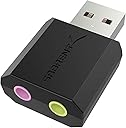
The Sabrent USB External Stereo Sound Card Adapter (AU-MMSA) is a compact, driverless USB audio solution that adds high-quality 3.5mm headphone and microphone ports to any Windows, Mac, or Linux device. With a 48kHz max sample rate and 98dB signal-to-noise ratio, it delivers clear stereo sound instantly—perfect for professionals needing reliable audio input/output without fuss or delay.


| ASIN | B00IRVQ0F8 |
| Audio Output Mode | 3D sound |
| Best Sellers Rank | #2 in External Sound Cards |
| Brand | SABRENT |
| Built-In Media | Sabrent USB External Stereo Sound Adapter |
| Compatible Devices | Gaming Console |
| Customer Reviews | 4.3 out of 5 stars 40,383 Reviews |
| Global Trade Identification Number | 00819921011138 |
| Hardware Connectivity | USB |
| Hardware Interface | USB |
| Hardware Platform | Linux |
| Item Dimensions L x W x H | 1.5"L x 0.4"W x 0.9"H |
| Item Type Name | EXTERNAL-SOUND-CARDS |
| Item Weight | 9 g |
| Manufacturer | Sabrent |
| Maximum Sample Rate | 48 KHz |
| Mfr Part Number | AU-MMSA |
| Model Name | AU-MMSA |
| Model Number | AU-MMSA |
| Number of Items | 1 |
| Platform | Windows |
| Signal-to-Noise Ratio | 98 db |
| Surround Sound Channel Configuration | 2 1 |
| UPC | 819921011138 |
| Unit Count | 1 Count |
| Warranty Description | 1 year limited |
G**B
Solved my problem and works great!
I had my doubts about this. I replaced my 2 monitors and used HDMI cables to connect to them. They worked great but for some reason I lost all audio. No matter what I did, I couldn't get the audio to work. I started looking at sound cards to possibly bypass the built-in audio of my Dell computer. I saw this and thought, what the hell. I got it, installed it, turned the computer on and it found it and my original speakers. Turned on Spotify and BOOM! I got my sound back and it sounded better than ever. I would give this 10 stars if I could. Sure worked for me.
J**R
Does what it claims. Greatly reduced pre-existing noise from on-board sound with some fine-tuning
I bought this after a junk Cudy Bluetooth/WiFi card (also reviewed - would not buy THAT again) caused serious noise and feedback issues between wifi and audio on my gaming PC. Troubleshooting had revealed that the RealTek driver required for certain functions was also exacerbating the issue, for those with the same problem. This item installed in seconds with no drivers required, though I recommend a USB extension cable to prevent the pull of gravity from excessively heavy audio cables damaging your USB ports or motherboard. NOTE: My audio runs through the GPU HDMI out to a TV, then from a TV back to the sound card. Output is split to a home theater system and a Bluetooth transmitter box (also reviewed here, couldn't be happier with it) for my headset. I had huge issues with a buzzing noise that came and went with varying intensity that is now gone on my headset, and all but gone on the home theater system. One difference here is that while I used Line In on the onboard sound, this has only a Mic input, which requires a bit of finesse to properly set levels without distortion. And the Mic input does indeed work, I am not sure what others are complaining about. I have noticed that with my usage, I don't need the gain up as much for what I am doing with it. AND I am running Win10, so it's clearly not a Win10 issue. Right out of the box, I was fairly impressed. The noise was all but gone, and after adjusting the more obvious sound levels and enabling some enhancements, it wasn't even noticeable anymore for the most part. Then I discovered that I could separately adjust sound levels and enhancements for the HDMI out the same way, and voila -- the noise is all but gone, and almost seems to have better sound than the factory onboard audio embedded in my Bazooka B450M Gaming motherboard. The fine-tuning, by the way, can be accessed by right-clicking the taskbar sound icon, clicking Open Volume Mixer, then select your HDMI monitor speakers or Speakers (this item will show up simply as "Speakers (USB Audio Device)"). You can then double-click its icon in the Volume Mixer, which will open another dialog box with tabs for Enhancements, Levels, etc. What I found to work best is as follows: For monitor pass-through back to this item, I set monitor volume to 100% and enabled Loudness equalization ONLY. I then switched to the USB audio mixer settings, setting mic input gain to 30% and enabling Bass Boost and Virtual Surround ONLY. After the above adjustments and fine-tuning, the aforementioned noise is still VERY faintly there in games, but it is now unnoticeable in other functions. I want to be clear that the noise is NOT a fault of this product, it is an annoying pre-existing issue that I bought this to solve, and it has helped greatly in minimizing it. It's not perfect, but has made huge improvements in noise reduction, which is, of course, the whole reason I bought it -- and there has been no noticeable sacrifice in sound quality. Side note here -- I believe an old friend used this exact item to run karaoke shows from his laptop, which speaks volumes for the quality. I couldn't tell the difference between the CD+Gs when he ran entirely from disc and the MP3+G files he played through this item. It's been less than six hours since install, but I am blown away by how good this thing sounds, considering it is truly plug and play and fits in the palm of your hand. You really can't beat this thing for the price, and if you're experiencing noise and feedback from your wifi with onboard audio - this will indeed solve the problem with a few adjustments. Order with confidence - this thing does what it claims to do and more.
K**C
Perfect for Mac computers, Easy to use! Plug and Play!
I have an iMac and wanted to use an external microphone with it but with a Mac you only have the one audio plugin which serves as a headphone and microphone jack and that this may cause an issue when adding a microphone. So I researched a bit and found that others with a Mac that wanted to get a microphone also bought this little external sound adapter gadget, so I did too. I wasn't totally sure I would need it but it was cheap (under $6) so I figured I better get it just in case and I did end up needing it so I am glad I got it. It's super easy to use, there's no files or software to install. Just plug this into your USB port and then plug in your plug from your microphone or headset. Then if it's not working you also may need to go to settings ( on a Mac: System Preferences, Sound and select USB Audio Device) to have it work with an external microphone. If it doesn't work for you for some reason when choosing USB Audio Device, select the other device you may have listed in the box ( which would be the headset or microphone you're using with it). I'll attach a screenshot so you can see what to pick. Really that's all there is to it. It's basically Plug and Play, although in some cases you may have to go to the Sound settings so just a little extra step...Plug, Settings, Play...no biggie! I got this microphone by the way : Excelvan BM-800 Condenser Studio Recording Microphone and Shock Mount Holder Blue and it works great with my iMac for blogging or videos. It comes with the mount holder which you can then add to an extendable arm like I did and it was an additional $15 or so. You will also need an external power adapter with it. You can hopefully click on my other reviews to find more info if you're also looking for a microphone and all that you'll need to go with it. *I bought this adapter and the microphone and all the stuff I had to get with it with my own money. No freebie, no discount for a review. This is all 100% my honest review with nothing given to me in exchange for it and I hope it helps you! ;)
A**R
Important to know for a Dell Laptop DC15255
It worked when it worked. It created conflicts with the default settings for sound and input on my Dell 15, DC15255. I made changes to the default device settings more than once. It's a good compact piece that would have given me added inputs, but not required for what I generally use this laptop for. It may work fine with other laptops. I could not get the default settings to always allow the internal and this external sound and inputs to work together. At times other erratic PC behavior would show up like a black screen when I could not shut the laptop off to reboot. It finally shut down on its own after a time. All works fine without this installed in the USB port. As it isn't essential, but just a convenience, I returned it to Amazon for a refund. Update: My laptop is new and I am setting it up as a unit to use for my music station. I am finding out now that this Dell seems to be unstable in other, non-audio ways, after the Sabrent is no longer used. I'm changing my rating to a 4 as it did work as advertised, until it or my internal speakers were intermittently being disabled. Sometimes both devices would work fine together. I can't lay the blame on this device, hence the rating change. For less than $8, I am keeping it for future use on a more stable laptop or for use on a tower unit I have that I may not want to get behind to use additional audio in or out.
L**A
Very Pleased
This works perfectly! I tried everything to fix the sound problem on my computer, nothing worked. I had Windows 10 installed and there was no more support . Very pleased with this!
M**.
Works Straight Away, No Driver Hassles
Worked immediately upon plugging it in. Windows recognized it and set it as the default device. Boss is listening to his production at his desk now through this little dongle. Works great with The Creative Labs speaker set. Haven't tried the line input. Was able to set the ASIO driver setting in Adobe Audition to accept this dongle and it works great in multi-track and edit modes.
A**S
Poor Quality
Works fine, but has a poor fit into a USB port. It's barely in there. It can't dock firmly. Puts unnecessary stress on any USB port.
T**.
good stuff
plug n play, easy.
D**L
🎧 Erweiterte Audiooptionen mit dem Sabrent USB auf Klinke 3,5 mm Adapter 🎶🔌
Der Sabrent USB auf Klinke 3,5 mm Adapter, auch bekannt als AU-MMSA, ist die ultimative Lösung, um deine Audioerfahrung zu verbessern. Egal ob du auf der Suche nach besserer Klangqualität oder erweiterten Audiooptionen für deine PS4, PS5, Windows oder Mac bist, dieser Adapter bietet vielseitige Möglichkeiten. Erweiterter Klanggenuss: Mit dem Sabrent USB auf Klinke 3,5 mm Adapter kannst du dein Audioerlebnis auf ein neues Level heben. Genieße 3D Stereo Sound und tauche in eine Klangwelt ein, die dich begeistern wird. Vielseitige Kompatibilität: Dieser Adapter ist vielseitig einsetzbar und kompatibel mit PS4, PS5, Windows und Mac. Egal welches Gerät du nutzt, du kannst problemlos hochwertigen Sound genießen. Einfache Handhabung: Der Adapter lässt sich mühelos anschließen und benötigt keine aufwendige Installation. Stecke ihn einfach in den USB-Port deines Geräts und verbinde deine Kopfhörer oder Lautsprecher mit der 3,5 mm Klinke. Kompakte Größe: Der Sabrent Adapter ist kompakt und leicht, sodass du ihn problemlos überall hin mitnehmen kannst. Er ist ein praktischer Begleiter für unterwegs. Verbesserter Sound: Dieser Adapter bietet eine klare Klangqualität ohne Störungen oder Interferenzen. Er ermöglicht dir, deine Lieblingsmusik, Filme und Spiele in bester Soundqualität zu genießen. Hochwertige Verarbeitung: Der Adapter ist solide verarbeitet und sorgt für eine langanhaltende Leistung, die deinen Audioanforderungen gerecht wird. Erweitere deine Audiooptionen: Mit dem Sabrent USB auf Klinke 3,5 mm Adapter kannst du auch Kopfhörer oder Lautsprecher mit einer 3,5 mm Klinke an Geräte anschließen, die nur einen USB-Anschluss haben. Das eröffnet dir neue Möglichkeiten für deine Audioausgabe. Fazit: Audioerlebnis auf nächster Stufe: Der Sabrent USB auf Klinke 3,5 mm Adapter (AU-MMSA) ist die perfekte Ergänzung für alle, die ihre Audioerfahrung erweitern möchten. Mit seiner vielseitigen Kompatibilität, einfachen Handhabung und hochwertigen Klangqualität ist dieser Adapter eine lohnenswerte Investition. Egal ob du Filme anschaust, Musik hörst oder Spiele spielst, du wirst von der verbesserten Soundqualität begeistert sein. 🎶🔌🎧
S**T
役に立ちます
ウェブ会議等で使用するヘッドセットをPCに接続するのに、たいへん役に立っています。リーズナブルな価格で購入できてよかったです。
A**O
Soluzione economica, qualità/prezzo super per usare l'uscita cuffie dal MacBook che non va più
La mini scheda audio Usb della Sabrent si presenta veramente compatta, comoda ed utilissima. Ho l'uscita cuffie del mio MacBook Pro (15' retina, late 2013, Big Sur 11.7.2) che non funziona più da tempo. Quando uscivo per andare a fare lezioni nelle scuole di musica, avendo bisogno del computer, dovevo portare con me anche una scheda audio per poter mandare il segnale audio nel mixer o in altri dispositivi. Con questa mini scheda audio invece, basta portare questa piccola usb, attaccare le cuffie o il minijack che poi andrà nel mixer-impianto etc, e tutto è risolto, in 2-3cm. Appena inserita nel mio MacBook, il sistema non ha fatto una piega nel riconoscerla, rilevando subito il dispositivo, la ho utilizzata con diverse applicazioni audio: Logic Pro X, VLC, Musica, QuickTime Player, Transcribe. Dalle altre recensioni, pensavo che la qualità audio fosse così così, ma in realtà per me la qualità dell'ascolto la definirei MIRACOLOSA per il costo: gli €8,99 miglior spesi nella mia vita. Qualità prezzo devastante direi. Premetto per paragone che uso strumentazione non proprio entry level, quali le Sennheiser HD600, Audio Technica m50x, Grado SR60, e solitamente uso una Apogee Duet 2 come scheda audio, ma sono passato anche da Motu ed altri marchi di schede audio. Ci sono le dovute differenze ovviamente (e ci mancherebbe, visti i prezzi e le utilità di ogni dispositivo), ma ripeto, per quello che costa, la qualità audio è miracolosa. Sto usando le HD600 per il test. Non ho provato l'ingresso microfono che ha a disposizione, ma non penso che lo userò mai. Ho solo testato l'uscita cuffie al momento, e dopo qualche giorno di utilizzo, non mi ha mai dato problemi. Ci sono anche i lati negativi ovviamente: la costruzione risulta un po' plasticosa, non mi dà l'idea di un prodotto solidissimo, e non mi sembra tra le migliori idee farla cadere o sbatterla contro il tavolo. Ma ripeto, per il prezzo, è superabile, basta trasportarla nella sua confezione che ha l'imbottitura interna, o fare semplicemente attenzione agli urti, ed il problema non si pone (classico blister in cartone, sarà circa 7x8cm). La consiglierei vivamente per chi, come me, ha problemi del genere al suo portatile e vuole risolvere con una spesa irrisoria, ottenendo un rapporto qualità/prezzo incredibile davvero, e con la comodità di un ingombro davvero minimo.
C**R
kısa süreli
Bence bu ürün kısa süreli. Eğer laptop kullanıyorsanız kesinlikle almayın. Çünkü diğer usb girişini net kapatıyor ve bence bu çok kötü. Bir süre sonra zaten kendiliğinden usb girişi yamulduğu için kullanmayı bıraktım ama baya götürdü.
A**H
Received items in good working condition.
Trustpilot
2 weeks ago
4 days ago