Buy anything from 5,000+ international stores. One checkout price. No surprise fees. Join 2M+ shoppers on Desertcart.
Desertcart purchases this item on your behalf and handles shipping, customs, and support to EGYPT.
⌨️ Compact power, endless play — your desk’s new MVP!
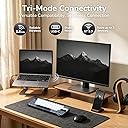
The RK ROYAL KLUDGE RK61 is a sleek, ultra-portable 60% mechanical keyboard featuring versatile triple-mode connectivity (Bluetooth 5.0, 2.4GHz dongle, and USB-C wired), hot-swappable blue switches for effortless customization, and a high-capacity battery delivering up to 13 hours of continuous use. Its dynamic single-color backlighting with 17 modes enhances your setup with subtle style, making it the perfect choice for gamers and professionals craving performance and portability.


| ASIN | B0GQHDN1PT |
| Additional Features | Ergonomic, Hot-Swappable, Lightweight, Portable, Rechargeable |
| Antenna Location | Everyday Use, Gaming, Personal, Student |
| Best Sellers Rank | #1,993 in Video Games ( See Top 100 in Video Games ) #183 in PC Gaming Keyboards |
| Brand | RK ROYAL KLUDGE |
| Built-In Media | 2 in 1 Keycap & Switch Puller, 2.4GHz Receiver, USB Cable, Dust Cover, RK61 Keyboard, Replace Switches |
| Button Quantity | 61 |
| Color | Knight Black |
| Compatible Devices | Gaming Console, Laptop, PC, Smartphone |
| Connectivity Technology | BT, RF , USB-C |
| Customer Reviews | 4.5 out of 5 stars 7,715 Reviews |
| Enclosure Material | Plastic |
| Hand Orientation | Ambidextrous |
| Keyboard Backlighting Color Support | Single Color |
| Keyboard Description | RK61 Mechanical Keyboard |
| Keyboard Layout | QWERTY |
| Manufacturer | RK ROYAL KLUDGE |
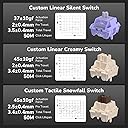
| Mechanical Keyboard Switch Model | Linear Switch |
| Minimum Required Operating System Version | Windows 10 |
| Model Number | RK 61 |
| Number of Keys | 61 |
| Power Source | Battery Powered |
| Recommended Uses For Product | Everyday Use, Gaming, Personal, Student |
| Special Feature | Ergonomic, Hot-Swappable , Lightweight, Portable, Rechargeable |
| Style Name | Classic |
| Switch Type | Linear |
| Unit Count | 1.0 Count |
| Warranty Description | 1 Year Manufacturer |
T**G
good quality
good
J**.
Five years in, still going strong
I moved to South America and I bought a couple of cheap(ish) mechanical keyboards for work. I have been using this one daily for almost five years, using it with my Mac Mini. The keys feel great to type on, the RGB (Or in my case, just blue) light can be toned down so that it is elegant and not "hit you over the face" with bright lights. I sometimes use it with my iPad, as it is pretty easy to switch between bluetooth devices. It is fairly light, but I don't really travel with this very often, so it's not a factor for me. I'm happy that it has lasted this long, didn't expect it considering its somewhat low price (At least compared to other wireless mechanical keyboards). Will happily buy another one when this one eventually breaks.
P**O
Great portable wireless mechanical keyboard.
I’m typing my review on this keyboard. I got the white one with the blue switches (I think they are Kailh Blues) and I’m pretty impressed with this keyboard for the price. Many of the reviews on this products complain about the weird placement of the arrow keys and combined functions of other keys, but in reality that the nature of most 60% keyboards. The wireless connection is solid, although using it without a cord for gaming introduces a good amount of input lag (blues are crap for gaming anyway). There seems to be an older version and an updated one, the updated one has some more ergonomic key combos to activate certain functions, and also have a USB-C cable, which is much preferable to a micro USB. Make sure you guys look at the manual and keep it in case you can't remember some of the unmarked key presses, such as ctrl + enter to disable the arrow keys. Typing on this keyboard is very satisfying, with a nice click and feedback every time you press a key. The keys are well spaced, and they each have enough heft so they can’t be pressed by accident. Someone with larger hands shouldn’t have much trouble using this to type. Also due to its size it is pretty easy to carry around in bag if you are trying to use it as a portable keyboard. I also like the fact that you can pair it to 3 separate devices at once and switch between them very easily. The backlighting is pretty great, especially when typing in the dark. All the other lighting mode other than the standard one are a little too flashy though. I usually just turn it off to save battery, which has been pretty good so far. I’m also using this on a iPad and it paired really easily and has had 0 problems with it so far. Make sure to switch to Mac mode from the Windows mode or vice versa. (Ctrl + A or ctrl + S) The downsides of this keyboard are the key legend which is a little cheesy, as well as how loud it is (that’s the nature of all blue switches though). Also if you listen closely beyond the loud clicking of the keys, there is some metallic pinging that can be heard. It isn't the greatest sounding thing in the world, but is mostly drowned out by the clickiness of the keys. Overall this is a great and rather discrete looking keyboard that is great value. Hopefully reliability is good, will update if anything happens to it. Buy this if you are considering it. EDIT: They are Outemu blues
C**A
Current version is fully hot swappable. 2.4ghz performance is pretty good too
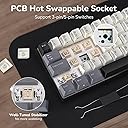
Hey, keyboard nerd here. I've been around the hobby for a while but I got one of these to use as a beater/travel board. This version of the board seems to be a newer version that was introduced this year (or maybe in 2021). Most reviews you can find online of the older one, but the main differences are switch compatibility and the 2.4ghz receiver. The current version that I have is fully hot swap compatible. I don't think it was made clear enough, and I think the fact that this amazon page includes the reviews for the old version is confusing. The old version is only compatible with Outemu style switches with the smaller stems. This version, to my surprise, worked fine with Gateron reds and other standard switches. I looked through the listing again and there was an indication in one of the *pictures* of all things that the keyboard switches are almost fully hot swappable. All of the online reviews for this keyboard are for the older version and indicated that it only supports Outemu style switches, which is no longer the case. Switch and keycap quality are okay. They're definitely fine for the price but the switches do have a bit of wobble to them. The texture on the keycaps is fine. They probably won't last forever but they seem like they'll survive at least a few years. The 2.4ghz performance is pretty good, which is to say it's pretty standard for a 2.4ghz wireless receiver at this price point. The latency is noticeably better than bluetooth. That said, wired performance is noticeably better than 2.4ghz to me. I still think the 2.4ghz receiver is plenty good for casual games and way better than bluetooth, but if you want to be a sweaty fps gamer, I'd stick to playing wired. I obviously didn't buy this keyboard for gaming, but for reference I tested it on cod mw2 (2022) running on performance mode at 240hz, with my usual keyboard being a rog falchion. Compared to that keyboard, the rk61's 2.4ghz mode had a pretty noticeable delay for me, but the wired mode was plenty good enough for fast-paced sweaty gaming. Also, the manual could use some improvements. Below I'm adding a rundown of how the keyboard is mapped out, since I had to look some of it up and trial-and-error the rest. - fn + left control: toggles between 3 fnlock modes. 1)[fnlock for the function row (f1-f12) + fnlock for the nav cluster (prtscr, home, end, etc)] 2)[fnlock for only the function row] 3)[no fnlock at all] - to access the multimedia keys (volume up, play, stop, open browser, etc), you need to have the number row set to the function row (f1-f12) from the step above, then hold down fn and press one of the f1-f12 keys. that should activate the key's multimedia functions. - fn + enter: toggles fnlock for arrow key cluster in the bottom right corner. press it again to disable it - fn + a, fn + s: switches to windows or mac mode respectively. this just switches the function of the alt/opt and windows/cmd keys to their usual layouts on windows/mac - fn + windows key: locks the windows key and prevents it from being clicked, for gaming. press again to remove the lock - fn + esc: use the tilde key. hold shift during this to type a backtick Okay, I think that should be it. Everything else is reasonably explained in the manual or on the key legends themselves. Overall. I like this keyboard. It's good value for the money. It's fully hotswap now so you can upgrade to whatever switches you want later. Keycaps feel fine to me for the price. The 2.4ghz receiver works fine for the price and latency is fine. Bluetooth and wired modes work fine. Really my biggest gripe is that the manual doesn't properly explain how the keyboard is laid out well, which is pretty essential on any board smaller than 65%, which is why I docked a star. Still recommend the board, but I really hope the manual and documentation can get an improvement in the future.
A**X
Good value and great customer support
The keyboard sounds and feels good. Built quality is solid. Many backlighting presets. Sometimes the Bluetooth takes a bit to connect, but it's a relatively minor issue for the price and overall quality. I had an issue with some keys not working (don't think it was a fault of the product, just a bug), and customer support was very good and responsive. They helped me troubleshoot pretty extensively and we were ultimately able to solve the issue.
N**L
Keyboard
Nice keyboard very clicky and small and aesthetic
K**G
after about one year not really good at all
I've' been used this keyboard little over one year, but a lot of type errors by skipping. The battery often gone fast, so I was using it with power cable most time. I thought that this one is hot swap, but it isn't, so some people like me might not cheated. Good thing is good typing and shape if it works but time to time it is not good by typing over. Thus I move to Keychron K2 and bye to Kg 61. I still using some of their key caps at least. I am not recommend this to anyone. After this review, they send me message saying that mine (year 2020) was not hot swap model, so they clear what was my misunderstanding. and they suggest detail more info for Bluetooth disconnection. So I like to share it. First time when I was experiencing disconnection after a week later of using it because I am not heavy typing person. But after recharging it, it became faster losing quickly perhaps battery quality is not great. I didn't want to charge and back and forth a lot, so after doing few time charge more I give up using wireless. This was less than a few weeks after I purchased it. However difficulty to use this keyboard is the typing response. even after I using cable, response of tying often slower. When it is connected to cable it must work all the time, but it was not and also when the keyboard is connected cable, wireless must not work, but it seems keep on working. is this switch back really functioning right? I am not sure. anyway because they response to my writing I go one more star. new update 11/4/21 the seller is very nice and understand my situation and sending me a new replace without any extra pay. Because of their great effort for the customer's satisfaction, at this moment I like to give them 5 stars and I can see the new one is hot swap possible and extra switches and tools comes with it. At this moment this is worth enough company very responsible for their product and I keep watching closely for their new products.
K**S
Yes, it works on XBoxs and PS4
This worked very well when connected to my XBoxs you can’t use this wireless you can only connect it to the XBoxs this works on many game but some you cannot use this keyboard with is GTA, Over Watch Apex Legends and more some you can use it on Mincarft, Fortnite,Call fo Duty Modern Warefare, Sea of Thieves, the sims 4 bomb crew and more also works on PS4 I don’t use the newest XBoxs I use a XBoxs I bought 6 years ago so any XBoxs works with keyboard and mouse. Hopefully this helps also if you have problems with this connecting to your XBoxs or PS4 you have 30 days to return it so instead of going through a hassle if it doesn't work just return it and buy a different one also the software isn’t working well so get the backlighting color you like before buying and if you want to buy new KeyCaps look for MX Cherry KeyCaps because those are the ones that fit this keyboard.
J**L
An absolute gem of a 60% keyboard.
Well, I’ve been after a small white mechanical wireless keyboard for some time now, intended. It to look at Amazon in my hunt as when you type the parameters “gaming” and “keyboard” into the search, the amount of pure rubbish that turns up is incredible. However when I read a top 10 list of 60% keyboards on a trusted review site and this guy featured, I thought I’d take a look. When it arrived I was amazed at the quality. For less than £50 I thought it was gonna be a bit cheap feeling, but actually it’s expensive feeling. It has a solid chassis, next to no deck flex or twist. The actuation of the key switch set is fantastically clicky and tactile (if that’s what you’re after), and even though it’s Bluetooth ive not noticed any discernible input latency (though I’m not a competitive shooter kinda guy or anything). I’ve been using for over a week now and apart from the initial charge, only charged it once (after 5 days of fairly heavy use), which took no time at all due to its usb-c interface, which can also be used to make it wired. The blue backlight is excellent. It can be super bright if you want, but I turn it right down to lowest and it’s still great. Each key is individually lit and can be individually turned on or off, and there are many different lighting patterns. Colour cannot change though, it’s cyan all the time, but looks really well implemented. The one I have is the American key layout, so if you’re set on UK layout then this isn’t for you, but I just changed my windows language settings to add “English (US)” as well as “English (UK)” so I had the option to change my keyboard language to match the RK61’s key layout. It’s very easy to get used to. Overall I’m extremely pleased with my purchase and would recommend anyone to give this board a go. It really did surprise me.
A**N
Magnifique
Le seul défaut à donner c'est que c'est compliquer à utiliser en bureautique mais pour le gaming c'est parfait , et que les touches se salissent un peu vite
F**N
Flawless Keyboard, Exceeds Expectations!
This keyboard is absolutely perfect in every way. The build quality feels premium, the keys are responsive and comfortable, and the overall design is sleek and practical. It delivers exactly what you’d expect and more, no complaints whatsoever. Highly recommended for anyone looking for reliability and performance.
R**A
klik fqrfe głośny
klik fqrfe głośny
K**K
bon achat !
le clavier est propre, le rgb est puissant rien a dire l'esthétique c'est magnifique.
Trustpilot
1 month ago
1 week ago