We remain fully operational. Our teams are working around the clock to ensure your deliveries continue safely.

قم بتنزيل التطبيق


معلومات عنا
حقوق الطبع والنشر © 2024 Desertcart Holdings Limited
قم بتنزيل التطبيق
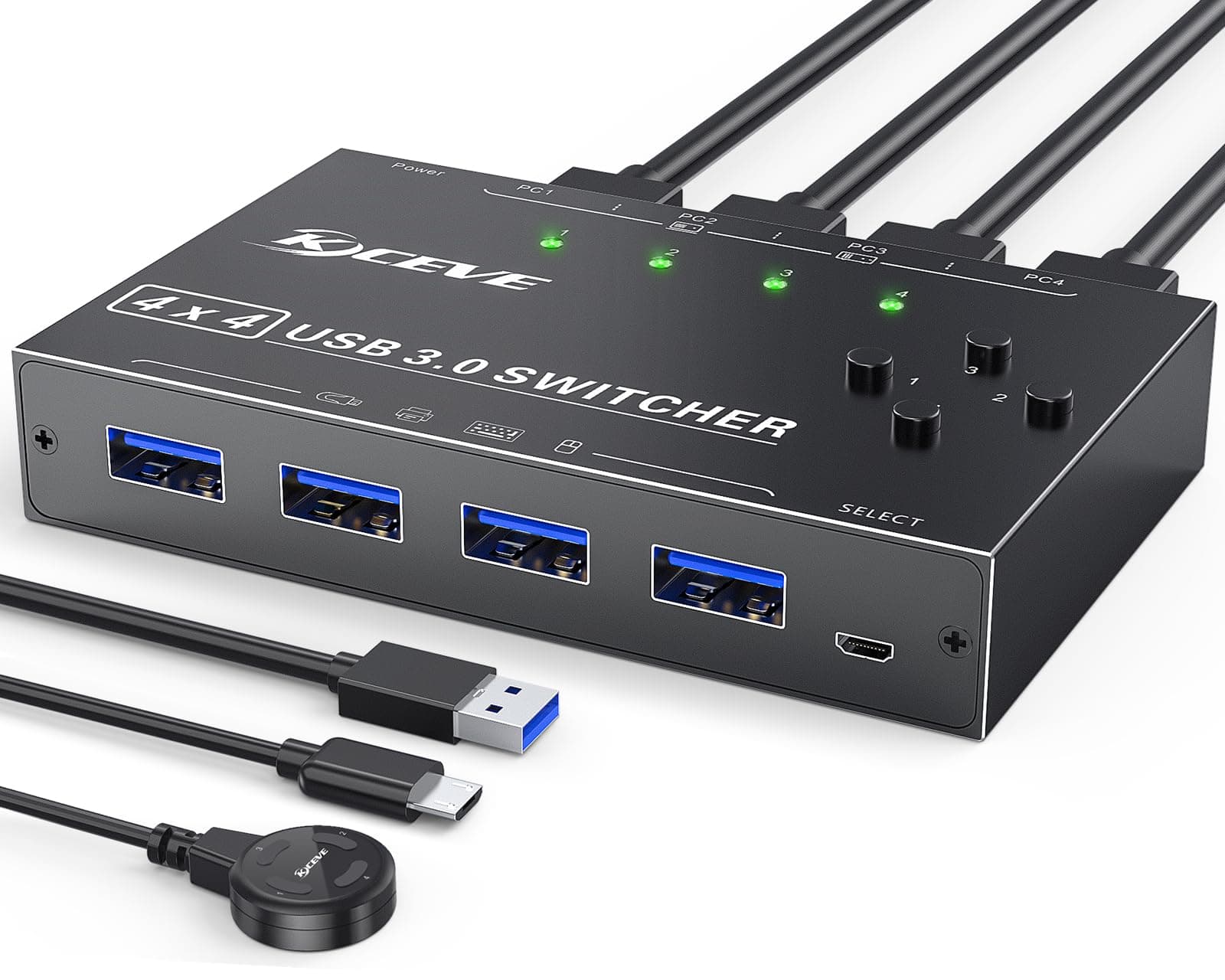
🔌 Power your multi-device workflow with speed and style!
The MLEEDA USB 3.0 Switch Selector is a professional-grade 4-port KVM switch that enables seamless sharing of USB peripherals across four computers. Supporting ultra-fast 5Gbps data transfer, it features both push button and wired remote switching for ultimate convenience. Compatible with all major operating systems and built with durable aluminum housing, this plug-and-play device streamlines multi-computer setups while offering lifetime warranty assurance.



| ASIN | B0B74SPYFN |
| Actuator Type | Push Button |
| Best Sellers Rank | #101 in KVM Switches |
| Brand Name | MLEEDA |
| Circuit Type | 4-way |
| Color | Black |
| Connectivity Protocol | Usb |
| Connector Type | Plug In |
| Contact Material | Aluminum |
| Contact Type | Normally Open |
| Control Method | Remote |
| Controller Type | Push Button |
| Current Rating | 2 Amps |
| Customer Reviews | 4.0 4.0 out of 5 stars (719) |
| Included Components | USB Switch 4 Computers,4*USB Cable;USB Power Remote. |
| International Protection Rating | IP54 |
| Item Dimensions | 4.02 x 2.56 x 0.75 inches |
| Item Weight | 380 Grams |
| Manufacturer | MLEEDA |
| Material Type | Aluminum |
| Model | USB 3.0 Switch 4 Computer |
| Mounting Type | Plug In Mount |
| Number of Positions | 4 |
| Operating Voltage | 5 Volts |
| Operation Mode | Button Switch or Wired Remote |
| Specification Met | CE |
| Switch Type | Push Button |
| Terminal | Solder |
| UPC | 754525154969 |
| Unit Count | 1.0 Count |
| Warranty Description | Lifetime Warranty |
| Wattage | 5 watts |
S**F
10 Port KVM comes with USB cables but not HDMI cables, wired remote connector is fragile.
The first unit I received did not work properly on some ports, so Amazon shipped me a 2nd unit. The 2nd unit is working properly. The device comes with 10 USB-3 cables (USB-3 Type A Male to USB-3 Type A Male) to connect the KVM to 10 computers. Unfortunately, it does not come with HDMI cables, so I ordered 10 cables about the same length as the USB cables. When you connect the cables to the back of the KVM be sure to DISCONNECT the remote control switch box: the microUSB connector there is fragile - I did not do this on the first unit and keeping the remote control switch box was a challenge (the connector had to be pulled slightly down to make a good connection). Once connected, the active computer sees a USB hub for the keyboard and mouse and any other USB devices connected. While the manufacturer claims a storage drive can be used on the KVM, I would not recommend it: when switching between computers only 1 computer sees the USB hub so if there is a USB drive connected and you switch machines without telling the computer it is going to lose a drive the drive is not disconnected in the correct sequence, which could result in drive corruption. The time to switch between computers is roughly 4 seconds or so, not the fastest but not terrible. I have one machine connected with HDMI and USB extension cables since it is more than 1.5m from the switch, and that works fine with a 1K (1920x1080) monitor. I have not tried a higher resolution monitor. The KVM works with wireless keyboard/mouse (Logitech) and wired devices. I have 2 Windows 11 computers (one Intel, one AMD), 3 LINUX (AMD) computers, 1 LINUX (Intel) miniPC computer and one Raspberry Pi 5 (ARM) connected to the KVM. No issues on any of them on the 2nd KVM unit. The company was very responsive during the period where I was having trouble with the 1st KVM. They responded to requests via Amazon in a very responsible manner. With a $30 discount this was an excellent buy at $139. Connecting that many cables to one device is never easy but the layout was not difficult although you must make sure the cables are completely inserted into the ports. Just be sure to disconnect the wired remote so the MicroUSB port is not damaged while connecting wires in the back.
B**Z
Dont buy this! 1/2 ports have already failed in less than a month.
Do not buy this product. I bought this a month ago, started using it a couple weeks ago and it's already not working. Only the first 4 ports work. Maybe 5-8 never worked. So if you don't heed my advice, test all ports when you get it. 5-8 only work on hdmi. The display port monitor shows "input not supported" whereas the same computer works fine in ports 1-4
R**D
Excellent Switch, Does what it is supposed to do!
This is a great device, I am really happy with it. The wired switch is excellent, has a nice feel and click to it. It is of great quality despite being so lightweight. The actual unit itself is sturdy, well made, and is very responsive. I have no issues running this between two computers with all ports in use. I should note, you may experience weird behavior if the unit does not have its USB power line connected to it when it comes to sleeping/hibernating/waking up. I noticed the computers would not turn on after going to sleep or into hibernation mode. Once plugged in, everything works well. If you expect this to instantly switch over between computers, it is an unrealistic expectation. By design, the computer thinks the USB has just been plugged in, and the computer takes a second to scan and initiate necessary drivers, so there will always be a half second or second delay when swapping between computers. Excellent product, buy with confidence
D**N
Great for connecting laptop and PC.
It's exactly what I was looking for. Now I'm able to just plug my work laptop in and it becomes a desktop by using my existing monitor, keyboard, mouse, and printer together. Works flawlessly.
G**L
Switching between docked Steam Deck and PC
Works great switching Keyboard and wireless mouse between a docked Steam Deck and PC. i like that it is small. Cables could've been longer but no problem, will pick up a longer one for cleaner cable management.
M**L
Excellent with Logitech Unifier
I have only had this for a few hours, but it works great for both my System 76 Bonobo Extreme Ubuntu Linux laptop and my work Windows laptop. It only takes 3 seconds to switch either way. I have read that it takes about 10 seconds to switch to the Windows boxes, but that is not my experience. It takes the same 3 seconds switching in either direction. Excellent product for the price. Video quality looks to be the same on my Samsung Curve monitor. I highly recommend this for those who have a work computer at home and limited desk space or want to get off of your laptop onto a larger monitor and keyboard.
J**F
Works well, but the "DisplayPort" model has only HDMI output.
Asked my company to purchase one of these to make my task of imaging multiple workstations easier. As the workstations only had DisplayPort video ports, I requested the DisplayPort model. And all eight inputs are indeed DisplayPort... but the only monitor output is HDMI. Fortunately, the monitors we have provide both DP and HDMI input, but the product was billed as "DisplayPort", and no mention was made (either in the "About this item" section or the "All product specifications") of the output being HDMI-only. Guess I should have looked more closely at the product images, but vision-impaired Amazon customers using a screen reader might not have had that option.
K**I
Perfect!
Works awesome and exactly as I need it to for my MacBook Air and Lenovo laptop to share a monitor, wireless keyboard, and wireless mouse without having to change cords and moving the dongle all of the time. Hubby said it wouldn’t work but I proved him wrong. 😈 (if you can’t get your keyboard or mouse to work, turn them both off first before you put the dongle in and then turn them on after it’s in. It didn’t matter which spot I put it in, they just had to be off first).
I**L
L'adattatore switch USB si è rivelato un investimento eccellente per ottimizzare la gestione delle periferiche su quattro diversi computer. La transizione tra i dispositivi è sorprendentemente veloce, persino quando si utilizzano periferiche con LED, senza la necessità di ricorrere a un'alimentazione supplementare per lo switch. Una delle caratteristiche più impressionanti è la stabilità del segnale, che si traduce in un funzionamento impeccabile della tastiera, del mouse (senza alcuna perdita di polling), della webcam e del microfono. Questo aspetto è fondamentale per chiunque richieda una connessione affidabile per svariate periferiche senza compromettere la qualità. La facilità d'uso è un altro punto a favore, rendendo l'adattatore accessibile anche per utenti meno esperti. L'interfaccia intuitiva semplifica la commutazione tra i computer, migliorando notevolmente l'efficienza nell'ambiente di lavoro o di gioco. In sintesi, sono estremamente soddisfatto di questo switch USB che ha superato le aspettative in termini di prestazioni, affidabilità e facilità d'uso. Consiglio vivamente questo prodotto a chiunque cerchi una soluzione pratica e efficiente per gestire multiple periferiche su diversi computer.
B**G
Väldigt bra. Gör sitt jobb. Skönt att kunna använda favorit-tangentbordet och favoritmusen till fyra olika datorer. Den switchar även webbkamera och headset.
M**T
Zu empfehlen, verrichtet tadellos seinen Job 👍
J**B
Funciona suficientemente bien, pero uno de los cables llegó dañado
S**M
Works well, but uses USB micro for power cable.
ترست بايلوت
منذ 5 أيام
منذ شهرين