We remain fully operational. Our teams are working around the clock to ensure your deliveries continue safely.

قم بتنزيل التطبيق


معلومات عنا
حقوق الطبع والنشر © 2024 Desertcart Holdings Limited
قم بتنزيل التطبيق
Buy anything from 5,000+ international stores. One checkout price. No surprise fees. Join 2M+ shoppers on Desertcart.
Desertcart purchases this item on your behalf and handles shipping, customs, and support to EGYPT.
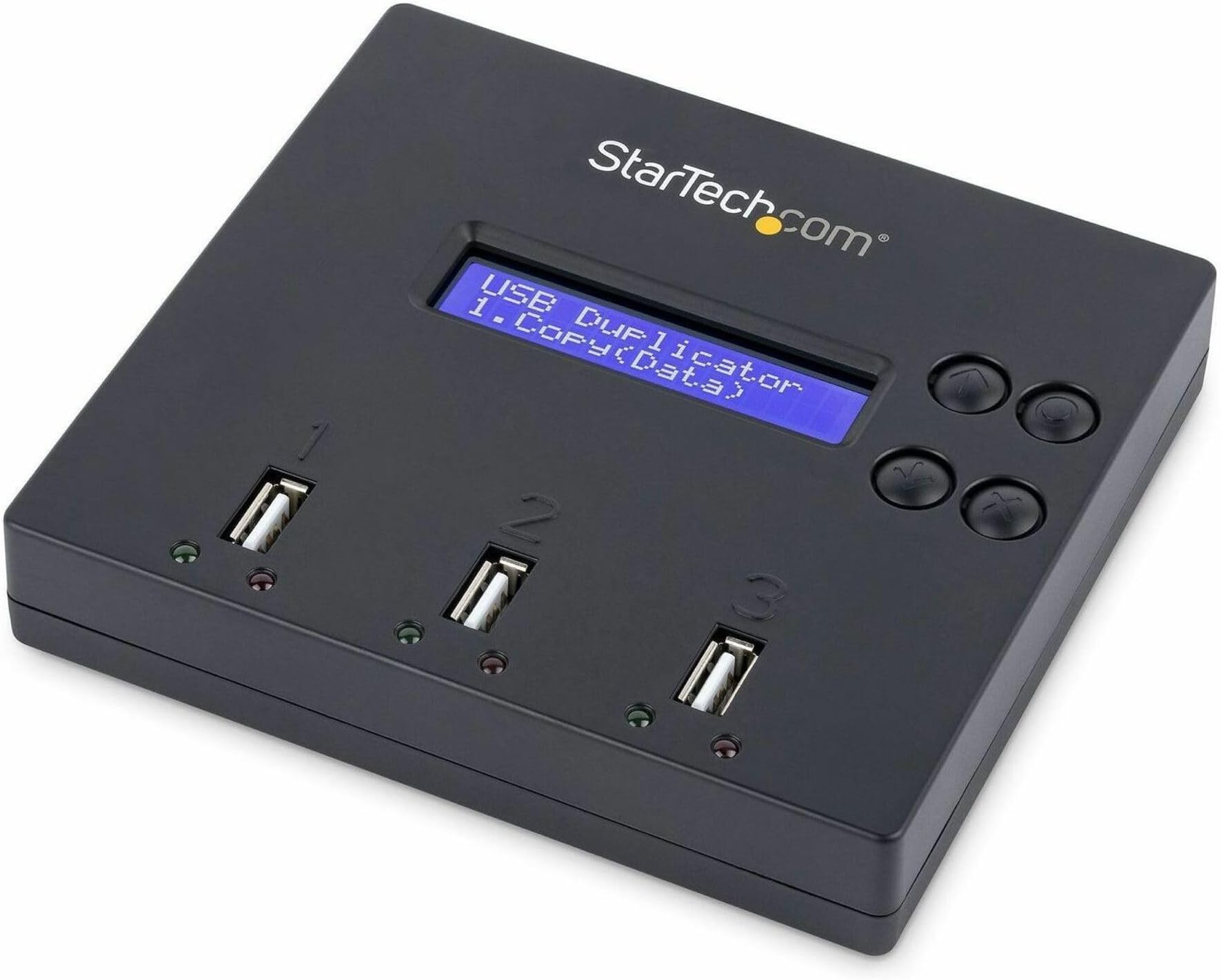
🚀 Clone, Erase, Repeat — The Ultimate USB Workflow Upgrade
The StarTech USBDUP12 is a compact, standalone USB duplicator and sanitizer that clones and erases up to two USB drives simultaneously at speeds up to 1.5 GB/min. Designed for IT professionals and technicians, it supports multiple file systems and external flash media (with adapters), features a user-friendly LCD menu with status LEDs, and offers secure 3-pass data wiping compliant with DoD/NIST standards—all without requiring a PC or software.






| ASIN | B00BOK3NQI |
| Best Sellers Rank | 70,128 in Computers & Accessories ( See Top 100 in Computers & Accessories ) 822 in USB Flash Drives |
| Brand Name | StarTech |
| Colour | Black |
| Compatible Devices | USB 3.0/2.0 flash drives, FAT16/32, NTFS, Linux ext2, ext3, ext4, SD, microSD |
| Country of Origin | Taiwan |
| Customer Reviews | 4.3 4.3 out of 5 stars (422) |
| Flash Memory Type | memory stick, usb |
| Global Trade Identification Number | 00065030849944 |
| Hardware Interface | USB 2.0 |
| Item Dimensions D x W x H | 11.9D x 13W x 2.5H centimetres |
| Item Weight | 0.19 Kilograms |
| Manufacturer | StarTech.com |
| Memory Storage Capacity | 64 MB |
| Model Name | USBDUP12 |
| Model Number | USBDUP12 |
| Network Connectivity Technology | USB |
| Product Features | USB Port |
| Read Speed | 1.5 Gigabytes Per Second |
| UPC | 065030849944 |
| Unit Count | 1.0 count |
| Write Speed | < 1,5 Gigabyte pro Sekunde |
S**Y
Slow USB 2 speed, but great functionality
I needed to build several hundred USBs for work. I usually use multiple USB hubs and slowly copy data into them, but for whatever reason it's not been as smooth as it has been in the past. Lots of migration errors. So, I did some research because surely someone has come up with a standalone USB copier. And they have. The larger ones, with more ports, are incredibly expensive. But this one, with just 3 ports (1 for the source, and 2 to copy into) is the cheapest option I could find. But even being the cheapest, it's still a really functional and well built device. *** Pros *** - Self-contained unit, you don't need anything else (except power and the USBs) - Can be used to copy data, but also format - Includes instructions on how to use it, which are easily understood - Menu is easily navigated - Comes with power unit - Display is basic and functional, but bright and easy to read - Plug and play, with one button copy makes batch building USBs really easy - Times the total migration, so you can walk off knowing how long a migration will take - DoD level wipe is offered *** Cons *** - USB 2 speeds are slow. Migrating 10GB took ~20 minutes *** Overall *** I wish I bought this before. If you're creating a bunch of USBs and need to copy data from an existing USB, then I'd highly recommend that you consider this device over using a USB hub. More reliable, more dedicated to the role, and you don't need a computer on to run it.
K**R
(+) Frees up a PC; not just a duplicator; (-) no intelligent resizing of source for unused space
Re: One port (source) to 2 ports (target) - StarTech Model USBDUP12 (USB 2). POSITIVE I bought one of these 7 years ago elsewhere and it is still going strong - good quality mains adaptor. Way more than a duplicator; you can thoroughly test drives, check actual capacity -vs- rated/described, carry out other operations. "Great way to avoid tying up a computer". Yes! Check out the manual for capabilities. "Takes 80hours to copy 8gb" - not in my case, it sounds like either a dud unit or more likely a poor quality and/or faked capacity flash drive. For destructive (write/read ) testing of for instance a (~5 years old) 512GB SATA SSD connected via a USB/SATA cable the average time taken on mine is 12 hours. NEGATIVE A mild-to-moderate quibble really: if you are duplicating drives, they must have the exact same capacity (or target must be larger than source) - for example some manufacturers describe a flash drive as 128GB but when capacity is checked it may differ from another manufacturer's self-described "128GB" drive. In practice this means if the target is ever so slightly smaller than source (though nominally the same capacity) the operation will not proceed - no intelligent resizing to take account of unused space. Conversely, if target is larger than source, in my experience the duplication will proceed, but the larger target drive will have a capacity reduced to same as source even though actually larger. You can manually fix that by extending target's partition in MS Windows cmd diskpart or by other means in the more recent versions of the o/s or by using GParted or equivalents in other o/s as I have done.
G**W
Superb duplicator
Great way to avoid tying up a computer
M**L
Absolutely brilliant so easy to use I would highly recommend this item
Very Easy to use Very good value for money small and compact.
M**G
Solid performance if you use the same kind of USB sticks
Just what we needed to copy info from one USB to many over and over again. Fast. Note that you need to use the same kind of USB sticks for the best results. Still, too expensive for my taste. There must be a cheaper way to do this.
A**R
Too slow for modern usb capacities
Takes 80hours to copy 8gb
A**R
Endorsed
Does exactly as I wanted
A**R
Five Stars
Great product!
D**S
Me encanto y agilizo los procesos para mi actividad, satisfecho.
D**S
I was supprised at how easy this was to opperate... Works great...👍👍👍
A**.
Excellent product - great user experience, really fast and works without a computer.
C**N
Se puede usar para : Pendrive, discos duros por USB, mediante adaptadores también mvme a USB, Hdd con adaptador a USB ..... Genial
A**L
c'est un outil diablement efficace pour cloner une clé USB. Ce n'est pas très rapide mais le résultat est à la hauteur
ترست بايلوت
منذ يومين
منذ 3 أسابيع