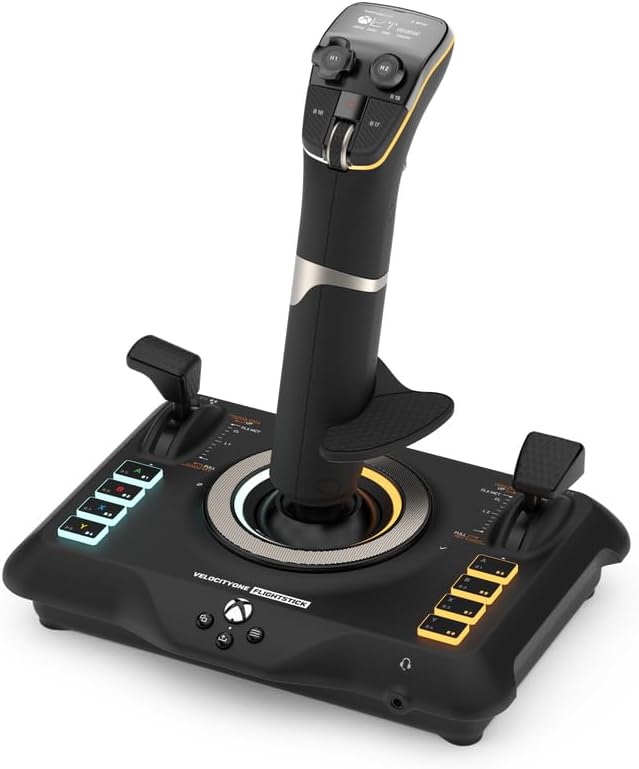
Turtle Beach VelocityOne Flightstick Universal Sim Controller, Xbox, PC
Product ID: 481542518
🌈adjustable RGB lighting
🎮27 programmable buttons
⚙️8 high-precision axes
Desertcart purchases this item on your behalf and handles shipping, customs, and support to EGYPT.
✈️ Own the Skies with Precision and Style
The Turtle Beach VelocityOne Flightstick is a high-precision, ambidextrous joystick designed for Xbox Series X|S, Xbox One, and PC flight simulation enthusiasts. Featuring 27 programmable buttons, 8 axes with non-contact sensors, an OLED Flight Management Display, and customizable RGB lighting, it delivers immersive, customizable control for both air and space combat games. Compatible with major flight sims and optimized for seamless platform switching, it’s engineered to elevate your piloting experience with professional-grade accuracy and ergonomic comfort.











| ASIN | B0BHTPP71M |
| Additional Features | Ergonomic |
| Best Sellers Rank | #2,008 in Video Games ( See Top 100 in Video Games ) #13 in PC Game Flight Controls |
| Brand Name | Turtle Beach |
| Button Quantity | 27 |
| Color | Black |
| Compatible Devices | Windows, Xbox One, Xbox Series X |
| Compatible Video Game Console Models | Microsoft Xbox One, Microsoft Xbox SERIES S, Microsoft Xbox SERIES X |
| Connectivity Technology | USB C |
| Controller Type | Joystick |
| Customer Reviews | 4.2 4.2 out of 5 stars (1,990) |
| Global Trade Identification Number | 00731855007226 |
| Hardware Platform | Desktop, Gaming Console, Laptop |
| Included Components | 10ft/3m USB-A to USB-C Cable, M5 Screws (3), Quick Flight Guide, VelocityOne Flightstick |
| Item Dimensions | 6.46 x 8.54 x 9.07 inches |
| Item Highlight | Xbox Series X|S, Xbox One, Joystick for Air & Space Combat Simulation, 27 Programmable Buttons, Hall-Effect Axes, Black |
| Item Type Name | Game Controller |
| Item Weight | 1.8 pounds |
| Manufacturer | Turtle Beach |
| Manufacturer Part Number | TBS-0722-05 |
| Model Name | VelocityOne Flight Stick (TBS-0722-05) |
| Model Number | TBS-0722-05 |
| Package Quantity | 1 |
| Power Source | Corded Electric |
| UPC | 731855007226 |
| Warranty Description | 1 year limited manufacturer |
G**Y
A Very Comfortable Joystick
So, I started playing War Thunder and I was using the Logitech 3D Extreme and after some time playing in the simulator mode, I realized I wanted to upgrade to a more quality joystick that had more features (buttons) that would suit my game play. I saw that Turtle Beach offered the Velocity One joystick listed on Amazon and after reading a few reviews and watching a couple YouTube videos I decided to go ahead and invest in one since I already owned the Turtle Beach gaming headset and ordered the joystick through Amazon. Now that I have been using it for the past three weeks, I can give an honest review. I love it. There are so many ways you can configure this stick and it comes with more than just extra buttons... it's got two throttles and a middle mouse wheel along with a touch pad to control the mouse pointer. It is unique in that you can adjust, calibrate, modify and do everything right on the stick that has a small navigation screen you use to adjust your settings. I could even adjust the audio and mic settings on the Turtle Beach gaming headphones right on the stick which is so cool. You can even change the button lights right on the stick for heaven's sake! Since I am a PC player, I cannot speak to how it performs on Xbox, but it does have a compatibility feature that enables a player to use it on an Xbox console. You just have to go to their website and download and install the new firmware version. You should do that whether you are a PC or console player right off the bat. It was painless for me. There is one thing that I must admit that I don't use on the stick and that is the mouse pointer pad. It is so sensitive that even the slightest touch will activate the mouse pointer when you don't want or have the need for it, so I turn that feature off. But it is really unique that it has that feature. One other thing I experienced when I first started using it is that it may seem a little stiff at first, but once you use it for a few hours it seems to get "broken in" and now it is very comfortable for me, I think that's due to the heavy spring that is inside. It can be configured for right or left-handed players and the palm rest is height adjustable in case you have large or small hands. I play a lot of War Thunder and this joystick has performed perfectly for me. I honestly feel that I really got my money's worth, and it is absolutely an upgrade from my Logitech's 3D Extreme stick. A solid 5 stars from me.
G**U
Excellent flight stick!
I’m a real pilot and this is an excellent flight stick. Of course nothing is like the real thing. I had a custom home built simulator for years and sold it after I started flying approximately 18 hours a week for my job. I decided years later to jump back in with an Xbox Series X since it’s somewhat portable and powerful for the price point, allowing me to use it in my motorhome. I also didn’t want to haul around a full yoke and rudder pedals. I initially bought the Thrustmaster stick and it was horrible. This has a much better build quality! The dual hat switches at your thumb are excellent, the two levers are perfect for throttle and gear. The second can easily be remapped for mixture, etc. It also features many more programmable buttons, but the out of the box preprogrammed set-up for Xbox is quite good. For something easily portable, extremely functional and easy to learn, I highly recommend the Turtle Beach - Velocity One Flight Stick. If you’re seriously using these tools to learn to fly for a living, I’d recommend the Turtle Beach Yoke, Throttle Quadrant and Rudder Pedals for a more realistic transition. I’m definitely impressed by this product. I’m also blown away by how awesome MSFS is on an Xbox Series X. I last used Flight Sim X on a PC, and this was a huge improvement. Happy Flying.
A**E
Good with a few annoyances
I personally had a good experience with this joystick. The stick itself is smooth, with a quite heavy spring. If you don't attach it to your desk or hold it down, the base will pop up, unless you're applying downward pressure. The adjustable nature of the hand rest is very convenient if you want to switch between using it for right and left handed play, for example going between MSFS and Star Citizen. When I first got it, the stick actuation was a bit rough, clicking and catching a little. However as I used it, this went away. The little sliders are handy, but cheap. My main problem with them is whatever actuation is going on in there, there's a bit of slop when you change direction. When you move it in one direction, then change direction, there's a few millimeters of travel before the slider actually starts changing the wiper which sends the signal. In a game where you want very fine control, this is annoying, but you can compensate for it. My biggest issue with this flight stick however is the firmware. There is no computer application. You must do it with your smartphone over bluetooth, which is a horrible pain. There was some computer app I tried to install but I had to get it through the freaking microsoft store of all places, and it was worthless and didn't do anything. You also cannot set a custom color, even though it obviously is capable of that. You can only use like 6 preprogrammed colors. The fact you have to go through a smartphone app in order to change the deadzone is incredibly annoying, and the lack of true customization is really frustrating, gating off things like quick swap profiles or keyboard inputs on buttons. Maybe its changed since I bought it. Besides the sliders, the rest of the build quality feels good. I don't think mine will be breaking any time soon. It gets the job done.
R**N
Great stick!
This has been awesome for flight simulator 24. I'm playing it through Xbox and it works great. The only thing that it doesn't seem to register is the trim wheel, but I just decided to use a different button for it. Not a big deal. Everything else seems to be working great and definitely makes the game a lot more interesting than using a controller. If anybody else is having the same problem I had trying to play flight simulator through Xbox cloud gaming..... (I have an Xbox One s which does not support the game hardware wise)....But if you have a PC that can support the game, you can download the Xbox app on your PC and then play the game with a stick that way. Because Xbox cloud gaming does not recognize this stick as a peripheral.... BUT hooked up to a PC with the game locally downloaded will register the stick so you can play as long as the stick is in PC input mode.
C**D
Very Good Flight Stick But
I like this flight stick and would have been happy to keep it, but it would always get to a certain point in Microsoft Flight Simulator and lock up. Nothing I could do would change anything, it just wouldn't interact with a certain window in Flight Training. If I went back to the regular X-Box controller everything worked fine. I asked for technical support, but the cure was to download an EXE. file and reset the flight stick. I don't have a PC, only Macs, so that wouldn't work. I had to return it and I wish I could have kept using it, but it just didn't work.
M**N
Device Permanently Malfunctioned After Two Weeks
I owned this joystick for exactly 12 days when it randomly stopped working mid-flight. It appears that the joystick tried to update but failed halfway through. To describe the issue in detail, the FlightStick started vibrating randomly (which is odd since I do not believe it has haptic feedback capacity). Ten minutes later, the device stopped responding to all inputs and started rebooting in a rapid manner. The device is now stuck in a boot loop, refuses to update, refuses connect to the XBOX, and does not respond to any inputs. It is entirely non-functional now. After looking on the forums, it seems that this update/boot loop issue is a known problem with the flight stick. Yet, none of the published solutions are effective in resolving this issue. While the manufacturer has released a recovery tool, it is only available for PC and I would have to go far out of my way to rent one for a day. Of note, the FlightStick states that the firmware version is 1.0.7, while the XBOX FlightStick App notes that the firmware version is 1.0.0. This discrepancy is either a cause, or an effect of the defect. The major issue I have with this product is the lack of a efficacious and concise repair option for a known issue. In addition, releasing a recovery tool for PC only leaves approximately 50% of the users unaccounted for. Finally, the fact that the product had a fatal malfunction in such a short period of time is of significant concern. If you choose to buy this, I highly recommend you do not connect it to your phone, or to any apps that would allow it to update as it seems that the issue is related to the product trying to update and then getting stuck in the process. I am currently waiting for a replacement from Amazon as it luckily/unluckily broke within the 30 day return period. We will have to see what happens with the warranty replacement. However, as of now, this product which couldn't even last longer than a tank of gas for $125 gets a one star review from me. Even the produce in my house lasted longer than this product, which is just insulting to the customer.
B**D
Almost a great flight stick.
At first I really liked this flight stick. It's very compact and doesn't take up a lot of desk space, feels firm, has plenty of buttons and nice throttle and flap levers. It has one major flaw in my case though. The right top hat that you use to look around. After about 6 to 8 months it developed slight drift where it would want to constantly turn the camera and you'd have to fiddle with it to make it stop. It got worse over time. I figured I had just gotten a defective one, it happens. I liked everything else about it so I replaced it with the same. Well about a year in I started to get the same drift which progressively got worse until now today I'm looking at replacing it again, but with something else this time. I really didn't use that switch excessively, but I DO need it and I was extra careful with the second one. If you don't need this button the rest of the stick is great and solid. If you do use it though, I can't recommend this stick.
G**O
Amazingly good.
Great for Glider/Center stick SIM. Multiple programmable switch options and great slides.
Q**.
Convenient
Quality
F**T
Pour le prix satisfait
En tant que passionné de simulation de vol et joueur sur Xbox et PC, le Turtle Beach VelocityOne Flightstick m’a rapidement séduit par son design polyvalent et ses fonctionnalités impressionnantes. Voici un aperçu de mon expérience avec ce produit : Tout d’abord, la compatibilité universelle avec les consoles Xbox Series X|S, Xbox One et les PC sous Windows 10/11 en fait un choix idéal pour les amateurs de simulation sur plusieurs plateformes. L’installation est simple, et le branchement plug-and-play assure une configuration rapide. Le joystick est extrêmement fluide, avec une excellente précision, ce qui est crucial pour les vols de précision et les manœuvres complexes. De plus, les multiples boutons programmables permettent de personnaliser facilement l’expérience de vol en fonction de ses préférences ou des différents jeux de simulation. J’ai également apprécié le contrôle total sur le gouvernail, qui améliore considérablement le réalisme en vol. Pour ceux qui recherchent une immersion maximale, ce produit se distingue par ses matériaux de qualité, offrant une bonne prise en main et un confort optimal, même lors de longues sessions de jeu. Enfin, les retours haptiques ajoutent une dimension immersive supplémentaire, vous plongeant au cœur de l’action. Je recommande vivement le Turtle Beach VelocityOne Flightstick pour les fans de simulation aérienne, qu’ils soient sur Xbox ou PC. Ses performances et sa polyvalence en font un outil indispensable pour profiter pleinement des jeux de simulation. Tester ce produit m’a permis de découvrir à quel point il améliore l’expérience de jeu, et je suis convaincu que d’autres utilisateurs partageront cet enthousiasme. Note globale : 4,5/5.
P**R
Outstanding Flight Stick
Great value for the price, a real bargain. Ease of setting up was really non stressing. Typical Turtle Beach Product, Quality.
M**O
Flight Stick turtle beach
Questi Flight Stick si presenta in una confezione curata e ben strutturata. Al suo interno, oltre al controller, troviamo il cavo USB c. È possibile invertire il poggia polso sul dorso dello Stick per i mancini ed è anche regolabile in altezza con relative tacche di orientamento. Il feedback è buono, forse un po' troppo resistente al suo rientro in posizione centrale. Ha un ottima compatibilità grazie all'ultimo update che consente oltre alla modalità PC e Xbox quella per terze parti, ovvero per tutte quei giochi non ottimizzati dalla casa produttrice. Si dovrà soltanto eseguire una mappatura dei pulsanti. Sostanzialmente verrà letto come un normale controller. Le impostazioni sono davvero molte, relative a trim, sensibilità, inversione assi, colore dei led, luminosità display e led ecc. Il mini touch pad sarebbe davvero utile, peccato che ad oggi soffra di una sensibilità decisamente imprecisa. Il cursore viene mosso correttamente in basso e verso l'alo l'input non è coerente con il movimento del dito. Ha molti tasti fisici personalizzabili, molti inaspettati, che rendono il controller, utilizzato da solo, molto sfruttabile per tutte le shortcut utili a chi lo usa con il simulatore e non. Con Flight simulator 2020 si comporta egregiamente, lo utilizzo prettamente su Xbox series x. Mi è bastato impostare alcuni parametri per mia comodità ed ero già pronto al volo. Unica pecca ancora non risolta è che pigiando il pulsante home dell' Xbox il cursore tenderà ad andare in basso a destra senza fermarsi, il che rende impossibile spostarsi nel menù della dashboard. A livello di feedback non ho apprezzato gli spostamenti dal punto zero, troppo rigidi e accompagnati da un ticchettio un po' fastidioso. In conclusione lo trovo un ottimo prodotto e con un buon qualità prezzo, ha tutte le comodità per chi vuole usare mfs da console e dal punto di vista estetico è veramente piacevole.
J**D
VélocityOne
Parfaitement reconnu et intégré à Flight simulator 2020. Facile à programmer. Fonctionne bien. Certaines personnes regrettent sa stabilité sans doute pour des jeux de combat. Mais pour piloter dans l'aviation civile, il n'y a aucun problème.
Trustpilot
1 week ago
2 weeks ago