

🎶 Connect. Create. Conquer your soundscape.
The Roland UM-ONE Mk2 is a compact, bus-powered USB MIDI interface designed for seamless connection between your MIDI controller and Mac, PC, or iPad. Featuring high-performance FPT processing for ultra-low latency and tight timing, it supports one MIDI input and output channel with clear data indicators. Compatible with major operating systems and powered directly via USB, it’s the perfect tool for professional musicians and producers seeking reliable, portable MIDI connectivity.
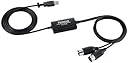


| ASIN | B00967UN50 |
| Audio Input | USB |
| Best Sellers Rank | 13,137 in Musical Instruments & DJ ( See Top 100 in Musical Instruments & DJ ) 20 in MIDI Interfaces |
| Brand | ROLAND |
| Brand Name | ROLAND |
| Compatible Devices | Personal Computer, Tablet |
| Compatible devices | Personal Computer, Tablet |
| Connectivity Technology | USB |
| Connectivity technology | USB |
| Customer Reviews | 4.5 out of 5 stars 2,828 Reviews |
| Global Trade Identification Number | 00761294503829, 04957054503826 |
| Included Components | 1 |
| Item Dimensions D x W x H | 3D x 6.1W x 1.5H centimetres |
| Item Highlight | USB bus-powered, Mac/PC/Ipad/Apple Ipad Camera Connection Kit Compatible |
| Item Type Name | USB MIDI Interface |
| Item Weight | 0.2 Pounds |
| Manufacturer | Roland |
| Manufacturer Part Number | UM-ONE-MK2 |
| Maximum Sample Rate | 48 KHz |
| Model Number | UM-ONEMK2B |
| Number of Channels | 1 |
| Number of Items | 1 |
| Number of channels | 1 |
| Operating System | Windows, macOS |
| Product Warranty | 1. |
| Product dimensions | 3D x 6.1W x 1.5H centimetres |
| Supported Software | ['Mac, Windows and iOS'] |
| Supported software | ['Mac, Windows and iOS'] |
| UPC | 761294503829 761294503836 |
| Unit Count | 1.0 count |
J**3
Perfect for old digital Piano
What can I say does.what it says on the box. Connects my old Roland digital piano to my Win 11 pc. automatically detected by windows and drivers downloaded via windows update. No perceived latency issues when using vst's and midi playback on piano flawless.
C**S
A great product from Roland.
Unlike many of those cheap midi leads you often see on other sites, these midi cables made by Roland just simply work. I tested these in Windows 7 Ultimate, and Windows 10 Pro, and they worked a bit better in Win7 - seemed more stable and no loss of notes. I connected a near 20 year-old Yamaha AN1X, loaded Yamaha's ageing editor and it worked first time. I was able to perform real-time changes to the AN1X, as well as upload many custom sounds found on the internet. The playing of notes, via the editor, was instant and I didn't notice any lag at all. The cable connects to any USB port, USB 2.0 or 3.0, but I would stick to 2.0 for 100% compatibility. Overall, a great product at a great price.
S**K
Su much better than the cheaper knockoffs
I had originally purchased one of the cheaper midi/usb cables on ebay. It would never work properly and either missed signals or would only transmit in one direction. The Roland one has none of these problems and just works. I don't really know what more to say. It's cheap enough. From a known manufacturer with customer support. Works with Windows 10 out of the box and just works with no stupid setup required. High value for money, If you want to save some money. Roll the dice with a cheap knockoff, or save time and hassle and buy Roland.
A**B
Good unit let down slightly by fiddly switch and a lack of native Win 10 support
If you're on Windows 10 you may not find this to be plug n play and may think you have a DOA unit when you try to install the driver. Apparently Roland state Win 10 is unsupported but you can work around this. This blog gives detailed instructions and worked perfectly for me [...] Restart to turn off driver signing and a couple of simple edits to the .INF file then update in Device Manager and you're good to go. Latency seems good but I'm on a low latency interface anyway so no better or worse than my old midi leads that have seen better days. A star off for lack of native Win 10 support out of the box and that truly horribly fiddly switch to alternate between tablet and computer. Otherwise seems good and works well with my DAW setup (Sonar Producer). I also think it's a tad overpriced for what is essentially a MIDI cable.
B**H
Resurrected my vintage Evolution MK-149 keyboard
I have a very old midi keyboard from the early 21st century: the Evolution MK-149. I had low expectations that it would work on a modern PC and iPad Pro, but this USB-MDI adaptor works great for both iPad Pro (plugging in via my Dell hub monitor) and plugged directly into a Windows 11 PC. I had to use the tiny switch for it to work on the iPad, but I was really impressed that it saved my old keyboard from the dumpster. The build quality felt lower than the price point would suggest, but I like the design, particularly the arrows for the outbound and inbound MIDI plugs.
J**R
Roland UM-ONE mk2 Midi interface
I had passed on my Yamaha electronic keyboard to my 12yr old grandson and bought him Mixcraft 7 recording studio for use on his Windows 8.1 computer. Then needed the USB Midi interface to connect the two devices. With the official Yamaha one being very expensive I read various reviews and decided on this Roland UM-ONE mk2 rather than the much cheaper alternatives. Came to installing the device and hit a problem, although Windows 8 drivers are on the enclosed CD the installation never completed. What is needed from Roland.com website is; UM-ONE USB Driver Windows 8/8.1 v1.0.2. I advise using the search function to locate it because depending on the path taken this driver doesn't always show up. Just a warning if you have impatient kids hacking their way into packaging, to remove the item by pressing from behind to remove the connectors rather than tugging on the wires! The item worked fine in the end and grandchild is delighted.
M**K
etc etc - Bit the bullet and bought this - Brilliant move! Yeh I know it costs quite a ...
JUST BUY IT - IT JUST WORKS PERFECTLY!!! - Cannot praise this product enough! - had major headaches trying to cut costs through buying other cheap 'generic' interfaces - NO GO! - nothing but problems - with sticking notes - having to constantly edited notes cos they weren't' recorded as I played them - pitch bend / mod wheel just went beserk ! etc etc - Bit the bullet and bought this - Brilliant move! Yeh I know it costs quite a lot more than the cheap stuff- but the reason for that is the fact that IT JUST WORKS PERFECTLY - YOU GET WHAT YOU PAY FOR!!! Don't keep going through midi headaches - just buy it - you will not regret it....those niggling hassles will disappear and you can get cracking on with creating your musical masterpieces!!! x x x
A**R
Flawless plug and play performance.
I had previously been using a Ploytec Terrasoniq MIDI One Bidirectional MIDI-To-USB cable and when I upgraded my laptop I was sad to discover that it apparently wasn't compatible with my new laptop. Knowing Roland to be reliable (and suspecting they would have better driver support for Windows 10) I bought this. As soon as I plugged it in, it downloaded the drivers and was good to go - brilliant! Latency is almost non-existent using my electronic drums and it never chokes. The only annoying thing is the red light that blinks with every single note hit. Useful as an initial troubleshooting indicator I guess but it would be distracting in a dark room. I guess it could be covered with electrical tape.
B**Y
It works with an iPAD!
I have been trying to send MIDI data from the 5 pin MIDI interface of my SR 18 drum machine via the lightning of my iPad to Music Studio (a Digital Audio Workstation app) on my iPad. This handy device, together with an Apple lightning camera adaptor, solves the problem, and I have found that it works. There are however a few little things one needs to do to make it work. The COMP TAB slider button which is hard to see, but is shown in one of the two photos needs to be pushed to the "TAB" position, and the MIDI cables need to be connected the correct way around to the correct MIDI interfaces on the SR 18 Drum Machine (In to Out and Out to In). Lastly, one needs to set the drum machine to actually send MIDI traffic OUT through the MIDI interface (by pushing the "System Setup" button, pushing the page buttons to find "MIDI OUT" and then selecting "ON" rather than the default "Off" position. After doing the above, I got the drum machine to send MIDI beats from the 5 pin MIDI interface to the lightning interface of my iPad - and confirmed that it worked with the MIDI wrench app and the Music Studio apps on the iPad.
L**Ë
Fiable, conforme, compatible avec tout et utilisable par plusieurs logiciels simultanément
Fonctionne parfaitement avec mon vieux piano numérique de 1992, de la marque Roland également. Contrairement à certains câbles sans marque et moins chers, celui-ci est isolé électriquement conformément aux spécifications de la norme MIDI (créée entre autres par Roland) et ne risque donc pas de provoquer des interférences ou d'endommager votre équipement. Le raccordement est très simple, la prise MIDI (IN/OUT) à laquelle la fiche doit être branchée est inscrite dessus. La longueur totale du câble est de 2m ce qui devrait convenir à la plupart des usages. De plus, sous Windows et MacOS, l'interface du câble est utilisable par plusieurs logiciels simultanément (ce qui n'est pas le cas de la plupart des périphériques MIDI), à condition d'utiliser le mode COMP (sélectionnable avec l'interrupteur sur le côté du boitier) et d'installer le pilote spécifique (ce processus est automatique sous Windows 10 et 11). En mode TAB, l'interface est compatible avec l'ensemble des appareils (ordinateurs, tablettes etc.) et aucun pilote n'est requis. En revanche, elle n'est plus utilisable par plusieurs logiciels simultanément.
E**A
Excelente interfaz
Una interfaz muy útil y práctica. Compatible con muchos sistemas operativos.
A**I
It’s great
It works as supposed to
J**.
Quality means something, Roland knows that
What can I say, Quality product, and they do exactly what they are meant to do, perfectly.
Trustpilot
3 weeks ago
4 days ago