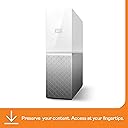
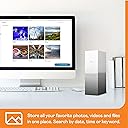
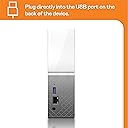
☁️ Your personal cloud, your digital sanctuary—store, share, and secure with style!
The WD 2TB My Cloud Home Personal Cloud is a sleek, user-friendly network storage device designed for professionals who demand centralized, secure, and subscription-free access to their multimedia and files. Compatible with Mac, PC, iOS, and Android, it offers effortless setup, remote access via dedicated apps, and private user spaces. With 2TB capacity, USB import, and hardware encryption, it balances convenience with security—ideal for managing your digital life on your terms.


| Asin | B074DXPS6B |
| Best Sellers Rank | 58,127 in Computers & Accessories (See Top 100 in Computers & Accessories) 45 in Network Attached Storage (NAS) Devices |
| Box Contents | Cloud storage device, power adapter, Ethernet cable |
| Brand Name | Western Digital |
| Cache Memory Installed Size | 2 |
| Color | White |
| Compatible Devices | Smartphone |
| Customer Package Type | Standard packaging |
| Customer Reviews | 3.8 3.8 out of 5 stars (6,594) 3.8 out of 5 stars |
| Data Transfer Rate | 60 Megabytes Per Second |
| Digital Storage Capacity | 2 TB |
| Eu Spare Part Availability Duration | 2 Years |
| Form Factor | 3.5-inch |
| Global Trade Identification Number | 00718037847962 |
| Hard Disk Description | Mechanical Hard Disk |
| Hard Disk Form Factor | 1 Inches |
| Hard Disk Interface | Gigabit Ethernet |
| Hard Drive Size | 2000 GB |
| Hardware Connectivity | USB 3.0 |
| Hardware Platform | PC |
| Installation Type | External Hard Drive |
| Item Dimensions L X W X Thickness | 13L x 5.3W x 17.6Th centimetres |
| Item Type Name | WD - My Cloud Home 2TB Personal Cloud - White |
| Item Weight | 0.96 Kilograms |
| Manufacturer | WD |
| Manufacturer Part Number | WDBVXC0020HWT-EESN |
| Model Name | WDBVXC0020HWT-EESN |
| Model Number | WDBMYCLOUDHOME0020HWT |
| Network Connectivity Technology | USB |
| Number Of Items | 1 |
| Product Features | Portable |
| Product Warranty | 2 years |
| Read Speed | 625 Megabytes Per Second |
| Specific Uses For Product | Multimedia, staff |
| Unit Count | 1.0 count |
| Upc | 007180378479 718037847962 |
User
Super Product, Excellent Photo storage device
The WD 4TB My Cloud Home Personal Cloud is a nifty little device that brings convenience and security to your photo storage needs. It offers some great features that make it an excellent choice for those who want an accessible storage solution without any fuss.Let's start with the setup process, which is an absolute breeze. Even if you're not the most tech-savvy person around, you'll find it a piece of cake to get the My Cloud Home up and running. Just connect it to your local network, and voila! You're ready to start using it in no time. No complicated steps or headaches involved.When it comes to storing your precious photos, this device truly shines. With a whopping 4TB capacity, it offers more than enough room to store a vast collection of pictures. And the best part? It automatically backs up all your photos from your phone as you take them, ensuring that none of those cherished memories are ever lost. Just imagine the peace of mind you'll have, knowing that your photos are safely stored and easily accessible whenever you need them.One standout feature of the My Cloud Home is its ability to invite different accounts to the drive. This means that each person can have their own private space to access their files, and even the owner of the drive won't be able to peek into someone else's stuff unless they're specifically invited. It's like having your own little digital haven where you can keep your files secure and separate from others. Privacy and control at their finest!Now, let's talk about one minor drawback. Some users have reported that transferring files from their computers to the My Cloud Home over the local network can be a bit slow. It's not a dealbreaker by any means, but it's something to keep in mind if you frequently transfer large amounts of data. However, when it comes to photo storage, this device truly excels.In a nutshell, the WD 4TB My Cloud Home Personal Cloud is a fantastic choice for anyone looking for an easy-to-use and reliable device to store their photos. The setup process is a breeze, and it automatically backs up your precious memories from your phone. Plus, with the ability to create private spaces for different users, you can rest assured that your files are safe and sound. Just keep in mind that if you're looking for lightning-fast transfers over the local network, there might be speed bumps along the way. But overall, it's a wonderful option for hassle-free and subscription-free file storage.
User
Amazing! I wish we got one sooner!
We bought this after I pressed a button on my MacBook and EVERYTHING disappeared! It was a very scary 5 minutes before it all returned as it was!!This amazing bit of tech has proved brilliant for us! Super simple to set it up. I didn't do this, but it took my other half about 20 minutes.All phones and tablets now have a back up stored safe!My other half especially likes it as all his music has now been backed up and he can listen to it from the cloud on his phone in the van without it clogging up storage on his phone.I like it because it has all of my documents and photos stored safely away. It's like having your very own personal cloud.The only thing I would say is slightly a pain, if I was being really picky, and that would be having to save everything twice. So I can hit save on my MacBook, but I then have to go in the cloud, add the file and delete the old one. There may be a quicker way, but I haven't found it yet and it's likely me being anal having to save everything each time I do it, rather than a monthly or weekly back up!But I would definitely recommend this! Does everything it says it will and definitely puts my mind at ease knowing everything is safe!
User
An abysmal product on every level. DO NOT BUY THIS!
I bought this drive for two purposes - as a PLEX server, and as a backup drive for my Windows 10 PC.1 - PLEX - Setup was a little rocky as the WD software first complained that "the server is offline", then "can't find PLEX server". After a few hours of re-trying, eventually I was able to get PLEX up and running. Having previously run a PLEX server directly on my PC, this NAS is S-L-O-W. Really slow. Everything takes an age to complete, from copying files across the network to scanning the media folders. Copying 1TB of video took literally more than an entire day (24 hours+). When I finally had it set up (after one PLEX database meltdown when it forgot everything) and started to play the media the slowness really became an issue. It takes an age to start playing anything, and it likes to transcode most things too, even with it set to send raw video whenever possible. The NAS does have transcoding hardware in it, which Western Digital claim can handle 1080/30. To be frank, this simply isn't true. 1080p video only ever plays for more than 30 seconds (the size of the transcoding buffer presumably) if it's in H.264/AAC. Anything else simply brings up an error message in PLEX that the server is too slow.2 - Backup - Western Digital don't provide any backup software, so you're left to source your own. I first tried Windows 10's built in backup, but it was unable to find the NAS. I then tried EaseUS Todo, which also couldn't find it. I ended up on GoodSync, which at last could see the drive and I was able to very, very, VERY slowly back up my PC's data drive. The data transfer rate bounced around between 10mb/sec and 500k/sec. There's certainly something fishy going on with how this NAS makes its presence known on the network.To sum up, this is a cheap drive and that cheapness is present every time you use it. It's incredibly, painfully, excruciatingly slow in every operation. As a PLEX server it works, just about, if you're using 720p video or lower or happen to have video in exactly the right format. The supplied WD software is incredibly basic and does very little, and I find the lack of a supplied backup application frankly baffling. Apparently the drive can however backup phones.... which boggles the mind. iCloud already does that with zero effort. And finally if you plan to have this in your home cinema room you'll need to either hide it in a cupboard or stick some electrical tape over the front, as it has a huge light bar running across it which lights up a darkened room, and of course there's no way to turn it off. There's not much you'll be able to do about the noise though, as this clattery drive is noisy in use and likes to regularly hammer the hard drive when it's not in use too.WD need to make this much, much quicker before it's properly usable, and they need to make it behave like a proper NAS too and show itself to all Windows applications.Update: Having torn my hair out over this for a few weeks I stumbled upon an app called Infuse Pro for the Apple TV. It essentially rides on the coat tails of the Plex server, using it to show all the correct metadata and artwork, but, and this is the crucial part, it completly bypasses the transcoding. This eliminates the awful transcoding hardware in this NAS and simply plays video directly on the Apple TV or other Apple device. It's made this very limited and slow NAS quite useable now. It's £15 or so on the app store and I highly recommend it once you've gone through the initial Plex pain of setting the NAS up.Update 2 - Turns out that if the power is cut to this drive, it corrupts the entire Plex metadata database, so if you've spent hours carefully tuning things, then it's all gone in a flash. I contacted WD support about this and it's apparently by design.Update 3 - Another unpleasant surprise - when my internet is down I can't use the NAS. My Wi-Fi can be up and running, but if the NAS can't talk to the internet (why it has to is beyond me) then the PC can't see it. Also, to see it at all in Windows you need to be logged into the WD desktop app, which loves to forget my login details often.This is a truly terrible product. I'd give it zero stars if I could. AVOID AT ALL COSTS.
User
Cheap storage, fast drive, but limited in accessibility
I opted for this as my OLD my book live (3TB) is pretty much full and I like the ability to stream my music, photos and videos on the go.My book live is a discontinued product, so when I saw this 6tb drive for a little over what I paid for my 3tb my book live several years ago, I jumped at the chance. Its a bit of a mixed bag though...The good:- pretty speedy drive. I get 100+MB sustained read and write speeds from the drive. This being attached to a 1Gbps router, I suspect that the drive can achieve faster speeds but is limited by the bandwidth of the router and Cat 5e cable. Compare this to the old My book love, that reaches a peak of around 65MB read speeds and wrote around 34MB - so a massive improvement over that.- The ability to automatically back up from an external media source (be this a USB drive, another WD drive, a cloud service such as Dropbox, Google drive etc).The not so good:- There's no dashboard to log into like the my book live (ie. You would go to the IP address of the drive and you could configure everything from there).- The drive stores your data in different locations depending on how you access the drive. This sounds confusing - what I mean is, if you access the drive through its IP address as opposed to the app/desktop software, then you ant access the media that you saved to it locally from the app/desktop software. And the opposite is true (can't access it locally if it was stored on the drive via the app). Whilst this mat not bother some, it's a BIG issue for me. For example, I stream a lot of media from the drive through my Amazon firestick. There is no app for the Firestick to access the drive, so I have to manually input the driver's IP details into the firestick (VLC player, Kodi etc) to be able to access the media. But that means that I can't access those files on my phone through the app - as they are stored in different locations on the drive. So I've resigned this drive to be a purely home media server, and use my old my book live as one that I can access remotely.For someone that isn't bothered about accessing the drive both locally and remotely - and one or the other will suffice - then this is a brilliant drive. The reason that I've kept a hold of it and not sent it back is because my old drive does what I need it to and use this as a cheapish media server only.
User
For all your digital home storage needs!
It's ideal for all your basic digital home storage needs such as Video, Music, pictures and backups for your tablet, phone and PC depending what you have on your PC and what size you get. The dimensions are about the size of a nintendo wii height and width is about half the size of a nintendo wii. As shown in the picturesIt's really easy to set up and upload your stuff on, and would highly recommend buying one 👌 if like me you would like that piece of mind in making sure your digital footprint is backed up.If you have a lot of stuff that needs to be backed up I would recommend the 6TB and above. Though overall a nice piece of kit to have for the price 👌
User
Never Buy One again No good as a NAS
I bought this to replace my old one, well to begin with it was OK, stored loads of photos both locally and in the cloud. I though used to use by previous as a NAS I shortly found out that this is not really a NAS as it stopped for no aparent reason allowing me into the unit. I got in touch with their support who were amazing but could not sort out my problem. After many hours on the Chat and then phone and remote access they asked me to send some data logs. I did this and after three days they said there was one user and it wasnt me. I eventually remembered I had asked a friend to access it so I could send a file. Well eventually I found out that I did have access myself and accessed it locally and got all my data back. I will never use it as a NAS as I was told by WD it is not to be used as one as I should only use it as a BACK up and not a main drive. So to sum up I now have a lovely unit in the corner which will only be used for PLEX as it is good for that unless you want to play 4k films when it doesnt have the correct processors to run them. Hope this helps.
User
Good for home use only
This is a home NAS, that is important to remember. It works well enough as a PLEX server, Dropbox alternative, backup for my phone and to share content to people without them having to sign up for anything which is what I bought it for.A good thing is I am actually very pleased with the upload speeds which have been quite consistent with a fibre connection, i can upload a 5gb video in a few minutes which is very good although be aware it is slower for large folders.The default app is very slow if you want to play long videos so I suggest you connect it to PLEX from he desktop site and upload all your photos and videos on PLEX as it seems the playback and user interface is a bit faster and easier to use.You also cannot stream audio from the app, you can only download it from the app to your phone, so if you want to stream your music collection I suggest you buy a lifetime in-app PLEX pass for £5 and upload you audio files to there.If you are using it for business use I suggest you invest in a Synology or other NAS with a better reputation. This is not for that even the duo ones! You might find yourself in a very bad situation, support is very slow, recently Mac OSX Catalina came out and WD was not compatible with it for several months which meant that if you were a mac user you could not upload any files over 2gb, which is pretty amateur if you ask me for such a big company and considering they had been given the beta version to work on it months in advance.It is also not safe, there have been a few security breaches for these drives in the past which WD have notably been very very slow to patch up so I would suggest you do not upload anything sensitive to the drive.You also do not have the option to manage, view and partition a set amount of data for other users sharing the drive, which should be a must really especially if it is a family drive.All in all for the price it is a good home drive and Dropbox alternative to access my things remotely but just that. It is a lot cheaper than the otherBut more advanced ones. For a home user should be fine. I would say PLEX is a must for this drive.Please note: If you want this as an alternative backup option to a cloud storage service like Dropbox do not do it unless it is also backed up elsewhere like on another drive! Those services are different in that they backup your data on multiple servers in different locations around the nation, for a home drive like this if one day it fails, or gets damaged in an incident at your house then it will not be backed up anywhere and your data will be gone for good. You still need another backup.
User
Works well for Mac Time Machine
It took me a long time for me decide to buy this because I wasn't sure whether it would work for Time Machine backups from my MacBook Pro. So this review is for you if that's what you want to do.I had this out of the box and up and running in about an hour. Most of that time I was trying to set up the first backup using a direct connection via USB because that was the advice I found on YouTube. There is no USB to USB supplied and I seemed to have every type of cable except USB to USB. I tried others like Thunderbolt on the Mac to USB on the device and Thunderbolt to Ethernet. But none of these combinations worked. I wasn't able to connect to the device.In the end I connected it up to its final location next to my router. Ethernet out of the router to the ethernet connection on the device. It took about a minute to start up and for the light to stop flashing, indicating that it was ready. They on my MacBook Pro went into Finder, selected Network and MyCloud showed up. I opened the MyCloud server and after two or three seconds TimeMachineBackup appeared as a folder.Reassured by this I then followed the standard Time Machine setup instructions from Apple support. If I had done this straight away, it would have been up and running in less than 10 minutes.I now have two MacBook Pros with Time Machine backups on the My Cloud Home. The first backups do take a long time - 5 hours for one and 8 hours for the other. I left these running overnight after running Caffeinate in Terminal to stop the computer from sleeping.
Trustpilot
1 week ago
2 months ago