Desertcart purchases this item on your behalf and handles shipping, customs, and support to EGYPT.
🖨️ Print smart, live sharp — your all-in-one productivity partner.
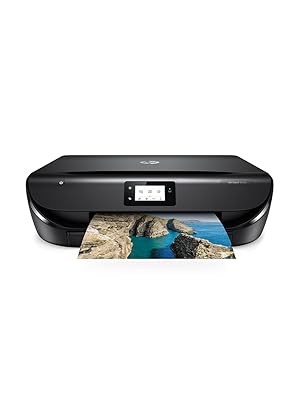
The HP Envy 5030 All-in-One Printer combines high-resolution 4800 x 1200 DPI printing with fast 10 ppm output and seamless Wi-Fi connectivity. Designed for the modern professional, it supports smartphone integration, automatic duplex printing, and offers an innovative Instant Ink subscription service that ensures you never run out of ink. Compact and stylish, it’s engineered to enhance your workspace with effortless setup and reliable performance.


| Additional Printer Functions | All In One |
| Asin | B074PMB9C9 |
| B W Pages Per Minute | 10 |
| Best Sellers Rank | 163,450 in Computers & Accessories (See Top 100 in Computers & Accessories) 318 in All-In-One Printers |
| Box Contents | HP ENVY 5030 Inkjet 10 ppm 4800 x 1200 DPI A4 Wi-Fi |
| Brand Name | HP |
| Color Depth | 24 bpp |
| Color Pages Per Minute | 7 |
| Colour | Black |
| Compatible Cartridge | Cartridges HP |
| Compatible Devices | Smartphones |
| Control Method | App |
| Controller Type | Android |
| Customer Reviews | 4.3 4.3 out of 5 stars (7,419) 4.3 out of 5 stars |
| Dual Sided Printing | Yes |
| Duplex | Automatic |
| Global Trade Identification Number | 00190781512431 |
| Hardware Interface | USB 2.0 |
| Initial Page Print Time | 3 seconds |
| Ink Colour | Coloured |
| Item Dimensions D X W X H | 6D x 17W x 19H millimetres |
| Item Type Name | inkjet printer |
| Item Weight | 5.4 Kilograms |
| Manufacturer | HP |
| Maximum Copies Per Run | 300 |
| Maximum Copy Resolution Black And White | 4800 x 1200 dpi |
| Maximum Copy Resolution Color | 4800 x 1200 |
| Maximum Copy Speed Black And White | 30 ppm |
| Maximum Print Resolution Black And White | 4800 |
| Maximum Print Resolution Color | hoch |
| Maximum Sheet Capacity | 100 |
| Maximum Supported Paper Size | A4 |
| Model Name | 5030 |
| Model Number | M2U92B#BHC |
| Model Series | 2 |
| Network Connectivity Technology | USB, Wi-Fi |
| Number Of Drivers | 2 |
| Number Of Trays | 1 |
| Other Special Features Of The Product | Instant Ink, WiFi, Airprint, Mobile Printing, Touchscreen, Automatic Duplex Printing |
| Output Sheet Capacity | 100 |
| Paper Size | A4 |
| Power Consumption Size | 14 Watts |
| Print Media | Paper (plain) |
| Printer Output Type | Monochrome |
| Printer Resolution Horizontal In Black And White | 1884 Centimeters |
| Printer Resolution Vertical In Black And White | 472 Centimeters |
| Printer Resolution Vertical Max In Color | 47.24 Centimeters |
| Printer Type | Inkjet |
| Processor Count | 1 |
| Product Warranty | One-year limited hardware warranty; 24-hour, 7 days a week support |
| Resolution | 4800 x 1200 |
| Scanner Type | Sheetfed |
| Series Number | 2 |
| Specific Uses For Product | Photo Print |
| Total Usb 2 0 Ports | 1 |
| Total Usb Ports | 1 |
| Upc | 190781512431 |
| Wattage | 14 watts |
User
HP ENVY printer, with free printing plan & instant ink...
My order arrived within a few days in the box you see in the picture which was abit of a surprise as there was no outer brown box, I must have missed that bit of info when ordering but it's something to be aware of especially if you're not going to be in & your safe drop spot is visible by passers by...The printer itself is a beauty very nice looking as printers go & not oversized compared to a lot of other makes,I found the set up very easy & was online within minutes, I did download the HP app before I started so unsure if that made a diffrence, the only thing that stopped me in my tracks for a few minutes was the paper tray, I couldn't find it..! & when I did I didn't pull it out far enough, but I soon figured it out, I guess I was being abit careful incase I pulled the tray of or something,BTW, the paper tray is at the front of the printer & slides out from the bottam.. ( looking face on) ... I hope this helps others who may have problems locating the paper tray..The paper does not come with the printer but the ink does, & there's also a option for a subscription for 12mths of HP instant ink which I think is pretty Awesome , 15 pages per mth is free, & if you need abit more than 15 pages then there's a small fee of 1 pound/$1 for an extra 10 pages, the first 3mths is free of charge if you sign up for this offer within 7days of activating your printer, there are other plans with more pages like 1.99p/$1.99 for 50 pages per mth, this one allows a roll over of any unused pages,& also like the free plan you can pay $1 etc for the extra 10 pages, there are increased prices depending on which plan you chose & you can change this at anytime, I chose the free plan to start with as I really do not know how much I print out in a mth so no doubt il be changing it,Also the printer will send for more ink when your printer is low on ink & this will be delivered by post with options of disposing of your empty ink cartridges,I would deffo recomend this printer it is the best printer I've had & for me I found its very easy to set up & use albeit with slight confusion of finding the paper tray....lol...
User
Good printer, good Instant Ink
I have had this printer a few weeks now and am very pleased with all that it does. The set up was a doddle, no problem at all, even connecting it to my iPad and smartphone. I particularly like the double sided printing. Photograph prints look good too. It prints quickly and fairly quietly. I like the Instant Ink process, happy with it so far. I was away for nearly a week so I turned off the power to the printer and got an email asking me if I was away and ok, and would I please reconnect the printer to the Internet so that HP would know how my ink was doing! I was also sent a set of inks to have in hand.The only glitch I had was how to clear a paper jam. I had to go to YouTube to find out how to do it as the process was completely different to any other printer I have had in the past. Once I saw how to do it, it was easily sorted.
User
There were some installation issues, but the printer works very well afterwards.
I ran the installer (not as administrator) on a laptop using Windows 10 with all of the updates. I don't know if that caused all of the problems or not. I discovered the printer and printed the alignment page. Then the display on the printer said "waiting for ink choice". I clicked on continue on the laptop and the installer hung. I searched for a resolution, but only found issues where the installer stopped when trying to print the alignment page. I stopped the installer through task manager. I followed some of the instructions in the problem with the installer and the alignment page. That is, I turned off the printer, plugged it into a sockect (and not the surge protector), turned the printer backk on and took out the ink cartridges and put them back in. I restarted the installer on the laptop and this time I right clicked and ran as administrator. This time the installer said the cartridges were not installed. I had had a lot of trouble getting the cartridges in. Cartridges were very easy to install on my HP photosmart, but not on the HP ENVY 5030. So, I found a YouTube video that showed how to insert the cartridges. You don't do it like the HP Photosmart. You just slide the cartridge in easily, then pull down the clip. Then the installer continued and said it couldn't discover the printer. It had discovered the printer and wifi the first time I ran it. I turned off the printer and reboot the laptop. I turned the printer back on and started the installer as administrator. This time the installer discovered the printer and recognized that the ink cartridges were installed. After all of this, I was actually able to print and copy. The quality is much better than the HP Photosmart. Also, the paper feed is much better. The HP Photosmart wrinkled the paper about 50% of the time. It looks like HP has fixed that problem. The paper goes in straight as well. I did not select Instant Ink because there were a lot of negative reviews about it. My printer is still printing with the original cartridges.
User
Great value and some very nice features for the price.
So far so good with this new printer. We have had two others before, Cannon and Kodak and this seems the best one we’ve had.I love the two sided print option and the Insta Ink scheme. I like the concealed paper drawer.Very glad of the trial ink period as I made some errors to start with in printing from my iPad. The printer has no resizing of the text option and all my devices are set to huge bold text as my eyesight’s useless.So remember before each print job to check that you’ve altered text and bold settings on your device to normal size.A little tricky to set up at first as it seemed to want to hijack my ISP WiFi but a google at some solutions and it was soon fixed.Really glad I chose this model and am looking forward to seeing how the Instant ink works out.
User
Print quality very good
When things go wrong it happens in two's or three's. My Monitor went down then my printer so I found this one on Amazon. The price was very good, and the setup very easy. I was replacing an EPSON that had given me excellent service for some years. I have used the printer now for a few months, and very happy with the results. I joined the ink scheme and have three months of free ink before starting to pay. As it happened I had to print off a long list of CD Tracks and the ink ran low, however, I quickly received two new cartridges at no cost. Very happy with printing and scanning.
User
The printer wizard to connect to the wireless network works fine. The software wizard completes OK with a big ...
The device is OK. Seems to print well enough and scan too.The Windows software that must be downloaded to install the printer didn't work for me. I had a new out of the box PC with fresh install of Windows 10 and it took me two hours get set-up.The printer wizard to connect to the wireless network works fine. The software wizard completes OK with a big green tick to say its installed and connected but Windows doesn't recognise the printer and no applications can print.To make this printer work I did the following:1) connected to wireless using the printer setup wizard2) ran the HP set-up software only as far as installing the drivers - do not commence network setup3) open Windows settings and add a printer. When it fails to find a printer click on the link that says something like 'the printer I want isn't listed'. Search for the printer using its IP address and when its found complete the Windows install wizard.4) return to the Windows printer settings page and click on the printer. Click the link that says something like 'manage the printer' and open the 'HP Smart' App.5) use the HP Smart App to run the printerI tried all the HP wizards and tutorials and virtual assistants to make this printer work and they failed therefore I cannot rate this product or recommend.
User
Beware the 'Your DPD' app - delivery preferences override what you select on Amazon...
This is a fantastic printer. It's so easy to set up and even pretty intelligent - I accidentally closed the window and had to start again and the set-up knew where I'd got to.Definitely sign up for the free ink, you can downgrade or cancel anytime during the 4 months, and if you go for the max plan, you can rollover up to 300 pages.I have a Mac, and I have to say it's the easiest printer ever to set up. I love the fact that I can have the app on my phone and iPad, and print directly from both if I want to.The dashboard is clear and intuitive.The only problem I had was with the delivery, I specified to Amazon to deliver to my home address, unaware that I had the 'Your DPD' app installed on my phone with a different preference, so my printer went to the wrong address.Amazon were fantastic, they sent me another one (after I changed the Your DPD app settings) and took care of the return of the wrong one.Brilliant - can't fault this, which I'd bought it years ago!
User
Very pleased, a good all rounder.
I have always had HP printers except for one venture into Canon, which we will never mention again as it did not end well.This is (so far) a great printer. Very easy to set up, and if things go pear shaped, running HP printer wizard usually sorts any hiccups. It looks smart, nicely shaped, and the control panel is easy to read and follow. It prints quietly and efficiently.We particularly like the double side printing option, and the fact that paper is loaded into a tray underneath the printer. This is so much easier for me, I have painful hands and not having to fiddle about filling and lining up the usual paper feeder is a bonus.HP Instant Ink is definitely worth trying, we used it with the previous printer too and it's very handy.(I don't secretly work for HP, truly, I just like their printers!)
User
Più che una stampante di emergenza, una stampante facile da usare e dai buoni risultati
Ho preso questa stampante a gennaio ed ora siamo ad ottobre, l'acquisto è stato motivato oltre che dall'ottimo prezzo al momento, dalla necessità di una stampante di riserva alla professionale che utilizzo abitualmente, per intenderci per le emergenze.Abituato a stampanti di altra categoria questa sembra davvero un giocattolo, ma i motivi che mi hanno spinto a recensirla sono due: il programma Istant Ink di HP e la gestione mediante App dallo smartphone.La configurazione è semplice a patto di utilizzare uno smartphone, ci si deve registrare con le solite modalità, dopodiché si ha la possibilità di gestire la stampante con uno schermo intorno ai 6" (sei pollici!) ovvero quello del cellulare, trovo la cosa davvero eccezionale, intanto la stampante è dotata di un piccolo touchscreen, dimensioni francobollone, necessario per alcune manovre da fare per l'uso ma comunque semplicissimo, tramite lo smartphone è possibile inviare stampe di documenti o foto, è possibile fare scansioni in maniera semplificata tanto da farmela usare tutti i giorni a tale scopo, per le pagine singole o pochi fogli, in maniera immediata e salvataggio sul cell, poi si possono scaricare anche dalla macchina fotografica ed altre utilità come il fronte/retro che però non ho mai verificato.La stampa B/N è più che buona, l'inchiostro esce subito asciutto, mai avuto problemi di macchie, la stampa fotografica è buona, non ho avuto riscontri eccezionali, forse per colpa della sorgente, cioè ho provato a stampare foto poco definite, ovviamente foto scattate con il cellulare che si vedono perfettamente sullo schermo ma quando si provano a stampare in formati spinti fino all'A4 perdono di definizione, almeno suppongo, in ogni caso ripeto a me sono uscite delle stampe di foto dignitose, proverò ad usare file più definiti per vedere se è colpa della stampante, della carta o del file jpg poco brillante, una decina di foto stampate mi hanno comunque soddisfatto, ovviamente non sono confondibili con stampe in laboratorio provenienti da una reflex.Relativamente al programma Istant Ink, questa è stata una piacevole scoperta, seppur tardiva, è possibile abbonarsi a vari livelli di fornitura, misurati in pagine stampate, io ho aderito a quello gratuito con un tetto di 15 pagine mensili, che siano stampe normali o foto non importa, sono un paio di mesi che provo e devo dire che la cosa è ottima, il primo mese non ho pagato, il secondo credo che sarà uguale, ma in futuro sto valutando l'ipotesi di aderire ad un piano a pagamento visto che i costi pagina sembrano davvero essere convenienti e le cartucce vengono spedite preventivamente al consumo totale delle esistenti all'indirizzo che si desidera. Si ottiene un duplice vantaggio ovvero il risparmio dei costi di acquisto ed il disturbo di recarsi ad acquistarle o ordinarle, è tutto automatico, naturalmente è necessario registrare una carta di credito anche ricaricabile comunque. Aggiorno con la notizia ricevuta che da dicembre il piano gratuito costerà 1 euro al mese, ovvero 12 euro annui, meno del costo di una cartuccia, ciononostante rimango soddisfatto e continuerò ad usufruire del programma se pur a pagamento, visto che ero già intenzionato a farlo.In definitiva sono pienamente soddisfatto della stampante e del programma Istant Ink.
User
Überzeugendes Gerät mit gutem Preis-Leistungs-Verhältnis
Ich war auf der Suche nach einem neuen Multifunktionsgerät für das Homeoffice und habe mich für dieses Gerät von HP entschieden, weil die für mich relevanten Ausstattungsmerkmale WLAN, Duplexdruck, Touchscreen gegeben sind. Die Lieferung erfolgte schnell und zuverlässig wie von Amazon gewöhnt. Bei der Installation gab es keinerlei Probleme. Sie war in sehr kurzer Zeit erledigt. Viele Schritte konnte ich intuitiv erledigen, da sie von vorherigen Geräten bekannt waren. Für den Nutzer liegt ansonsten eine Beschreibung bei und auf dem Touchscreen wird auch alles angezeigt. Der Download der benötigten Software verlief ebenso reibungslos wie die Einbindung ins Netzwerk, so dass ich von allen Geräten aus drucken kann. Da ich bereits einen Account für das HP Instant Ink-Tintenprogramm besaß, war ich gespannt, wie die Anmeldung des neuen Druckers klappen würde. Auch hier gab es keine Schwierigkeiten. Das Gerät wurde erfasst und die kostenlosen Monate meinem Konto entsprechend gut geschrieben. Nach den ersten Wochen der Nutzung kann ich sagen, dass ich sehr zufrieden bin, denn die Ausdrucke erfolgen schnell und in guter Qualität. Der Drucker arbeitet leise und auch der Duplexdruck klappt einwandfrei. Ein klarer Pluspunkt ist die Papierkassette durch die gewährleistet wird, dass das Papier immer unbeeinflusst von Licht und Staub bleibt. Auch Scanner und Kopierer haben mich bislang absolut überzeugt, so dass ich das Gerät definitiv empfehlen kann.
User
Perfecta
Dudaba mucho entre distintas HP y alguna Epson y tengo que decir que va fenomenal.Leí que había gente que tenía problemas con la instalación... Yo no he tenido ninguno. Rápido y fácil siguiendo las instrucciones.Lo que puede liar más quizás es el tema del instant ink, a mi no me interesaba y lo rechazé en la instalación.Imprime rápido y muy bien a doble cara, sin la necesidad de girar el papel manualmente. Las fotos también salen muy bien en distinto papel.Y el sistema de almacenaje de papel es muy cómodo! No tienes que ir poniendo y quitando el papel como en otras impresoras para que no se te llene de polvo, lo metes en el cajón y te olvidas!De momento todo perfecto!
User
Très bonne imprimante
Installation facile et rapide sous Windows 10, très bon rapport qualité/prix, seul le niveau des cartouches descend un peu vite. Mais pour un usage privé, c'est pas grave.
User
Soddisfacente
Acquistata ad un prezzo leggermente scontato devo dire che è una stampante molto valida per uso casalingo(certamente non è idonea per un ufficio) ma con un prezzo del genere vi assicuro che non potete chiedere di meglio. Bella anche nel design , comodo il suo cassettino per i fogli(forse un tantino ridotto come capienza) . Spedizione con prime come sempre rapidissima , facile da installare tramite display, vi chiederà prima alcune cose e poi avviate i vari test x scansionare e stampare. si può connettere a più computer e a più cellulari (ai cellulari sfruttando l app dedicata ,e vi assicuro funziona molto bene e molto intuitiva, basta avere la stampante accesa e con il cellulare mandate in stampa qualsiasi cosa in pochi istanti. Non è molto rumorosa , unica pecca nel momento dell accensione ( impiega quei 15/20 secondi x essere pronta ). Ma x il resto ripeto, difficile trovare di meglio a questo prezzo. Infine, la qualità dell inchiostro sembra essere soddisfacente. Se questa recensione vi è stata in qualche modo utile potete segnalarlo, grazie e spero di avervi aiutato in qualche modo.
Trustpilot
1 month ago
2 weeks ago