Desertcart purchases this item on your behalf and handles shipping, customs, and support to EGYPT.
🔄 Switch Smarter, Work Faster — Your USB Hub’s Best Kept Secret
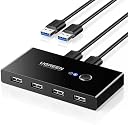
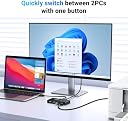
The UGREEN 4 Ports USB 2.0 Switch lets two computers share up to four USB 2.0 devices seamlessly, featuring a one-button push switch with LED indicators for instant toggling. Its USB 2.0 design ensures superior resistance to frequency interference compared to USB 3.0, delivering stable connections for peripherals like keyboards and mice. With a dedicated Micro USB power port, it supports power-hungry devices such as external HDDs and digital cameras. Compact, plug-and-play, and compatible across Mac, Linux, and Windows, this switch streamlines multi-device management for professional multitaskers.


| Actuator Type | Push Button |
| Asin | B01MXXQKGM |
| Best Sellers Rank | 1,109 in Computers & Accessories (See Top 100 in Computers & Accessories) 1 in KVM Switches |
| Brand | UGREEN |
| Circuit Type | parallel |
| Colour | multicolour |
| Compatible Devices | PCs |
| Connectivity Protocol | usb 2.0 |
| Connector Type | ['USB-A'] |
| Contact Material | Copper |
| Contact Type | Switch |
| Control Method | Touch |
| Control Type | Manual |
| Controller Type | Push Button |
| Country Of Origin | China |
| Current Rating | 0.5 Amps |
| Customer Reviews | 4.3 4.3 out of 5 stars (10,287) 4.3 out of 5 stars |
| Global Trade Identification Number | 06957303837670 |
| International Protection Rating | IP40 |
| Item Dimensions | 10.5 x 5.3 x 1.6 centimetres |
| Item Type Name | Adapter UGREEN 4XUSB 2.0 - Preto |
| Item Weight | 150 Grams |
| Manufacturer | Ugreen Group Limited |
| Manufacturer Part Number | UGREE-30767 |
| Material | Plastic |
| Model Number | 30767 |
| Mounting Type | Plug and play |
| Number Of Items | 1 |
| Number Of Positions | 1 |
| Operating Voltage | 5 Volts |
| Operation Mode | Manual |
| Specification Met | Ip54/Ip55 |
| Switch Type | Push Button |
| Terminal | kvm |
| Unit Count | 1.0 count |
| Wattage | 50 watts |
User
Incredibly Handy for a Two Computer Setup
A really useful bit of kit for switching peripherals between two computers without unplugging everything every time. Setup was straightforward and it works perfectly with our keyboard and mouse. Switching is instant and reliable with no connection issues. Saves a lot of desk clutter and faff. Excellent value for what it does.
User
Great, but for one little thing!
I use this to switch my keyboard and mouse from a work laptop and my personal desktop, and that works very well. It comes with decent usb leads to connect once to each computer, and acts as a small usb hub for the four front usb-A ports.The only problem is that the LED that shows which PC it's connected to is incredibly dim. It's really hard to see which computer you're connected to even in a dimly lit room - in a bright office or in sunlight, impossible.Normally we complain about blue leds being too bright, but this thing it's the opposite!
User
A simple and quick solution to switching USB devices between machines
For a while now I've been working from home on both my work Windows laptop and my iMac. I have to use both, but it's frustrating to move from the iMac, with a keyboard and a good mouse, to a laptop keyboard and a (frustrating) mousepad. It's obviously not the same, or as good, and that reduces my productivity and increases my frustrations!Enter the UGREEN USB Switch Selector. It's really simple, doesn't take up too much space and works perfectly. It allows me at the touch of a single button, with no delay, to switch my mouse and keyboard from the iMac to my Windows laptop.Transformed how I work at home, but pity it introduces more cables to manage and tidy away.*** Pros ***- Easy to set-up- Comes with good quality USB cables- Has an option for a 5v micro USB charger if you need to power devices through the switch- Small format- Absolutely no delay when switching- Can be used to switch 4 USB devices- Good packaging, which can be recycled- Great value*** Cons ***- USB cables are placed at the front and back of the device, which means cables aren't as neat as they could be- You need to be able to reach the device, so you can't tuck the device away*** Note ***- Can only be used to switch between two devices
User
very useful item - I wish I bought it many years ago.
I've had a good experience with UGREEN gear so far. I also have their webcam and both items are pretty good. I wish I chose the item has a HDMI cable as well, but for USB it's very solid and does exactly what I expected: switching USB keyboard, mouse, webcam between 2 computers with a press of a button.It's well made and feels expensive - all metal chassis and feels like it will last. I've had it for several months now and it's still kicking. :)No problem with interfacing - just plug & play. I never had to use additional power for it, so cannot say if it works and how it works.
User
Great value & compatibility
Really easy to set up, makes using 2 PCs hassle free. I'm able to seamlessly switch my keyboard, mouse, and usb hub between my Windows 10 & offline Vista machine.
User
Works well with different cables
Does exactly what it needs to, although every now and again connection drops, I think the cables supplied arent the best, but swapping them with others seems to have fixed that issue.
User
Failed after a few weeks (just outside of return window)
Worked great for a few weeks, then suddenly started dropping the connection. Now every few minutes, all connected peripherals (keyboard, mouse, and mic) drop at the same time for a few seconds. Nothing has changed with the setup since it was working. I am using the cables provided, and have connected external power. Simply not fit for purpose.
User
Brilliant
Bought this way back and it's still going strong.Never realised how much I would be using it but it's brilliant. Especially when switching between home computer and work laptop
User
Estremamente soddisfatto!
Questo piccolo dispositivo ha risolto un grosso problema che avevo: gestire facilmente le periferiche USB tra due computer diversi.La configurazione è stata estremamente semplice e intuitiva. Basta collegare i due PC alle porte USB designate sullo switch e poi collegare le periferiche USB (come stampanti, tastiere, mouse, hard disk esterni, ecc.) alle porte rimanenti dello switch. Il passaggio da un computer all'altro è rapido e senza intoppi. Premendo un pulsante sullo switch, posso facilmente commutare tra i due PC e utilizzare le periferiche come se fossero direttamente collegate al computer attivo.La compatibilità è un grande vantaggio di questo dispositivo. Ho testato il UGREEN 4 Porte USB 2.0 Switch su computer con sistemi operativi diversi (Windows e macOS) e ha funzionato perfettamente su entrambi. Inoltre, la velocità di trasferimento dati è stata molto buona per le periferiche USB 2.0, senza alcun ritardo o rallentamento evidente.La costruzione dello switch è solida e resistente, con un design compatto che si adatta facilmente alla scrivania senza occupare troppo spazio. La presenza di indicatori LED per mostrare quale computer è attivo è un tocco utile e intuitivo.In sintesi, il UGREEN 4 Porte USB 2.0 Switch per 2 PC è un dispositivo affidabile e altamente funzionale che ha semplificato notevolmente la mia vita quotidiana. Mi ha permesso di gestire agevolmente le periferiche USB tra i miei computer senza alcun problema. Lo consiglio vivamente a chiunque abbia bisogno di una soluzione per la condivisione di periferiche USB tra più computer.
User
Excelente selector de alta calidad.
Excelente aparatito que hace lo que debe hacer. Es sencillo y de tamaño pequeño. No ocupa espacio en el escritorio. Me ha servido mucho porque tengo una laptop y tambien una computadora de escritorio y el escritorio es pequeño. Este pequeño selector me ayudó a eliminar un teclado y un ratón.Pros:* Pequeño* Es posible compartir 4 dispositivos USB entre 2 computadoras.* No ocupa energía adicional si se usa para seleccionar teclado/ratón. Quizá dispositivos como discos duros externos y memorias USB pudieran ocupar esa energía adicional.* Es de buena calidad (es UGREEN)* Es relativamente económicoContras:* En realidad la única contra es que al oprimir el botón del selector, las computadoras tardan quizá 1 segundo para percatarse de que ha sido activado un teclado/ratón. El selector en sí no tiene fallas.Lo recomiendo por su funcionalidad, calidad y precio.
User
Works well
Works well
User
Seamless Device Sharing with One-Button Convenience!
I recently purchased the UGREEN USB Switch Selector, and it has made a significant difference in my home office setup. This device allows two computers to share up to four USB devices, making it incredibly easy to switch between my work and personal computers.Pros:1. Easy Switching: The one-button swapping feature is incredibly convenient. With just a press of a button, I can switch my mouse, keyboard, printer, and scanner between my two computers without any hassle.2. Plug and Play: Setup was a breeze. The device is plug and play, requiring no additional drivers or software. It worked perfectly straight out of the box.3. Solid Build Quality: The build quality of the switch is excellent. It feels sturdy and durable, with a sleek design that fits well on my desk.4. Stable Connection: The USB connections are stable and reliable. I haven’t experienced any interruptions or disconnections while using my peripherals through the switch.5. Included Cables: The inclusion of two USB A to A cables is a nice touch. It saved me the trouble of having to buy extra cables and ensured I had everything I needed to get started immediately.Cons:1. USB 2.0 Only: This switch is USB 2.0, which is fine for most peripherals like a mouse, keyboard, and printer. However, if you need higher data transfer speeds for devices like external hard drives, you might want to consider a USB 3.0 version.Overall, the UGREEN USB Switch Selector has greatly enhanced my productivity by making it easy to share USB devices between two computers. It’s reliable, easy to use, and comes with everything you need to get started. Highly recommend for anyone needing an efficient solution for managing multiple computers with shared peripherals!
User
It actually just works. All the time. (Review for USB 2.0 switch)
Like many people lately, I've got to use a work laptop at home, alongside my own personal computer. With two monitors to share and a keyboard/mouse/webcam to share as well, I bought this little USB switching hub. It allows 4 devices to be shared between two computers. The single button will switch from machine 1 to machine 2. Switching takes around 3.5 seconds.Major big plus: it works. All the time. As expected. No need to reboot "once in a while". Devices always get detected. No perceptible input lag when gaming (I ain't pro gamer though!). One of the reasons I chose USB 2.0 is that I suspected it would help "just working, all the time". So far so good. One computer is a Ryzen 7 machine, the other is a corporate Lenovo Thinkpad with a Thunderbolt dock.Only con is that you end up routing a lot of cables (five cables for three devices/two computers), all on your desk so you can reach the button on the box. I routed everything under my 32" main monitor, so it works out well, but it may be challenging if you wish a clean empty desk...So at the end, definitely recommended if you are looking for a simple, no frill way to share up to four devices between two machines.(for those curious why not a total KVM solution? Sharing two monitors require six more cables (2 per machines + to the actual monitors), that would have ended as a real cable mess behind the desk! Most monitors will sport several inputs, and it is actually possible to switch input _from the computer OS_ for most monitors)
Trustpilot
1 day ago
1 month ago