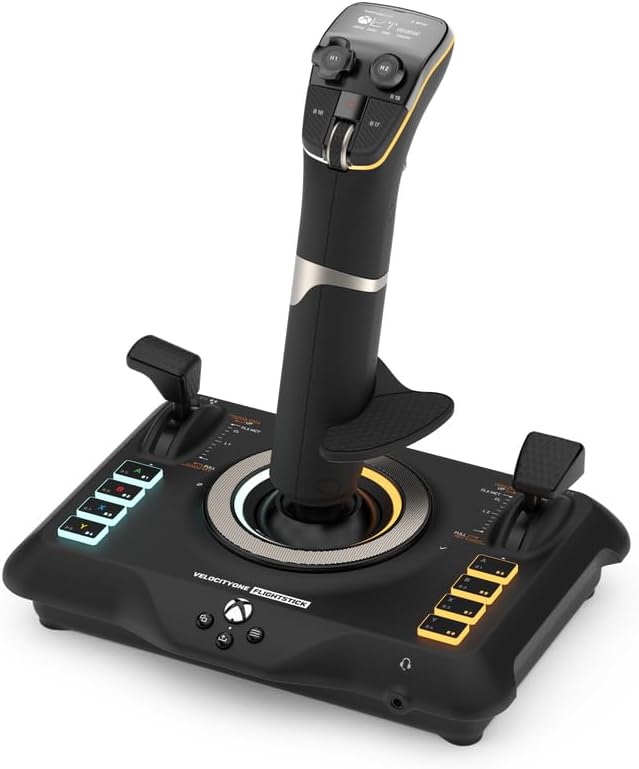
– Turtle Beach VelocityOne Flightstick Sim Controller, XBOX, PC
Product ID: 493034968
🎮27 programmable buttons
🔄Cross-platform Xbox & PC
⚙️8-axis high precision sensors
Desertcart purchases this item on your behalf and handles shipping, customs, and support to EGYPT.
✈️ Elevate your flight game — command the skies like a pro!
The Turtle Beach VelocityOne Flightstick is a high-precision, contactless HOTAS controller designed for Xbox and PC flight simulation enthusiasts. Featuring 8-axis Hall-effect sensors for accurate, drift-free input, 27 programmable buttons, and an OLED Flight Management Display, it offers extensive customization and real-time control adjustments. Its ambidextrous design, interchangeable joystick tips, and cross-platform compatibility make it a versatile and immersive tool for both casual and serious pilots seeking next-level flight simulation experiences.


| Asin | B0BHTPP71M |
| Best Sellers Rank | 8 in PC Flight Controls |
| Country Of Origin | China |
| Guaranteed Software Updates Until | unknown |
| Item Model Number | TBS-0722-05 |
| Language | English |
| Product Dimensions | 16.41 x 21.69 x 23.04 cm; 821 g |
| Release Date | 17 Nov. 2022 |
J**S
A well priced contactless flightstick!
It is difficult to make an assessment for something like a flight stick simply on the basis that all players with have different requirements for the “perfect” HOTAS. This being the case this review is judged with the Xbox One and/or Series X/S in use. First it must be accepted that most games will not accept a flight stick at all and even some flying games won’t. At this time... Ace Combat 7 for example will not see the Turtle Beach VelocityOne Flightstick, even though it will see a Thrustmaster HOTAS one. I mention the latter because of the price range only. Ace Combat 6 Ironically, not only plays on the Series X but the Turtle Beach VelocityOne Flightstick works with it rather well, although you must have current firmware and set the input of the flightstick to “Xbox compatibility mode”. Games that work with the Turtle Beach VelocityOne Flightstick include. • Air Missions HIND • Elite Dangerous • Microsoft Flight Simulator • Flying Tigers: Shadows Over China • Star Wars: Squadrons • War Thunder I would hazard a guess that there are more and hopefully new titles will see the VelocityOne Flightstick (V1F) as it does have potential. There is a mystery about this flight stick as it does have feedback motors that are not used at least on Xbox and I think also PC. I cannot find any reason why this feature is not working and I hope that a future firmware update might remedy this. But at this time don’t buy this thinking that vibration is active. Maybe Someone at Turtle Beach might have something to say if they read this. On the upside the main axis of this flight stick are non contact devices which means that they don’t wear in a physical manner. This should mean that pitch, roll and yaw will suffer less drift problems than traditional potentiometer devices. In addition there is an onboard checking system that allows the user to be sure that the full extent of the “travel” of pitch and roll is being used. There is a recalibration system also onboard but for the process it is best to go to the Turtle Beach web site. The unit also has a coloured lighting system and digital display for its customisation. If you don’t like these, all can be changed or turned off to suit yourself. Given that it is powered through the USB this would have almost no impact on power use. The overall feel of the V1F is of good quality and construction. It is however light when compared with its nearest rival the Thrustmaster Hotas One, which has added weights inside its body (a rather good idea). I guess that this is easily dealt with by most users though, and won’t really be a big issue. An issue that does get mentioned and should also be pointed out, is that the main stick axis is quite tight compared to other flight sticks and there is no outside way to reduce this nature. The internal spring could be changed but that might invalidate the warranty and might not be something that some would be prepared to do. Whether this feel will loosen in the long term is anybody’s guess, so it is worth trying to get a feel of one before purchase. So far in use I find that this is a great flight stick. The customisation alone is a great addition at this price as is the contactless main axis control. Of course as I said, something like a flight-stick is of personal opinion but I think that many would like this for its build, quality and features as well as its customisation. For me, I say well done Turtle Beach.
B**E
turtle beach at their best
I ordered this for my gaming PC but use it on both PC and Series X It arrived in branded box on removing your meet with a well made but lightweight flight stick. Now I’ve been using the Turtle Beach VelocityOne Flightstick with Microsoft Flight Simulator 2020 and 2024 on both PC and Xbox Series X,for sometime and it’s been a great addition to my setup. The flightstick is well-built, responsive, and comfortable to use, offering a much more immersive experience compared to a standard controller. The button layout is intuitive, with plenty of programmable buttons and controls that work well for managing flight functions without needing to dive into menus. The Hall-effect sensors give smooth and precise inputs, which makes a noticeable difference in handling aircraft, especially during takeoff, landing, and maneuvering. The throttle lever and hat switches add to the realism and give good control over flight operations. Compatibility was straightforward — it worked right out of the box with both Flight Sim 2020 and 2024, with minimal setup. Whether flying casual or more advanced aircraft, this flightstick strikes a nice balance between accessibility and realism, making it a solid choice for beginner and intermediate sim enthusiasts. Overall, the VelocityOne Flightstick offers great value, solid performance, and a more immersive experience for flight simulation fans on Xbox and PC.
M**P
Good build but some drawbacks
Not bad, good quality build, good ergonomy with quite a few buttons Main drawbacks: - as many have mentionned already the Stick is way to hard to move to properly simulate any type of aircrafts, it feels like a constent battle, personlly I wouldnt recommend it because of that unless you are willing to tinkier with the spring inside (otherwise to play Arcade stuff should be fine but then its kinda overkill joystick) - the base is too narrow comparing with the height of the stick and its stifness so you need to either hold the base with your hand or attach it to something with the screw (might be solved by replacing the tension spring as mentionend above) - the Trim wheel is not recognised or not working efficently at least in MSFS
K**K
Perfect
My husband loves it, he couldn't stop raving about how accurate it is.
M**.
Great stick with two pretty big flaws
Good quality stick with plenty of features. Incredible number of axes and buttons for this price range. Most of the buttons feel really good and have positive feedback. The two buttons next to the trim wheel on the stick are way too easy to press, so I wouldn't bind them to critical functions. The tiny joystick on top of the stick is a really nice touch and great for camera control if no VR or headtracking. And having two throttle axes at this budget is pretty amazing, even if this is not a proper Hotas. The stick is plug and play on PC and Xbox. In MSFS 2024 the default setup was pretty good but I did need to configure the trim wheel and change a few buttons around to suit me. The display on top of the stick allows for some configuration on the fly, like stick speed. It even has a chrono, helping with dead reckoning navigation (for people who are into that kind of thing). However this stick has two big flaws. The biggest one is the stiffness. It's unbelivably stiff and it has no way of tweaking it without opening it up. After 20 minutes of doing circuits in a GA my hand was numb. I read you can mod it to fix that up, but it should not be needed. The second flaw is stick travel. It's just too short. It's fine for GA or airliners but for any kind of combat you have to pick between precision or turn rate (even with the precision profile). If you're willing to mod it yourself (potentially voiding the warranty) and only fly GA and airliners then this ks a great stick for the money. Otherwise I'd look elsewhere.
T**C
Perfect for PC with MSFS 2024 and Fenix Airbuses.
I purchased this to replace my aging Logitech Extreme3DPro joystick that was as old as the hills (you served me well!). It is primarily used to play MSFS 2024 on my PC with the Fenix A3xx Airbus series, the Just Flight RJ Professional and the PMDG Boeing 737 series (when PMDG finally pull their fingers out and get it compatible for FS24 that is). My first impressions was that the joystick was lighter than I was anticipated, but the stiffness of the stick was not as much as I had expected, though the twist axis is quite stiff. If you're not careful you can lift one end of the base from your desk as you move the stick, but you soon get used to how that comes about and you can adjust your operation of the joystick. I have actually attached a rubber sucker cup on each corner of the under base of the joystick to keep it a little more firmly attached to the table. The cups I have stuck on with some double-sided sticky tap to the base. Plenty of programmable buttons, certainly enough for me. Also has two throttle levers, one on each side of the stick, but I only have the left one bound to my engines. The right one I have bound to spoilers. You can adjust sensitivities, the lights on the stick (various pre-set colour schemes or off). You can also control those and update firmware via an app you can download to your smart phone. The stick also has Bluetooth and a 3.5mm headphone jack in the base. Overall a fantastic product for the price.
T**R
Absolute waste of money
Absolute waste of money - probably the most frustrating piece of kit I've ever purchased in my entire life. The thing is so glitchy and temperamental I had to replace with an alternative NOT from Turtlebeach and NOT this piece of junk. Unfortunately I missed the return window for reasons I won't bore you with. The thing is not fit for purpose. If you're using for MS Flight Sim you'll find the scroll wheel doesn't work, Half the settings you want to put in place won't remain in place. All known issues according to the user forums, I wish I had properly read these user reviews before I purchased.
P**L
The Next Generation of Joystick
I am using this with Microsoft Flight Simulator 2023 on a Win 11 Pro PC. There are so many buttons and levers it is ideal straight out of the box with a ready made profile in Flight Simulator. I find the look and feel perfect for me and the colours look pretty as well! You can change general settings and colours using your mobile phone which is incredible. The first thing I did was update the firmware, and I can confirm that every button, lever, hat and wheel works. The Xbox buttons can be mapped as well. The touch-pad is too small, but does work if you have tiny fingers and has a left click. It is not something I would ever use. So far highly recommended, especially if you have a dumb joystick.
Q**.
Convenient
Quality
F**T
Pour le prix satisfait
En tant que passionné de simulation de vol et joueur sur Xbox et PC, le Turtle Beach VelocityOne Flightstick m’a rapidement séduit par son design polyvalent et ses fonctionnalités impressionnantes. Voici un aperçu de mon expérience avec ce produit : Tout d’abord, la compatibilité universelle avec les consoles Xbox Series X|S, Xbox One et les PC sous Windows 10/11 en fait un choix idéal pour les amateurs de simulation sur plusieurs plateformes. L’installation est simple, et le branchement plug-and-play assure une configuration rapide. Le joystick est extrêmement fluide, avec une excellente précision, ce qui est crucial pour les vols de précision et les manœuvres complexes. De plus, les multiples boutons programmables permettent de personnaliser facilement l’expérience de vol en fonction de ses préférences ou des différents jeux de simulation. J’ai également apprécié le contrôle total sur le gouvernail, qui améliore considérablement le réalisme en vol. Pour ceux qui recherchent une immersion maximale, ce produit se distingue par ses matériaux de qualité, offrant une bonne prise en main et un confort optimal, même lors de longues sessions de jeu. Enfin, les retours haptiques ajoutent une dimension immersive supplémentaire, vous plongeant au cœur de l’action. Je recommande vivement le Turtle Beach VelocityOne Flightstick pour les fans de simulation aérienne, qu’ils soient sur Xbox ou PC. Ses performances et sa polyvalence en font un outil indispensable pour profiter pleinement des jeux de simulation. Tester ce produit m’a permis de découvrir à quel point il améliore l’expérience de jeu, et je suis convaincu que d’autres utilisateurs partageront cet enthousiasme. Note globale : 4,5/5.
P**R
Outstanding Flight Stick
Great value for the price, a real bargain. Ease of setting up was really non stressing. Typical Turtle Beach Product, Quality.
M**O
Flight Stick turtle beach
Questi Flight Stick si presenta in una confezione curata e ben strutturata. Al suo interno, oltre al controller, troviamo il cavo USB c. È possibile invertire il poggia polso sul dorso dello Stick per i mancini ed è anche regolabile in altezza con relative tacche di orientamento. Il feedback è buono, forse un po' troppo resistente al suo rientro in posizione centrale. Ha un ottima compatibilità grazie all'ultimo update che consente oltre alla modalità PC e Xbox quella per terze parti, ovvero per tutte quei giochi non ottimizzati dalla casa produttrice. Si dovrà soltanto eseguire una mappatura dei pulsanti. Sostanzialmente verrà letto come un normale controller. Le impostazioni sono davvero molte, relative a trim, sensibilità, inversione assi, colore dei led, luminosità display e led ecc. Il mini touch pad sarebbe davvero utile, peccato che ad oggi soffra di una sensibilità decisamente imprecisa. Il cursore viene mosso correttamente in basso e verso l'alo l'input non è coerente con il movimento del dito. Ha molti tasti fisici personalizzabili, molti inaspettati, che rendono il controller, utilizzato da solo, molto sfruttabile per tutte le shortcut utili a chi lo usa con il simulatore e non. Con Flight simulator 2020 si comporta egregiamente, lo utilizzo prettamente su Xbox series x. Mi è bastato impostare alcuni parametri per mia comodità ed ero già pronto al volo. Unica pecca ancora non risolta è che pigiando il pulsante home dell' Xbox il cursore tenderà ad andare in basso a destra senza fermarsi, il che rende impossibile spostarsi nel menù della dashboard. A livello di feedback non ho apprezzato gli spostamenti dal punto zero, troppo rigidi e accompagnati da un ticchettio un po' fastidioso. In conclusione lo trovo un ottimo prodotto e con un buon qualità prezzo, ha tutte le comodità per chi vuole usare mfs da console e dal punto di vista estetico è veramente piacevole.
J**D
VélocityOne
Parfaitement reconnu et intégré à Flight simulator 2020. Facile à programmer. Fonctionne bien. Certaines personnes regrettent sa stabilité sans doute pour des jeux de combat. Mais pour piloter dans l'aviation civile, il n'y a aucun problème.
Trustpilot
4 days ago
3 weeks ago